DMN Orchestration
The DMN tab enables the editor to go beyond metadata authoring and become an active tool for deploying and testing decision logic. It integrates directly with the Operaton rule engine, which hosts the DMN models that execute government service decisions.
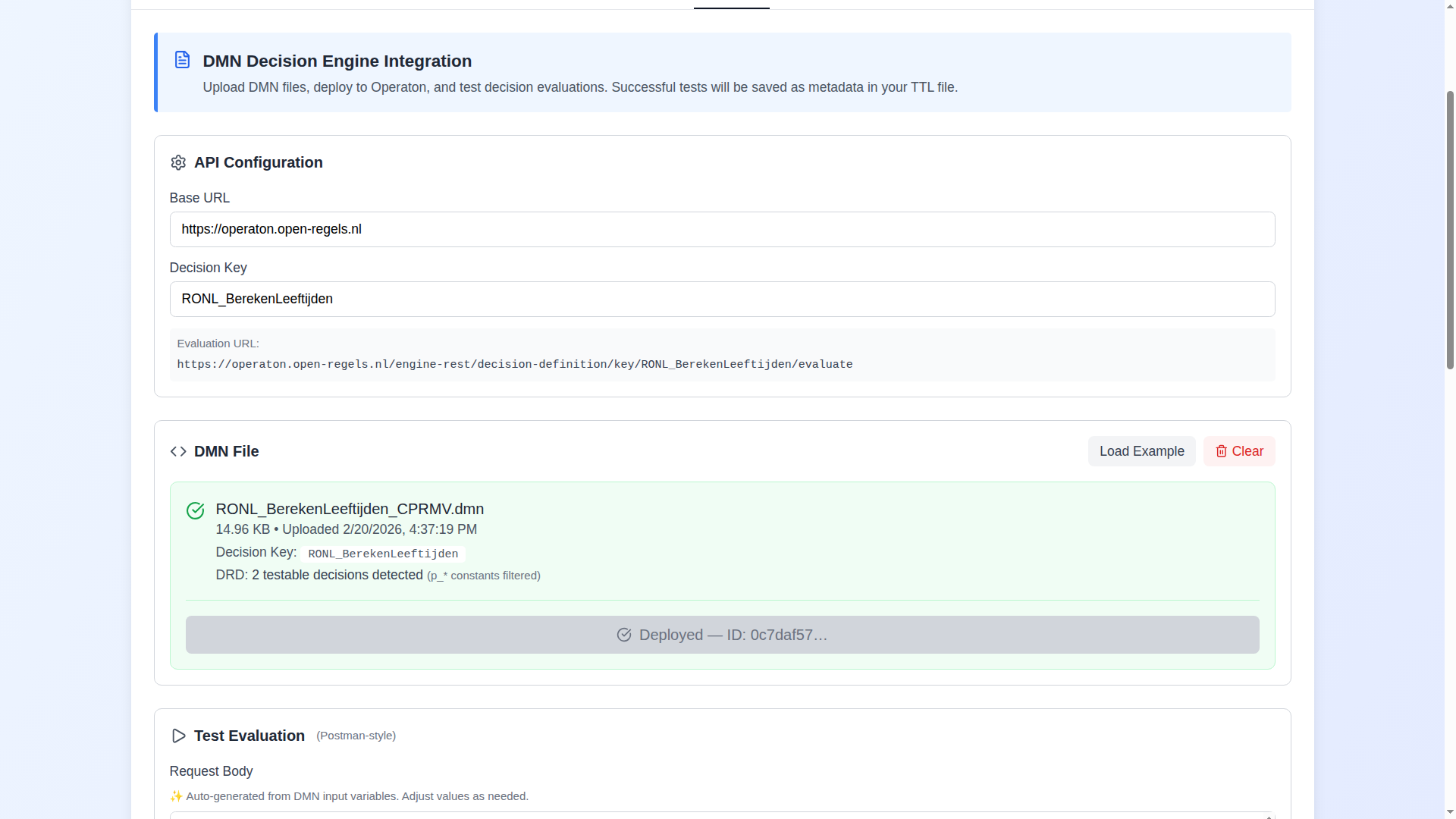
What the DMN tab does
The tab handles the complete lifecycle of a Decision Model and Notation (DMN 1.3) file within a service definition:
File management. Upload a .dmn file, or load one of the provided examples. The editor parses the DMN XML, extracts all <decision> elements, identifies the primary decision key (automatically skipping constant parameters prefixed with p_*), and pre-populates the request body with the correct input variable names and types.
Syntactic validation. Immediately after upload, the editor runs the DMN file through the shared backend's five-layer syntactic validator. The result is shown inline in the file card — valid files display a green badge, files with issues display a collapsible panel grouped by layer. See Syntactic Validation below.
Deployment to Operaton. Send the DMN file to the configured Operaton engine endpoint via the REST deployment API. Deployment status and ID are tracked and included in the exported Turtle.
Live decision evaluation. Test the deployed model with configurable input variables using a Postman-style interface. The request body is auto-generated but fully editable. Responses are displayed inline.
Metadata documentation. The exported Turtle includes the full DMN metadata: the decision model URI, deployment ID, API endpoint, all input variables as cpsv:Input entities, and extracted decision rules with their legal article references as cprmv:DecisionRule entities.
Import preservation. When a Turtle file containing DMN data is imported, the DMN blocks are preserved exactly as-is across the import/export cycle. The tab displays a clear notice indicating that the DMN is in imported state, and provides the option to clear and recreate it.
Syntactic validation
When a DMN file is uploaded or an example is loaded, the editor automatically calls POST /v1/dmns/validate on the shared backend and displays the result in the file card.
Validation covers five layers. Issues are grouped by layer in a collapsible panel. Each issue carries a severity (error, warning, or informational), a typed code, a human-readable message, and — where applicable — an element reference and line number.
| Layer | What is checked |
|---|---|
| Base DMN | XML well-formedness, root element, DMN namespace, required <definitions> attributes, presence of at least one <decision> |
| Business Rules | Hit policy values, typeRef on inputs and outputs, rule entry count consistency |
| Execution Rules | CPRMV extension attributes — rulesetType, ruleType, confidence enums, ISO date format, BWB ID format, temporal-period completeness |
| Interaction Rules | informationRequirement href resolution, orphaned <inputData> elements, variable name consistency |
| Content | Non-empty CPRMV descriptive attributes, variable typeRef presence, non-empty <textAnnotation> content |
A file is considered valid when no layer produces an error. Warnings and informational messages do not block deployment — they flag quality improvements recommended for RONL publishing.
Validation state is cleared when the file is removed via the Clear button, and re-run whenever a new file is loaded.
For the full specification of every validation code and its rationale, see the DMN Validation Reference in the Linked Data Explorer documentation.
Testing capabilities
Beyond single-evaluation testing, the DMN tab includes two advanced testing modes:
Intermediate decision tests evaluate each sub-decision in the Decision Requirements Diagram (DRD) individually. This is invaluable for debugging complex multi-table DMNs — rather than examining the final output, you can see exactly which sub-decision is producing an unexpected result. Constant parameters are automatically filtered out; only testable decisions are shown.
Test cases run multiple predefined scenarios from an uploaded JSON file against the primary decision key. Results are displayed progressively — pass/fail counters update in real time as each case executes. Two JSON formats are supported (Toeslagen and DUO format), with automatic normalisation.
A successful test case run also generates NL-SBB concepts for semantic linking via the Linked Data Explorer.
Smart constant filtering
DMNs for government services frequently contain a large number of constant parameter decisions (prefixed p_) alongside the actual decision logic. The editor automatically detects and filters these from the decision key extraction and intermediate test list, so you work with only the testable decisions. The file card shows a badge like "12 testable decisions detected (p_* constants filtered)" to make the filtering transparent.