BPMN Modeler
The BPMN Modeler is a full BPMN 2.0 process editor integrated into the Linked Data Explorer. It lets you design government service workflows visually, link BusinessRuleTask elements to DMN decision models or DRD chains, link UserTask and StartEvent elements to Camunda Forms authored in the Form Editor, link UserTask elements to document templates authored in the Document Composer, and deploy the complete bundle — BPMN, subprocess BPMNs, forms and document templates — to Operaton in a single operation.
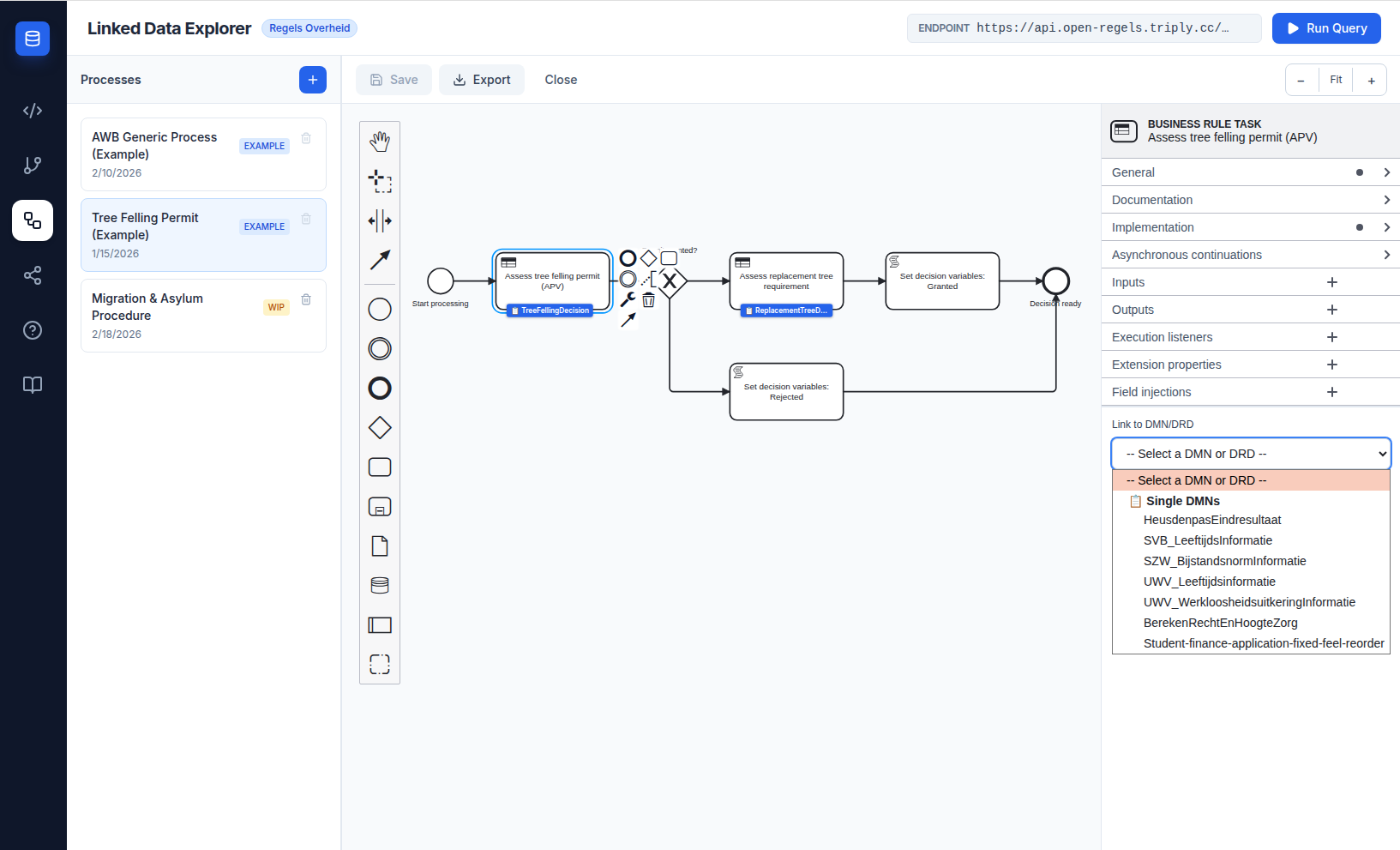
Three-panel layout
The Modeler uses the same three-panel layout as the Chain Builder:
- Left panel — Process list. Shows all saved processes with create, rename, and delete actions. An EXAMPLE badge marks protected processes that cannot be deleted.
- Centre panel — Canvas. Interactive BPMN 2.0 canvas powered by bpmn-js, with drag-and-drop palette, zoom controls, and scroll-to-zoom.
- Right panel — Properties. Shows element type, ID, name field, and — for
BusinessRuleTaskelements — the DMN/DRD decision reference section. Below the other sections it shows the phase controls: the process's phases when the process or a pool is selected, the Start van fase picker when a node is.
Process library
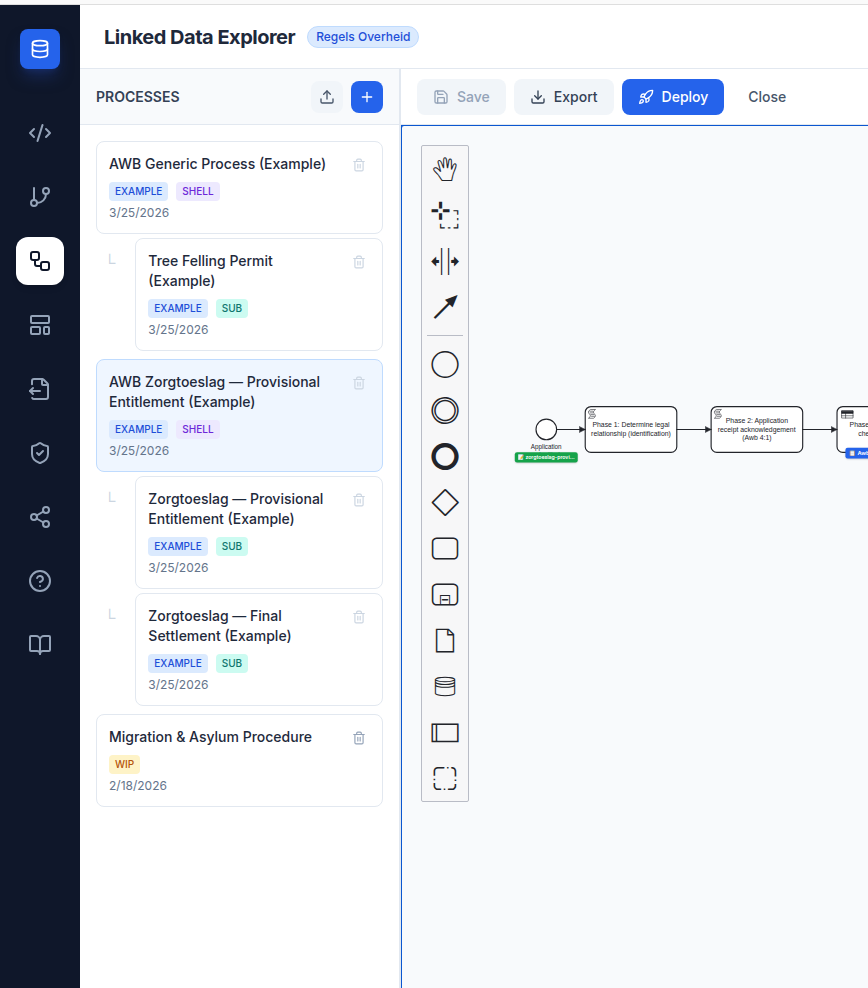
The left panel lists all processes grouped by their role in the AWB shell pattern.
Shell / subprocess hierarchy
The Linked Data Explorer models government service workflows as two-layer BPMN compositions: a universal AWB shell process handles the eight statutory procedural phases, and a product-specific subprocess delivers the substantive decision via a Call Activity. The process list reflects this structure visually.
Shell processes are top-level entries. Their subprocesses are indented beneath them with a tree connector. Standalone processes — those with no parent-child relationship — appear as top-level entries without indentation.
Automatic shell/subprocess linking
Uploaded BPMN processes that form a shell/subprocess pair are linked automatically: a process containing Call Activity elements is classified as a shell, and any process whose BPMN process ID is targeted by a shell's call-activity becomes its subprocess. Classification runs both on fresh imports and on startup, so a process stored as standalone is reclassified without needing a re-upload.
Role badges
Each process card carries one or more badges:
| Badge | Colour | Meaning |
|---|---|---|
EXAMPLE |
Blue | Seeded example — editable, but cannot be deleted |
WIP |
Amber | Work in progress, such as the seeded Migration & Asylum Procedure |
SHELL |
Violet | AWB shell process — calls one or more subprocesses via a Call Activity |
SUB |
Teal | Subprocess — called by a shell via its calledElement attribute |
Process roles
Every BpmnProcess record carries three relationship fields:
| Field | Type | Description |
|---|---|---|
bpmnProcessId |
string |
The <process id="..."> value from the BPMN XML |
processRole |
'shell' \| 'subprocess' \| 'standalone' |
How this process relates to others |
calledElement |
string? |
For subprocesses: the bpmnProcessId of the parent shell |
User-created and imported processes default to standalone. The BPMN <process id="..."> value is extracted automatically from the XML on save.
A process id is unique within an organisation: the backend refuses to store a second process with the same id in the same organisation. So New process gives every new process a fresh id — the template's id plus a timestamp — rather than the template's own. An imported BPMN whose process id the organisation already uses opens a dialog: OK replaces the existing process's content with the import, keeping that process's record, status and deploy stamp; Cancel asks for another process id for the import, suggesting a fresh one. Renaming a process id in the properties panel to one already in use is not saved, and the Modeler says which process holds it.
Example processes
| Process | processRole |
calledElement |
|---|---|---|
| AWB Generic Process | shell |
— |
| Tree Felling Permit | subprocess |
AwbShellProcess |
| AWB Zorgtoeslag — Provisional Entitlement | shell |
— |
| Zorgtoeslag — Provisional Entitlement | subprocess |
AwbZorgtoeslagProcess |
| Zorgtoeslag — Final Settlement | subprocess |
AwbZorgtoeslagProcess |
| Subsidie Thuisbatterij Flevoland | shell |
— |
| Thuisbatterijsubsidie — Beoordeling recht en hoogte | subprocess |
ThuisbatterijSubsidieAanvraagProcess |
| DvTP — Flow A: Toestemming geven | standalone |
— |
| Beheer capaciteitsclaim — proces (NL) | standalone |
— |
| Besluitvorming onder gedelegeerde bevoegdheid (NL) | standalone |
— |
| Migration & Asylum Procedure | standalone |
— |
The list shows each seeded example with the suffix (Example), or (Voorbeeld, NL) for the two Dutch ones. The Awb shells and subprocesses are drawn as pools with lanes — Aanvrager, Behandelaar and Systeem in a shell, Behandelaar and Systeem in a subprocess — and carry Dutch element names. The Dutch HR capacity claim has eight lanes; Besluitvorming onder gedelegeerde bevoegdheid has six and is described on its own page, Besluitvorming onder gedelegeerde bevoegdheid.
BPMN palette
The palette provides all standard BPMN 2.0 elements: start, intermediate, and end events; tasks (including business rule tasks); gateways (exclusive, parallel, inclusive, event-based); sub-processes; data objects; pools; and text annotations.
DMN/DRD linking
When a BusinessRuleTask is selected in the properties panel, a Link to DMN/DRD dropdown appears. It loads options from two sources simultaneously:
- DRDs (Unified Chains) — DRD templates saved locally from the Chain Builder
- Single DMNs — individual decision models from the active TriplyDB endpoint
Selecting an option auto-populates camunda:decisionRef with the correct identifier and suggests a value for camunda:resultVariable. A visual info card below the dropdown confirms the selection, with purple styling for DRDs and blue for single DMNs. DRD cards also show the chain composition (which DMNs the DRD combines).
Export
Processes can be exported as .bpmn files for deployment to Operaton. The XML uses camunda: namespace attributes, which Operaton accepts for compatibility with the Camunda 7 ecosystem.
Form linking
When a UserTask or StartEvent is selected, the properties panel shows a Link to Form dropdown in addition to the standard element fields. The dropdown lists every form currently stored in the Form Editor's localStorage.
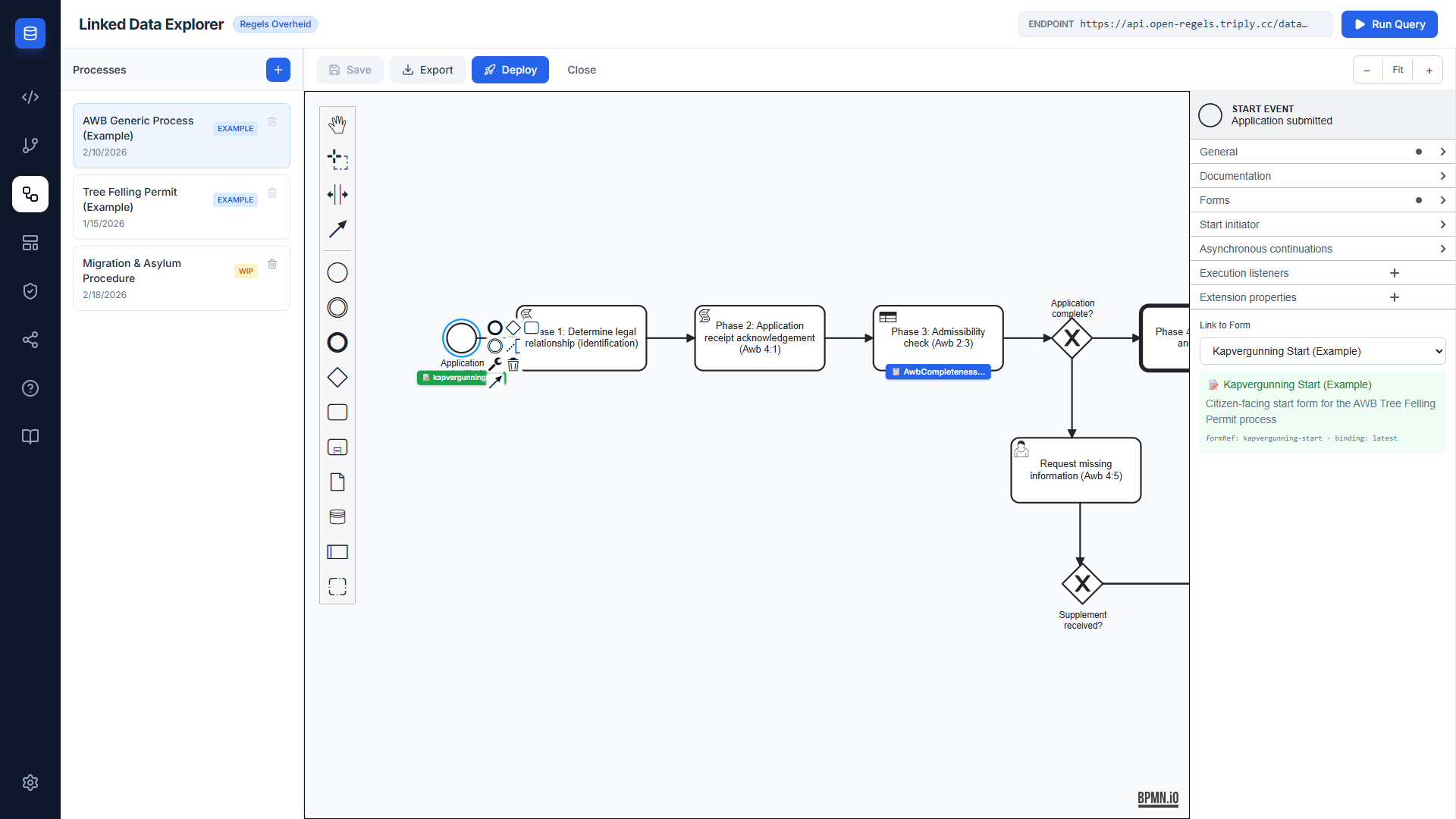
Selecting a form writes two attributes to the BPMN XML:
camunda:formRefBinding="deployment" resolves the form from the process definition's own deployment, which is unambiguous because the deploy modal ships the BPMN and its forms together. Every seeded example uses the same binding. The alternative, latest, looks the form key up across the whole engine, so once the same form is deployed under more than one tenant Operaton cannot choose and fails with ENGINE-03109.
A green badge appears below the element on the canvas once a form is linked, showing the form ID. The badge colour distinguishes form links (green) from DMN decision links (blue).
To remove a form link, open the Link to Form dropdown and select the blank option at the top.
Document template linking
When a UserTask is selected, the properties panel shows a Link decision templates section below the form selector. A task can carry several document templates, because one step can produce more than one deliverable.
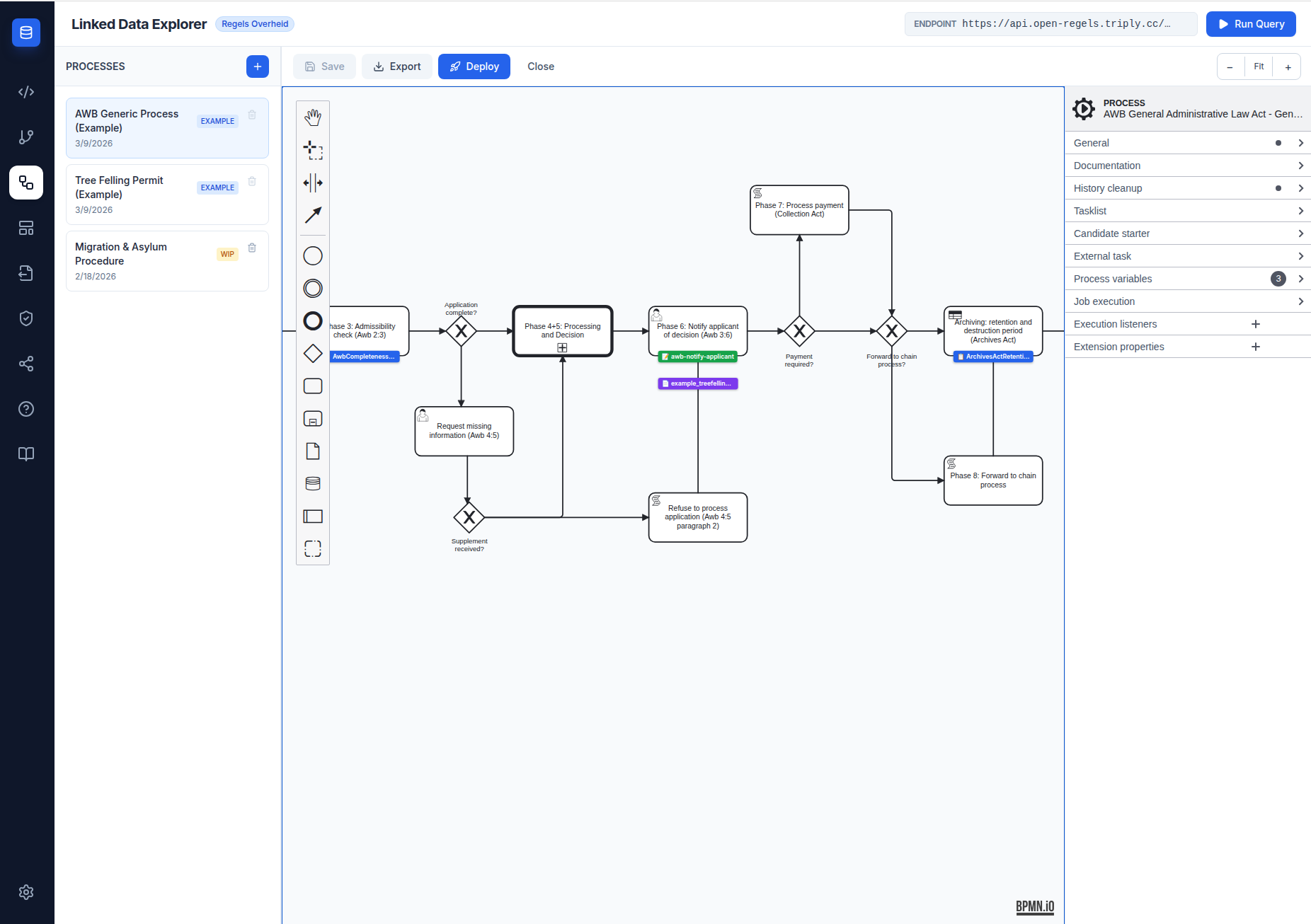
- Attached templates appear as chips, each showing the template's name and id, with a ✕ button that removes it. A template id this browser does not know is shown as its bare id rather than hidden.
- The select below the chips adds a template. It lists only the templates saved in the Document Composer that are not yet attached, under -- Add a template --, and reads -- All templates attached -- once none are left.
The Modeler writes the attached ids to ronl:documentRef as a comma-separated list — ronl:documentRef="rip-ontwerptoelichting,rip-objectenboom" — and removes the attribute when the last chip is removed. A BPMN with a single id is a list of one, so existing processes need no change.
A purple badge (📄) appears beneath the element on the canvas, below the green form badge. With one template it shows the template id; with several it reads N documents, and hovering it lists every id. Each badge colour stands for one kind of link:
| Badge colour | Artefact type | Attribute written |
|---|---|---|
| Blue | DMN / DRD decision | camunda:decisionRef |
| Green | Camunda Form | camunda:formRef |
| Purple | Document templates | ronl:documentRef |
| One colour per phase, top left of the node | Phase | ronl:phase or ronl:awbPhase — see Phases |
Document template linking is only available for UserTask elements (not StartEvent). The purple badge is drawn only on a user task that also has a form linked.
Hand-authored ronl:signatureRef
ronl:signatureRef on a user task is set by hand in the BPMN: the
Modeler keeps it through a save but offers no control for it and shows no
badge for it. It names a document template. For that task the RONL
Business API offers a ValidSign signing ceremony for the document in place
of the task's plain form. The deploy modal bundles that template like any
other. See ValidSign signing
and RIP R2.1 Bundle.
See Document Composer for how to create and manage document templates.
Phases
The RONL Business API draws a phase stepper above a caseworker's process view. It reads the phases from the BPMN — see Lanes and phase markers — and the Modeler sets them: the process says which phases it has, and a node says which phase it starts. Every node after it inherits that phase until the next marker.
The process's phases
With the process selected — nothing selected on the canvas, or its pool — the properties panel shows Phases (RBA stepper) with three choices:
- None — no stepper.
- Own phases — the process declares its own list, written to
ronl:phasesascode:Namepairs separated by;. Type a name under New phase name and click Add phase; the Modeler derives a code from the name, which you can change. Each phase can be renamed, given another code, moved up or down, or removed. Changing a code moves the markers that use it along with it; removing a phase removes its markers, after a confirmation. Label sets the word the stepper puts before a phase's number (ronl:phaseLabel),Fasewhen left as it is. - Awb phases — the eight phases of the Awb procedure, from 1 · Rechtsbetrekking to archivering · Archivering. They are built in, so the process carries no list; nodes mark them with
ronl:awbPhase.
Switching away from a scheme asks first when it would remove something. From Own phases to None the list and label go and the node markers stay; to Awb phases the markers go too. Leaving Awb phases removes every Awb marker.
The RONL Business API reads only the first process of a collaboration. Selecting another pool shows a line saying so instead of the controls; with nothing selected in a collaboration, the panel edits the first participant's process and says that it does.
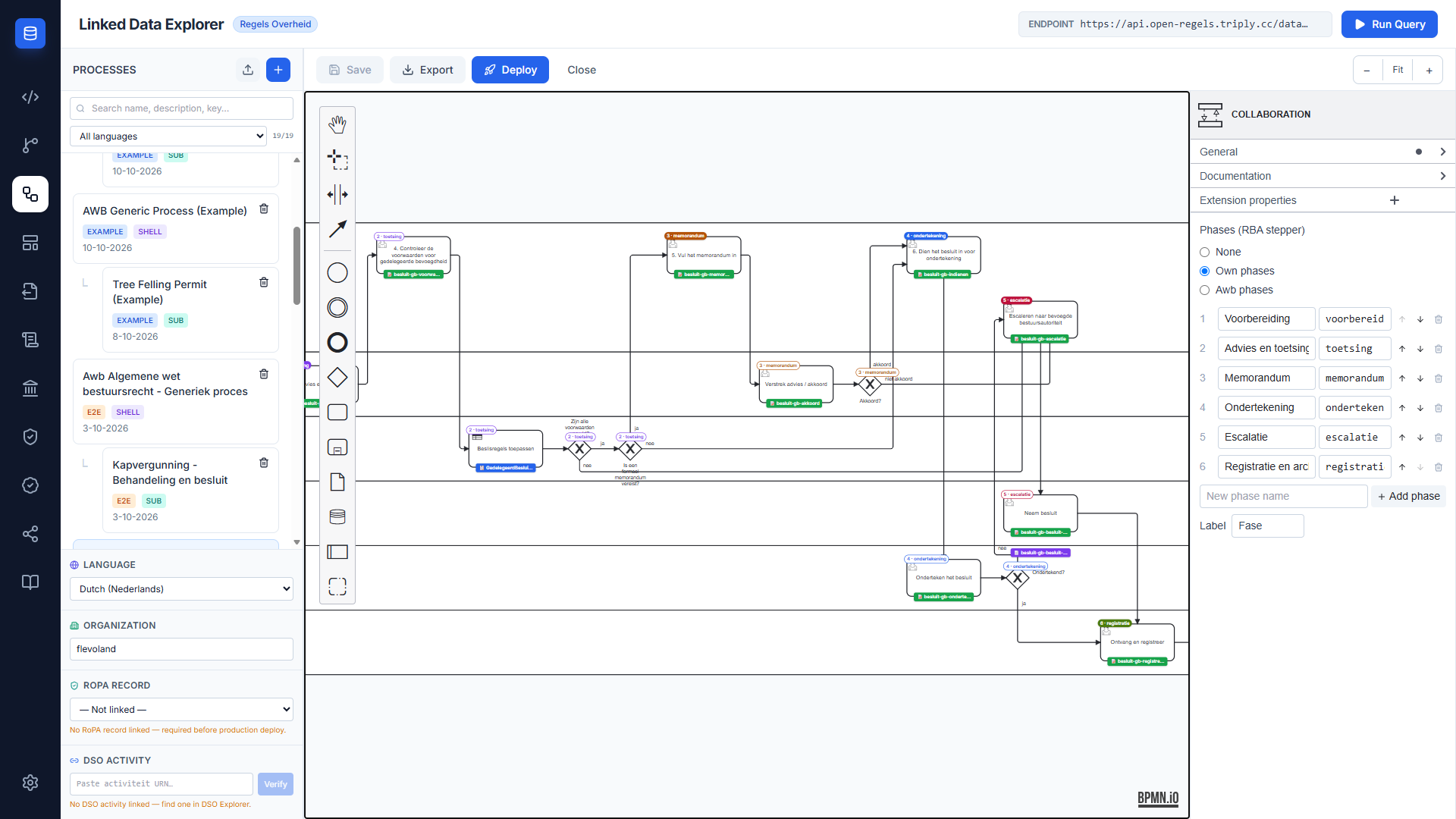
Where a phase starts
With a node selected, the panel shows Start van fase: a select with (erft over) and every phase of the process. Choosing a phase marks the node as its start; (erft over) removes the marker, so the node inherits. Without a marker of its own, a line under the select says which phase the node inherits, or that it lies before the first phase marker.
The picker follows the RONL Business API's own rules for which nodes count. A node inside an embedded subprocess, or of a kind the stepper does not count, gets a line explaining why instead of the select; so does a node in a pool other than the first. Until the process has phases, the picker asks for those first.
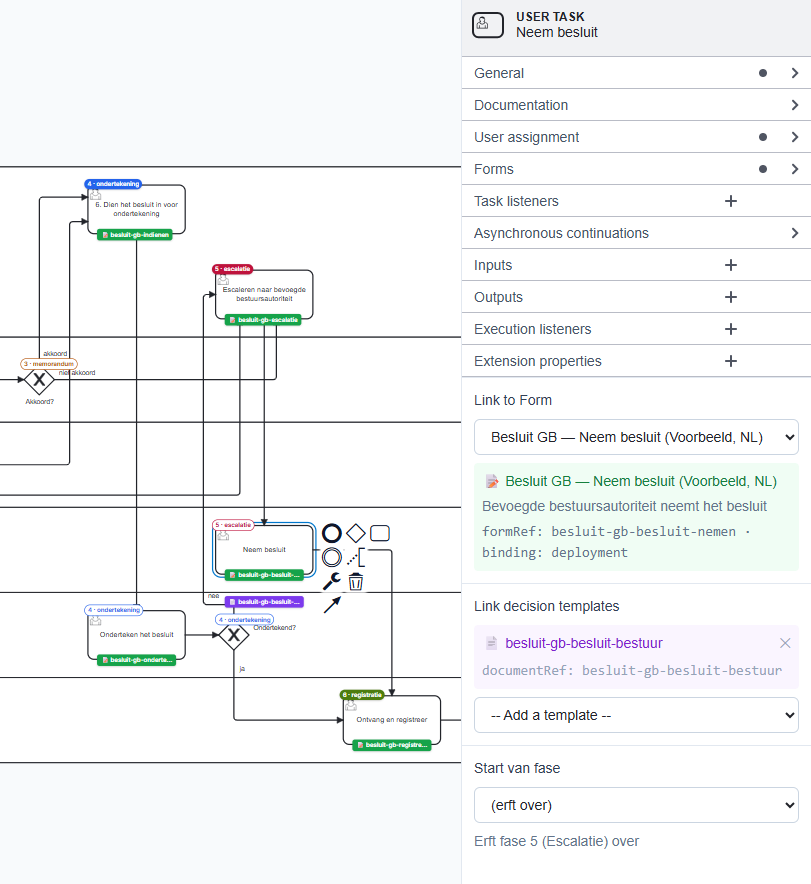
Phase badges on the canvas
Every node that falls in a phase carries a badge at its top left, one colour per phase. The badge is solid where the node starts the phase and outlined where it inherits it; the text is the same either way — the phase's number and code for own phases, Fase 4+5 or Archiefwet for Awb phases.
The Modeler recomputes the badges 150 ms after each change, from the diagram's XML — the input the RONL Business API reads — and with the same inheritance rules, so the canvas shows the stepper the caseworker will see. Each phase edit — a rename that moves eight markers included — is one undo step.
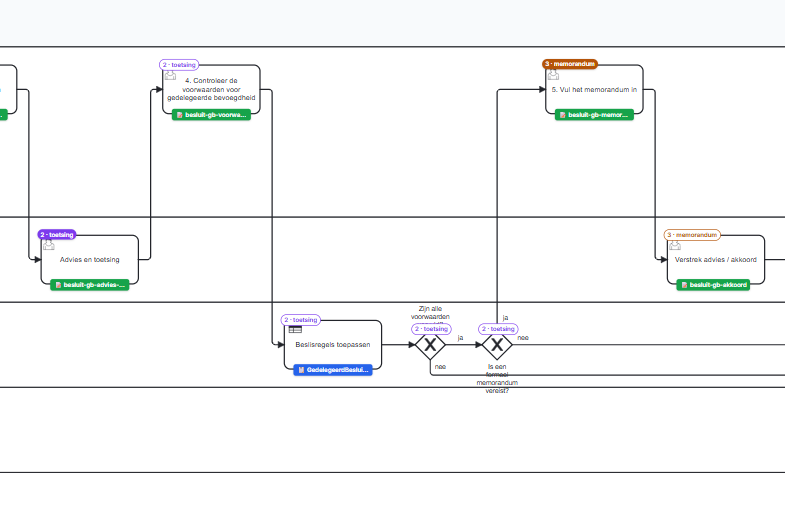
One-click deploy
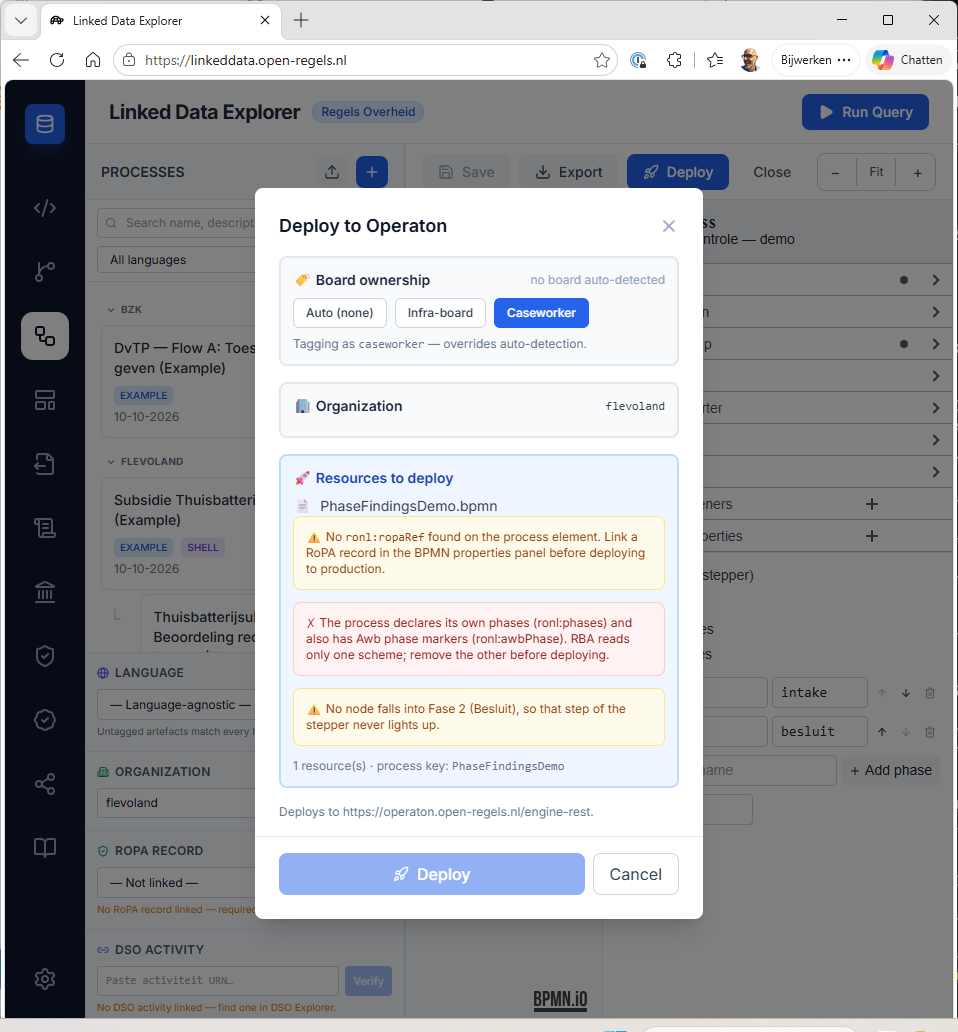
The Deploy button in the Modeler toolbar opens a deploy modal that collects all resources needed for a complete Operaton deployment:
- The currently open BPMN file
- The subprocess BPMNs the open process calls through a
calledElementattribute, matched against saved processes by their BPMN process id. A called element that no saved process provides is left out, and Operaton reports it when the process starts - All
.formfiles whoseidmatches acamunda:formReffound anywhere in the bundle - All
.documentfiles whose id is named by aronl:documentRef— which can list several per task — or by aronl:signatureRef, anywhere in the bundle
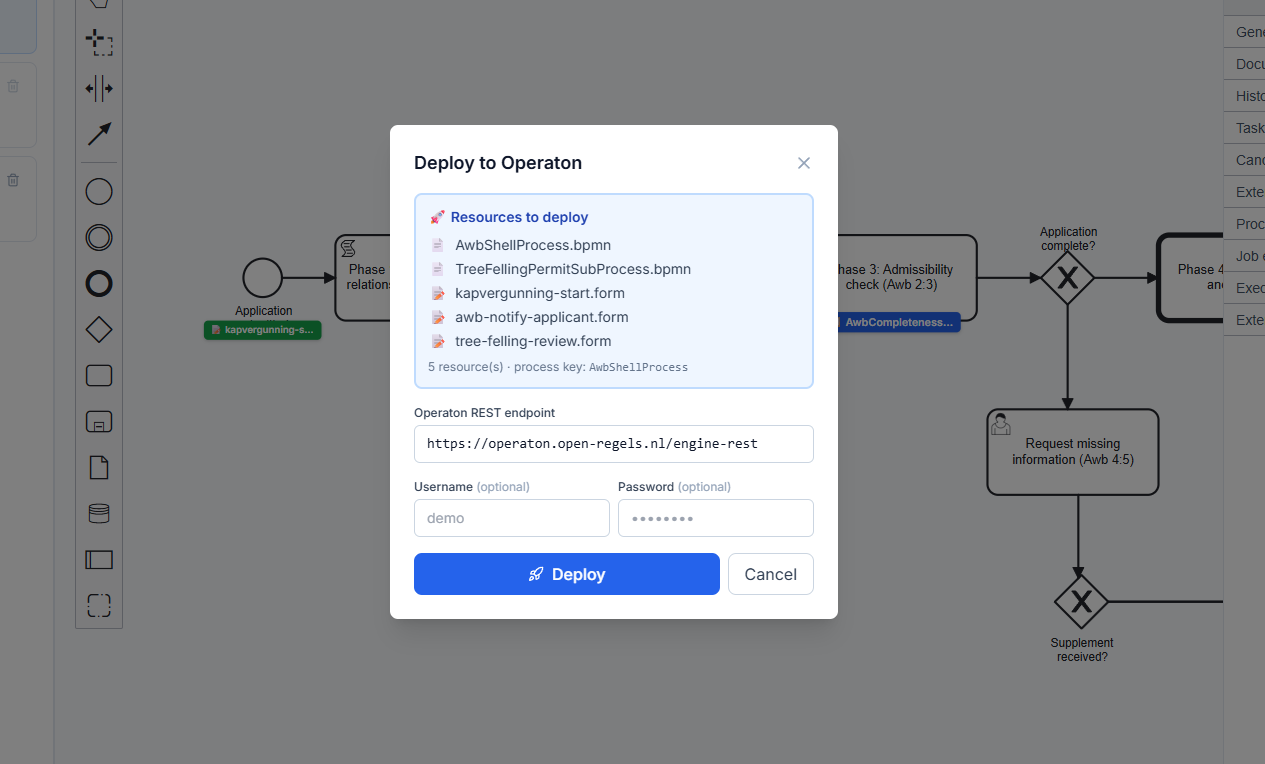
The browser sends the bundle in one request to the Linked Data Explorer backend, which posts every resource to Operaton in a single multipart deployment. Because the BPMN, its forms and its document templates share one deployment, camunda:formRef resolves correctly at runtime — no separate form deployment step is needed.
The modal provides:
- Board ownership (required) — the owning board, auto-detected from the process's candidate groups (infra/rip → Infra-board, caseworker/hr → Caseworker) and overridable. The choice is stamped onto the deployed BPMN as a process-level
camunda:property boardOwner, persisted on theprocess_definitionsrecord (board_ownercolumn), and exposed via/bundles/publicfor downstream consumers (ronl-business-api Procesbibliotheek and archive split) - Operaton target — named, not chosen. A line reading Deploys to … says which Operaton the process will reach. The backend always deploys to its own configured Operaton with its own credentials, so the modal offers no endpoint URL, username or password
- Resource list — shows exactly what will be included before you commit
- Organization (required) — taken from the process's
ronl:organization, set in the sidebar's Organization field; the deploy will not submit without one. It is sent to Operaton as its native tenant-id (POST /deployment/create'stenant-idfield), so no process is deployed without a tenant and left invisible to tenant-scoped lookups - Deploy button — disabled after a successful deployment to prevent accidental re-deploy
- Recording result — the backend records the deployed process in the same request, so it appears on the caseworker dashboard and the public site. If that record could not be written, the result shows as a warning rather than a tick: the deployment itself succeeded and cannot be undone, but the process will not appear on the dashboard or the public site until it is saved and deployed again
If a camunda:formRef, ronl:documentRef or ronl:signatureRef names a form or document template that is not in local storage, the modal lists it under ⛔ Referenced resources are missing from local storage and Deploy stays disabled until it is imported in the Form Editor or the Document Composer: a bundle without it is one the engine cannot resolve at runtime.
Board-owner injection preserves BPMN schema order
When a <bpmn:process> already carries a <bpmn:documentation> child, the boardOwner property is inserted after it — injectBoardOwner skips past any leading <documentation> element(s) before locating or creating extensionElements, so the resulting XML stays schema-valid (documentation must precede extensionElements). A failed deploy shows the error the backend reports rather than a generic message.
Phase findings
The modal also checks the open process's phases, the way the RONL Business API will read them:
- Error (red, ✗) — the process declares its own phases (
ronl:phases) and also carries Awb phase markers (ronl:awbPhase). The stepper reads only one scheme, so Deploy stays disabled until the other is removed. - Warnings (amber, ⚠️) — none of them blocks the deploy; each describes a stepper that will look wrong:
- phases are set on the process, but no node starts one, so there is no stepper;
- a marker names a phase the process does not have;
- a phase that no node falls into, so its step never lights up;
- an entry of
ronl:phasesthe stepper skips — no code, no name, or a repeated code; - a phase marker on an element the stepper does not count, such as a boundary event.
RoPA record linkage
Every process in the LDE can be linked to a RoPA record via ronl:ropaRef. Two mechanisms are available:
RoPA Record selector in the process list — when a process is open, a RoPA Record panel is pinned to the bottom of the left panel below the scrollable process list. A dropdown shows all available records; selecting one writes ronl:ropaRef into the process XML immediately.
BPMN Link tab in the RoPA Editor — the RoPA Editor's BPMN Link tab writes the same attribute and shows whether the current record ID matches the value already in the XML.
Both mechanisms produce identical results. The attribute is registered in ronlModdleDescriptor.json under the http://ronl.nl/schema/1.0 namespace so it survives saveXML() serialisation.
Shared DMN decisions and tenancy
Now that deployed processes always carry a tenant-id, a businessRuleTask's
camunda:decisionRef resolves against a decision definition under the
exact same tenant — with no fallback to a shared, untenanted decision
even when one exists. This was confirmed empirically against a live engine.
To call a genuinely shared decision from a tenant-scoped process, set
camunda:decisionRefTenantId to an EL expression evaluating to null
(${null}). A literal empty string is silently ignored.
Deploy warning
The deploy modal checks for the presence of ronl:ropaRef on the process element. If absent, an amber warning appears between the resource list and the resource count line. The warning is non-blocking — the bundle can still be deployed — but is intended to prevent deploying to production without a linked RoPA record.
See RoPA Records for the full feature description.
DSO activiteit linkage
The BPMN Modeler footer panel includes a DSO Activity selector for linking a process to a DSO activiteit URN. Pasting a URN and clicking Verify queries the live DSO RTR; on success the panel shows the activity's omschrijving, authority block, and a link to the public RTR viewer. The URN is persisted on <bpmn:process> as the ronl:dsoActiviteitUrn attribute and survives saveXML round-trips.
Verification always runs against the pre-production DSO — the selector passes no env
argument, so the Settings toggle does not apply here. Production-only URNs will not verify in
this panel.
See DSO Integration for the full integration overview and DSO Explorer user guide for the verification workflow.
Language and organization
The footer panel includes Language and Organization selectors:
- Language — ISO 639-1 dropdown (Language-agnostic / English / Dutch / German). Persisted as
ronl:languageon<bpmn:process>and as theprocess_definitions.languageDB column. - Organization — free-text input with autocomplete from existing organization keys. Persisted as
ronl:organizationand as the DB column.
Both fields are pending-until-Save: typing in them updates the editor's draft state but does not regroup the artefact in the list panel until Save is clicked. Saving a shell process atomically propagates language and organization to all linked subprocesses.
The list panel toolbar offers a language filter and a search box; cards are grouped under collapsible organization headers. Subprocesses follow their shell's organization regardless of their own tag.
See Multilingualism for the full feature description and Multilingualism user guide for the tagging workflow.
Deploy modal — language consistency check
When the deploy modal opens, LDE walks the bundle resources (shell BPMN + subprocess BPMNs + linked forms + linked documents) and collects all distinct language tags. If more than one is present, an amber warning surfaces inline in the modal listing the offending codes. The warning is non-blocking — Deploy stays enabled. DMNs are excluded from the check (language-agnostic by design).
The check sits alongside the existing RoPA-missing warning, both rendered between the resource list and the resource count.
The seeded Thuisbatterij bundle shows it: its two processes are untagged, but awb-notify-applicant-thuisbatterij is tagged en while the bundle's other forms — recht-en-hoogte-subsidie-thuisbatterij, thuisbatterij-aanvullende-gegevens, thuisbatterij-subsidie-review — and thuisbatterij_subsidie_beschikking are tagged nl, so the modal warns that the bundle mixes en, nl. Untagged artefacts never count, so the warning names exactly the tags that disagree; retagging one side, or untagging it, clears it.
Tree Felling Permit example
The Tree Felling Permit example is the Kapvergunning subprocess TreeFellingPermitSubProcess, seeded with the other examples on first launch. The AWB Generic Process shell calls it through its Call Activity Fase 4+5: Behandeling en besluit, once the application is complete. It is drawn in the pool Kapvergunning - Behandeling en besluit with two lanes:
- Systeem — the start event Start behandeling; two
BusinessRuleTaskelements linked to DMN decision models, Kapvergunning beoordelen (APV) (TreeFellingDecision) and Herplantplicht beoordelen (ReplacementTreeDecision); the script task Definitief besluit kapvergunning vaststellen; the exclusive gateway Vergunning verleend? and the two script tasks that set the decision variables, Besluitvariabelen zetten: Verleend and Besluitvariabelen zetten: Geweigerd; and the single end event Besluit gereed - Behandelaar — the user task Beoordeling behandelaar: besluit kapvergunning, with the form
tree-felling-reviewand the document templateexample_treefelling_beschikking
The example cannot be deleted and serves as a reference for process designers.
Engine compatibility
The Modeler targets Operaton, the open-source fork of Camunda 7 CE. It uses camunda-bpmn-moddle for namespace support since no operaton-bpmn-moddle package exists yet. Operaton accepts both camunda: and operaton: namespace attributes, ensuring compatibility.
Related documentation
- Form Editor — creating and managing Camunda Forms in the LDE
- RONL Business API — Dynamic Forms — how deployed forms are fetched and rendered at runtime in MijnOmgeving
- API Specification — the Linked Data Explorer's
POST /v1/dmns/process/deployendpoint this button calls - Document Composer — authoring decision document templates
- Document Composer user guide — step-by-step workflow
- Besluitvorming onder gedelegeerde bevoegdheid — the example with six lanes, declared phases, a routing DMN and a signed besluit
- RONL Business API — BPMN Design Criteria — how lanes and phase markers drive the caseworker process view