Import, Export & Live Preview
Import
The editor can import existing .ttl files, populating all tabs from the imported data. This enables round-trip editing: export a service definition, share it, have a colleague edit it, then import the updated file. No data is lost in the cycle.
The import system uses vocabulary configuration to recognise entities by their RDF type (cpsv:PublicService, eli:LegalResource, cprmv:TemporalRule, etc.) and maps properties to editor fields via a configurable alias table. This means the editor can import Turtle files that use variant vocabulary prefixes or alternative property names and still parse them correctly. Legacy types and namespaces are normalised on import — ronl:TemporalRule/ronl:ParameterWaarde, the cprmv/0.3.0/ namespace, and the organisation's legacy cv:spatial (read alongside the current dct:spatial) all round-trip cleanly.
CPRMV 0.4.1 API import. Beyond Turtle, the CPRMV (Policy) tab's Import JSON accepts the CPRMV 0.4.1 Rules API output — an array of cprmv:RuleSet objects with nested …#hasPart maps — flattening nested sub-rules into the editor's rule model. Legacy 0.3.0 and flat-array exports are tolerated too. Nested enumeration sub-clauses that carry no rule_id_path (e.g. the onderdeel 1°./2°./3°. under an article member) are folded, in order and recursively, into their parent rule's cprmv:definition rather than becoming standalone norm-less rules — while nested members that are rules in their own right are still imported separately (v1.10.5).
DMN preservation. When a Turtle file contains DMN blocks (cprmv:DecisionModel, cpsv:Input, cprmv:DecisionRule), those blocks are detected and preserved verbatim in the exported output. The DMN tab displays an imported-state notice. On re-export the preserved blocks are appended after a conformance-only normalisation pass (v1.10.2) that injects missing dct:title/dct:description on Decision Rules and repoints a cpsv:implements that targets the service to the legal resource — additive edits only, so deployed decision logic is never modified.
Preservation also covers the cell-level grounding layer. A published export types four different things a cprmv:Rule — the Policy tab's own rules, and the grounding layer's cell resources, minted concepts and citation stubs. On import only subjects under the CPRMV rule base (https://cprmv.open-regels.nl/rules/) become Policy rules; every other cprmv:Rule is treated as part of the DMN block and preserved verbatim, so the grounding survives the round trip instead of arriving in the Policy tab as rules nobody wrote. A skos:ConceptScheme likewise closes the DMN section rather than being swallowed into it, so a round trip no longer adds an extra scheme block (v2026.10.0).
IRI safety. Generated NL-SBB concept URIs, dct:subject links and skos:exactMatch values are sanitised so whitespace becomes underscores and IRI-illegal characters are percent-encoded (v1.10.2). A downloaded .ttl therefore parses under a strict (SHACL) parser and re-imports cleanly.
Export
Clicking Download TTL generates the complete Turtle output for all tabs and triggers a browser download. The filename is derived from the service identifier.
The export always includes the full set of namespace declarations, all populated entities, and — when present — the preserved DMN blocks. Export and re-import of the same file produces identical output, apart from the export timestamps the generator stamps on each download (round-trip fidelity). An end-to-end test asserts this on the published Amsterdam export: it imports the file, exports it, imports that and exports again, and the second export matches the first byte for byte once the timestamps are blanked.
CPRMV vocabulary version (0.4.1 / 0.3.2)
A CPRMV version selector next to the preview/export controls chooses which CPRMV vocabulary version the generated Turtle targets, applied consistently to the live preview, the Download TTL action, and publishing to TriplyDB (v1.10.5).
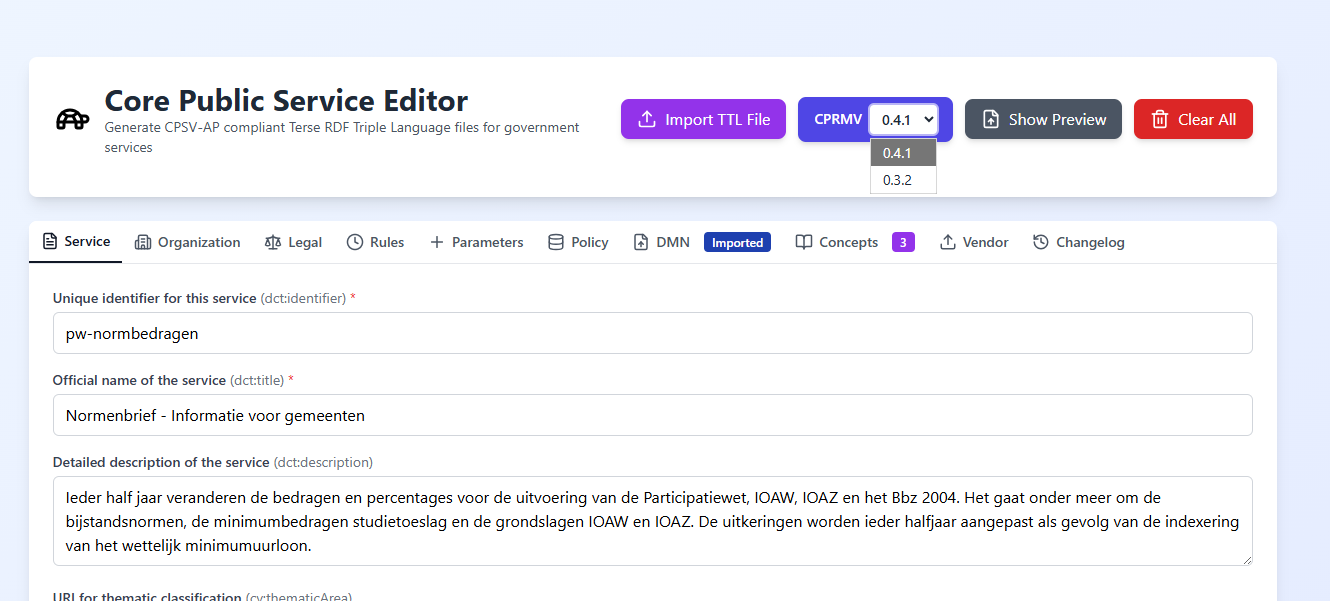
The two targets differ in shape, not just prefix:
0.4.1 (default) |
0.3.2 |
|
|---|---|---|
cprmv: namespace |
https://standaarden.open-regels.nl/standards/cprmv/0.4.1# |
https://cprmv.open-regels.nl/0.3.2/ |
| Grouping | cprmv:RuleSet + cprmv:hasPart |
cprmv:Dataset per ruleset |
Flat cprmv:Rule resources |
Yes | Yes |
| LDE query unit | dataset_versions via cprmv:RuleSet |
dataset_versions via cprmv:Dataset, read by /v1/norms?cprmv_version=0.3.2 |
Selecting 0.3.2 makes data publishable for a 0.3.x consumer that would otherwise not see 0.4.1-namespaced output. The 0.3.2 cprmv:Dataset records are typed only cprmv:Dataset (not co-typed dcat:Dataset), so they no longer trip the CPSV-AP 3.2.0 DatasetShape and pass pre-publish validation while staying fully consumable (v1.10.5). For the full generator-level detail see CPRMV RuleSet / Dataset Generation.
Regardless of the selected version, two rule-shaping behaviours apply on export (v1.10.5):
- Consolidation dates are derived from the rules. The
eli:is_realized_byversion on the LegalResource and each ruleset'scprmv:validFrom/versionedcprmv:idcome from the BWB in-force date the rules carry in theirruleIdPath(e.g.BWBR0015703_2026-04-03_0→2026-04-03), so a dataset's version always matches its rules' applicable date. Non-primary rulesets are dated from their own rules too. The manual "Version or consolidation date" field is a fallback when no rule carries a dated path. - Rules sharing a legal path keep unique URIs. Two rules on the same legal path (a range's bounds, or multiple maxima) no longer collapse onto one RDF subject: the first keeps the path-derived URI and each duplicate gets an
_Nsuffix in document order, so all values survive publish (69 in, 69 out). Duplicates still share arule_id_path_keythat the LDE uses as the dedup key.
Live preview
The preview panel shows the generated Turtle in real time as you type, with syntax highlighting and line numbering. It can be toggled on and off via the Show Preview button in the header. When visible, the application switches to a split-screen layout with the form on the left and the Turtle preview on the right.
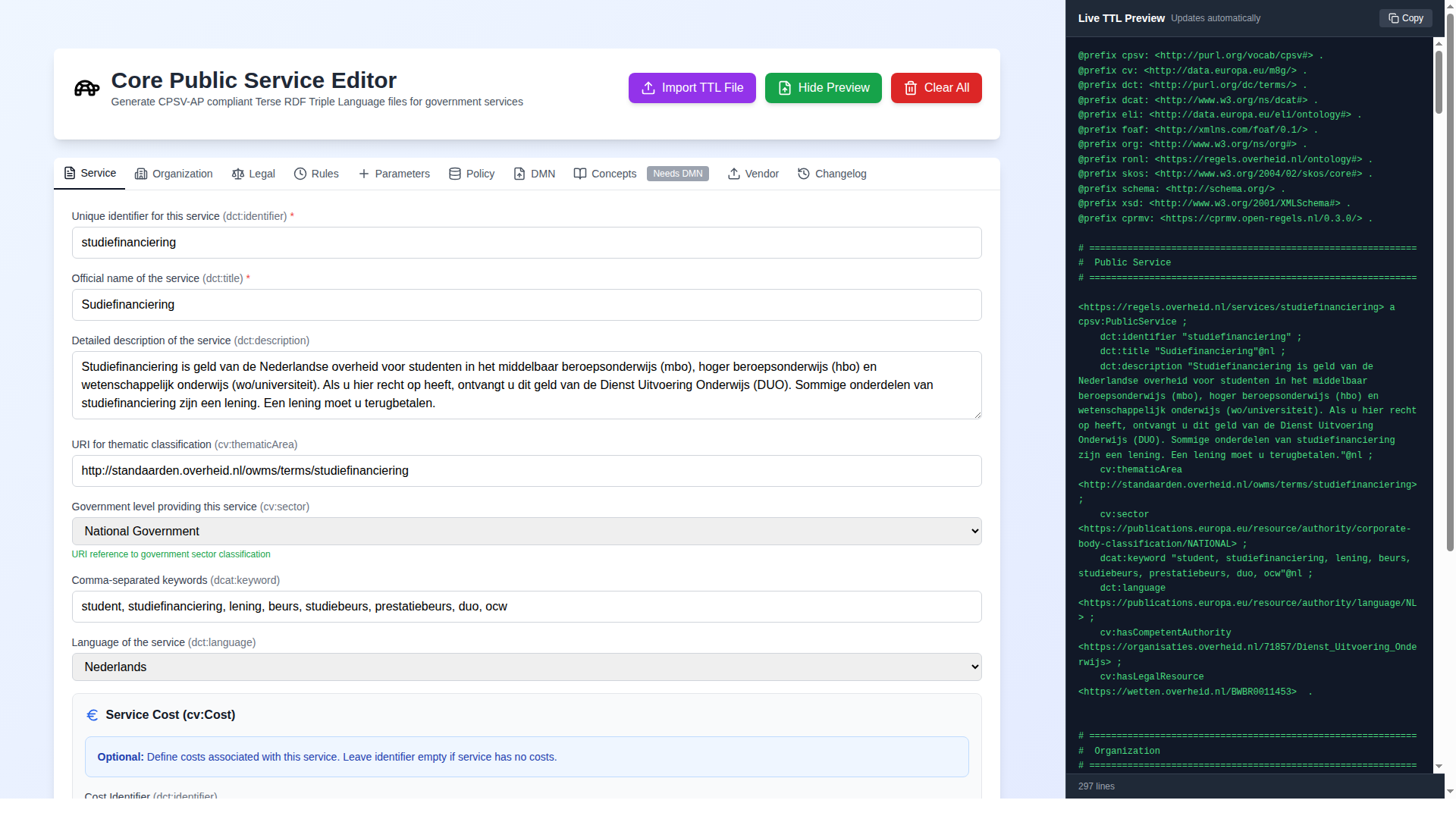
A Copy button in the preview panel copies the full Turtle content to the clipboard without downloading a file.