BPMN Modeler
The BPMN Modeler lets you design government service workflows and link decision model references directly to DMNs and DRDs you have discovered or saved in the Chain Builder.
Opening the Modeler
Click the Workflow icon in the left sidebar. The Modeler opens with the process list on the left, the canvas in the centre, and the properties panel on the right.
On your first visit, the Modeler seeds its example processes and opens the first of them, the AWB Generic Process. The examples demonstrate complete government workflows and serve as a reference — examine them before creating your own processes.
Creating a process
- Click the blue + button at the top of the process list.
- A new process named "New Process" appears in the list and the canvas shows an empty diagram with a start event.
- Double-click the process name in the list to rename it.
Each new process gets a process id of its own — the template's id plus a timestamp — because a process id is unique within an organisation.
Importing a process whose id is already used
When you import a BPMN whose process id your organisation already uses, the Modeler asks what to do. OK replaces the existing process's content with the import, keeping that process's record, status and deploy stamp. Cancel asks for another process id for the import, with a fresh one filled in; leave it empty and nothing is imported. The same id in a different organisation is no conflict.
Building a diagram
Drag elements from the palette on the left edge of the canvas onto the diagram area. Connect elements by clicking the source element and dragging the blue arrow handle that appears on hover to the target element.
Available element types: start events, intermediate events, end events, tasks (user, service, business rule), gateways (exclusive, parallel, inclusive, event-based), sub-processes, data objects, pools, and text annotations.
Linking a BusinessRuleTask to a decision
Select a BusinessRuleTask on the canvas. The properties panel on the right shows the element details, including a DMN/DRD Decision Reference section.
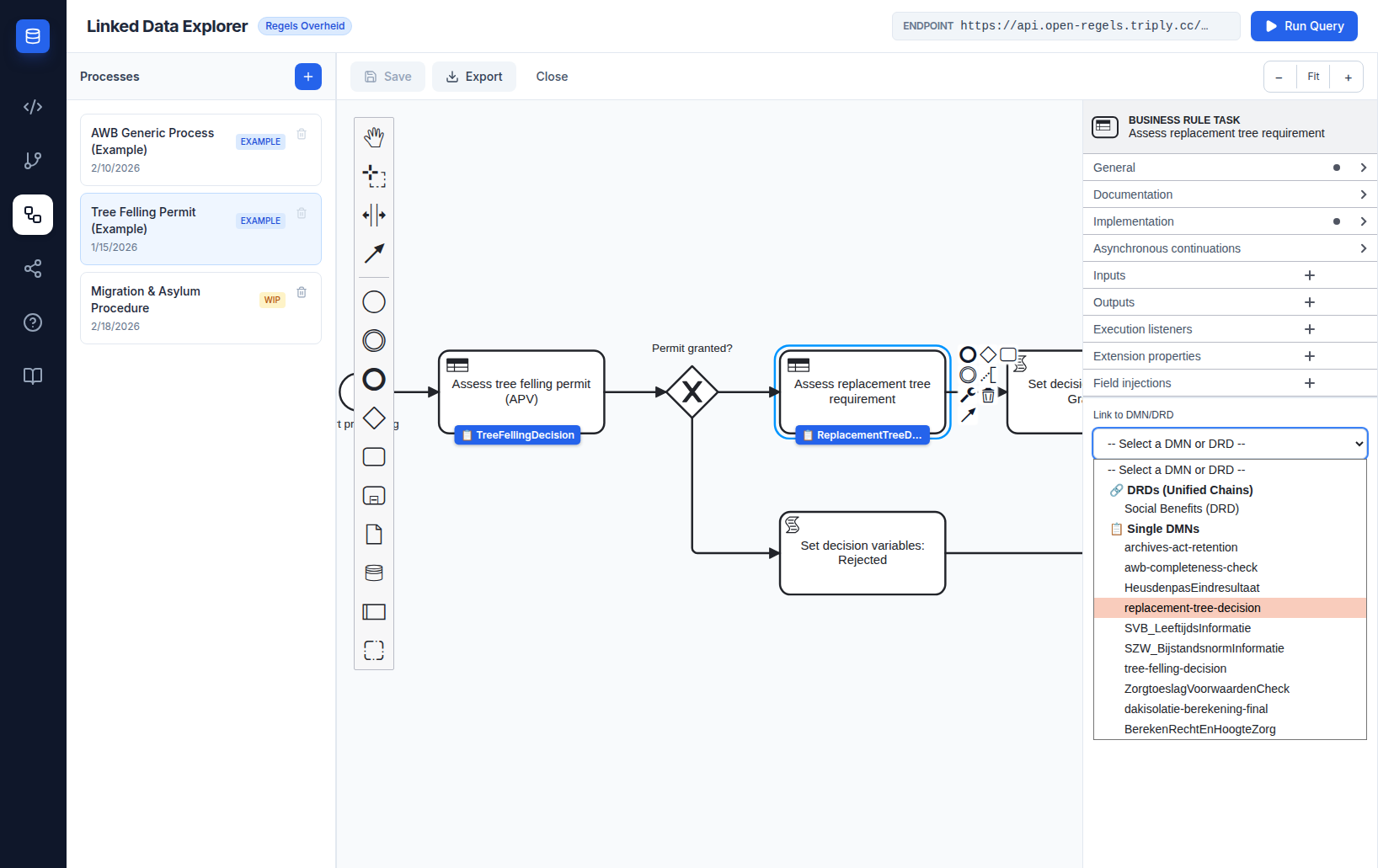
- Click Link to DMN/DRD to open the dropdown.
- The dropdown shows two groups:
- 🔗 DRDs (Unified Chains) — DRD templates saved from the Chain Builder
- 📋 Single DMNs — individual decision models from the active TriplyDB endpoint
- Select an option. The
camunda:decisionReffield auto-populates with the correct identifier and a suggestedcamunda:resultVariablevalue appears. - An info card confirms your selection. DRD cards show the constituent DMNs the DRD combines; single DMN cards show the decision identifier.
Linking a UserTask or StartEvent to a form
UserTask and StartEvent elements can be linked to Camunda Forms authored in the Form Editor. Once linked, Operaton renders the form at runtime for the citizen or caseworker assigned to that task.
Select a UserTask or StartEvent on the canvas. The properties panel shows a Link to Form section beneath the standard element fields.
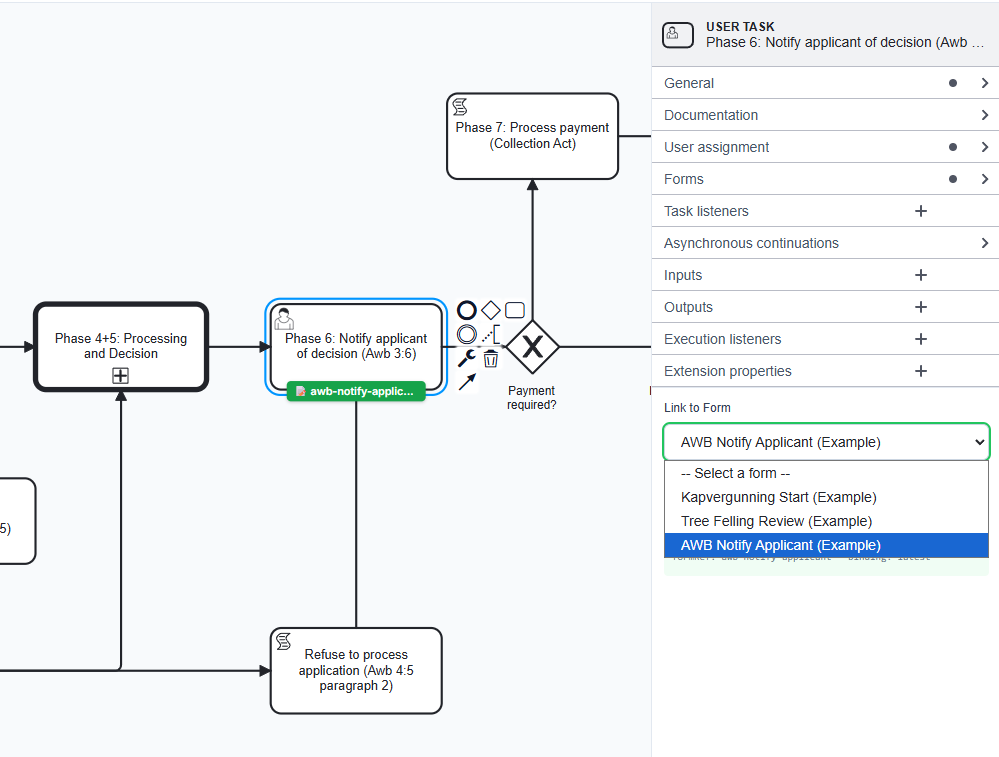
- Click the Link to Form dropdown. It lists all forms currently saved in the Form Editor.
- Select the form you want to link.
- A confirmation card appears below the dropdown showing the form name and the resulting
camunda:formRefvalue. - A green badge appears below the element on the canvas, confirming the link.
The dropdown writes camunda:formRef and camunda:formRefBinding="deployment" into the BPMN XML, the binding every seeded example uses. deployment takes the form from the process's own deployment, which the deploy modal ships together with the BPMN, so the form resolves even when the same form key is deployed under several organizations (tenants). There is nothing to edit by hand.
To unlink a form, open the dropdown and select the blank option at the top.
Linking a UserTask to document templates
Select a UserTask. Below the form selector, the properties panel shows Link decision templates.
- Pick a template from -- Add a template --. It appears as a chip above the select, and the select stops offering it.
- Add more templates the same way when the task produces several documents.
- Remove one with the ✕ on its chip.
A purple badge below the task on the canvas names the template, or reads 2 documents (or more) when several are attached; hover it to see every id. The badge shows only on a task that also has a form linked. See Document template linking.
Form not in the list?
Open the Form Editor view and create or save the form first. Forms appear in the dropdown immediately after saving — no page reload required.
Setting phases
The RONL Business API shows a caseworker a phase stepper for the process. You set its phases in two places.
On the process. Click an empty spot on the canvas — or the pool, in a diagram with pools — so the process itself is selected. Under Phases (RBA stepper):
- Choose Own phases to give the process its own list, or Awb phases to use the eight phases of the Awb procedure.
- For own phases, type a name under New phase name and click Add phase. Repeat for every phase, in order. The Modeler fills in a code for each; change it if you want another.
- Put the phases in order with the arrows, and remove one with the bin.
- Optionally change Label, the word before a phase's number in the stepper. It is
Faseunless you change it.
On the nodes. Select the node where a phase begins. Under Start van fase, pick that phase. Leave the nodes that follow on (erft over): they inherit it, and the line under the select says which phase that is.
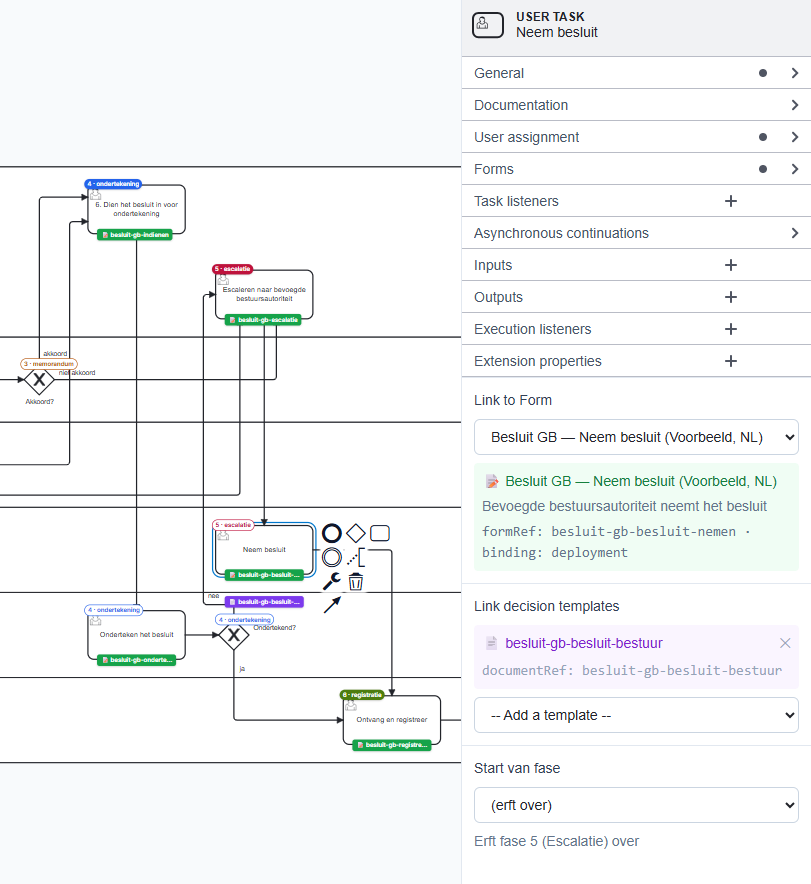
The canvas shows the result as you go: a solid badge on a node that starts a phase, an outlined one on a node that inherits it. Undo takes back a whole phase edit in one step. The deploy modal checks the phases before you deploy; see Phases for the details and Phase findings for what it reports.
Deploying to Operaton
The Modeler can deploy your process — including subprocess BPMNs, linked forms and document templates — to Operaton in a single step.
Click the Deploy button in the canvas toolbar. The deploy modal opens and lists:
- The current BPMN file
- Any subprocess BPMNs it calls via
calledElement(resolved from your saved processes) - All
.formfiles whose IDs matchcamunda:formRefreferences in the bundle - All
.documentfiles whose IDs matchronl:documentRefreferences — several per task where a task carries several — orronl:signatureRefreferences in the bundle
The modal also has a required Board ownership section. It auto-detects the owning board from the process's candidate groups — infra/rip groups → Infra-board, caseworker/hr groups → Caseworker — and lets you override the choice. The selected board is stamped onto the deployed BPMN as a process-level camunda:property boardOwner, persisted with the process, and exposed via /bundles/public so downstream consumers (the ronl-business-api Procesbibliotheek and archive split) can read which board owns the process.
DMNs are not part of the deploy bundle
Decision models referenced via camunda:decisionRef on BusinessRuleTask elements are not included in this deployment. DMNs reach Operaton through a separate path: they are published to TriplyDB by the CPSV Editor and deployed to Operaton from there. The BPMN process resolves camunda:decisionRef at runtime against whatever is already deployed — as long as the DMN key matches, no additional action is needed here. A process deployed under an organization reaches a shared DMN deployed without one only when its business rule task carries camunda:decisionRefTenantId="${null}", as the seeded examples do.
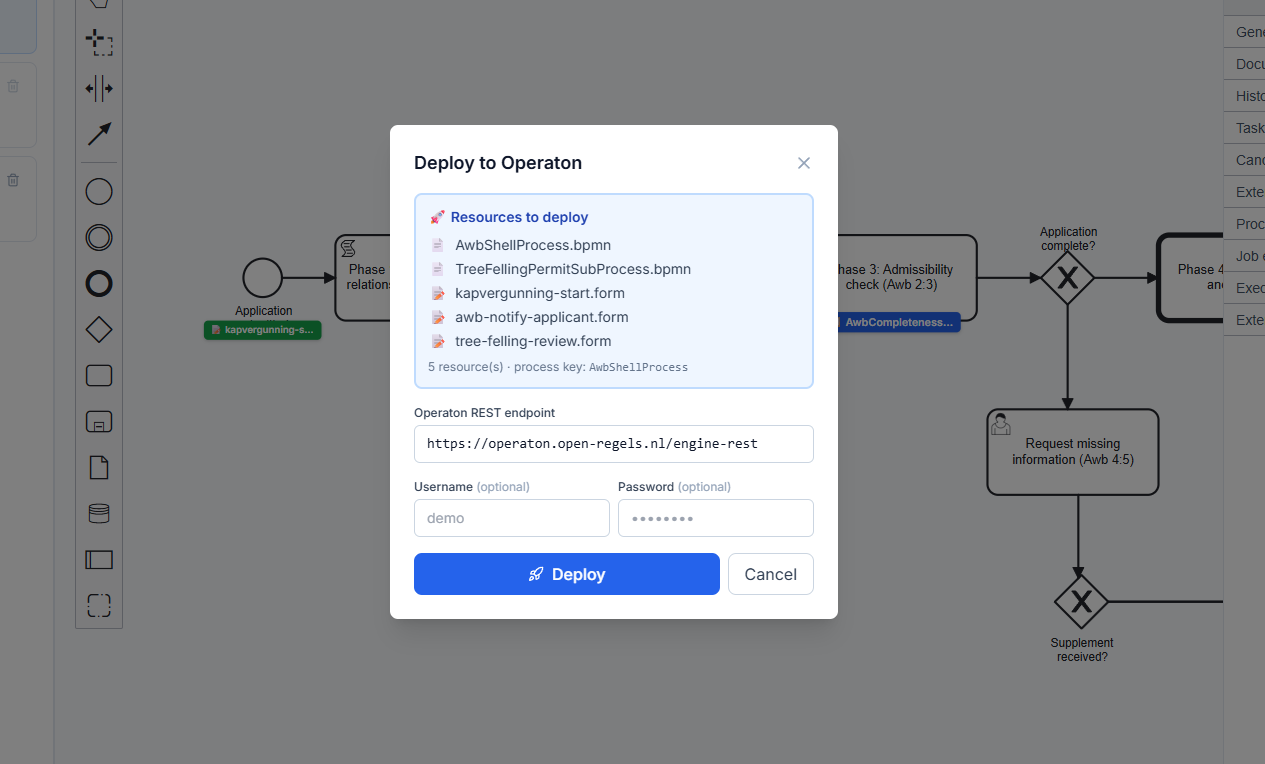
- Review the resource list. A form or document template the process references but this browser does not have is listed under ⛔ Referenced resources are missing from local storage, and Deploy stays disabled until you import it in the Form Editor or the Document Composer.
- Read any red or amber finding. A process that declares its own phases and also has Awb phase markers gets a red one, and Deploy stays disabled until you remove one of the two schemes; the amber phase warnings do not block. Bundle mixes languages means the artefacts carry more than one language tag — a process's
ronl:language, or the language of a form or document template; untagged artefacts do not count. It does not stop the deploy, but a deployed bundle should be one language: retag or untag the odd one out first. A missingronl:ropaRefgets a warning of the same kind. - Check the Board ownership section — accept the auto-detected board or override it. A board owner is required to deploy.
- Check the Organization. It comes from the sidebar's Organization field once the process is saved, and it is required — the deploy will not submit without one. It is sent to Operaton as the deployment's tenant-id, so a process deployed without it would be invisible to any tenant-scoped lookup made later.
- Check the line Deploys to …, which names the Operaton the process will reach. You do not choose it here: the backend always deploys to its own configured Operaton, with its own credentials.
- Click Deploy. The Linked Data Explorer backend posts all resources to Operaton in one multipart deployment.
- On success, a deployment ID is shown and the Deploy button is disabled to prevent accidental re-deploy.
If the result shows as a warning rather than a tick, the deployment succeeded but the process could not be recorded, and the message says why. It will not appear on the caseworker dashboard or the public site until you save it and deploy it again.
Because the BPMN and all its forms and document templates land in the same Operaton deployment, camunda:formRef resolves correctly at runtime with no additional steps.
Editing element properties
- Name: editable in the right properties panel for any selected element
- Element ID: shown read-only (managed by bpmn-js)
- BusinessRuleTask specific:
camunda:decisionRef,camunda:resultVariable,camunda:mapDecisionResult
Zoom and navigation
- Scroll wheel — zoom in and out
- + / − buttons in the toolbar — zoom in/out in steps
- Fit to viewport button — centres and scales the diagram to fill the canvas
- Click and drag on empty canvas — pan
Storage
Processes are stored in PostgreSQL via the LDE backend and cached in browser localStorage for instant access. On editor load, the service fetches the authoritative list from the server and replaces the local cache. If the backend is unreachable, the local cache is used as a fallback without any error surfaced to the user.
Seeded example processes are fetched from public/examples/ on the frontend. They are editable and are written to the database when saved, like your own processes — except the DvTP example, the one seeded record marked readonly, which stays in local storage only.
See Asset Storage for the full architecture.
Click Export to download a .bpmn file for deployment to Operaton. You can also deploy directly from the Modeler using the Deploy button. See Deploying to Operaton above.
The Tree Felling Permit example
The Tree Felling Permit example is the Kapvergunning subprocess the AWB Generic Process calls in its phase Fase 4+5: Behandeling en besluit. It is drawn in the pool Kapvergunning - Behandeling en besluit with two lanes, Behandelaar and Systeem, and demonstrates:
BusinessRuleTaskKapvergunning beoordelen (APV), linked toTreeFellingDecisionBusinessRuleTaskHerplantplicht beoordelen, linked toReplacementTreeDecisionUserTaskBeoordeling behandelaar: besluit kapvergunning in the Behandelaar lane, with a form and a document template linkedExclusiveGatewayVergunning verleend? routing on the final decision- One end event, Besluit gereed
The application itself is submitted in the shell, through its start form. To use the example as a starting point, export it and import the copy as a new process.
AWB shell and subprocess examples
The process library ships with three AWB shell processes and their subprocesses. Each is drawn as a pool with lanes and carries Dutch element names: a shell has the lanes Aanvrager, Behandelaar and Systeem; a subprocess has only Behandelaar and Systeem, because it has no step for the applicant.
AWB Generic Process (SHELL) — the universal eight-phase AWB procedural shell for the Kapvergunning (tree felling permit). Calls TreeFellingPermitSubProcess via a Call Activity at Phase 4+5.
└── Tree Felling Permit (SUB) — evaluates the substantive tree felling decision and routes to caseworker review.
AWB Zorgtoeslag — Provisional Entitlement (SHELL) — AWB shell wired for the Zorgtoeslag provisional entitlement subprocess.
└── Zorgtoeslag — Provisional Entitlement (SUB) — evaluates the resultaat_zorgtoeslag DMN and routes to caseworker review.
└── Zorgtoeslag — Final Settlement (SUB) — started via the FinalIncomeReceived message event once final annual income data arrives from Belastingdienst. Evaluates confirmed income and sets the settlement outcome.
Subsidie Thuisbatterij Flevoland (SHELL) — AWB shell for the Provincie Flevoland home-battery subsidy.
└── Thuisbatterijsubsidie — Beoordeling recht en hoogte (SUB) — evaluates entitlement and amount, and routes to caseworker review.
Asking for missing information. When an application is incomplete, each shell opens the task Aanvullende gegevens opvragen (Awb 4:5) with its own form — kapvergunning-aanvullende-gegevens, zorgtoeslag-aanvullende-gegevens or thuisbatterij-aanvullende-gegevens. Its supplementReceived checkbox decides the next gateway, Aanvulling ontvangen?: the case continues, or the application is not processed. The form deploys with the shell like its other forms.
The Thuisbatterij shell checks completeness with a decision of its own, ThuisbatterijCompletenessCheck, and its gateway Aanvraag volledig? has three exits: a complete application goes on to the assessment; an incomplete one goes to Aanvullende gegevens opvragen (Awb 4:5) the first time; and one still incomplete after that recovery is put out of consideration, Aanvraag buiten behandeling stellen (Awb 4:5 lid 2). A supplement received within the recovery period sends the application back through the completeness check. The form shows the fields the check found missing (missingFields) and records the values the applicant supplied.
Standalone examples
Three examples are standalone processes, with no shell:
- Beheer capaciteitsclaim — proces (Voorbeeld, NL) — the Dutch HR capacity claim, drawn in eight lanes and declaring eight phases of its own. See Multilingualism.
- Besluitvorming onder gedelegeerde bevoegdheid (Voorbeeld, NL) — a decision prepared, reviewed, signed through ValidSign or escalated, then registered and archived, in six lanes and six phases. See Besluitvorming onder gedelegeerde bevoegdheid.
- DvTP — Flow A: Toestemming geven — the DvTP consent process.
The lanes and phases are what the RONL Business API shows a caseworker; to set phases on a process of your own, see Setting phases above and Lanes and phase markers.
All seeded examples carry the EXAMPLE badge and cannot be deleted. They can be edited and saved, but a later example update replaces your edits, so to keep a change, export the process and import the copy as a new process.