Besluitvorming onder gedelegeerde bevoegdheid
Besluitvorming onder gedelegeerde bevoegdheid is an example bundle for the Province of Flevoland: a medewerker prepares a decision under delegated authority, Juridische Zaken reviews it, a gemachtigde ondertekenaar signs it through ValidSign — or it is escalated to the bevoegde bestuursautoriteit — and Registratie & Beheer registers and archives it.
It lives in packages/frontend/public/examples/flevoland/besluitvorming-gedelegeerd/ and is seeded in the Modeler as Besluitvorming onder gedelegeerde bevoegdheid (Voorbeeld, NL). Everything in it is Dutch: element names, lanes, phases, forms and the document. Like the Kapvergunning, Thuisbatterij, Zorgtoeslag and HR capacity examples, it is drawn in swimlanes and declares phases the RONL Business API shows the caseworker.
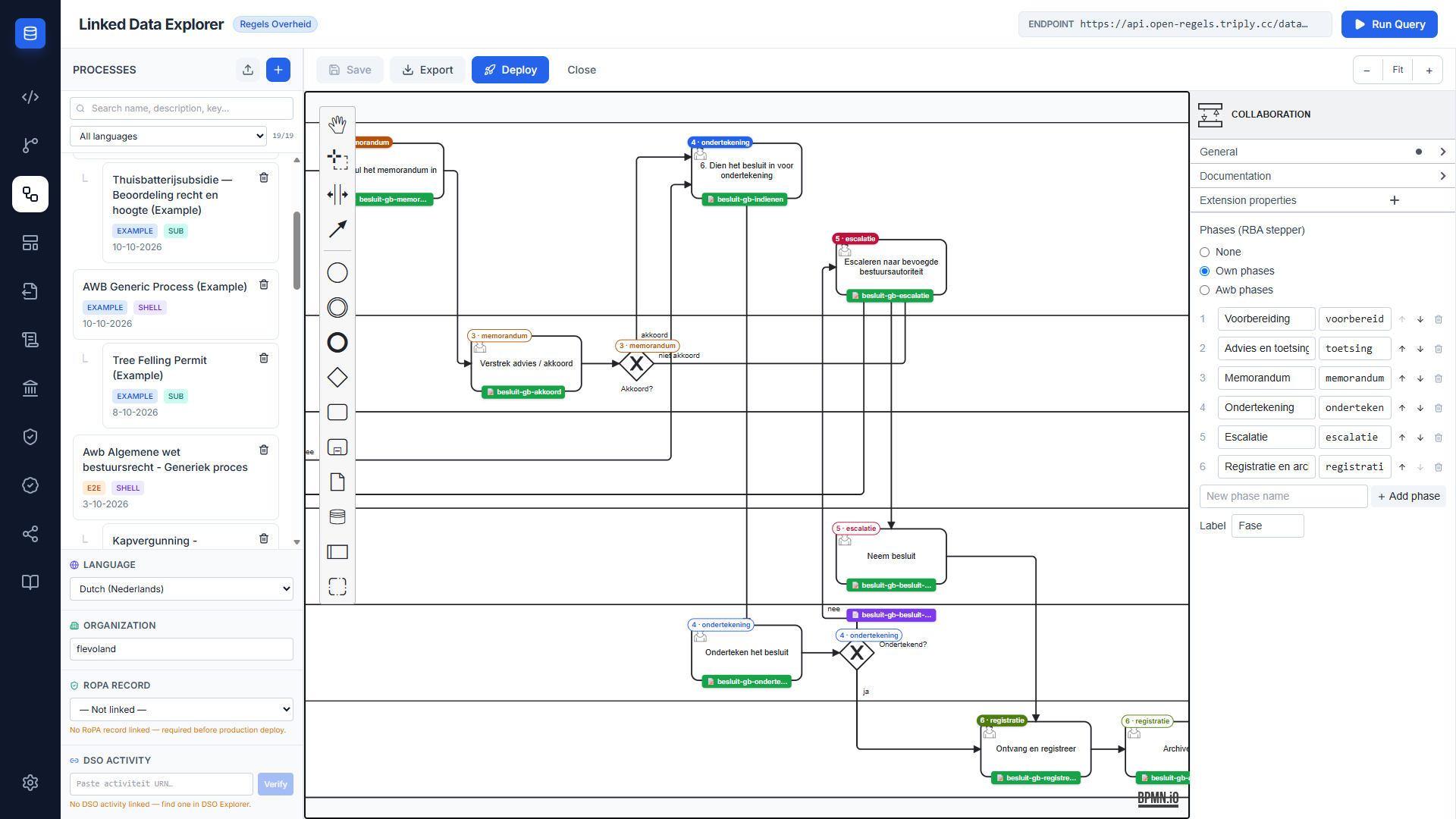
Process flow
GedelegeerdBesluitProcess is a standalone process with six lanes, twelve user tasks and one business rule task. It carries ronl:organization="flevoland" and ronl:language="nl". Every user task takes its form with camunda:formRefBinding="deployment" and goes to the candidate group of its lane.
| Lane | Candidate group | Tasks |
|---|---|---|
| Aanvrager / Indiener | besluit-indiener |
1. Kies de juiste beslissingssjabloon · 2. Vul de sjabloon in · 4. Controleer de voorwaarden voor gedelegeerde bevoegdheid · 5. Vul het memorandum in · 6. Dien het besluit in voor ondertekening · Escaleren naar bevoegde bestuursautoriteit |
| Juridische Zaken / Compliance | besluit-jurist |
Advies en toetsing · Verstrek advies / akkoord |
| Systeem | — | Beslisregels toepassen (business rule task) |
| Bevoegde bestuursautoriteit | besluit-bestuursautoriteit |
Neem besluit |
| Gemachtigde ondertekenaar | besluit-ondertekenaar |
Onderteken het besluit |
| Registratie & Beheer | besluit-registratie |
Ontvang en registreer · Archiveer |
The process starts at Besluit voorbereiden. The indiener chooses a decision template and fills it in, Juridische Zaken gives its advice, and the indiener checks the conditions for delegated authority. Beslisregels toepassen then evaluates the routing DMN, and two gateways in the Systeem lane act on its answer:
- Zijn alle voorwaarden vervuld? —
escalerengoes to Escaleren naar bevoegde bestuursautoriteit; anything else goes on. - Is een formeel memorandum vereist? —
memorandumgoes to 5. Vul het memorandum in and then to Juridische Zaken for Verstrek advies / akkoord;ondertekenengoes straight to 6. Dien het besluit in voor ondertekening.
After the memorandum, Akkoord? sends an agreed besluit to submission and a refused one to escalation. After signing, Ondertekend? sends a signed besluit to Ontvang en registreer and a declined one to Escaleren naar bevoegde bestuursautoriteit. On the escalation path the indiener records why, and the bevoegde bestuursautoriteit decides in Neem besluit. Both endings meet at Ontvang en registreer, followed by Archiveer and the end event Besluit gearchiveerd.
A declined signature escalates
A declined signature does not return the besluit to the indiener. 6. Dien het besluit in voor ondertekening cannot change the besluit, so sending it back would put the same document up for signature again. With the advice, the conditions and the memorandum already behind it, a decline is an incident rather than a correction round, and the process has no rework loop.
The routing decision
gedelegeerd-besluit-route.dmn holds the decision GedelegeerdBesluitRoute, Route besluit onder gedelegeerde bevoegdheid: hit policy FIRST, five inputs and one string output, route.
| # | voorwaardenVervuld |
binnenMandaat |
politiekGevoelig |
overwegingenDuidelijk |
financieleGevolgen |
route |
|---|---|---|---|---|---|---|
| 1 | false |
– | – | – | – | "escaleren" |
| 2 | – | false |
– | – | – | "escaleren" |
| 3 | – | – | true |
– | – | "escaleren" |
| 4 | – | – | – | false |
– | "memorandum" |
| 5 | – | – | – | – | > 50000 |
"memorandum" |
| 6 | – | – | – | – | – | "ondertekenen" |
Because the hit policy is FIRST, the escalation rules win over the memorandum rules, and the last rule catches everything else. Rule 5 is strictly greater: a besluit of exactly € 50.000 needs no memorandum.
The business rule task calls the decision with camunda:decisionRefTenantId="${null}", camunda:resultVariable="besluitRoute" and camunda:mapDecisionResult="singleEntry". The process is deployed under the tenant flevoland and the DMN without one; without the ${null} the engine would look for the decision inside the process's own tenant and not find it.
Phases
The process declares its own phases, which the RONL Business API reads to draw the caseworker's phase stepper:
ronl:phaseLabel="Fase"
ronl:phases="voorbereiding:Voorbereiding;toetsing:Advies en toetsing;memorandum:Memorandum;ondertekening:Ondertekening;escalatie:Escalatie;registratie:Registratie en archivering"
| # | Code | Marked with ronl:phase on |
|---|---|---|
| 1 | voorbereiding |
Besluit voorbereiden (start event) |
| 2 | toetsing |
Advies en toetsing |
| 3 | memorandum |
5. Vul het memorandum in |
| 4 | ondertekening |
6. Dien het besluit in voor ondertekening |
| 5 | escalatie |
Escaleren naar bevoegde bestuursautoriteit |
| 6 | registratie |
Ontvang en registreer |
Every unmarked node inherits its phase from the flow before it. Memorandum and Escalatie are optional branches, so a besluit on the direct path skips them on the stepper. The Modeler shows the phases as badges on the canvas and edits them in the properties panel — see Phases. See A process's own phases for how they are read.
Bundle contents
Sixteen files: one BPMN, one DMN, twelve forms and two document templates.
Forms
One form per user task, each named after its own id and seeded in the Form Editor as example_besluit_gb_<form>. Fields set earlier are shown read-only where a later task needs them.
| Form | Task | Fields it sets |
|---|---|---|
besluit-gb-sjabloon-kiezen |
1. Kies de juiste beslissingssjabloon | besluitType — standaard, motivering, financieel, buiten-delegatie or specifiek |
besluit-gb-sjabloon-invullen |
2. Vul de sjabloon in | onderwerp, motivering, voorgesteldBesluit, financieleGevolgen (a number, 0 by default), relevanteGegevens, bijlagen |
besluit-gb-advies-toetsing |
Advies en toetsing | toetsWetgeving, toetsBeleid, toetsBegroting, binnenMandaat (checked by default), politiekGevoelig (unchecked by default), advies |
besluit-gb-voorwaarden |
4. Controleer de voorwaarden | voorwaardenVervuld (unchecked by default), overwegingenDuidelijk (checked by default) |
besluit-gb-memorandum |
5. Vul het memorandum in | aanleiding, overwegingen, risicos, financieleToelichting |
besluit-gb-akkoord |
Verstrek advies / akkoord | juridischAkkoord — akkoord or niet-akkoord — and akkoordToelichting |
besluit-gb-indienen |
6. Dien het besluit in voor ondertekening | documentenCompleet, ondertekenaar |
besluit-gb-ondertekenen |
Onderteken het besluit | approvalStatus — approved or rejected — and ondertekenToelichting |
besluit-gb-escalatie |
Escaleren naar bevoegde bestuursautoriteit | escalatieReden |
besluit-gb-besluit-nemen |
Neem besluit | besluitUitkomst — genomen or afgewezen — besluitToelichting, and besluitnemer, the name of the bevoegde bestuursautoriteit's decision-maker (required) |
besluit-gb-registreren |
Ontvang en registreer | zaaknummer, kenmerk, documentenGekoppeld |
besluit-gb-archiveren |
Archiveer | bewaartermijn — 5, 10 or 20 years, or permanent — and toegankelijkOpgeslagen |
The five DMN inputs all come from these forms, and each has a default, so the DMN never receives an empty value from a field left untouched. The radios set exactly the string values the gateways test: form-js radios submit strings, so Akkoord? tests juridischAkkoord == "akkoord" rather than a boolean.
besluit-gb-ondertekenen is the fallback for the signing task. The RONL Business API shows its ValidSign signing panel in place of the form, and falls back to the form only when it cannot fetch the signing specification. Both write approvalStatus, so Ondertekend? works either way — see Configuring a process for signing.
Document templates
besluit-gb-besluit.document, Besluit onder gedelegeerde bevoegdheid, is the besluit itself. It has a Provincie Flevoland letterhead and contact block, a reference block with the subject and type, a body with the scope of the delegation, the besluit, the motivering and the financial consequences, a closing with the objection clause, and a signOff zone for the gemachtigde ondertekenaar. It binds six process variables: onderwerp, besluitType, voorgesteldBesluit, motivering, financieleGevolgen and ondertekenaar.
besluit-gb-besluit-bestuur.document, Besluit van de bevoegde bestuursautoriteit, is the besluit on the escalation path. It has the same letterhead, reference block and objection clause, but says that the bevoegde bestuursautoriteit decided, and why: the besluit could not be settled under the delegated authority, because it fell outside the mandate or the gemachtigde ondertekenaar did not sign it. Below the proposed besluit it gives the outcome and the authority's explanation, and its sign-off, De bevoegde bestuursautoriteit,, closes with the besluitnemer. It binds eight process variables: onderwerp, besluitType, voorgesteldBesluit, motivering, financieleGevolgen, besluitUitkomst, besluitToelichting and besluitnemer — the last three set on Neem besluit itself. It does not bind ondertekenaar.
Each task refers to its own document:
| Task | Attribute | Effect |
|---|---|---|
| Onderteken het besluit | ronl:signatureRef="besluit-gb-besluit" |
The RONL Business API has the gemachtigde ondertekenaar sign the document through ValidSign |
| Neem besluit | ronl:documentRef="besluit-gb-besluit-bestuur" |
The bevoegde bestuursautoriteit sees its own besluit with the task |
The ordinary path keeps besluit-gb-besluit and its ValidSign signing. The Modeler's deploy modal follows both attributes, so both documents travel with the process. The Document Composer seeds the templates from inline copies, BESLUIT_GB_BESLUIT and BESLUIT_GB_BESLUIT_BESTUUR in defaultTemplates.ts, because the Vite dev server rejects imports from public/; defaultTemplates.test.ts keeps each inline copy identical to its file.
Deploying the bundle
- Deploy the DMN once, without an organization.
GedelegeerdBesluitRouteis not part of the Modeler's deploy bundle. It is shared and untenanted, which is whatdecisionRefTenantId="${null}"expects. - Deploy the process from the Modeler. Open Besluitvorming onder gedelegeerde bevoegdheid (Voorbeeld, NL) and click Deploy. The modal lists
GedelegeerdBesluitProcess.bpmn, the twelve forms,besluit-gb-besluit.documentandbesluit-gb-besluit-bestuur.document, and deploys them under the organizationflevoland. See One-click deploy.
The bundle has no e2e-fixtures/ copy and no E2E journey; it is checked by its bundle test. Its authored copy is examples/organizations/flevoland/besluitvorming-gedelegeerd/, and public-example-fixture-parity.test.ts keeps every file the Modeler serves from public/examples/flevoland/ identical to it.
Its BPMN is nonetheless copied downstream: the RONL Business API keeps GedelegeerdBesluitProcess.bpmn as a parser fixture for a process that declares its own phases. npm run check-rip-bpmn therefore fingerprints it in rip-bpmn-fingerprints.json, in the pre-push hook and the required CI audit job, so an edit to the BPMN fails that check until node scripts/check-rip-bpmn-copies.mjs --write records the new fingerprint, and the RONL Business API's fixture is refreshed with the command it prints. See RIP R2.2 Bundle → The mirrored copy.
The bundle test
The files reference each other by id and by variable name, and nothing else checks those references before a deploy fails on Operaton or a gateway finds no variable at runtime. packages/backend/src/besluitvorming-gedelegeerd-bundle.test.ts does. It pins:
- the DMN's id, hit policy, five inputs in order and six rules;
- the twelve forms, each named after its own id, with the DMN inputs writable and defaulted, the radio values the gateways test, and every value the document binds collected as a required field before signing;
- the process's id, name, organization and language, the six lanes in order, a deployed form and the lane's candidate group on every user task, the untenanted DMN call,
signatureRefanddocumentRef, the six phases and their markers, the gateway conditions, and the declined signature leading to escalation; - the document's id, process key and bindings;
- the escalation document: its id and process key, a
besluitnemerbinding and noondertekenaar, only bindings a form writes, andbesluitUitkomst,besluitToelichtingand a requiredbesluitnemerwritable on Neem besluit.
Running it in the RONL Business API
The process starts on the caseworker dashboard rather than from a resident's request: Besluit voorbereiden, in the Besluitvorming rail group, starts it for a holder of besluit-indiener. The five candidate groups are realm roles in Keycloak. See Caseworker — Besluitvorming for the dashboard and ValidSign signing for how ronl:signatureRef becomes a signing ceremony.
Related
- BPMN Modeler — the Deploy modal, the phase editors and the
ronl:*attributes - Form Editor — the seeded forms
- Document Composer — how
.documenttemplates and their zones work - RONL Business API — BPMN Design Criteria — lanes and phase markers in the caseworker process view
- RONL Business API — Caseworker — preparing, signing and following a besluit