Multilingualism
Overview
LDE supports tagging design artefacts (BPMN processes, Camunda forms, document templates) with a language and an organization so that bundles can be designed once and deployed in multiple languages without forking the underlying logic.
The model is sibling-artefact i18n, not in-schema key-lookup i18n: each form/BPMN/document exists once per language, with a language tag, and the deploy modal warns if a bundle mixes languages. DMNs stay language-agnostic — variable keys remain stable English across language siblings, so a single DMN serves both English and Dutch versions of the BPMN that calls it.
The LDE interface itself remains English. Language tags apply only to the design artefacts the LDE produces.
What can be tagged
| Artefact | Language storage | Organization storage |
|---|---|---|
| BPMN process | ronl:language attribute on <bpmn:process> (XML) + DB column |
ronl:organization + DB column |
| Camunda form | DB column on the form wrapper (not inside the form-js schema) | DB column |
| Document template | DB column on the wrapper (not inside zones) | DB column |
| DMN | Not tagged — language-agnostic by design | Not tagged |
Languages follow ISO 639-1 — currently en, nl, de. Organization is an open-ended string; existing values include flevoland, toeslagen, bzk, ind.
List panel toolbar
Each editor's list panel (BPMN Modeler, Form Editor, Document Composer) shares the same toolbar:
- Search — free text matches against name, description, and the artefact's identifier (BPMN process id, form schema id, document process key)
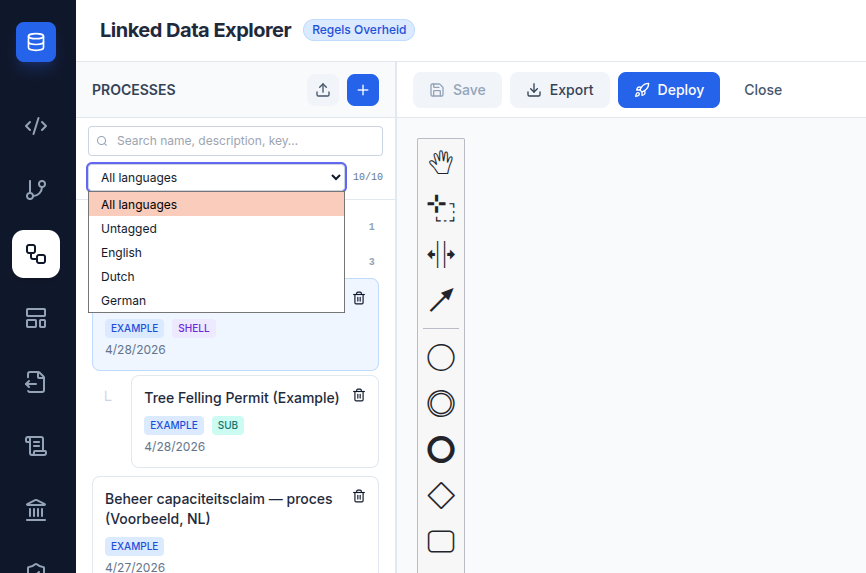
- Language filter —
All languages(default),Untagged, or a specific code (English, Dutch, German). Untagged artefacts always match the All filter and only appear when Untagged is selected. - Match counter —
<matched>/<total>shown next to the filter when both numbers are useful
A live count appears next to the language filter so you can see at a glance how many of your artefacts match the current filter.
Collapsible organization groups
Below the toolbar, artefacts are grouped under collapsible organization headers (FLEVOLAND, TOESLAGEN, BZK, etc.). Untagged artefacts go to an UNGROUPED group at the bottom. Click a header to collapse or expand the group.
For BPMN, subprocesses follow their shell's organization regardless of their own tag — so a Tree Felling subprocess shows under FLEVOLAND together with its AWB shell, even if the subprocess itself has no organization tag.
If a subprocess's shell is hidden by the active filter (e.g. you've filtered to language=nl and the shell is English), the subprocess renders as a flat orphan card rather than disappearing.
Editor footer panel
Each editor (BPMN Modeler, Form Editor, Document Composer) shares the same footer pattern. Selecting an artefact opens a footer panel below the list with the metadata selectors:
- Language — dropdown with Language-agnostic / English / Dutch / German
- Organization — text input with autocomplete from existing organization keys
- (BPMN only) RoPA Record — link to a GDPR Art. 30 record
- (BPMN only) DSO Activity — verify and link a DSO activiteit URN
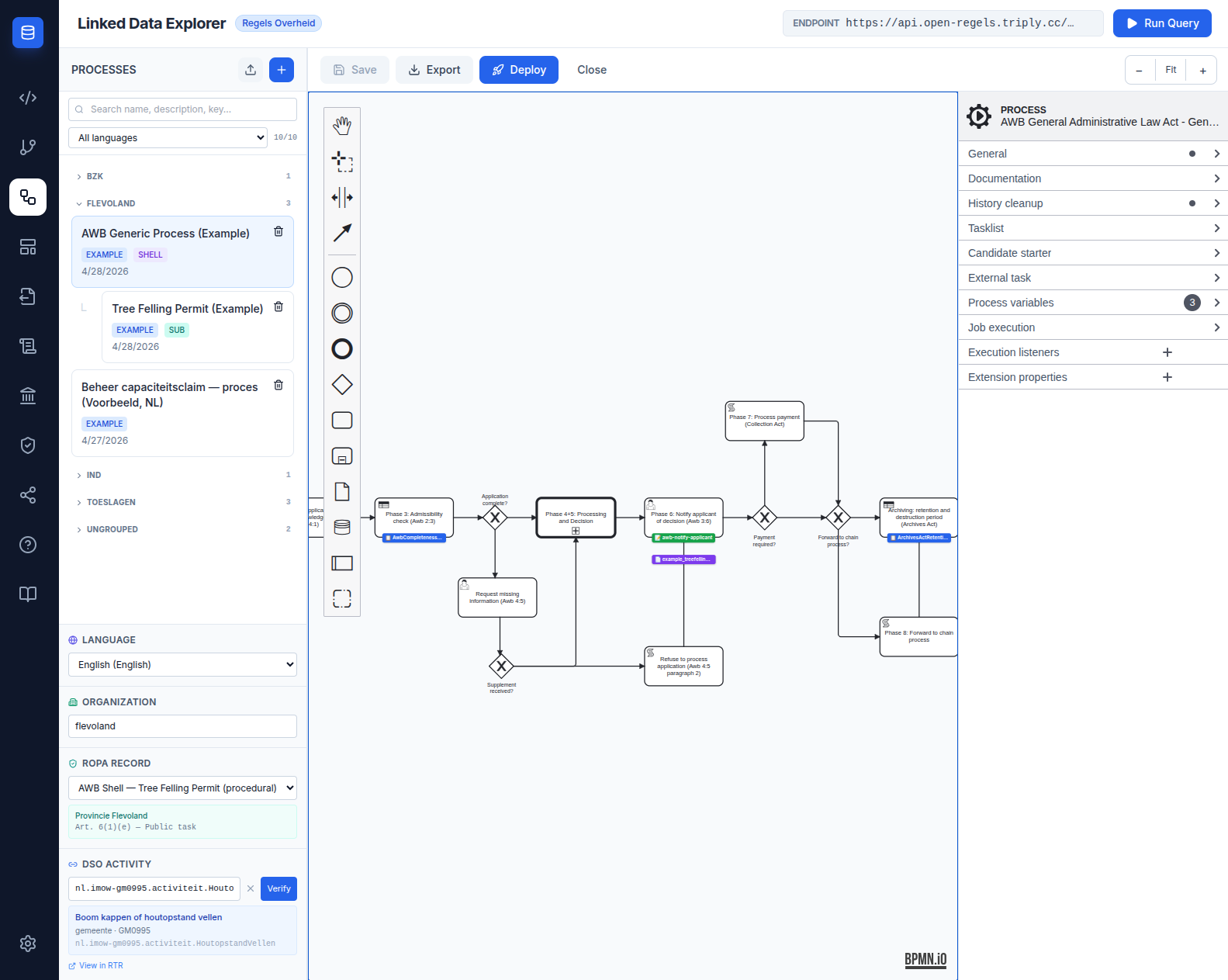
The same footer pattern, scoped to language and organization only, appears in the Form Editor and Document Composer.
Pending-until-Save model
Footer edits are pending until you click Save — they no longer write through immediately. While you're typing in the organization field, the artefact does not regroup in the list panel. Save commits all pending changes (canvas content plus footer metadata) atomically and the list updates.
If you try to navigate away from an artefact with unsaved changes, a confirm prompt asks whether to discard them. Cancel keeps you on the artefact; OK discards the draft and proceeds.
For BPMN shells, saving propagates the shell's language and organization to all linked subprocesses in the same atomic write — so an AWB shell saved with nl / flevoland pulls the Tree Felling subprocess to the same values automatically. Shell wins unconditionally; example subprocesses (readonly: true) are skipped.
Filename-based language inference on import
Drop a .bpmn, .form, or .document file with a language suffix in its name (e.g. intake-form.nl.form) into the import button — LDE picks up the suffix and tags the imported artefact automatically. Order of precedence:
- Language baked into the file (
ronl:languagein BPMN XML, top-levellanguagekey in form/document JSON) - Filename suffix
.<lang>.<ext> - Untagged
The form export reciprocates: clicking Export .form wraps the form-js schema with the language and organization at the top of the exported JSON and uses a language-suffixed filename. Re-importing that file populates both fields automatically.
Deploy-time language consistency check
When you open the Deploy modal on a BPMN bundle, LDE walks the resources (shell BPMN + subprocess BPMNs + linked forms + linked documents) and collects all distinct language tags. If more than one is present, an amber warning appears inline in the modal listing the offending codes:
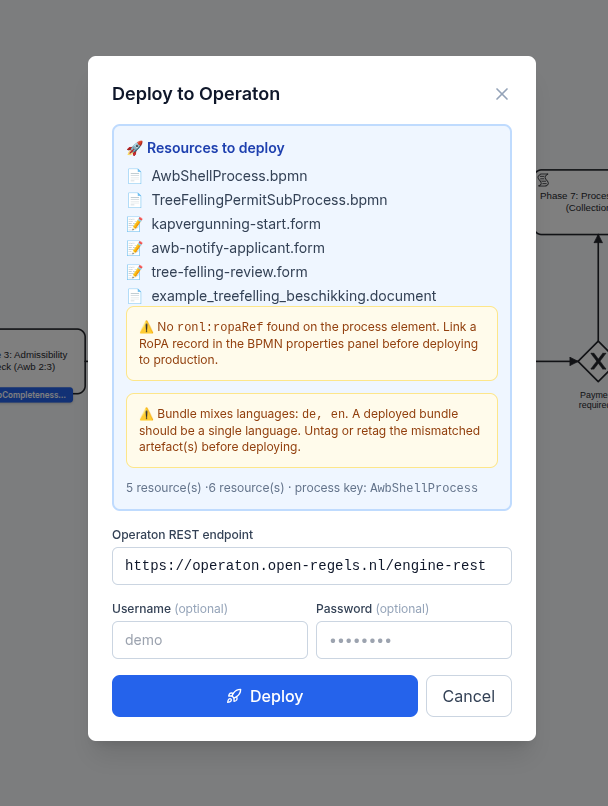
The warning is non-blocking — Deploy stays enabled. It mirrors the existing RoPA-missing warning UX. DMNs are not part of the check because they're language-agnostic by design.
HR-capacity Dutch reference bundle
The HR-capacity Dutch bundle is the multi-language reference bundle:
Beheer capaciteitsclaim — proces (Voorbeeld, NL)— 1 BPMN, 8 forms, 2 documents- All artefacts tagged
language=nl,organization=flevoland - The shared
CapacityClaimRoutingDMN keeps its variable keys (requestType,decisionRoute,advisoryGroup, etc.) in stable English; only labels and option text are Dutch - The files sit directly under
public/examples/flevoland/HR-capacity/with no language infix in their names (ManagementCapacityClaimProcess.bpmn,capacity-claim-intake.form, …); their ids keep the-nlsuffix, so everyformRefanddocumentRefin the BPMN names a…-nlid - The Dutch BPMN has eight lanes and declares eight phases (
ronl:phases, with aronl:phasemarker on the node where each begins), which the RONL Business API reads for its caseworker process view — see BPMN Design Criteria → A process's own phases - Its routing task resolves the shared
CapacityClaimRoutingdecision without a tenant (camunda:decisionRefTenantId="${null}"), so it uses the DMN deployed without a tenant even when the process itself is deployed under one
Open the BPMN under FLEVOLAND, walk the canvas, open the linked forms — every label, description, button, and option label is in Dutch; behind the scenes the variable keys and DMN logic stay English.
Known limitation — form-js properties panel focus loss
When editing properties in the Form Editor (Field label, Description, Key), the input loses focus when you pause typing. This is upstream form-js issue #86, marked wontfix by bpmn-io — the form-js properties panel rebuilds itself on its own debounced commit, which loses the active input focus. It is not caused by LDE and not fixable from React without forking form-js.
Workaround: edit the .form JSON directly in a code editor and re-import. Filename-based language inference handles the language tagging automatically.
Related documentation
- Multilingualism user guide — step-by-step tagging and translation workflow
- BPMN Modeler — language and organization
- Form Editor — language and organization
- Document Composer — language and organization