DMN Orchestration
The DMN tab enables the editor to go beyond metadata authoring and become an active tool for deploying and testing decision logic. It integrates directly with the Operaton rule engine, which hosts the DMN models that execute government service decisions.
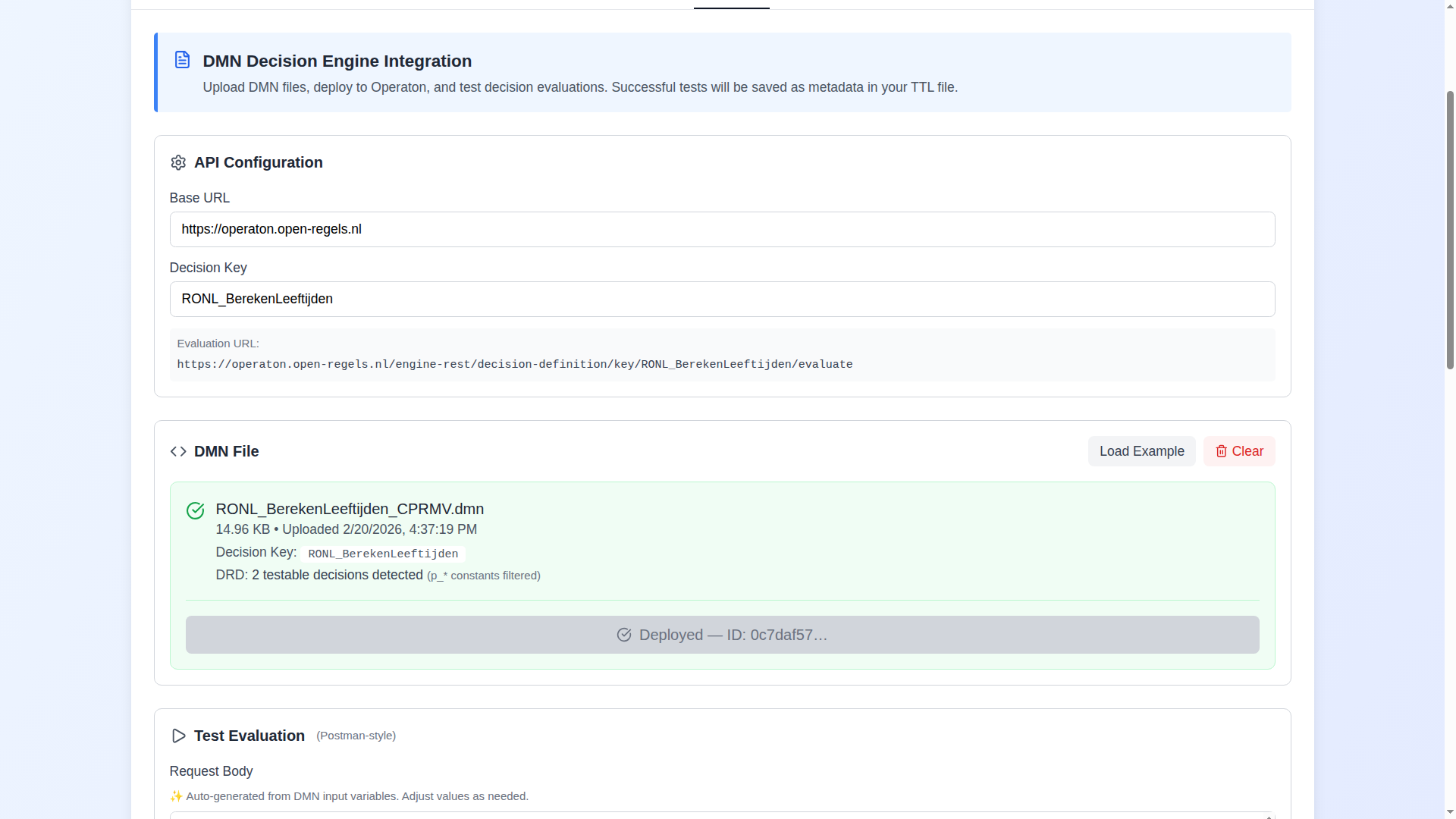
What the DMN tab does
The tab handles the complete lifecycle of a Decision Model and Notation (DMN 1.3) file within a service definition:
File management. Upload a .dmn file, or load one of the provided examples. The editor parses the DMN XML, extracts all <decision> elements, identifies the primary decision key (automatically skipping constant parameters prefixed with p_*), and pre-populates the request body with the correct input variable names and types. The primary key is chosen by preferring a root decision — one that no other decision requires via informationRequirement — rather than the first <decision> in document order, so a model whose intended output decision is authored later is still resolved correctly. When a file contains more than one testable decision, a Decision Key dropdown lets you pick which one to evaluate; the selection updates the evaluation URL everywhere (v1.10.3).
Syntactic validation. Immediately after upload, the editor runs the DMN file through the shared backend's five-layer syntactic validator. The result is shown inline in the file card — valid files display a green badge, files with issues display a collapsible panel grouped by layer. See Syntactic Validation below.
Deployment to Operaton. Send the DMN file to the configured Operaton engine. The request goes through the shared Linked Data Explorer backend, which forwards it to Operaton server-to-server — the browser never calls the engine directly (v2026.08.0). Deployment status and ID are tracked and included in the exported Turtle.
Live decision evaluation. Test the deployed model with configurable input variables using a Postman-style interface. The request body is auto-generated but fully editable, and date inputs are sent as typed Date values with a full ISO timestamp so decisions that do date arithmetic evaluate correctly. Evaluation is routed through the same backend as deployment, and the Evaluation URL preview shows the URL actually called. Responses are displayed inline.
Metadata documentation. The exported Turtle includes the full DMN metadata: the decision model URI, deployment ID (cprmv:deploymentId), API endpoint (cprmv:implementedBy), all input variables as cpsv:Input entities and outputs as cpsv:Output entities, and extracted decision rules with their legal article references as cpsv:Rule, cprmv:DecisionRule entities (each carrying dct:title/dct:description and, when a legal resource is set, cpsv:implements → the eli:LegalResource).
When a DMN carries cell-level grounding, the export goes finer still: each Decision Rule gains a cprmv:hasPart list of per-cell cprmv:Rule resources, so an individual decision-table condition can cite the specific provision it rests on rather than inheriting the whole rule's legal reference (v2026.08.0). When the DMN entry also names the concept the cell is grounded in (cprmv:conceptName, cprmv:conceptType), the cell resource carries that name as skos:prefLabel and its type as dct:type (v2026.10.0). See Cell-Level Legislative Grounding.
Import preservation. When a Turtle file containing DMN data is imported, the DMN blocks are preserved verbatim across the import/export cycle. The tab displays a clear notice indicating that the DMN is in imported state, and provides the option to clear and recreate it. On export, a normalizeImportedDmnBlocks pass makes only additive/repointing edits to the preserved Decision Rules so they remain CPSV-AP 3.2.0 conformant (v1.10.2): missing dct:title/dct:description are injected, and a cpsv:implements that still points at the cpsv:PublicService is repointed to the eli:LegalResource (or dropped when none exists). The edits never remove preserved triples and are idempotent, so re-importing an already-conformant export is a no-op.
Syntactic validation
When a DMN file is uploaded or an example is loaded, the editor automatically calls POST /v1/dmns/validate on the shared backend and displays the result in the file card.
Validation covers five layers. Issues are grouped by layer in a collapsible panel. Each issue carries a severity (error, warning, or informational), a typed code, a human-readable message, and — where applicable — an element reference and line number.
| Layer | What is checked |
|---|---|
| Base DMN | XML well-formedness, root element, DMN namespace, required <definitions> attributes, presence of at least one <decision> |
| Business Rules | Hit policy values, typeRef on inputs and outputs, rule entry count consistency |
| Execution Rules | CPRMV extension attributes — rulesetType, ruleType, confidence enums, ISO date format, BWB ID format, temporal-period completeness |
| Interaction Rules | informationRequirement href resolution, orphaned <inputData> elements, variable name consistency |
| Content | Non-empty CPRMV descriptive attributes, variable typeRef presence, non-empty <textAnnotation> content |
A file is considered valid when no layer produces an error. Warnings and informational messages do not block deployment — they flag quality improvements recommended for RONL publishing.
Validation state is cleared when the file is removed via the Clear button, and re-run whenever a new file is loaded.
For the full specification of every validation code and its rationale, see the DMN Validation Reference in the Linked Data Explorer documentation.
Testing capabilities
Beyond single-evaluation testing, the DMN tab includes two advanced testing modes:
Intermediate decision tests evaluate each sub-decision in the Decision Requirements Diagram (DRD) individually. This is invaluable for debugging complex multi-table DMNs — rather than examining the final output, you can see exactly which sub-decision is producing an unexpected result. Constant parameters are automatically filtered out; only testable decisions are shown.
Test cases run multiple predefined scenarios from an uploaded JSON file and verify each one — expected outputs are compared against the engine's actual outputs, so a case only passes when it is functionally correct rather than merely returning HTTP 200. Each case resolves to PASS, FAIL (with an Expected-vs-Actual mismatch table), ERROR, or OK-unchecked (amber, when no expectation could be parsed), and the counters are verdict-based (v1.10.3). A case's optional decision field routes it to its own decision, so one file can exercise every decision of a multi-decision DMN, each result showing the decision it ran against (v1.10.4). A literal empty-collection expectation ([] / {}) is verified as an empty-result case (v1.10.6). Two JSON formats are supported (Toeslagen and DUO format), with automatic normalisation.
Running uploaded test cases also populates the Concepts tab: input and output concepts are unioned across every uploaded case (deduped by name), and each variable records the decision(s) it appears in — so all inputs and outputs are attributed to their decision(s) even without a successful evaluate (v1.10.4). Output concepts also survive an evaluation that legitimately matches no rule: when the engine returns an empty result, the editor reads the decision's declared outputs from the DMN XML instead, so the Concepts tab — and the published Turtle — keep them (v2026.08.0).
Smart constant filtering
DMNs for government services frequently contain a large number of constant parameter decisions (prefixed p_) alongside the actual decision logic. The editor automatically detects and filters these from the decision key extraction and intermediate test list, so you work with only the testable decisions. The file card shows a badge like "12 testable decisions detected (p_* constants filtered)" to make the filtering transparent.