DSO → DMN Import
The CPSV Editor can receive a decision model directly from the Linked Data Explorer through a deep-link handoff. When a user discovers a toepasbare regel (applicable rule) in the DSO (Digitaal Stelsel Omgevingswet) browser of the Linked Data Explorer and chooses to turn it into a service definition, the Explorer opens the editor with the DMN already loaded — no manual download and re-upload required.
This feature was introduced in v1.9.6.
How the handoff works
The Linked Data Explorer links to the editor with a set of query parameters that make up the deep-link contract:
https://cpsv-editor.open-regels.nl/?dsoImport=dmn
    &dmnId=<decision id>
    &env=<pre|prod>
    &activityName=<DSO activity name>
    &authority=<resolved competent authority>
    &activityUrn=<DSO activity URN>
    &fsRef=<functional-structure reference>
When the editor opens with dsoImport=dmn, the useDsoImport hook runs once on mount and:
- Fetches the DMN. It requests the standalone DMN XML from the shared backend (
GET /v1/dso/toepasbare-regels/{dmnId}/dmn, adding?env=prodonly whenenv=prod). - Prefills the DMN tab with the fetched XML, a filename of
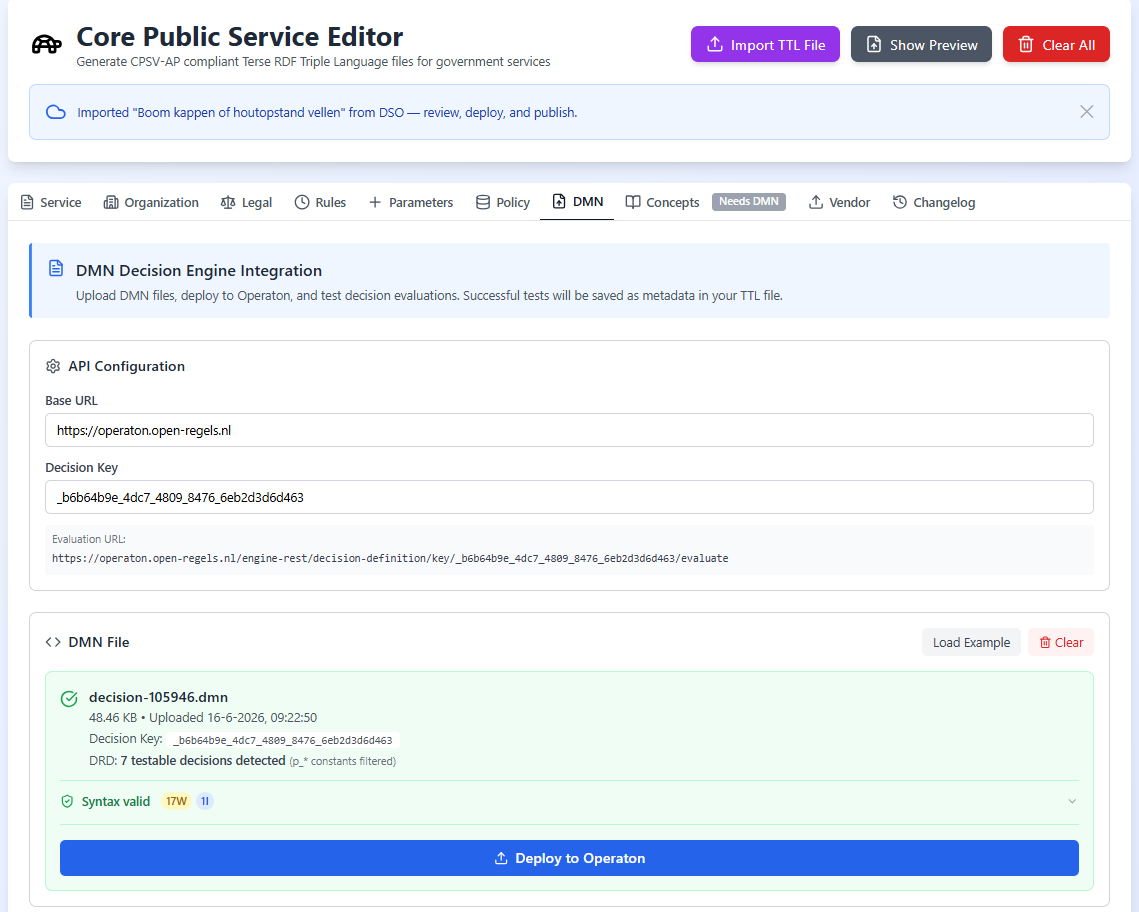
decision-{dmnId}.dmn, and the extracted primary decision key. The tab stays fully interactive — this is not the imported-preserved DMN mode, so you can deploy, test, and publish through the normal workflow. - Prefills the Service tab from the DSO activity — the title from
activityName, the identifier fromactivityUrn, and a Dutch provenance description carrying the activity URN and functional-structure reference. - Prefills the Organization tab from the resolved
authority. - Switches to the DMN tab and raises a banner inviting you to review, deploy, and publish.
- Cleans the URL. The import parameters are stripped via
history.replaceState, so refreshing the page cannot re-trigger the import.
A consumedRef guard ensures the import runs only once, even under React StrictMode's double-invoke in development.
After the import
The handoff only prefills the editor — nothing is published automatically. From here you continue exactly as with a manually uploaded DMN:
- Review and complete the Service, Organization, and Legal tabs.
- Deploy the DMN to Operaton and test it (see The DMN Tab).
- Publish to TriplyDB when ready (see TriplyDB Publishing).
If dmnId is missing, or the backend returns an error or an empty document, the editor reports the problem through the message banner and you can still upload the DMN manually.
Provenance
The Service description generated from a DSO handoff records where the model came from, in Dutch, for example:
Geïmporteerd uit DSO (DSO-activiteit
<activityUrn>, functionele structuur<fsRef>).
This keeps the link back to the originating DSO activity visible in the exported Turtle.