Frontend Development
The frontend is packages/frontend (@ronl/frontend) — a React 18 + TypeScript SPA built with Vite.
Project structure
The Public Affairs cockpit is not in this package
Since v2026.08.27 the PA cockpit lives in
@ronl/pa-cockpit, which the frontend imports and
configures through a host adapter (pages/pa-cockpit-host.tsx,
pages/PaCockpitRoute.tsx, components/PADashboardV2/). Everything else —
the landing page, the citizen portal and the Caseworker, Infra-board and Woo
boards — is in the tree below. Test files (*.test.ts[x]) sit beside the
code they test and are left out, except indexHtml.test.ts, which tests
no module.
packages/frontend/src/
├── App.tsx                        # React Router routes
├── main.tsx                       # React entry point, StrictMode
├── index.css                      # Global CSS (Tailwind base + custom properties)
├── vite-env.d.ts
├── pages/
│   ├── LoginChoice.tsx            # Landing page for / and /:tenantId: board grid or single-board page
│   ├── login-choice/              # boards.config.ts, landing-login.ts (useLandingLogin),
│   │                              #   single-board.copy.ts, login-portal.css
│   ├── AuthCallback.tsx           # Keycloak check-sso, then login() with a hint
│   ├── Dashboard.tsx              # Citizen portal (Diensten, Mijn aanvragen, Tijdlijn)
│   ├── citizen/                   # citizenServiceUi.ts (a card per citizen service),
│   │                              #   heusdenpasTestCases.ts
│   ├── CaseworkerDashboardV2.tsx  # Caseworker shell: auth, tenant, nav state, layout
│   ├── caseworker-v2/             # modes.config.ts, dashboard-v2.css, regelsimulatie.css
│   ├── InfraBoardDashboard.tsx    # Infra-board shell
│   ├── infra-board/               # RIP phase catalog and model, data, modes, dashboard-infra.css
│   ├── WooDashboard.tsx           # Woo dashboard shell
│   ├── woo/                       # modes.config.ts, woo.data.ts, dashboard-woo.css
│   ├── PaCockpitRoute.tsx         # Route into @ronl/pa-cockpit
│   ├── pa-cockpit-host.tsx        # Host adapter for @ronl/pa-cockpit
│   ├── ChangelogPanel.tsx         # Sliding changelog panel
│   ├── ChangelogPanelContent.tsx
│   └── changelog-data.ts          # Changelog content
├── components/
│   ├── process/                   # The process view, shared by the Infra-board and the Taken inbox
│   │   ├── PhaseStepper.tsx       # Phase stepper (RIP phases, or a process's phase set)
│   │   ├── PhaseSwimlane.tsx      # SVG BPMN swimlane
│   │   ├── ProcessWhere.tsx       # "Waar sta ik": compact phase stepper under the task header
│   │   ├── ProcessLaneSteps.tsx   # "Processtappen per rol"
│   │   ├── ProcessOverlay.tsx     # Modal: full stepper, breadcrumb, legend, swimlane
│   │   ├── useTaskProcessContext.ts  # Loads a task's call chain, histories and models
│   │   ├── processContext.ts      # buildProcessContext: pure assembly, engine-ordered history
│   │   ├── laneSteps.ts           # Derivations behind "Processtappen per rol"
│   │   ├── phaseSet.ts            # A model's phase set as stepper phases; phaseRef, captions
│   │   ├── swimlaneText.ts        # Condition expressions as readable flow labels
│   │   ├── process-view.css       # Stepper and swimlane styles, scoped under .pbd
│   │   └── caseworker-process.css # Caseworker additions (one-line rules; not prettier-formatted)
│   ├── CaseworkerDashboardV2/     # V2 shell parts: SectionRouter, TakenInbox, CommandPalette,
│   │   │                          #   PaletteActions, paletteActionsContext, AssistantDock,
│   │   │                          #   RegelSimulatie, GegevenswoordenboekV2, NoAccessPanel,
│   │   │                          #   SectionErrorBoundary
│   │   └── regelsimulatie/        # Simulation engine, chart and panels
│   ├── CaseworkerDashboard/       # Sections the V2 shell routes to (Nieuws, Berichten,
│   │                              #   RegelCatalogus, ProcesBibliotheek, HR onboarding,
│   │                              #   capacity claim, IOU, Audit, Gereedschap, McpChat,
│   │                              #   Profiel, Rollen, …) and TaskFormViewer.tsx
│   ├── InfraBoardDashboard/       # Infra-board sections: Portfolio, ProjectDetail, PhaseDetail,
│   │                              #   MijnDag, FaseladderOverview, router, dock
│   ├── signing/                   # ValidSign signing, shared by every task view: SigningPanel,
│   │                              #   useTaskSignature, resolveSigningUrl, signing-panel.css
│   ├── WooDashboard/              # Woo sections: Overzicht, Verzoeken, Proces, Publicatie,
│   │                              #   Register, Bezwaar, Tijdigheid, router, dock, charts
│   ├── PADashboardV2/             # PA dock and section router for the host
│   ├── LoginChoice/               # BoardCard, BoardPreview, SingleBoardLanding,
│   │                              #   AccessDeniedDialog (with their CSS)
│   ├── ProcessStartFormViewer.tsx # Citizen start form (@bpmn-io/form-js)
│   ├── StartFailureNotice.tsx     # The notice under a failed citizen start (#171)
│   ├── DecisionViewer.tsx         # Final decision of a completed citizen process
│   ├── AltchaWidget.tsx
│   ├── PersonalDataPanel.tsx
│   ├── SessionExpiryWarning.tsx
│   └── TimeLine.tsx
├── hooks/
│   └── useProfielData.ts          # Shared hook for Profiel and Rollen sections
├── services/
│   ├── api.ts                     # Business API client (Axios) — businessApi
│   ├── keycloak.ts                # Keycloak JS adapter, initializeKeycloak()
│   ├── identity-providers.ts      # FLEVOLAND_IDP, the Entra alias sent as idpHint
│   ├── tenant.ts                  # Tenant config loading, landing resolution, theme application
│   ├── landing.ts                 # landingUrl(): the logout redirect to the tenant's own page
│   ├── board-request.ts           # The board chosen on a landing page, carried through login
│   ├── infra.api.ts               # Infra-board live-data hooks over businessApi
│   └── brp.api.ts, brp.timeline.ts, bsn.mapping.ts
├── types/
│   └── brp.types.ts
├── utils/
│   ├── buildInfo.ts               # "build <sha> · #<run>", or "local build"
│   ├── formatDate.ts              # Shared date formatter
│   └── problem.ts                 # RFC 9457 problem details → the ApiResponse error shape
├── test/                          # Vitest setup and fixtures
└── indexHtml.test.ts              # index.html and the .env.<mode> files agree
packages/frontend/public/
├── tenants.json                   # Municipality configurations (loaded at runtime)
├── timeline-config.json
├── og-image-acc.png, og-image-prod.png  # Link-preview images, one per environment
├── og-image-<id>-{acc,prod}.png   # Per single-board tenant: amsterdam, heusden, toeslagen, unive
├── tenants/                       # Tenant logos: amsterdam/, heusden/, toeslagen/
├── pa/                            # PA cockpit assets
└── staticwebapp.config.json       # Azure SWA routing configuration
packages/frontend/scripts/
└── check-og.mjs                   # CI gate: every built page carries this environment's link preview
packages/frontend/
└── vite-plugin-tenant-pages.ts    # Build step: dist/<id>/index.html and an SWA rewrite per single-board tenant
Landing page architecture
The frontend uses a three-route flow: landing page → auth callback → dashboard. Every flow now starts the same way at the callback — a passive check-sso — and differs only in the keycloak.login() call it makes when that comes back unauthenticated.
1. Landing Page (/ and /:tenantId — LoginChoice.tsx)
Both routes render LoginChoice, which waits for tenants.json and asks resolveLandingTenant(pathname, search) in services/tenant.ts what the URL shows:
| URL | Shows |
|---|---|
/ |
The default tenant's ("default": "flevoland") board grid |
/<id> for an enabled tenant with exactly one board |
That tenant's single-board page (SingleBoardLanding), in its theme |
/<id> for anything else — unknown, disabled, several boards, or a reserved id (auth, dashboard, assets, tenants, api, t, pa) |
A redirect to /; a mixed-case id redirects to its lower-case path |
/?tenant=<id> (the URL before tenants had paths) |
A redirect to /<id> |
The single-board tenants today are Gemeente Amsterdam, Gemeente Heusden, Dienst Toeslagen and Univé Verzekeringen, each with boards: ["caseworker"]. Both layouts start their logins through the same hook, useLandingLogin() in pages/login-choice/landing-login.ts.
The board grid (/) offers these ways in:
| Control | Handler | Effect |
|---|---|---|
| Hero primary button, Inloggen met uw Flevoland-account | startIdpLogin(FLEVOLAND_IDP) |
Hints Provincie Flevoland's Entra ID, brokered by Keycloak |
Inwoner? Log in met DigiD (citizen-link) |
startIdpLogin('digid', 'test-citizen-flevoland') |
Hints DigiD, with a test-user login hint |
Top-bar Inloggen (login-link) |
startMedewerkerLogin(undefined, 'test-caseworker-flevoland') |
Keycloak's own form with the test user pre-filled; no board target |
| A board card's Openen | startMedewerkerLogin(route, testUser) |
As above with the board's test user, plus a stored redirect to that board |
A board card's Flevoland-account (Caseworker, PA-Cockpit, Infra-board — every board with an entraRole in boards.config.ts; not Woo) |
startEntraBoardLogin(route) |
Entra ID, plus a stored redirect to that board |
All four cards show before sign-in; the grid does not filter by role. FLEVOLAND_IDP is 'entra-flevoland', exported from services/identity-providers.ts so the landing page can name the provider without importing keycloak-js. The alias must match the provider scripts/keycloak-add-entra-idp.sh creates and the redirect URI registered in Flevoland's Entra app registration — renaming it means changing all three. Bekijk de borden beside the hero button is a secondary anchor to #boards; it starts no login.
The single-board page (/<id>) is tenant-first: the tenant's logo (or its name, when logo is absent), its colours, copy chosen by organisationType from pages/login-choice/single-board.copy.ts (a province falls back to the municipality copy), an illustrative Caseworker preview, and the ronl. mark only in the footer. Its controls are Inloggen als medewerker (startMedewerkerLogin(board.route, 'test-caseworker-<id>')), the top-bar Inloggen (the same hint, no board target) and Inwoner? Log in met DigiD (startIdpLogin('digid', 'test-citizen-<id>')). It has no Entra button: Entra ID exists only for Flevoland.
function startIdpLogin(idp: LandingIdp, usernameHint?: string) {
  try {
    // A board click stores a redirect and a test-user hint before the user
    // may come back and choose an identity provider instead. Neither belongs
    // to this login: the landing page follows the role Entra/DigiD grants.
    // A hint passed here is this login's own, e.g. a tenant's test citizen.
    chooseBoard(undefined);
    if (usernameHint) sessionStorage.setItem('username_hint', usernameHint);
    else sessionStorage.removeItem('username_hint');
    sessionStorage.setItem('selected_idp', idp);
  } catch {
    /* non-fatal */
  }
  navigate('/auth');
}
The selected value is stored in sessionStorage under the key selected_idp and read by AuthCallback.tsx. 'eherkenning' and 'eidas' remain in the LandingIdp union but no control emits them today: the realm export defines digid and eidas as disabled SAML providers and no eHerkenning provider at all.
A board chosen on a landing page is remembered twice: post_login_redirect says where to go, and login_board_request (services/board-request.ts) records that the person picked that board on this landing page. When the login grants the board's role, navigateAfterLogin() opens the board. When it does not, a redirect stored by a dashboard just falls back to the role's own dashboard, but a board picked on a landing page sends the person back to that page with an AccessDeniedState in router state, and AccessDeniedDialog explains the refusal: Geen toegang tot <bord>, the signed-in name, the missing role, for boards with an Entra role the app role to ask for (IOU_USERS, IOU_PA, IOU_INFRA), and the buttons Naar mijn dashboard (only when the account has a staff dashboard) and Uitloggen. Closing it drops the router state, so a refresh or Back does not bring it back.
Logging out of the Caseworker and citizen dashboards, or from the session-expiry warning, returns to the person's own landing page: they pass landingUrl(user.municipality) from services/landing.ts as Keycloak's redirectUri, so an Amsterdam caseworker lands on /amsterdam. A tenant without a page of its own, such as Flevoland, is sent on to /. The PA-Cockpit, Infra-board and Woo boards log out to /; Uitloggen in the no-access dialog returns to the landing page it was shown on.
2. Authentication Callback (/auth — AuthCallback.tsx)
The callback reads selected_idp and branches on whether the user is a caseworker. Both branches call initializeKeycloak() first — a shared, memoised check-sso that never redirects by itself — and only then call keycloak.login(...).
External-IdP path (entra-flevoland / digid):
const authenticated = await initializeKeycloak();
if (authenticated) {
  sessionStorage.removeItem('selected_idp');
  navigateAfterLogin(navigate);
} else {
  const loginHint = sessionStorage.getItem('username_hint') ?? undefined;
  sessionStorage.removeItem('username_hint');
  await keycloak.login(
    selectedIdp ? { idpHint: selectedIdp, ...(loginHint && { loginHint }) } : undefined
  );
}
The idpHint tells Keycloak to skip its native login form and redirect straight to the hinted provider. For entra-flevoland that is Provincie Flevoland's Entra ID; on a Flevoland-managed laptop Entra usually signs the employee in without a prompt. Where the hinted provider is not configured, Keycloak falls back to its native form without a context banner — with the DigiD links' test-citizen-<id> hint pre-filled, which is how a tenant page signs in its own test citizen.
keycloak.init({ onLoad: 'login-required', idpHint }) is not how this works any more
An earlier version of the citizen flow called .init() directly with
onLoad: 'login-required'. It broke the moment anything else in the app —
ProtectedRoute on a protected route visited while logged out, for
instance — had already called the shared, memoised init with different
options. .init() can only ever run once; .login() has no such
restriction, which is why it is the only safe way to trigger a real
redirect from more than one call site.
Caseworker path (medewerker):
const authenticated = await initializeKeycloak();
if (authenticated) {
  sessionStorage.removeItem('selected_idp');
  sessionStorage.removeItem('username_hint');
  navigateAfterLogin(navigate);
} else {
  const usernameHint = sessionStorage.getItem('username_hint') ?? undefined;
  sessionStorage.removeItem('username_hint');
  await keycloak.login({ loginHint: usernameHint ?? '__medewerker__' });
}
check-sso returns true if a Keycloak SSO session cookie already exists in the browser, allowing the caseworker to skip the login screen entirely on subsequent visits within the session window. If no session exists, keycloak.login() redirects to Keycloak with a login_hint: the stored test-user hint when the landing page set one, which Keycloak pre-fills in the username field, otherwise the __medewerker__ sentinel. The dashboards' own login buttons store no hint, so they send the sentinel; the login.ftl template detects it and renders the caseworker context banner (see Keycloak Deployment — Caseworker banner).
3. Caseworker dashboard (/dashboard/caseworker — V2 shell)
The caseworker portal, rendered by the V2 shell (pages/CaseworkerDashboardV2.tsx) inside ProtectedRoute requiredRole="caseworker": a visitor without a session goes to /, a signed-in user without the caseworker role to /dashboard/citizen. The shell owns auth state, tenant theme, navigation state, and layout only; SectionRouter dispatches every section. See Caseworker Dashboard (V2).
The shell groups the sections into four modes — werk | zoeken | simulatie | beheer (pages/caseworker-v2/modes.config.ts) — each with its own rail of sections, gated per item by authentication, realm roles and organisation type. The tenant's leftPanelSections in tenants.json add the tenant-scoped section ids. The tenant config is the signed-in user's (from the municipality claim); without one it falls back to the default tenant (flevoland). The ⌘K command palette reaches any section, and the assistant dock sits on the right.
4. Citizen dashboard (/dashboard/citizen — Dashboard.tsx)
The citizen portal, protected by ProtectedRoute requiredRole="citizen": a signed-in caseworker is sent to /dashboard/caseworker. It has three tabs — Diensten, Mijn aanvragen and Tijdlijn. Diensten shows a card for each service GET /v1/process/available returns, with its label, icon and form from CITIZEN_SERVICE_UI (pages/citizen/citizenServiceUi.ts); see Adding a citizen service. Mijn aanvragen lists the citizen's applications, one per case. Tijdlijn shows the BRP timeline.
Changelog Panel Component
A sliding panel that displays platform updates matching the format from CPSV Editor and Linked Data Explorer.
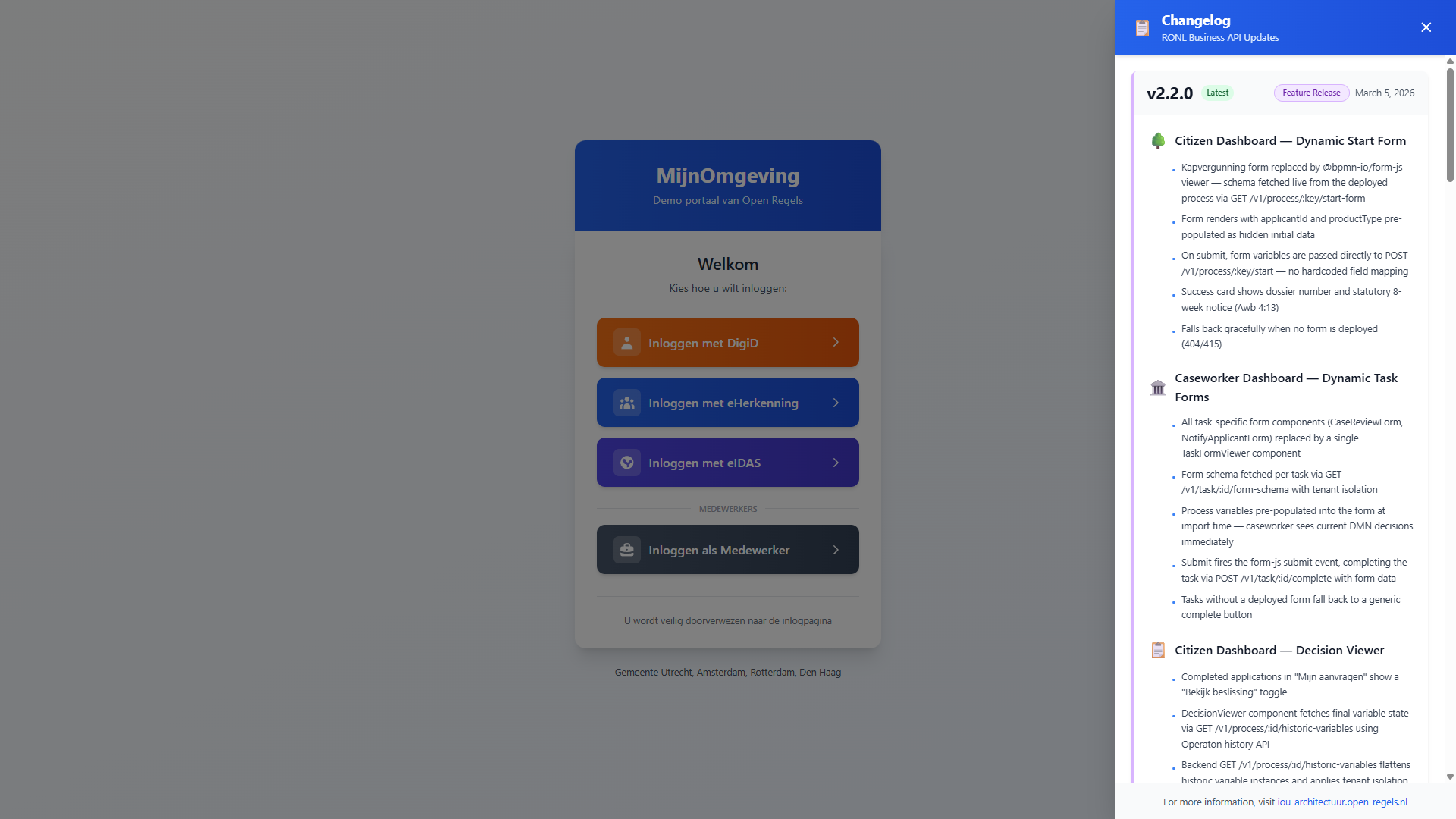
Features:
- Slides in from right (450px wide desktop, full-screen mobile)
- Blue gradient header matching MijnOmgeving theme
- Version-based organization with status badges
- Color-coded sections with icons
- Sticky footer with documentation link
- Closes via: click outside, ESC key, or X button
Usage in LoginChoice.tsx:
import { useState } from 'react';
import ChangelogPanel from './ChangelogPanel';

export default function LoginChoice() {
  const [changelogOpen, setChangelogOpen] = useState(false);

  return (
    <div>
      {/* Toggle Button */}
      <button onClick={() => setChangelogOpen(true)}>
        📋 Updates
      </button>

      {/* Changelog Panel */}
      <ChangelogPanel
        isOpen={changelogOpen}
        onClose={() => setChangelogOpen(false)}
      />
    </div>
  );
}
Updating changelog content:
Edit changelog-data.ts:
export const changelog: Changelog = {
  versions: [
    {
      version: "2.0.0",
      status: "Major Release",
      statusColor: "blue",
      borderColor: "blue",
      date: "February 21, 2026",
      sections: [
        {
          title: "Frontend Redesign",
          icon: "🎨",
          iconColor: "blue",
          items: [
            "New landing page with identity provider selection",
            "Custom Keycloak theme matching MijnOmgeving design",
          ],
        },
      ],
    },
  ],
};
Authentication with Keycloak JS
services/keycloak.ts exports the Keycloak instance. Initialisation is done manually in AuthCallback.tsx (not on import) so the IDP selection and caseworker sentinel can be applied before the first Keycloak call.
// services/keycloak.ts
const keycloak = new Keycloak({
  url: KEYCLOAK_URL, // resolved from hostname
  realm: "ronl",
  clientId: "ronl-business-api",
});

export default keycloak;
AuthCallback.tsx is the only place keycloak.init() is called, through the shared initializeKeycloak(). There is now one init strategy, and the branch is in the login() call that follows it:
| Flow | Init | Redirect, when check-sso returns false |
|---|---|---|
| External IdP | 'check-sso' |
keycloak.login({ idpHint }) — entra-flevoland or digid |
| Medewerker | 'check-sso' |
keycloak.login({ loginHint }) — the stored username hint, else the __medewerker__ sentinel |
After any successful authentication, sessionStorage.removeItem('selected_idp') is called before navigateAfterLogin() chooses where to go: a stored post_login_redirect the caller's roles allow, otherwise the default board — Woo, then Infra-board, then PA-Cockpit, then Caseworker, falling through to /dashboard/citizen.
Token refresh is done by the frontend, not by the adapter on a timer, and only while the SSO session remains active. Two places call keycloak.updateToken(): the API client before every request (see API client), and SessionExpiryWarning on real interaction — typing, clicking, scrolling or moving the mouse, at most once per 30 seconds — once fewer than 180 seconds remain, so filling in a long form without any API call does not let the token run out. Below 120 seconds the warning modal appears; Sessie verlengen forces a refresh and falls back to keycloak.login() when the session is gone.
Multi-tenant theming
On successful login, each dashboard reads the municipality claim from the decoded JWT and applies the corresponding theme:
Before login, the landing page applies the theme of the tenant its URL resolves to — the default tenant on /, the single-board tenant on /<id> — by calling applyTenantTheme(resolution.tenant.theme) directly.
initializeTenantTheme loads public/tenants.json, finds the matching entry, and calls applyTenantTheme, which sets CSS custom properties on document.documentElement:
root.style.setProperty("--color-primary", theme.primary);
root.style.setProperty("--color-primary-dark", theme.primaryDark);
// ...
// Removed when absent, so a tenant without one does not keep the previous
// tenant's background.
if (theme.background) root.style.setProperty("--color-background", theme.background);
else root.style.removeProperty("--color-background");
All Tailwind utility classes and component styles reference these custom properties, so the entire UI re-themes without a page reload.
API client
services/api.ts wraps Axios in two interceptors. The request interceptor refreshes the token when fewer than 120 seconds remain and adds it as the bearer token:
const api = axios.create({
  baseURL: API_BASE_URL, // import.meta.env.VITE_API_URL
});

api.interceptors.request.use(async (config) => {
  if (keycloak.authenticated) {
    try {
      await keycloak.updateToken(120);
    } catch {
      keycloak.login();
      return Promise.reject(new Error('Session expired'));
    }
  }
  if (keycloak.token) {
    config.headers.Authorization = `Bearer ${keycloak.token}`;
  }
  return config;
});
When the refresh fails — the SSO session is gone — the request is not sent and the browser goes to keycloak.login(). A 401 is not retried: there is no response-side refresh, so a request that comes back 401 fails like any other error.
The response interceptor normalises error bodies. The backend answers every 4xx and 5xx with RFC 9457 problem details (application/problem+json); toApiResponse in utils/problem.ts rewrites such a body, once, into the ApiResponse error shape the components read:
api.interceptors.response.use(undefined, (error: unknown) => {
  if (axios.isAxiosError(error) && error.response) {
    error.response.data = toApiResponse(error.response.data);
  }
  return Promise.reject(error);
});
| Problem member | Becomes |
|---|---|
code |
error.code (ERROR when absent) |
detail |
error.message |
details (extension) |
error.details |
engine (extension, the Operaton base URL on a failed process start) |
error.instance |
The problem's own members are kept beside success: false and error, so an extension survives — the health call reads the report from data on a 503. A body that is not a problem passes through unchanged, and success responses keep { success: true, data }. Call sites that use fetch rather than Axios — the MCP chat stream among them — read the message with problemMessage(body, fallback): the problem's detail, else a legacy envelope's error.message, else the fallback.
Environment variables
The frontend reads its settings from committed per-mode files in
packages/frontend/. Vite picks the file from the mode, so there is no .env
to create for local development:
| Variable | .env.development (vite, local) |
.env.acceptance (build:acc) |
.env.production (build, build:prod) |
|---|---|---|---|
VITE_KEYCLOAK_URL |
http://localhost:8080 |
https://acc.keycloak.open-regels.nl |
https://keycloak.open-regels.nl |
VITE_API_URL |
http://localhost:3002/v1 |
https://acc.api.open-regels.nl/v1 |
https://api.open-regels.nl/v1 |
VITE_LDE_API_URL (Procesbibliotheek) |
http://localhost:3001/v1 |
https://acc.backend.linkeddata.open-regels.nl/v1 |
https://backend.linkeddata.open-regels.nl/v1 |
VITE_PA_SIGNALS_MOCK, VITE_PA_DOSSIERS_MOCK, VITE_PA_AGENDA_MOCK |
false |
false |
false |
VITE_SITE_URL |
http://localhost:5173 |
https://acc.mijn.open-regels.nl |
https://mijn.open-regels.nl |
VITE_OG_IMAGE |
og-image-acc.png |
og-image-acc.png |
og-image-prod.png |
VITE_OG_TITLE_PREFIX |
"[DEV] " |
"[ACC] " |
"" |
VITE_ROBOTS |
noindex, nofollow |
noindex, nofollow |
index, follow |
The last four fill the link-preview tags in index.html at build time —
%VITE_…% placeholders in the canonical link, the robots meta tag and the
Open Graph and Twitter tags, since crawlers do not run JavaScript. The prefix
is quoted so its trailing space survives. src/indexHtml.test.ts checks the
template against each mode's file, and every deploy build checks the built
dist/index.html with scripts/check-og.mjs — see CI/CD → Static-site deploy
shape.
To override a value on your own machine, use .env.development.local, which is
gitignored. See Local Development Setup.
Environment detection:
The application automatically detects the environment based on hostname:
const hostname = window.location.hostname;

let env: "local" | "acc" | "prod" = "local";
if (hostname.includes("acc.mijn.open-regels.nl")) {
  env = "acc";
} else if (hostname === "mijn.open-regels.nl") {
  env = "prod";
}
This is used in the Architecture footer to show environment-specific URLs.
Development commands
Install once from the repository root with npm ci; see
Local Development Setup. The
commands below are @ronl/frontend workspace scripts, run from the root:
# Dev server only (http://localhost:5173), without the dependency and Docker checks
npm run dev:frontend

# Build: production mode, or acceptance mode
npm run build --workspace=@ronl/frontend
npm run build:acc --workspace=@ronl/frontend

# Preview the last build
npm run preview --workspace=@ronl/frontend

# Type check, lint
npm run type-check --workspace=@ronl/frontend
npm run lint --workspace=@ronl/frontend

# Unit tests (Vitest), E2E (Playwright)
npm run test --workspace=@ronl/frontend
npm run test:e2e --workspace=@ronl/frontend
npm run dev at the root starts the frontend together with the backend, the
public site and PA-demo. Formatting is a root script only, covering the whole
repository: npm run format writes, npm run check-format checks. For the test
suites, see Testing.
Calling the Business API from a component
Example: Evaluating a DMN decision
import { businessApi } from "../services/api";
import type { OperatonVariable } from "@ronl/shared";

const handleEvaluate = async () => {
  try {
    const variables: Record<string, OperatonVariable> = {
      inkomen: {
        value: 24000,
        type: "Double",
      },
      leeftijd_requirement: {
        value: true,
        type: "Boolean",
      },
    };

    const response = await businessApi.evaluateDecision(
      "berekenrechtenhoogtezorg",
      variables,
    );

    if (response.success) {
      console.log("Result:", response.data.result);
    }
  } catch (error) {
    console.error("Evaluation failed:", error);
  }
};
Camunda Forms — @bpmn-io/form-js
Form rendering in both dashboards is handled by @bpmn-io/form-js v1.20.x (MIT-compatible). Forms are JSON schemas authored in the LDE Form Editor, deployed alongside BPMN in Operaton, and fetched at runtime by the backend form schema endpoints.
The package is already in packages/frontend/package.json. Import in any component that renders a form:
The CSS import is required — without it the form renders completely unstyled.
Callback stability pattern
All three form components store callbacks (onCompleted, onStarted, onError) in refs rather than including them in the useEffect dependency array. Without this, inline arrow functions passed from a parent cause the effect to re-fire on every render, instantiating a new Form object and looping indefinitely.
const onStartedRef = useRef(onStarted);
const onErrorRef = useRef(onError);

useEffect(() => { onStartedRef.current = onStarted; }, [onStarted]);
useEffect(() => { onErrorRef.current = onError; }, [onError]);

// Main init effect — callbacks intentionally NOT in the dependency array:
useEffect(() => { /* importSchema, attach listeners */ }, [processKey]);
Container div must always be in the DOM
The <div ref={containerRef} /> must be present in the DOM before form.importSchema is called. Conditional rendering (status === 'loading' && <div ref={...} />) means containerRef.current is null when the effect fires. Always render the container div and toggle visibility via a CSS class:
ProcessStartFormViewer
packages/frontend/src/components/ProcessStartFormViewer.tsx
Renders the start form for a BPMN process in the citizen dashboard.
| Prop | Type | Description |
|---|---|---|
processKey |
string |
BPMN process definition key |
initialData |
Record<string, unknown> |
Hidden pre-populated variables (e.g. applicantId, productType) |
onStarted |
(dossier: string) => void |
Called with businessKey on successful process start |
onError |
(failure: StartFailure) => void |
Called when the start fails, with { cause?, instance? } |
On mount: calls businessApi.process.startForm(processKey) to fetch the schema. On submit: calls businessApi.process.start(processKey, formData). Extracts businessKey from the response (falls back to processInstanceId).
When the start fails, StartFailure carries what came back: cause is the backend's own explanation (error.details, else error.message — Operaton's message when the engine refused) or a thrown error's message, and instance is the engine base URL the backend targeted. Both come from the problem body through the response interceptor: error.details is the problem's details extension and error.instance its engine extension — not the problem's own instance, which is the request path. Either may be absent. The viewer logs Process start failed with the process key and both fields to the browser console on every tier, production included, and then calls onError; whether the detail reaches the screen is the caller's decision.
The citizen dashboard (Dashboard.tsx) renders it with StartFailureNotice under each of its three start forms. The headline is the same on every tier — De aanvraag kon niet worden ingediend. Probeer het opnieuw. — and below it the notice shows Oorzaak and Operaton unless the Vite build mode is production (#171). build:prod builds with --mode production, build:acc — acceptance and its pull-request previews — with --mode acceptance, and the dev server runs as development, so only the production build hides the cause.
TaskFormViewer
packages/frontend/src/components/CaseworkerDashboard/TaskFormViewer.tsx
Renders the form for a claimed task in the caseworker dashboard.
| Prop | Type | Description |
|---|---|---|
taskId |
string |
Operaton task ID |
variables |
Record<string, unknown> \| null |
Process variables for pre-population |
onCompleted |
() => void |
Called after successful task completion |
onError |
() => void |
Called on API or form error |
On mount: calls businessApi.task.formSchema(taskId) to fetch the task's form and imports it with variables as its data. On submit: calls businessApi.task.complete(taskId, data), then onCompleted or onError. When the task has no form — an unsuccessful answer, or a 404 or 415 from the API — it sets status = 'no-form' and renders a plain Taak voltooien button that completes the task with no variables. On unmount, calls form.destroy() to release the @bpmn-io/form-js instance.
A task view asks useTaskSignature(taskId) (components/signing/) first, and renders TaskFormViewer only when the task needs no signature. While the answer is out it shows Ondertekening controleren… rather than either, because the form would let a signature task be approved without signing; a task whose BPMN carries ronl:signatureRef gets SigningPanel instead, and a failed lookup falls back to the form. The Taken inbox and the Infra-board's ProjectDetail both work this way — see ValidSign signing.
DecisionViewer
packages/frontend/src/components/DecisionViewer.tsx
Displays the final decision for a completed process instance in the citizen dashboard (Mijn aanvragen). Readonly — no submit handler.
| Prop | Type | Description |
|---|---|---|
processInstanceId |
string |
Operaton process instance ID |
On mount, fires two requests in parallel via Promise.allSettled:
businessApi.process.historicVariables(processInstanceId)— resolves to the flattened final variable state.businessApi.process.decisionDocument(processInstanceId)— resolves to{ success: true, template: DocumentTemplate }if a document template is bundled in the Operaton deployment; rejects or returnssuccess: falsefor pre-v2.3.0 deployments.
Which document is the decision. GET /v1/process/:id/decision-document, and its machine twin GET /v1/m2m/process/:id/decision-document, return the template of the path the case took: the most recently completed, non-cancelled user task that carries ronl:documentRef — or, when it has none, ronl:signatureRef — taking the first entry when the value is a comma-separated list. Only when no completed task carries either do they fall back to the first ronl:documentRef in the BPMN, which is what a single-document process always got. The besluitvorming example needs the rule: on the ordinary path the decision is the besluit signed at Task_Onderteken (ronl:signatureRef="besluit-gb-besluit"), after escalation it is the competent authority's own document from Task_NeemBesluit (ronl:documentRef="besluit-gb-besluit-bestuur") — sgort/linked-data-explorer#246. One limitation is known: the fallback takes the first ronl:documentRef attribute as written and does not split a list, so where the first reference in the BPMN is a list, an instance that has not yet completed a task carrying a reference resolves the whole list as one template id and gets no document (sgort/ronl-business-api#371).
Document template rendering (status === 'ready'): renderTipTapNode recursively walks the ProseMirror JSON tree, substituting {{variableKey}} text placeholders with the resolved historic variables and applying bold, italic, and underline marks. renderBlock dispatches on block.type: text → renderTipTapNode; variable → direct variable lookup; separator → <hr>; spacer → empty div; image → <img>. Zones are rendered in order — letterhead and contactInformation side-by-side in a CSS grid, then reference, body, closing, signOff, annex stacked vertically.
Form-js fallback (status === 'fallback'): When the decision-document fetch returns 404 or fails, a hardcoded FALLBACK_SCHEMA (five fields: status, permitDecision, finalMessage, replacementInfo, dossierReference) is mounted into a <div ref={containerRef}> via form.importSchema. The container div is always present in the DOM (toggled via CSS class) so that containerRef.current is non-null when the fallback useEffect fires.
Caseworker-only fields are excluded from both rendering paths.
See Dynamic Forms — Document templates for the feature description.
The process view
components/process/ holds the process view: the phase stepper and BPMN
swimlane the Infra-board has always drawn, and the caseworker's view of where a
task stands in its process, which the Taken inbox (CaseworkerDashboardV2/TakenInbox.tsx)
renders for the selected task. What a caseworker sees is described in the
Caseworker guide; this section is how it is put
together.
Which parts render
| Part | Component | Renders when |
|---|---|---|
| Waar sta ik — compact phase stepper under the task header | ProcessWhere |
The task's process has lanes and the task has a phase |
| Processtappen per rol — history and what comes next, grouped by lane | ProcessLaneSteps |
The task's process has lanes |
The overlay — full stepper, Hoofdproces › Deelproces breadcrumb, legend, swimlane |
ProcessOverlay |
Opened from either part above, or from ⌘K |
Without lanes, or when the context failed to load, the inbox shows the
flat list of activity-history steps it has always shown. The phase comes from
the swimlane model: its phaseSet is either the built-in Awb table, selected by
ronl:awbPhase markers, or the phases the process declares itself in
ronl:phases, selected by ronl:phase markers, and each node carries the
phase code it belongs to. A task in a subprocess without markers takes the
phase — and the phase set — of the call activity that started it, walking up
the chain. With no phase at all, ProcessWhere renders nothing. Its eyebrow
reads Waar sta ik · <label> <ref> · stap <n> van <total>: phaseRef gives the
legal phase number for Awb (Awb-fase 4+5) and the position for a declared set
(Fase 2), and the caption under the stepper is the phase's codeLabel and
name (Fase 2 · Advies en toetsing). See BPMN design
criteria for what a model needs.
Loading a task's context
useTaskProcessContext(task) loads everything the view draws for one task and
reloads when the selection changes; a result for a task that is no longer
selected is discarded, so a slow earlier load cannot overwrite the current one.
loadProcessContext fetches, in order:
- the task's own lineage (
businessApi.process.lineage,GET /v1/process/:id/lineage), then each calling instance upwards throughsuperProcessInstanceId, at most five levels; - the activity history of every instance in that chain, and of each child a
call activity started (
calledProcessInstanceId) that is not in the chain; - the swimlane model (
businessApi.process.swimlane,GET /v1/process/definition/key/:key/swimlane) of every process involved, plus any subprocess a call node names that the case has not reached yet, so the overlay can open it.
Only the task's own lineage and history are required — either failing rejects the load. Everything above or beside it (a caller refused by the tenant check, a finished child, a model) is optional, so a partial chain still renders.
buildProcessContext in processContext.ts is the pure assembly step. It
merges the histories into one list in engine order, which time alone cannot
give: Operaton runs a call activity, its child's start event and the child's
first automated steps in one transaction, often in the same millisecond. So each
instance's own entries are ordered by time and a child's entries are spliced in
directly after the call activity that started it. From that list it derives a
node status per process, the call chain, the task's phase with the phase set it
belongs to, and hasLanes.
laneSteps.ts, phaseSet.ts and swimlaneText.ts hold the remaining
derivations as pure functions, so the rules are unit-tested and the components
only render.
Styling
process-view.css carries the stepper and swimlane styles moved verbatim from
the Infra-board, still scoped under .pbd, so the Infra-board renders exactly
as before. A caseworker container opts in by carrying the pbd class — only
the two wrappers do, ProcessWhere's .cwp-where and ProcessOverlay's
.cwp-ov-panel, not the inbox around them. PhaseSwimlane adds .cwp-swim to
its root when it is given any caseworker prop (myLaneKeys, claimedLabel,
onOpenCall, scrollToNodeId), and that class scopes the caseworker restyling
of elements the Infra-board also draws, such as the claimed-node tab and the
label clamp. Aligning the two boards' styling is open as #277.
caseworker-process.css is written as one-line rules, as its header says; the
root format and check-format scripts cover only ts, tsx, json and
md, so they leave it alone — do not run Prettier on it by hand.
The ⌘K action
A section can offer a command to the ⌘K palette while it has something to act
on. PaletteActionsProvider wraps the caseworker shell, usePaletteAction
registers an action from anywhere below it, and CommandPalette lists the
registered actions beside the static sections from modes.config. The Taken
inbox registers Proces van deze taak bekijken, which opens the overlay,
while the selected task's process has lanes.
Adding a new page
- Create the component:
// packages/frontend/src/pages/NewPage.tsx
export default function NewPage() {
  return (
    <div className="min-h-screen bg-gray-50">
      <h1>New Page</h1>
    </div>
  );
}
- Add route in App.tsx:
import NewPage from './pages/NewPage';

// In Routes
<Route path="/new-page" element={<NewPage />} />
A static path outranks <Route path="/:tenantId" …>, which catches every other top-level path for the tenant landing pages (App.tsx keeps it after the fixed routes for readability). Add the new path's first segment to RESERVED_TENANT_IDS in services/tenant.ts so no tenant id can claim it.
- Add navigation link:
Adding a citizen service
There are no per-tenant feature flags: tenants.json lists no services, and a guard test (pages/citizen/citizenServices.test.ts) fails if a tenant carries a features key. Which services a citizen sees on Diensten follows from the CITIZEN_SERVICES registry in @ronl/shared and from what is deployed in Operaton. Adding one takes three steps:
-
Register it in
packages/shared/src/citizen-services.ts— its id, the process it starts, and its scope:own-tenantoffers the service only to citizens whose own tenant has deployed the process;cross-tenantoffers it to every citizen when exactly one tenant deploys it, and that tenant handles the case (Zorgtoeslag at Dienst Toeslagen). -
Give it a face in
packages/frontend/src/pages/citizen/citizenServiceUi.ts— label, description and icon — and render its form inDashboard.tsxunderactiveService === '<id>'. Add the process key toPROCESS_DEFINITION_LABELSthere so Mijn aanvragen names the application. A unit test checks thatCITIZEN_SERVICE_UIandCITIZEN_SERVICESname the same ids, so neither can ship without the other. -
Deploy the process under the tenant (or, for a cross-tenant service, under the one tenant that handles it).
GET /v1/process/availablereads the latest deployment per tenant; an untenanted deployment never counts, so a service deployed without a tenant does not appear.
The dashboard skips an id the backend returns that the bundle has no card for, since backend and frontend release separately.
Styling guidelines
Use Tailwind utility classes:
<div className="bg-white rounded-lg shadow-md p-6">
  <h2 className="text-xl font-bold text-gray-900 mb-4">Title</h2>
</div>
Use CSS custom properties for themeable colors:
<button
  style={{ backgroundColor: 'var(--color-primary)' }}
  className="px-6 py-3 text-white rounded-lg"
>
  Themed Button
</button>
Responsive design:
Testing
Component Testing
Manual Testing Checklist
Landing page:
- The hero's primary button reads "Inloggen met uw Flevoland-account"
- "Bekijk de borden" renders as the secondary action and only scrolls to
#boards - The DigiD link and the top-bar "Inloggen" both render
- All four board cards render before sign-in; Caseworker, PA-Cockpit and Infra-board carry a Flevoland-account button beside Openen, Woo does not
-
/amsterdam,/heusden,/toeslagenand/univeshow the single-board page in the tenant's colours;/?tenant=amsterdamredirects to/amsterdam; an unknown/<id>redirects to/ - A board opened with an account that lacks its role returns to the landing page with the Geen toegang tot … dialog
- Changelog panel opens and closes correctly
- Mobile responsive (< 640px)
External-IdP flow:
- The Flevoland button stores
selected_idp = entra-flevolandin sessionStorage - Choosing a provider clears any
post_login_redirectandusername_hinta board card left behind - DigiD button stores
selected_idp = digidin sessionStorage -
AuthCallbackredirects to Keycloak with the matchingidpHint - Login succeeds and JWT contains
roles: ["citizen"] - Dashboard loads with correct municipality theme
- Diensten shows the cards for the citizen's organisation (Zorgtoeslag for everyone; Heusdenpas for
test-citizen-heusden)
Caseworker flow:
- A board card's Openen stores
selected_idp = medewerker,post_login_redirectand the board's test user asusername_hint -
AuthCallbackcallscheck-sso, notlogin-required - From a landing page, Keycloak's username field is pre-filled with the test user
- From a dashboard's own login button (no hint), Keycloak shows the indigo "Inloggen als gemeentemedewerker" banner and an empty username field (sentinel
__medewerker__suppressed) - Login succeeds and JWT contains
roles: ["caseworker"] - SSO session reuse: second visit within session window goes straight to dashboard
Common:
- Token refresh works (keep page open > 15 min)
- "← Terug naar inlogkeuze" returns to
/in a single click - Logout clears the SSO session and returns to the user's own landing page (
/amsterdamfor an Amsterdam caseworker,/for Flevoland)
Browser Compatibility
Test in:
- Chrome 90+
- Firefox 88+
- Safari 14+
- Edge 90+
- Mobile Safari (iOS 14+)
- Chrome Mobile (Android)
Common Tasks
Update municipality themes
Edit public/tenants.json:
{
  "tenants": {
    "newmunicipality": {
      "id": "newmunicipality",
      "name": "newmunicipality",
      "displayName": "Gemeente NewCity",
      "organisationType": "municipality",
      "theme": {
        "primary": "#1e3a8a",
        "primaryDark": "#1e40af"
      }
    }
  }
}
The full shape, including the optional background, boards, logo and share, is in Municipality Themes.
Add a new IDP button
The alias has to exist as an identity provider in the ronl realm first — AuthCallback passes it through as idpHint and Keycloak falls back to its own form for an alias it does not know. Then edit LoginChoice.tsx:
<button type="button" className="citizen-link" onClick={() => startIdpLogin('new-idp')}>
  Inloggen met New IDP
</button>
Widen the LandingIdp type in pages/login-choice/landing-login.ts to accept the alias. If it is a provider the platform owns rather than a one-off, give it a named export in services/identity-providers.ts the way FLEVOLAND_IDP has one, so the alias is written down in exactly one place.
Debug Keycloak issues
Enable debug logging in services/keycloak.ts:
keycloak.onAuthSuccess = () => console.log("Auth success!");
keycloak.onAuthError = (error) => console.error("Auth error:", error);
keycloak.onAuthRefreshSuccess = () => console.log("Token refreshed");
keycloak.onAuthRefreshError = () => console.error("Token refresh failed");
keycloak.onTokenExpired = () => console.log("Token expired");
Related Documentation
- Local Development Setup — Prerequisites and getting started
- Frontend Deployment — Azure Static Web Apps deployment
- Keycloak Deployment — Custom theme setup
- Multi-Tenant Portal Features — Theming and tenant isolation
Questions? See Troubleshooting or check the Gitlab repository.