SHACL Validator
The SHACL Validator lets you validate one or more CPSV-AP Turtle files against the canonical CPSV-AP 3.2.0 shapes, the CPRMV 0.4.1 shapes, and the RONL Custom shapes before publishing them to TriplyDB. It is accessible from the badge-check icon in the sidebar.
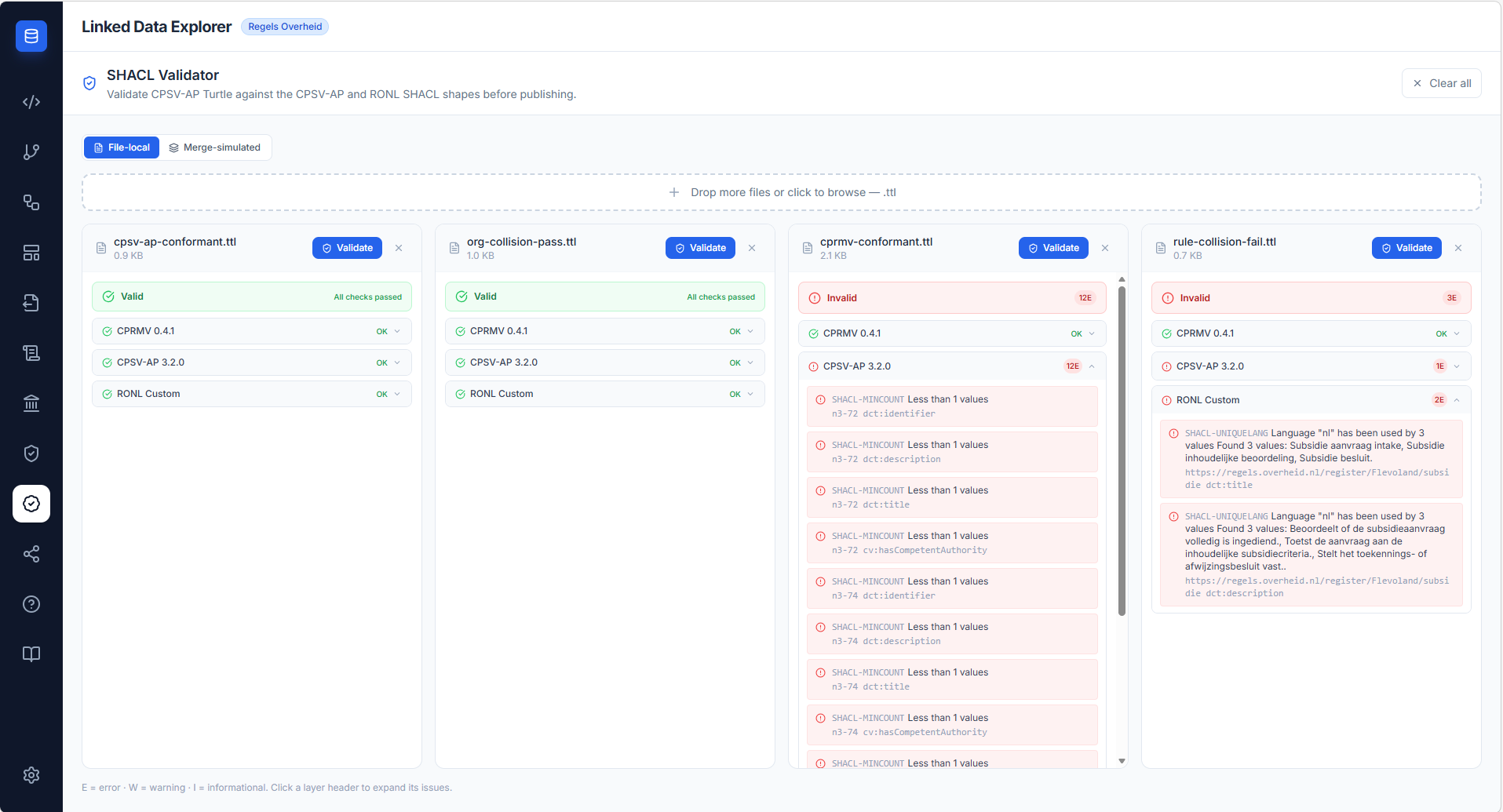
Two validation modes
A toggle at the top of the panel selects how each file is validated:
- File-local — the uploaded Turtle is validated on its own, exactly as written. This catches problems contained within the file (for example, three
cpsv:Ruleblocks accidentally published under one subject URI). - Merge-simulated — before validation, the already-published triples for the file's subjects are fetched from a SPARQL endpoint and unioned with the uploaded file. This catches collisions that only emerge once your file is added to the store — for example, an organisation whose
foaf:homepagediffers between an existing publication and the file you are about to publish.
Merge-simulated mode shows an optional endpoint field; when left blank, the configured default TriplyDB endpoint is used.
Multi-file validation
You can drop any number of .ttl files onto the validator at once, or add files incrementally — the drop zone remains visible at the top of the panel whenever files are loaded. Files are validated independently and displayed side-by-side for easy comparison.
Each file card shows:
- File name and size
- A Validate button to trigger validation for that file individually
- The validation result with a summary badge and collapsible layer sections
- A remove (×) button to dismiss the file
A Clear all button in the header removes every file and resets the panel. Navigation state is preserved: switching to another view and returning does not clear the loaded files or their results.
Validation layers
Results are grouped into three layers (v1.9.5 added the CPRMV layer). Each layer can be expanded to see individual issues. Issues carry a severity, a typed code, and a human-readable message; cardinality and uniqueness issues also list the offending values.
| Layer | Source | Covers |
|---|---|---|
| CPSV-AP 3.2.0 | Canonical SEMIC shapes, vendored | The full CPSV-AP model — PublicService, Rule, PublicOrganisation, ContactPoint, Channel, Address, and related classes (32 shapes). Enforces required properties, datatypes, and class constraints. |
| CPRMV 0.4.1 | CPRMV SHACL shapes (shapes/cprmv/0.4.1/cprmv.shacl.ttl) |
The CPRMV rule-management model — RuleSet, Rule, RuleMethod and their required properties. Added in v1.9.5; v1.9.8 added ParameterWaardeShape (mandatory skos:notation/skos:prefLabel) and TemporalRuleShape. See the SHACL Validation Reference. |
| RONL Custom | RONL-authored shapes | RONL publishing invariants on top of CPSV-AP — at most one foaf:homepage / dct:identifier / cv:spatial per organisation, and at most one dct:title / dct:description per language on a rule. |
A file is valid only when every shape layer loaded and no layer produces an error. Warnings and informational messages are advisory. Each file gets one of three verdicts:
| Verdict | Meaning |
|---|---|
| Valid (green) | Every layer ran, and none reported an error |
| Not validated (amber) | No errors, but at least one layer did not load — shown as N of M shape layers not loaded. Nothing was checked against that layer, so the file is not called valid |
| Invalid (red) | At least one error, or the Turtle did not parse |
A layer is shown as Not loaded (rather than OK) when no shape files are present for it — so an unvendored layer never displays a misleading green check, and since v2026.09.5 it cannot make the whole file look valid either. Before that, a file checked against no layers at all was reported Valid · All checks passed: production did exactly that, because its deployment had never shipped the shape files, while acceptance found the same file invalid with 25 errors. For the complete specification of the shapes and codes, see the SHACL Validation Reference.
Full issue text (v1.9.7)
Long issue messages and focus-node locations are no longer truncated with an ellipsis — they wrap in full and the complete text is also available on hover (title tooltip). The backend's earlier 60-character cap on the offending values reported for cardinality (maxCount / uniqueLang) violations has been removed, so the full value appears in the message.
Severity levels
The SHACL result severity (sh:Violation, sh:Warning, sh:Info) maps directly to:
| Icon | Level | Meaning |
|---|---|---|
| 🔴 | Error | A sh:Violation — the data does not conform and should not be published as-is. Must be resolved. |
| 🟡 | Warning | A sh:Warning — the data conforms but deviates from a recommended practice. Should be reviewed. |
| 🔵 | Info | A sh:Info — a quality suggestion. No conformance impact. |
Validation example
The screenshot below shows rule-collision-fail.ttl — three cpsv:Rule blocks deliberately published under a single subject URI — expanded in the validator. The CPSV-AP layer reports one error (the rule is missing the required dct:identifier); the RONL Custom layer reports two (sh:uniqueLang on dct:title and dct:description, since the single subject now carries three Dutch labels).
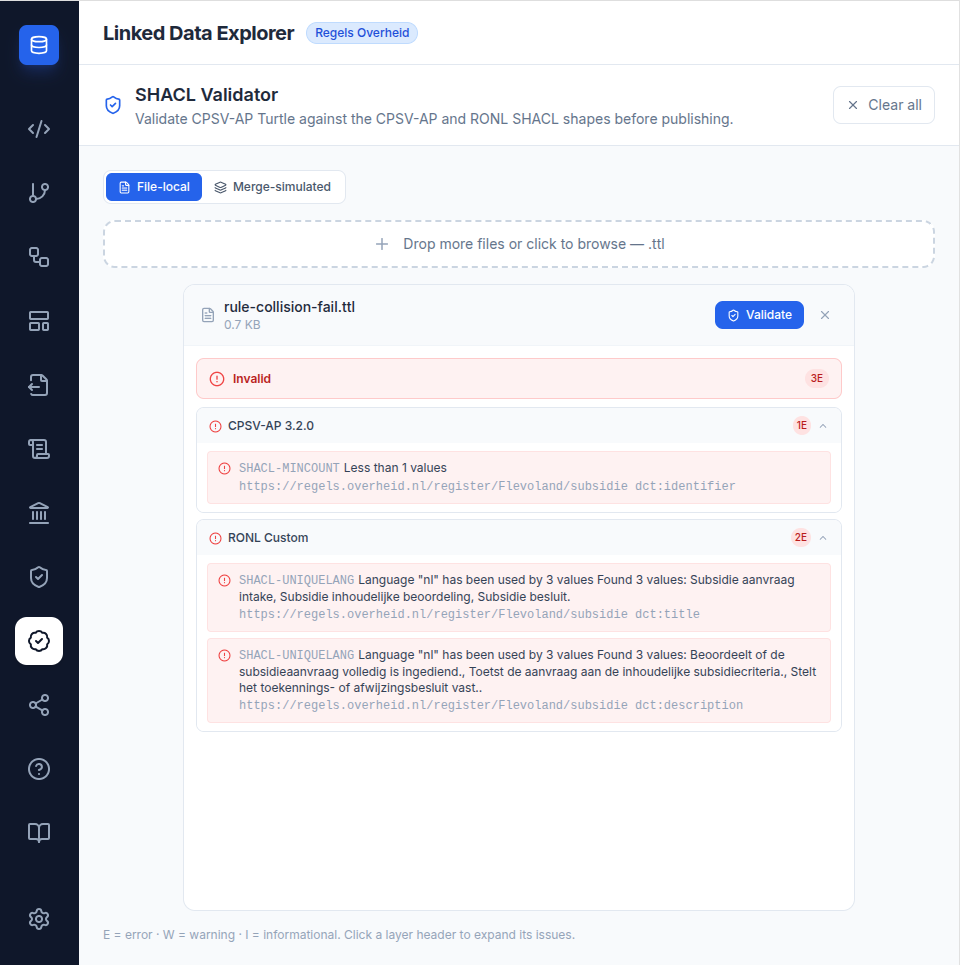
Note how the two layers are independent: a file can pass the RONL Custom layer while still failing CPSV-AP conformance (for example, a minimal rule that is unique but lacks dct:identifier), and vice versa.
Merge-simulated validation
Merge-simulated mode is the most effective way to catch problems that only appear at publication time. Because TriplyDB merges your file into the existing graph, a property that is single-valued in your file can become multi-valued once unioned with what is already published.
The classic case is foaf:homepage: your file lists https://flevoland.nl/home, the store already holds https://www.flevoland.nl/home for the same organisation, and the merged organisation now has two homepages — which fans out into duplicate rows downstream. File-local validation cannot see this; merge-simulated validation flags it as a SHACL-MAXCOUNT error in the RONL Custom layer.
See Using the SHACL Validator for the step-by-step workflow.