Using Timeline Navigation
Archived — not maintained
This guide is kept for reference and is no longer updated. It describes the application around v2.9.1. For current documentation see Getting Started.
What is Timeline Navigation?
Timeline Navigation lets you view your personal data from the BRP (Basisregistratie Personen) at any point in time - past, present, or future. This helps you:
- Understand your history — See how your household looked at any date
- Plan for changes — Explore how future life events affect your benefits
- Check eligibility — Understand which services you qualified for in the past
- Verify data — Confirm your BRP data is correct
Getting Started
Step 1: Login
- Go to MijnOmgeving for your municipality:
- Utrecht: https://mijn.open-regels.nl (or ACC: https://acc.mijn.open-regels.nl)
- Amsterdam, Rotterdam, Den Haag: Same URL, different theme
- Click "Inloggen met DigiD"
- Login with your DigiD credentials
- You'll see the Dashboard
Step 2: Open Timeline
- On the Dashboard, click the "📅 Toon Tijdlijn" button
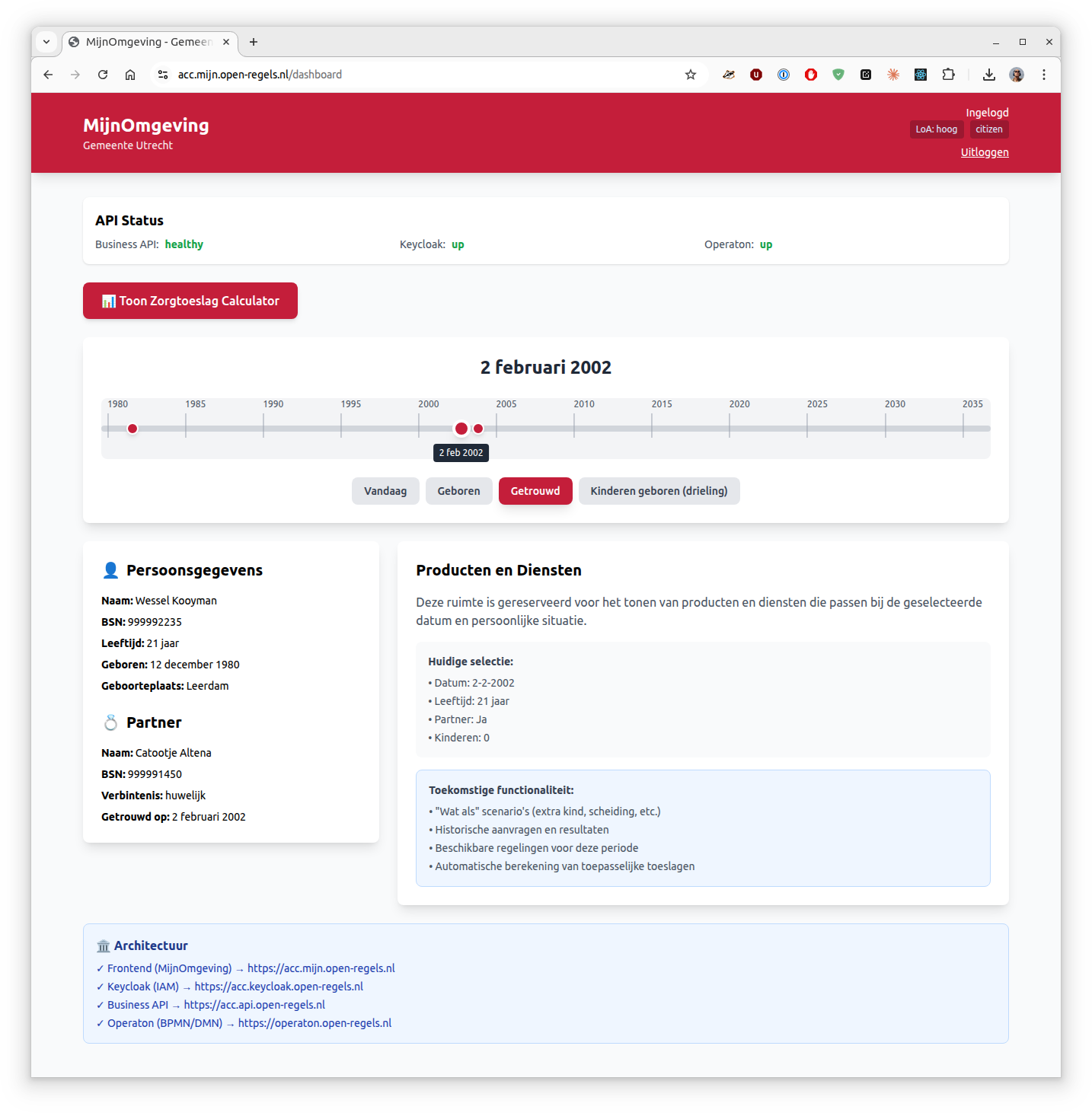
- The timeline loads your life events from BRP
- You'll see:
- Timeline bar at the top with your life events
- Your personal data on the left
- Products/services on the right (coming soon)
Using the Timeline
Navigation Methods
You have three ways to move through time:
1. Drag the Slider
- Click and hold the blue circle on the timeline
- Drag left to go back in time
- Drag right to go forward in time
- The date updates as you drag
2. Click Year Markers
- Year markers appear every 5 years (1980, 1985, 1990...)
- Click a year to jump to January 1st of that year
3. Click Event Buttons
Below the timeline, you'll see buttons for major life events:
- Vandaag — Jump to today's date
- Geboren — Jump to your birth date
- Getrouwd — Jump to your marriage date (if married)
- Kinderen geboren — Jump to when your children were born
Tip: The selected button is highlighted in your municipality's color.
Understanding What You See
Personal Data Panel (Left Side)
This panel shows your data at the selected date:
👤 Persoonsgegevens (Your Information)
Always visible, shows:
- Naam — Your full name
- BSN — Your citizen service number
- Leeftijd — Your age at the selected date
- Geboren — Your birth date and place
- Geboorteplaats — Where you were born
💑 Partner (Partner Information)
Only appears after your marriage date, shows:
- Naam — Partner's full name
- BSN — Partner's citizen service number
- Verbintenis — Type of relationship (marriage/partnership)
- Getrouwd op — Marriage date and place
👶 Kinderen (Children Information)
Only appears after children are born, shows for each child:
- Naam — Child's full name
- BSN — Child's citizen service number
- Leeftijd — Child's age at the selected date
- Geboren — Child's birth date
Note: Ages automatically update based on the date you select!
Example Scenarios
Scenario 1: "How old were my children in 2010?"
- Click "Kinderen geboren" button
- Drag slider to 2010
- Look at the Kinderen section
- See each child's age calculated for 2010
Scenario 2: "Was I married in 2000?"
- Drag slider to 2000
- Look for the Partner section
- If it's not there, you weren't married yet
- Click "Getrouwd" to jump to your marriage date
Scenario 3: "What did my household look like when I was 25?"
- Calculate: Birth year + 25 = target year
- Drag slider to that year
- See your complete household at age 25
- Check if you had partner/children at that time
Scenario 4: "Planning for the future"
- Drag slider beyond today
- See how your children's ages will change
- (Future feature) See how benefits eligibility changes
- Plan for when children turn 18, etc.
Tips & Tricks
Quick Date Selection
- Double-click a year marker to jump there instantly
- Use "Vandaag" button to return to present
- Event buttons show tooltips on hover with full descriptions
Understanding the Colors
- Blue circle = Current selected date
- Blue/Red events = Life events on timeline
- Municipality color = Selected buttons and highlights
Reading Dates
All dates are shown in Dutch format:
- Short: 12-12-1980
- Long: 12 december 1980
Ages are always calculated based on the selected date, not today.
What If No Data Appears?
If sections are missing:
- No Partner section = Not married/partnered at that date
- No Children section = No children born yet at that date
- This is normal! Sections only appear when relevant.
Privacy & Your Data
What Data Do We Use?
The timeline uses data from:
- BRP (Basisregistratie Personen) — Your municipal records
- Your DigiD login — To verify your identity
Is My Data Stored?
No. The timeline:
- ✅ Fetches your current BRP data when you open it
- ✅ Calculates historical views in your browser
- ❌ Does NOT store your personal data
- ❌ Does NOT track what dates you view
Who Can See My Timeline?
- Only you — No one else can access your timeline
- Audit logs — System logs that you accessed the timeline (for security)
- No sharing — Your timeline data is never shared with third parties
Your Rights
Under AVG/GDPR, you have the right to:
- Access — Request your audit log data
- Correction — Report incorrect BRP data to your municipality
- Erasure — Request anonymization of audit logs
Common Questions
Q: Why can't I see my address history?
A: Address history (verblijfplaatshistorie) is coming in a future update. Currently, only person/partner/children data is shown.
Q: Can I change my past data?
A: No, the timeline shows BRP data which is the official government record. To correct errors, contact your municipality's BRPloket.
Q: Why does it say I'm 0 years old?
A: You selected your birth date. At birth, age is 0. Move forward in time to see your age increase.
Q: Can I print or export my timeline?
A: Not yet. Export to PDF is planned for a future release.
Q: What are "what if" scenarios?
A: This is a future feature where you can simulate life changes (having a child, getting divorced) to see how they affect your benefits eligibility.
Q: Why do I only see one test person?
A: The test environment currently has one demo persona (Wessel Kooyman). More diverse test data will be added.
Q: How far into the future can I go?
A: You can select dates up to 10 years in the future for planning purposes.
Troubleshooting
Timeline Won't Load
Symptoms: Blank screen, endless loading
Try: 1. Refresh the page (F5) 2. Logout and login again 3. Clear your browser cache 4. Try a different browser
If still not working, contact your municipality's helpdesk.
Events Not Showing
Symptoms: Timeline shows but no event buttons
Possible cause: Your BRP record might not have marriage/children data
Note: If you're single with no children, only "Geboren" and "Vandaag" buttons appear. This is normal.
Wrong Data Displayed
Symptoms: Names, dates, or ages look incorrect
Action:
- Verify the selected date is correct
- Check your BRP data is accurate (contact municipality BRPloket)
- Report the issue to your municipality's helpdesk with:
- Date selected
- What data looks wrong
- Screenshot if possible
Page is Slow
Symptoms: Timeline loads but dragging is laggy
Try:
- Close other browser tabs
- Disable browser extensions
- Use a modern browser (Chrome, Firefox, Edge, Safari)
Keyboard Shortcuts
Coming in future release: - Arrow keys to move timeline - Spacebar to toggle timeline view - Number keys to jump to specific years
Giving Feedback
We'd love to hear your thoughts:
- Like the feature? Let us know what works well
- Found a bug? Report it with as much detail as possible
- Have ideas? Suggest improvements for future releases
Contact: Your municipality's MijnOmgeving helpdesk or support@open-regels.nl
What's Coming Next?
Planned features:
- 📍 Address history — See where you lived at any date
- 🔮 "What if" scenarios — Simulate life changes and see benefit impacts
- 📊 Historical applications — View past zorgtoeslag calculations
- 📄 Export to PDF — Download your timeline
- 🎯 Service matching — See which services you're eligible for at any date
Related Help Articles
Need more help? Contact your municipality's helpdesk or visit your municipality's website.