Caseworker Dashboard (V2)
From v3.0.0 the caseworker portal at /dashboard/caseworker is served by the V2 shell. The earlier three-zone V1 shell has been retired; there is one caseworker dashboard and the /dashboard/caseworker/v2 path now redirects to the canonical route for one release to catch stale bookmarks.
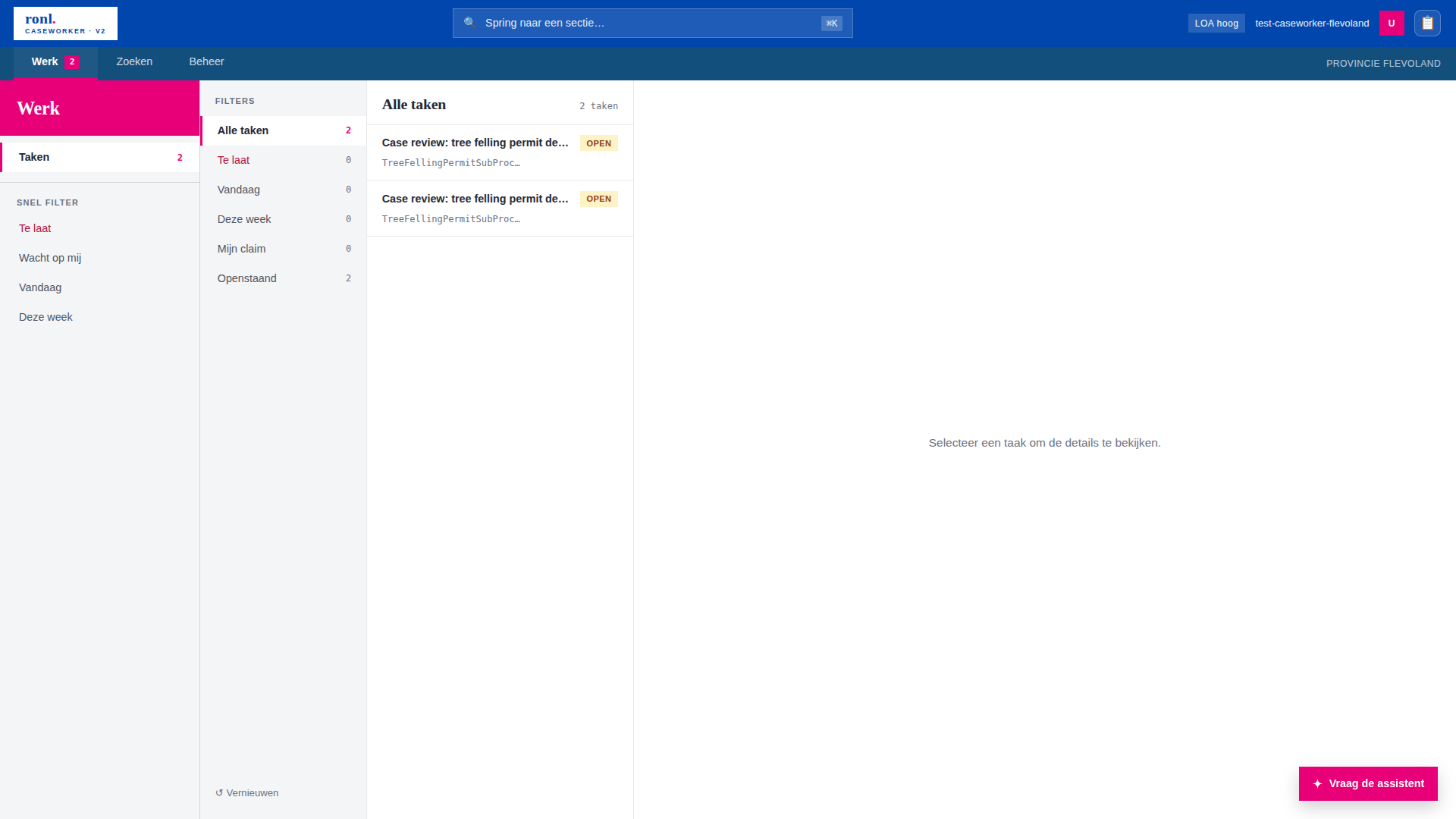
Shell layout
V2 replaces V1's flat 25-item left panel with a three-mode information architecture. The shell renders four regions:
┌────────────────────────────────────────────────────────────┐
│ Top bar (logo · ⌘K search · user)                          │
├────────────────────────────────────────────────────────────┤
│ Werk · Zoeken · Beheer                             [tenant]│
├──────────┬─────────────────────────────────┬───────────────┤
│ Rail     │ Main (section content)          │ Assistant ▶   │
│ (mode-   │                                 │ (toggleable)  │
│  scoped) │                                 │               │
└──────────┴─────────────────────────────────┴───────────────┘
The shell itself (pages/CaseworkerDashboardV2.tsx) owns only auth state, tenant theme application, navigation state, and layout. All section content is dispatched by components/CaseworkerDashboardV2/SectionRouter.tsx, which re-uses the existing section components verbatim.
Inherited from V1
Keycloak auth and role guards, tenant theme application via initializeTenantTheme(...), and every section component and its network calls are inherited unchanged. V2 is a shell redesign, not a rewrite of the sections.
The three modes
Modes are defined in pages/caseworker-v2/modes.config.ts. The mapping is derived from V1's tenants.<tenant>.leftPanelSections:
| Mode | Default section | Maps from V1 | Contents |
|---|---|---|---|
| Werk | taken |
V2-native | Taken, quick filters (Te laat / Wacht op mij / Vandaag / Deze week), DVTP (municipality tenants only) |
| Zoeken | berichten |
V1 "Home" | Berichten, Nieuws, Producten & Diensten, Regelcatalogus, Procesbibliotheek, Gegevenswoordenboek |
| Beheer | profiel |
V1 "Persoonlijke info" + "Projecten" + "IOU" + "Audit log" + "Gereedschap" | Account, Onboarding, Capaciteit, RIP, IOU, Hulpmiddelen, Audit log |
When switching modes, the shell jumps to that mode's defaultSectionId if the current section does not belong to the new mode, keeping the rail consistent with the selected tab.
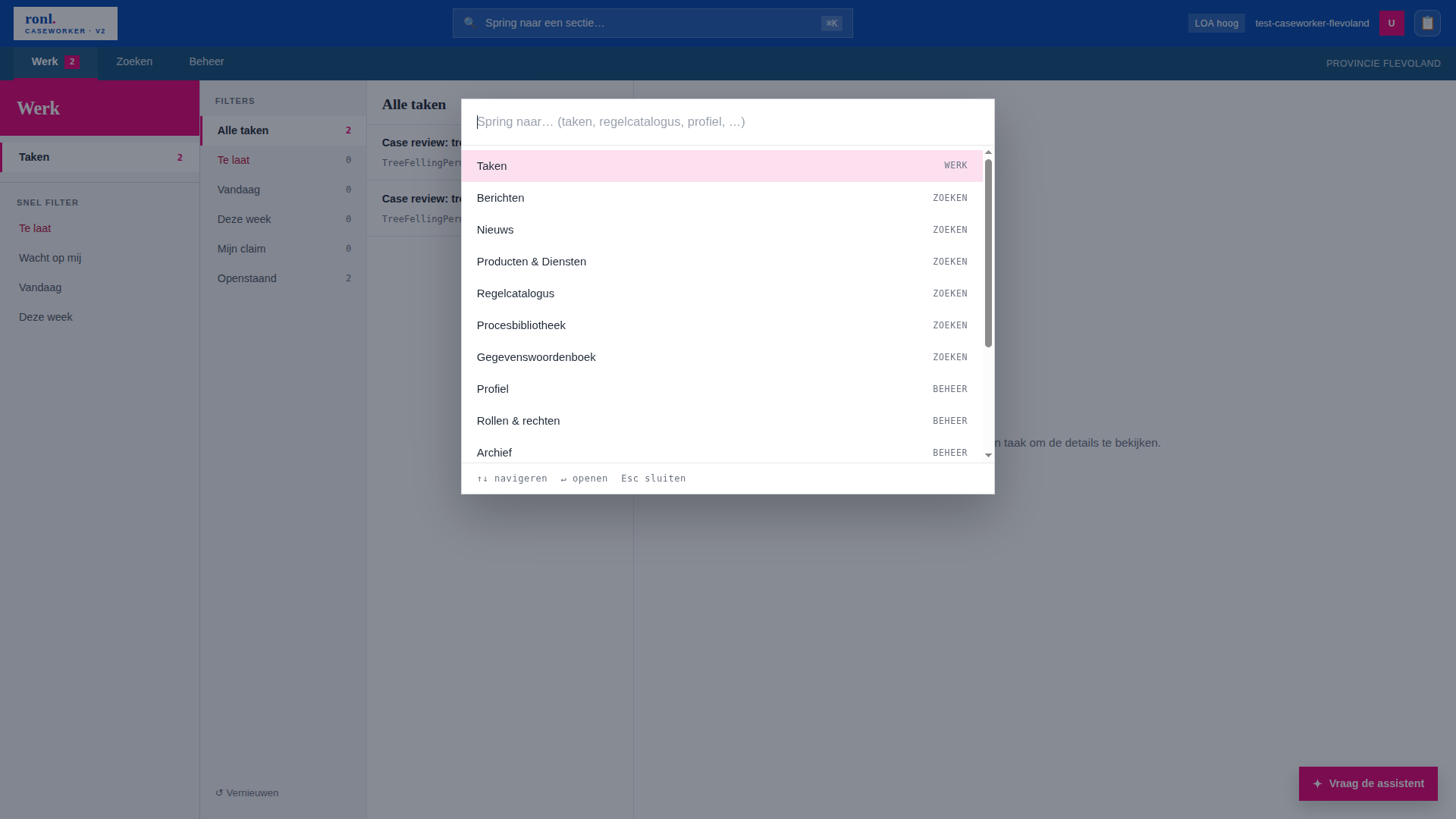
Command palette (⌘K)
components/CaseworkerDashboardV2/CommandPalette.tsx provides keyboard-driven navigation. ⌘K (or Ctrl+K) toggles it; any section is reachable in two keystrokes. The palette searches all non-filter sections via allSearchableSections() and applies the same visibility gate as the rail (see Section gating), so a section the user cannot see in the rail is also absent from palette results.
Assistant dock
The AI assistant is hosted in a toggleable right-side dock (components/CaseworkerDashboardV2/AssistantDock.tsx), not as a rail item. The dock re-uses McpChatSection verbatim; conversation state is hoisted into the dock and persisted to sessionStorage, so toggling the dock or reloading the page keeps the thread. A floating "Vraag de assistent" button opens the dock when it is closed.
See MCP AI Assistant for the assistant itself.
Section gating
V2 enforces visibility through a single predicate, isRailItemVisible(item, ctx) in modes.config.ts, used by both the rail filter and the command palette so what is hidden is hidden everywhere. A RailItem may declare:
authRequired— hidden for anonymous visitorsrequiredRoles?: string[]— OR-set of realm roles; hidden unless the user holds at least onerequiredOrgTypes?: OrgTypeGate[]— hidden unless the user'sorganisation_typematches- tenant gate — a tenant-scoped section only shows if its id appears in the active tenant's
leftPanelSections; shell-global ids (audit-*,gereedschap-overzicht,taken,dvtp-*,filter-*) bypass the tenant gate
SectionRouter applies a defence-in-depth check via findGateFor(): any gated section deep-linked or reached by palette renders <NoAccessPanel> instead of the section if the gate fails. This means a permission regression cannot leak a section even if the rail filter is bypassed.
The current gate populations:
| Section | Gate |
|---|---|
hr-onboarding, onboarding-archief |
requiredRoles: ['hr-medewerker'] |
capacity-claim |
requiredRoles: ['manager'] |
capacity-claim-archief |
OR-set of all capacity-claim participant roles |
rip-fase1, rip-fase1-wip, rip-fase1-gereed |
requiredRoles: ['infra-projectteam'] |
audit-overzicht, audit-details |
requiredRoles: ['admin'] |
dvtp-start, dvtp-taken |
requiredOrgTypes: ['municipality'] |
Per-section crash isolation
SectionErrorBoundary wraps <SectionRouter>. A render error in one section shows an inline recovery panel ("Deze sectie kon niet geladen worden") with a retry action, without taking down the top bar, rail, or dock.
Related documentation
- Caseworker Dashboard (section reference) — section ID table, tenant vs platform scoping
- Multi-Tenant Municipality Portal — tenant theming and isolation
- MCP AI Assistant — the assistant hosted in the dock
- Frontend Development — V2 shell architecture