Filling In the Tabs
This page describes each tab's fields, what they map to in the generated Turtle, and what validation rules apply. For the full UI field ↔ RDF property mapping tables, see the Field Mapping Reference.
Service tab
The Service tab models cpsv:PublicService.
Unique identifier (dct:identifier) — Mandatory. Used as the base for all URIs in the file. Spaces are converted to hyphens automatically. Choose a stable, human-readable value.
Official name (dct:title) — Mandatory. The public-facing name of the service, stored with @nl language tag.
Description (dct:description) — Detailed explanation of what the service does.
Thematic area (cv:thematicArea) — URI for thematic classification. Select from the dropdown or enter a URI directly.
Government level (cv:sector) — Mandatory. Select from the controlled vocabulary (national, provincial, municipal, etc.).
Keywords (dcat:keyword) — Comma-separated terms for discoverability.
Language (dct:language) — Outputs as a LinguisticSystem URI (e.g. https://publications.europa.eu/resource/authority/language/NLD).
Cost section — Documents fees associated with the service as cv:Cost. Enter amount and currency.
Output section — Documents what the citizen receives as cv:Output. Enter a title and description.
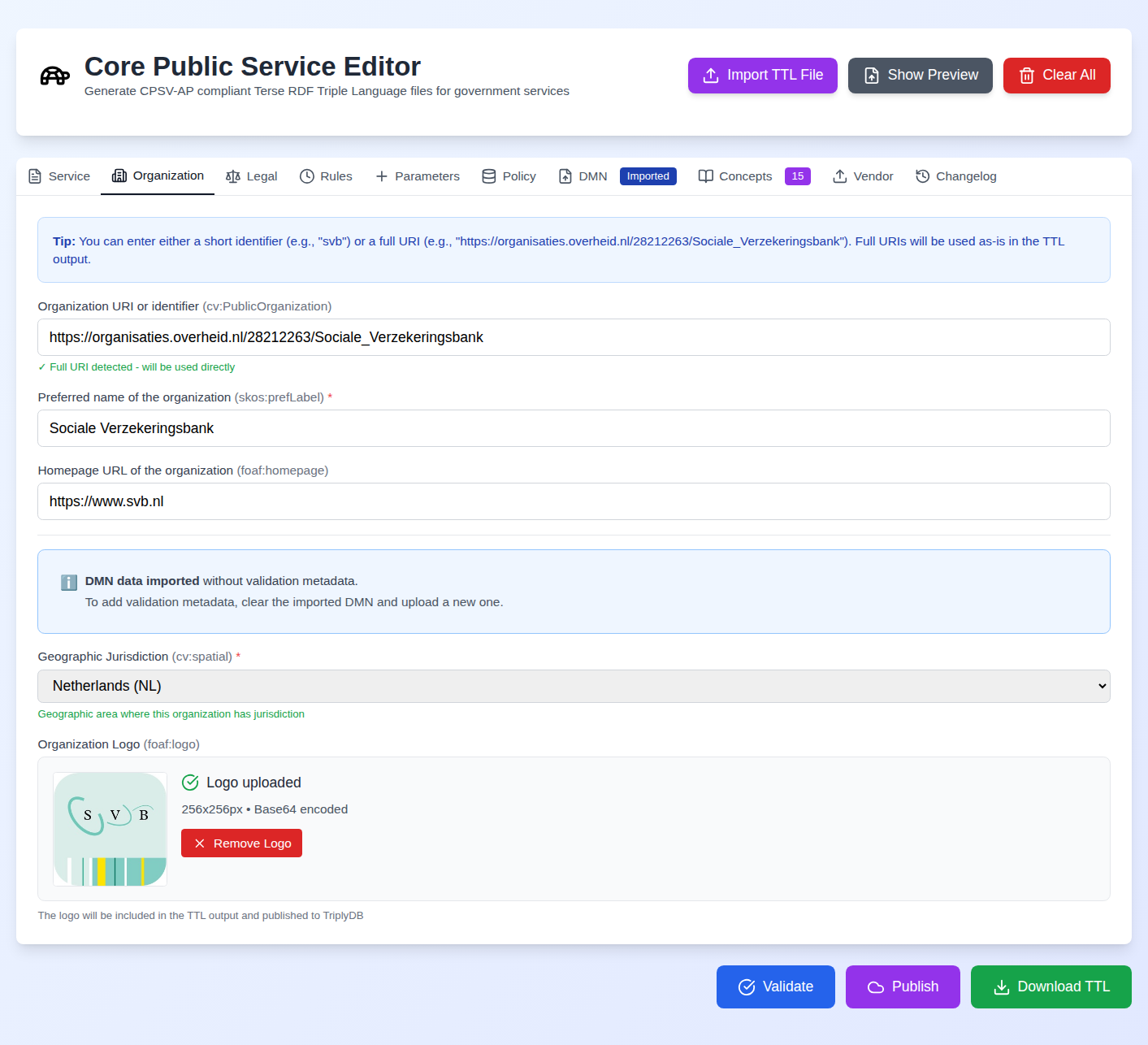
Organisation tab
The Organisation tab models cv:PublicOrganisation.
Organisation identifier — Mandatory. Enter a short ID (e.g. SVB) or a full URI. Short IDs are expanded to https://regels.overheid.nl/organizations/{id}.
Organisation name (skos:prefLabel) — The official name.
Geographic jurisdiction (cv:spatial) — Mandatory. The geographic area the organisation is responsible for, as a URI.
Homepage (foaf:homepage) — The organisation's official website URI.
Logo — Upload a JPG or PNG. The editor resizes it to 256×256px. The logo URI is generated as ./assets/{OrganisationName}_logo.png and included in the Turtle as both foaf:logo and schema:image.
Legal tab
The Legal tab models eli:LegalResource.
BWB ID — The Dutch legal resource identifier (e.g. BWBR0002221). Validated against the BWB pattern. The editor constructs a wetten.overheid.nl URI automatically.
Version / consolidation date — The specific version of the legislation being referenced.
Title and description — Human-readable metadata for the legal resource.
Rules tab (RPP: Rules)
Each rule models cpsv:Rule, ronl:TemporalRule.
Rule identifier (dct:identifier) — Mandatory. Unique identifier for this rule.
Rule title (dct:title) — Mandatory. Human-readable name.
Rule URI — Full URI for the rule, or leave blank to auto-generate from the service identifier.
Extends (ronl:extends) — URI of the legal article or version this rule implements.
Valid from / until (ronl:validFrom, ronl:validUntil) — Temporal validity window as ISO dates.
Confidence level (ronl:confidenceLevel) — The certainty with which this rule implements the policy.
Multiple rules can be added with the Add Rule button. Each rule appears as an expandable card.
Parameters tab (RPP: Parameters)
Each parameter models ronl:ParameterWaarde.
Notation (skos:notation) — Machine-readable identifier for the parameter (e.g. AOW_LEEFTIJD_STANDAARD).
Label (skos:prefLabel) — Human-readable name.
Value (schema:value) — The numeric or string value.
Unit (schema:unitCode) — The unit of measurement (e.g. ANN for years, EUR for euros).
Valid from / until — Temporal validity.
CPRMV tab (RPP: Policy)
Each entry models cprmv:Rule. All six fields are mandatory.
Identifier (dct:identifier), Title (dct:title), Definition (cprmv:definition) — Standard metadata.
Situation (cprmv:situatie) — The contextual situation to which the rule applies.
Norm (cprmv:norm) — The normative value mandated by the rule.
Rule ID path (cprmv:ruleIdPath) — The legislative path to the source article.
CPRMV rules can be entered individually or imported in bulk via the Import JSON button, which accepts normenbrief-format JSON.
DMN tab
See the DMN Workflow and DMN Testing user guides.
Vendor tab
See the Vendor Integration user guide.