Frontend (Azure Static Web Apps)
The frontend is deployed to Azure Static Web Apps via GitHub Actions. Separate instances run for ACC and PROD environments.
Architecture
┌──────────────────────────────────────────┐
│   GitHub Repository (ronl-business-api)  │
│                                          │
│  ┌─────────────────────────────────────┐ │
│  │  packages/frontend/                 │ │
│  │  ├── src/                           │ │
│  │  ├── public/                        │ │
│  │  │   ├── tenants.json               │ │
│  │  │   └── staticwebapp.config.json   │ │ ← SPA routing config
│  │  ├── vite.config.ts                 │ │
│  │  └── package.json                   │ │
│  └─────────────────────────────────────┘ │
│                 │                        │
│                 │ Push to 'acc' branch   │
│                 ▼                        │
│  ┌─────────────────────────────────────┐ │
│  │  .github/workflows/                 │ │
│  │  ├── azure-frontend-acc.yml         │ │
│  │  └── azure-frontend-prod.yml        │ │
│  └─────────────────────────────────────┘ │
└──────────────────────────────────────────┘
                 │
                 │ GitHub Actions
                 ▼
┌─────────────────────────────────────────┐
│      Azure Static Web Apps              │
│                                         │
│  ACC:  acc.mijn.open-regels.nl          │
│  PROD: mijn.open-regels.nl              │
│                                         │
│  ✅ Global CDN                          │
│  ✅ Automatic SSL                       │
│  ✅ Custom domains                      │
│  ✅ SPA fallback routing                │
└─────────────────────────────────────────┘
GitHub Actions Workflows
ACC Workflow
File: .github/workflows/azure-frontend-acc.yml
name: Deploy Frontend to ACC

on:
  push:
    branches:
      - acc
    paths:
      - 'packages/frontend/**'
      - '.github/workflows/azure-frontend-acc.yml'

jobs:
  build_and_deploy:
    runs-on: ubuntu-latest
    name: Build and Deploy to ACC
    steps:
      - uses: actions/checkout@v3
        with:
          submodules: true

      - name: Setup Node.js
        uses: actions/setup-node@v3
        with:
          node-version: '20'
          cache: 'npm'

      - name: Install dependencies
        run: |
          npm ci
          npm ci --workspace=packages/frontend

      - name: Build frontend
        run: npm run build --workspace=packages/frontend
        env:
          VITE_KEYCLOAK_URL: ${{ secrets.ACC_KEYCLOAK_URL }}
          VITE_API_URL: ${{ secrets.ACC_API_URL }}

      - name: Deploy to Azure Static Web Apps
        uses: Azure/static-web-apps-deploy@v1
        with:
          azure_static_web_apps_api_token: ${{ secrets.ACC_AZURE_SWA_TOKEN }}
          repo_token: ${{ secrets.GITHUB_TOKEN }}
          action: 'upload'
          app_location: 'packages/frontend'
          output_location: 'dist'
          skip_app_build: true
Triggers:
- Push to acc branch
- Changes in packages/frontend/**
- Changes to workflow file itself
PROD Workflow
File: .github/workflows/azure-frontend-prod.yml
Same structure as ACC but with:
- Branch:
mainorprod - PROD secrets (
PROD_KEYCLOAK_URL,PROD_API_URL,PROD_AZURE_SWA_TOKEN) - Additional approval gate (manual approval before deployment)
SPA Routing Configuration
Critical for React Router: Azure Static Web Apps needs staticwebapp.config.json to handle client-side routing.
File: packages/frontend/public/staticwebapp.config.json
{
  "navigationFallback": {
    "rewrite": "/index.html",
    "exclude": ["/assets/*", "/*.js", "/*.css", "/*.json", "/*.png", "/*.jpg", "/*.svg"]
  },
  "globalHeaders": {
    "cache-control": "no-cache, no-store, must-revalidate"
  },
  "mimeTypes": {
    ".json": "application/json",
    ".css": "text/css",
    ".js": "application/javascript"
  }
}
What it does:
- ✅ All routes (
/,/auth,/dashboard) → served byindex.html - ✅ React Router handles routing client-side
- ✅ Static assets excluded from fallback
- ✅ Proper cache headers
- ✅ Correct MIME types
Without this file: Routes like /auth and /dashboard return 404 errors after Keycloak redirect.
Build and Deployment Steps
Step 1 — Trigger
Push changes to acc branch:
cd ~/Development/ronl-business-api

# Make frontend changes
nano packages/frontend/src/pages/Dashboard.tsx

# Commit and push
git add packages/frontend/
git commit -m "feat: update dashboard styling"
git push origin acc
Step 2 — GitHub Actions Build
The workflow automatically:
- Checks out code
- Sets up Node.js 20
- Installs dependencies (monorepo aware)
- Builds frontend with environment variables
- Outputs to
packages/frontend/dist/
Build artifacts:
dist/
├── index.html                 # Entry point
├── assets/
│   ├── index-[hash].js        # Main bundle
│   ├── index-[hash].css       # Styles
│   └── [other assets]
├── tenants.json               # Municipality config (copied from public/)
└── staticwebapp.config.json   # SPA routing (copied from public/)
Step 3 — Azure Deployment
The Azure/static-web-apps-deploy@v1 action:
- Authenticates with Azure using API token
- Uploads
dist/folder to Azure Storage - Invalidates CDN cache
- Updates routing rules from
staticwebapp.config.json - Makes new version live
Deployment time: ~2-3 minutes
Step 4 — Verification
# Check deployment status
# GitHub Actions → Workflows → Deploy Frontend to ACC

# Test URLs
curl -I https://acc.mijn.open-regels.nl
# Should return: 200 OK

curl -I https://acc.mijn.open-regels.nl/auth
# Should return: 200 OK (not 404!)

# Test in browser
# Visit: https://acc.mijn.open-regels.nl
# Click "Inloggen met DigiD"
# After Keycloak auth, /auth route should work
# Dashboard should load at /dashboard
Environment Files
Environment variables are configured as GitHub Secrets:
ACC Secrets
ACC_KEYCLOAK_URL=https://acc.keycloak.open-regels.nl
ACC_API_URL=https://acc.api.open-regels.nl/v1
ACC_AZURE_SWA_TOKEN=<deployment-token>
PROD Secrets
PROD_KEYCLOAK_URL=https://keycloak.open-regels.nl
PROD_API_URL=https://api.open-regels.nl/v1
PROD_AZURE_SWA_TOKEN=<deployment-token>
Adding/Updating Secrets
- GitHub Repository → Settings → Secrets and variables → Actions
- Click New repository secret
- Name:
ACC_KEYCLOAK_URL - Value:
https://acc.keycloak.open-regels.nl - Click Add secret
Azure Static Web App Configuration
Resource Details
ACC:
- Name:
ronl-frontend-acc - Resource Group:
rg-ronl-acc - Region: West Europe
- Custom Domain:
acc.mijn.open-regels.nl - Pricing: Free tier (sufficient for this application)
PROD:
- Name:
ronl-frontend-prod - Resource Group:
rg-ronl-prod - Region: West Europe
- Custom Domain:
mijn.open-regels.nl - Pricing: Standard tier (for production SLA)
Deployment Token
Retrieve token from Azure Portal:
- Navigate to Static Web App resource
- Left menu → Deployment tokens
- Copy Deployment token
- Store in GitHub Secrets as
ACC_AZURE_SWA_TOKEN
Token permissions:
- Upload build artifacts
- Update routing configuration
- Invalidate CDN cache
Custom Domain Setup
ACC domain (acc.mijn.open-regels.nl):
- Azure Portal → Static Web App → Custom domains
- Click Add
- Enter:
acc.mijn.open-regels.nl - Choose: Other DNS
- Add DNS records:
- Verify and add
SSL certificate: Automatically provisioned by Azure (Let's Encrypt)
Post-Deployment Verification
Automated Tests (Future)
# Add to workflow after deployment
- name: Test deployed app
  run: |
    # Test root route
    curl -f https://acc.mijn.open-regels.nl

    # Test SPA routes
    curl -f https://acc.mijn.open-regels.nl/auth
    curl -f https://acc.mijn.open-regels.nl/dashboard

    # Test static assets
    curl -f https://acc.mijn.open-regels.nl/tenants.json
Manual Testing Checklist
- Landing page loads (https://acc.mijn.open-regels.nl)
- Three IDP buttons visible and styled correctly
- Changelog panel opens/closes
- DigiD button → redirects to Keycloak
- After auth →
/authroute works (no 404) - Dashboard loads at
/dashboard - Municipality theme applied correctly
- Calculator form submits
- Mobile responsive (test on phone)
- No console errors in browser DevTools
Manual Deployment
If GitHub Actions fails or for emergency hotfix:
Step 1 — Build locally
cd ~/Development/ronl-business-api/packages/frontend

# Set environment variables
export VITE_KEYCLOAK_URL=https://acc.keycloak.open-regels.nl
export VITE_API_URL=https://acc.api.open-regels.nl/v1

# Build
npm run build

# Output: dist/ directory
ls -la dist/
Step 2 — Deploy via Azure CLI
# Install Azure CLI (if not installed)
curl -sL https://aka.ms/InstallAzureCLIDeb | sudo bash

# Login to Azure
az login

# Deploy to ACC
az staticwebapp deploy \
  --name ronl-frontend-acc \
  --resource-group rg-ronl-acc \
  --source ./dist \
  --no-use-keychain

# Wait for deployment (~2-3 minutes)
Step 3 — Verify
# Test deployment
curl -I https://acc.mijn.open-regels.nl
# Should return: 200 OK

# Open in browser
# Visit: https://acc.mijn.open-regels.nl
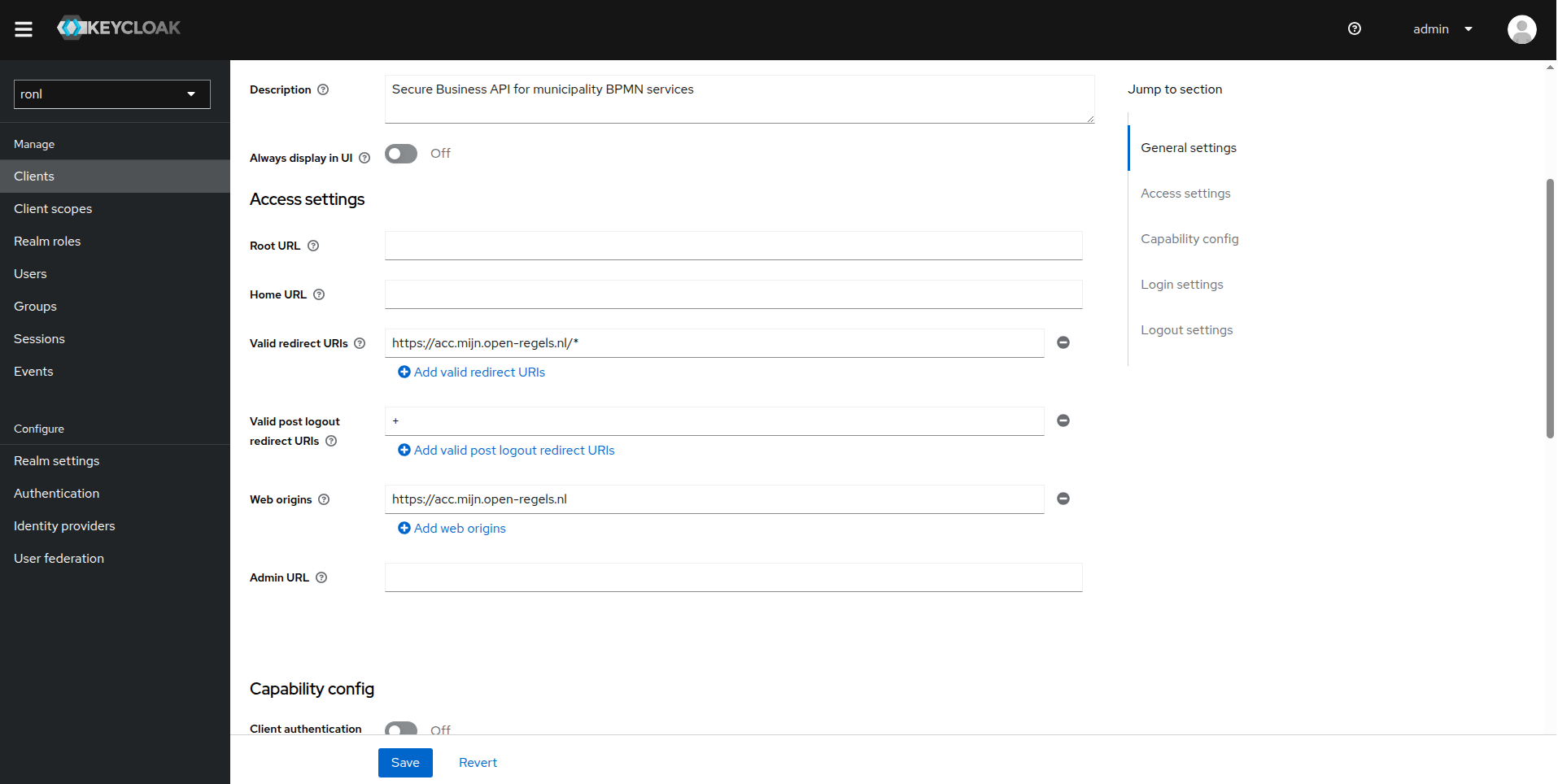
Keycloak Redirect URIs
Critical: Keycloak client must allow redirects from deployed URLs.
ACC Configuration
Keycloak Admin Console:
- Realm:
ronl - Clients →
ronl-business-api - Valid Redirect URIs:
https://acc.mijn.open-regels.nl/* - Valid Post Logout Redirect URIs:
+(inherits from redirect URIs) - Web Origins:
https://acc.mijn.open-regels.nl
PROD Configuration
Same as ACC but with:
- Valid Redirect URIs:
https://mijn.open-regels.nl/* - Web Origins:
https://mijn.open-regels.nl
Rollback Procedure
If deployment causes issues:
Option 1 — Revert via GitHub
# Find last working commit
git log --oneline packages/frontend/

# Revert to that commit
git revert <commit-hash>

# Push to trigger new deployment
git push origin acc
Option 2 — Rollback in Azure Portal
- Azure Portal → Static Web App
- Left menu → Environments
- Select previous deployment
- Click Promote
Troubleshooting
404 on routes after deployment
Symptoms: Landing page works, but /auth and /dashboard return 404.
Cause: staticwebapp.config.json missing or not deployed.
Solution:
# Verify file exists in source
ls -la packages/frontend/public/staticwebapp.config.json

# File must be in public/ to be copied to dist/ during build

# If missing, create it:
cat > packages/frontend/public/staticwebapp.config.json << 'EOF'
{
  "navigationFallback": {
    "rewrite": "/index.html",
    "exclude": ["/assets/*", "/*.js", "/*.css", "/*.json"]
  }
}
EOF

# Commit and redeploy
git add packages/frontend/public/staticwebapp.config.json
git commit -m "fix: add SPA routing configuration"
git push origin acc
Environment variables not applied
Symptoms: App loads but can't connect to Keycloak or API.
Cause: Build-time environment variables not set.
Solution:
# Check GitHub Secrets are configured
# Repository → Settings → Secrets and variables → Actions

# Required secrets:
# - ACC_KEYCLOAK_URL
# - ACC_API_URL

# Verify workflow uses them:
# .github/workflows/azure-frontend-acc.yml
env:
  VITE_KEYCLOAK_URL: ${{ secrets.ACC_KEYCLOAK_URL }}
  VITE_API_URL: ${{ secrets.ACC_API_URL }}

# Re-run workflow after fixing
CORS errors in browser console
Symptoms: Browser shows CORS policy errors when calling API.
Cause: Keycloak or API not configured for frontend origin.
Solution:
# Keycloak: Web Origins should be '+'
# This inherits all Valid Redirect URIs as allowed origins

# API: Backend must allow frontend origin in CORS config
# packages/backend/src/index.ts
app.use(cors({
  origin: [
    'https://acc.mijn.open-regels.nl',
    'https://mijn.open-regels.nl'
  ],
  credentials: true
}));
Deployment takes too long or fails
Symptoms: GitHub Actions workflow runs for 10+ minutes or fails.
Cause: Azure Static Web Apps service issues or incorrect token.
Solution:
# Check Azure service status
# Visit: https://status.azure.com/

# Verify deployment token is valid
# Azure Portal → Static Web App → Deployment tokens
# Regenerate if needed and update GitHub Secret

# Check workflow logs for specific error
# GitHub Actions → Failed workflow → View logs

# Common errors:
# - "401 Unauthorized" → Token invalid, regenerate
# - "429 Too Many Requests" → Wait and retry later
Build succeeds but app doesn't update
Symptoms: Deployment completes successfully but changes not visible.
Cause: Browser cache or CDN cache.
Solution:
# Hard refresh browser
# Chrome: Ctrl+Shift+R (Windows/Linux) or Cmd+Shift+R (Mac)
# Firefox: Ctrl+F5 (Windows/Linux) or Cmd+Shift+R (Mac)

# Check deployed version
# View source: https://acc.mijn.open-regels.nl
# Look for timestamp or version comments

# CDN cache usually invalidates within 5 minutes
# Wait and try again if issue persists
Performance Optimization
Bundle Size
Current build stats (~production):
- Total bundle: ~250 KB gzipped
- index.js: ~200 KB (React, React Router, Keycloak, Axios)
- index.css: ~50 KB (Tailwind CSS)
Optimization opportunities:
- ✅ Vite code splitting (already enabled)
- ✅ Tree shaking (already enabled)
- ⚠️ Consider lazy loading routes for larger apps
- ⚠️ Consider removing unused Tailwind classes
CDN Performance
Azure Static Web Apps provides:
- ✅ Global CDN distribution
- ✅ Automatic gzip/brotli compression
- ✅ HTTP/2 support
- ✅ Edge caching (configured via
staticwebapp.config.json)
Cache headers:
Currently set to no-cache for development. For production, consider:
{
  "routes": [
    {
      "route": "/assets/*",
      "headers": {
        "cache-control": "public, max-age=31536000, immutable"
      }
    }
  ]
}
Related Documentation
- Frontend Development — Local development setup
- Keycloak Deployment — Redirect URI configuration
- Backend Deployment — API CORS configuration
- Deployment Overview — Full architecture
- CI/CD Guide — GitHub Actions workflows
Questions or issues? See Troubleshooting or contact the DevOps team.