Keycloak Deployment (VM)
Keycloak runs in Docker on the VM (open-regels.nl). Two fully isolated instances run in parallel: ACC and PROD. Each has its own PostgreSQL database container and custom RONL theme.
Repository structure
ronl-business-api/
├── deployment/vm/keycloak/
│   ├── acc/
│   │   ├── docker-compose.yml      # ACC configuration
│   │   ├── README.md               # ACC setup guide
│   │   └── .env.example            # ACC environment template
│   ├── prod/
│   │   ├── docker-compose.yml      # PROD configuration
│   │   ├── README.md               # PROD setup guide
│   │   └── .env.example            # PROD environment template
│   └── themes/
│       └── ronl/                   # Custom RONL theme
│           └── login/
│               ├── login.ftl       # FreeMarker template
│               ├── theme.properties
│               ├── resources/css/
│               │   └── login.css   # Custom styles
│               └── messages/
│                   └── messages_nl.properties
└── config/keycloak/
    └── ronl-realm.json             # Realm configuration (users, clients, mappers)
Prerequisites
On the VM (Ubuntu 24.04 LTS):
- Docker Engine 24+
- Docker Compose 2.x
- Domain
open-regels.nlwith DNS configured - Ports 80 and 443 open
- Caddy running (see Caddy Deployment)
- SSH access restricted to authorized IPs
Custom RONL Theme
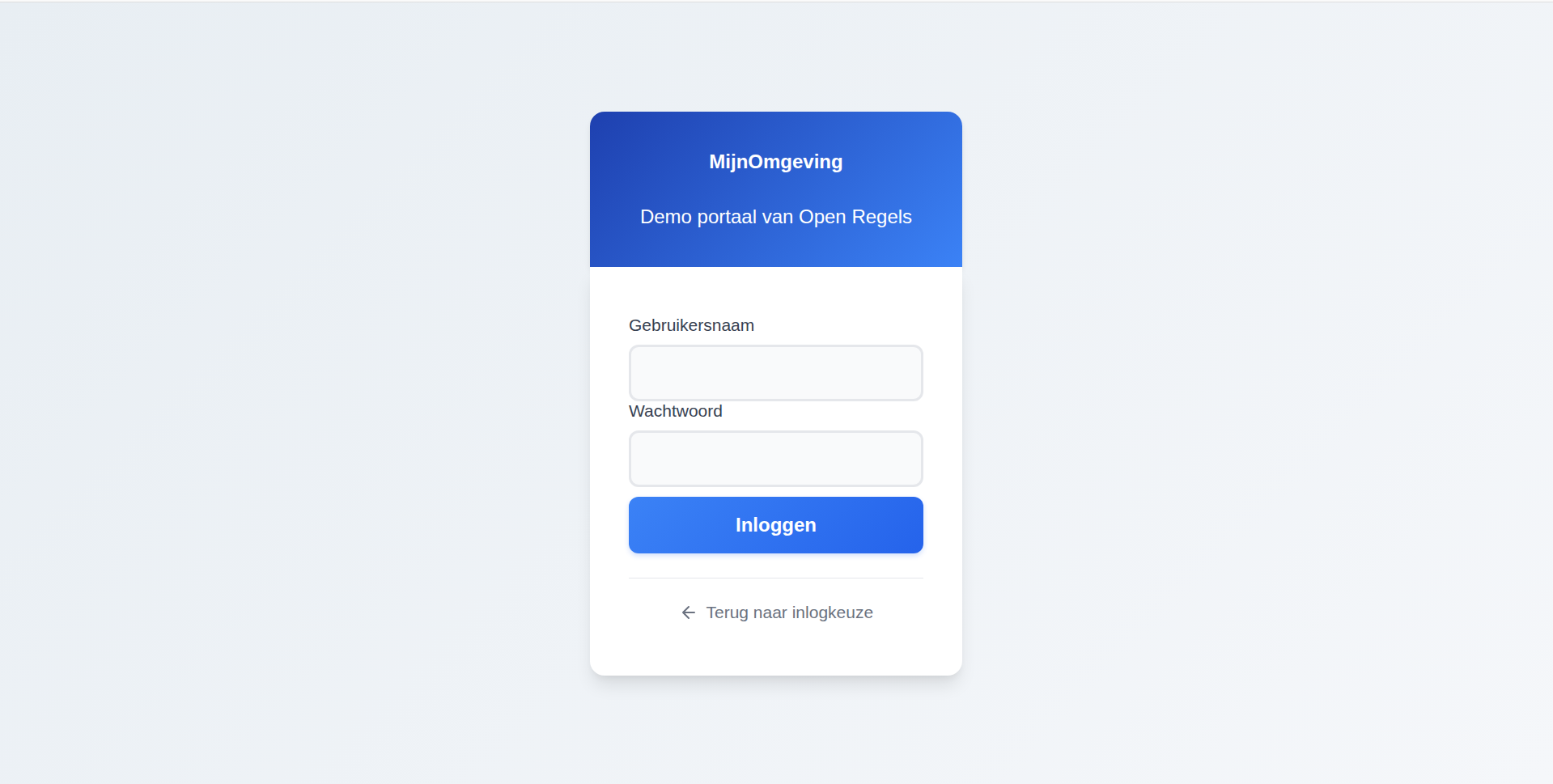
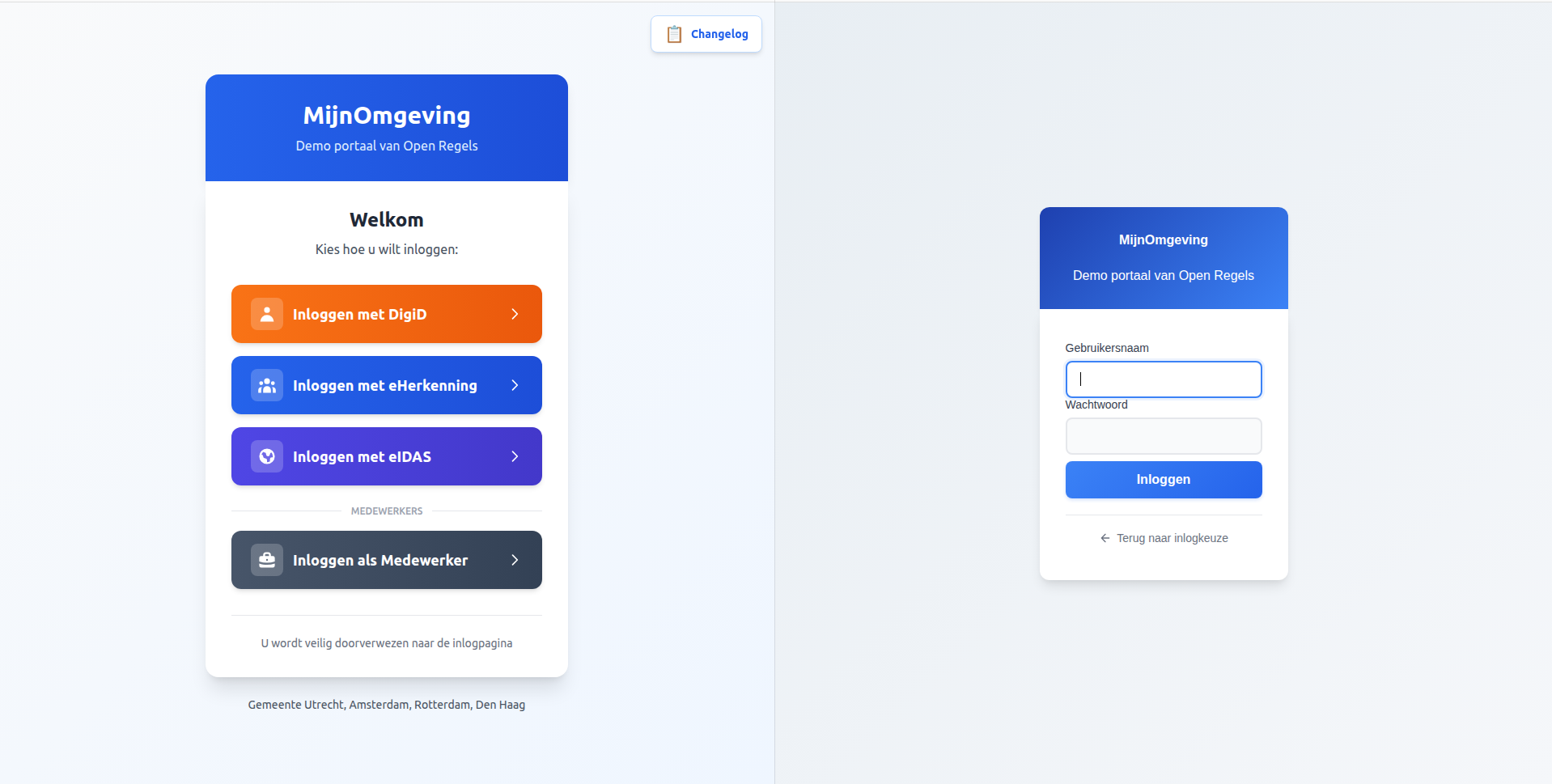
The RONL theme provides a consistent visual experience from the MijnOmgeving landing page through the authentication flow.
Theme Features
Visual Design:
- ✅ Blue gradient header (
from-blue-600 to-blue-700) - ✅ Modern rounded input fields with focus states
- ✅ Custom styled buttons with hover animations
- ✅ Responsive mobile-first design
- ✅ Dutch language throughout
- ✅ Identity provider button styling (DigiD/eHerkenning/eIDAS)
Technical:
Technical:
- ✅ FreeMarker templates for login flow
- ✅ Custom CSS with government colour schemes
- ✅ Dutch translations (messages_nl.properties)
- ✅ Optimised for accessibility (WCAG 2.1 AA)
- ✅ Caseworker context banner via
loginHintsentinel detection - ✅ "← Terug naar inlogkeuze" cancel link using
history.go(-2)
Theme Structure
ronl/login/
├── login.ftl                          # Main login template
├── theme.properties                   # Theme configuration
├── resources/
│   └── css/
│       └── login.css                  # Custom styles (~500 lines)
└── messages/
    └── messages_nl.properties         # Dutch translations (40+ strings)
Key CSS Components:
/* Blue gradient header */
#kc-header {
  background: linear-gradient(to right, #2563eb, #1d4ed8);
  color: white;
  padding: 2rem;
  text-align: center;
}

/* Rounded modern inputs */
.pf-c-form-control {
  border-radius: 0.5rem;
  border: 1px solid #e5e7eb;
  padding: 0.75rem 1rem;
}

/* Styled login button */
#kc-login {
  background: linear-gradient(to right, #3b82f6, #2563eb);
  border-radius: 0.75rem;
  padding: 0.875rem;
  font-weight: 600;
  transition: all 0.2s;
}
Caseworker context banner
The login.ftl template distinguishes citizen and caseworker login using a sentinel value passed via Keycloak's login_hint parameter. When AuthCallback.tsx calls keycloak.login({ loginHint: '__medewerker__' }), Keycloak populates login.username with this sentinel before rendering login.ftl.
The template detects the sentinel at the top of the file:
When isMedewerker is true:
- The page
<header>section renders "Medewerker portaal" instead of the default "Inloggen" title - An indigo context banner is rendered above the form:
<#if isMedewerker>
<div id="kc-context-banner" class="kc-context-medewerker">
    <!-- briefcase SVG icon -->
    Inloggen als gemeentemedewerker
</div>
</#if>
- The username
<input>suppresses the sentinel so the caseworker sees an empty field:
The corresponding CSS in login.css:
#kc-context-banner {
  display: flex;
  align-items: center;
  gap: 0.5rem;
  padding: 0.625rem 1rem;
  margin-bottom: 1.5rem;
  background: #f0f4ff;
  border: 1px solid #c7d7fd;
  border-radius: 8px;
  color: #3730a3;
  font-size: 0.875rem;
  font-weight: 500;
}
No JavaScript is involved — all detection and suppression happens server-side in FreeMarker before the HTML reaches the browser.
Cancel link
Both citizen (test/fallback) and caseworker login forms include a "← Terug naar inlogkeuze" link below the submit button. It uses history.go(-2) to skip over the /auth intermediate route:
<div id="kc-cancel-container">
    <a id="kc-cancel" href="${client.baseUrl!'/'}"
       onclick="history.go(-2); return false;" tabindex="7">
        <!-- left-arrow SVG -->
        Terug naar inlogkeuze
    </a>
</div>
The href fallback (client.baseUrl) points to the frontend root URL configured in Keycloak Admin → Clients → ronl-business-api → Root URL. This is only used if JavaScript is disabled. The history.go(-2) skip is necessary because the browser history stack at this point is: / → /auth → [Keycloak], and history.back() would land on /auth, which immediately redirects back to Keycloak.
Container restart required after theme changes
Keycloak caches theme templates at startup. Any change to .ftl or .css files requires a container restart to take effect — regardless of whether Keycloak is running in development or production mode. Theme changes do not require an image rebuild.
Deploying to ACC
Step 1 — Prepare theme files
On your local machine:
cd ~/Development/ronl-business-api

# Create theme tarball
cd deployment/vm/keycloak/themes
tar -czf ronl-theme.tar.gz ronl/

# Upload to VM
scp ronl-theme.tar.gz user@your-vm:/tmp/
Step 2 — Deploy theme on VM
SSH into the VM:
ssh user@your-vm

# Create themes directory (one-time setup)
sudo mkdir -p /opt/keycloak/themes
sudo chown 1000:1000 /opt/keycloak/themes
sudo chmod 755 /opt/keycloak/themes

# Extract theme
cd /tmp
tar -xzf ronl-theme.tar.gz

# Install theme
sudo rm -rf /opt/keycloak/themes/ronl
sudo mv ronl /opt/keycloak/themes/

# Set permissions (Keycloak runs as UID 1000)
sudo chown -R 1000:1000 /opt/keycloak/themes/ronl
sudo chmod -R 755 /opt/keycloak/themes/ronl
sudo find /opt/keycloak/themes/ronl -type f -exec chmod 644 {} \;

# Verify
ls -la /opt/keycloak/themes/ronl/login/

# Cleanup
rm /tmp/ronl-theme.tar.gz
Step 3 — Update docker-compose.yml
The docker-compose.yml must mount the themes directory:
services:
  keycloak-acc:
    image: quay.io/keycloak/keycloak:23.0
    container_name: keycloak-acc
    volumes:
      - ./ronl-realm.json:/opt/keycloak/data/import/ronl-realm.json:ro
      - keycloak-acc-data:/opt/keycloak/data
      - /opt/keycloak/themes:/opt/keycloak/themes:ro  # Theme volume mount
Update on VM:
cd /home/steven/keycloak/acc

# Backup current config
cp docker-compose.yml docker-compose.yml.backup

# Edit to add theme volume
nano docker-compose.yml
# Add: - /opt/keycloak/themes:/opt/keycloak/themes:ro

# Recreate container to apply volume mount
docker compose down
docker compose up -d

# Wait for startup
sleep 30

# Check logs
docker compose logs keycloak-acc --tail 50
Step 4 — Copy configuration files to VM
# On local machine
cd ~/Development/ronl-business-api

# Copy docker-compose.yml
scp deployment/vm/keycloak/acc/docker-compose.yml user@your-vm:~/keycloak/acc/

# Copy realm file
scp config/keycloak/ronl-realm.json user@your-vm:~/keycloak/acc/
Step 5 — Create environment file
# On VM
cd ~/keycloak/acc

# Generate secure password
ADMIN_PW=$(openssl rand -base64 32)

# Create .env file
cat > .env << EOF
KEYCLOAK_ADMIN_PASSWORD=$ADMIN_PW
EOF

chmod 600 .env

# Save password securely
echo "ACC Admin: $ADMIN_PW" >> ~/keycloak-passwords-acc.txt
chmod 600 ~/keycloak-passwords-acc.txt
Step 6 — Start Keycloak
cd ~/keycloak/acc

# Start services
docker compose up -d

# Watch logs
docker compose logs -f keycloak-acc

# Wait for: "Keycloak started" and "Realm 'ronl' imported"
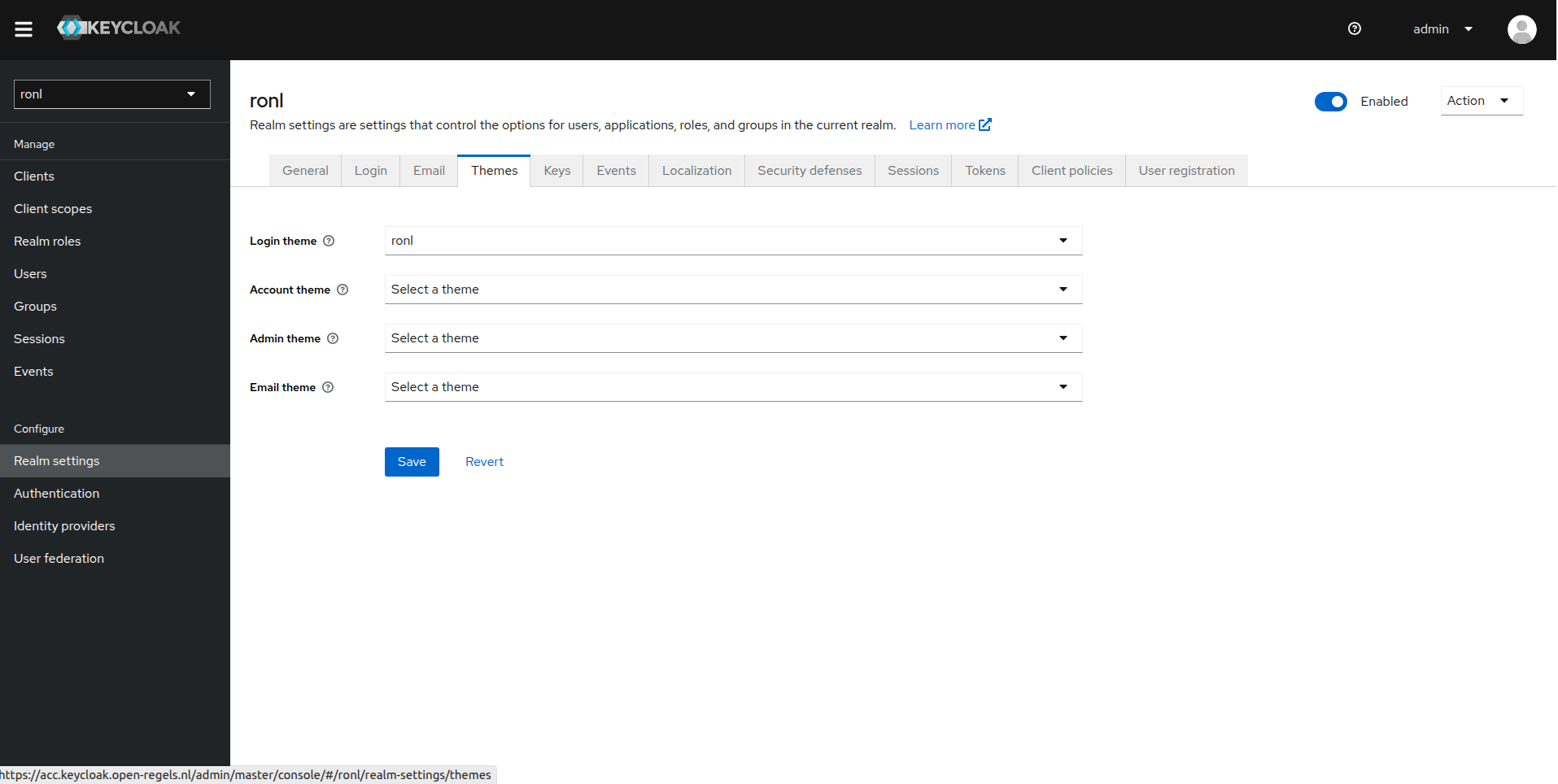
Step 7 — Configure theme in Admin Console
- Open Admin Console: https://acc.keycloak.open-regels.nl/admin
- Login with admin credentials (from
~/keycloak-passwords-acc.txt) - Select realm: Switch to
ronlrealm (top-left dropdown) - Configure theme:
- Left menu → Realm Settings
- Tab → Themes
- Login Theme: Select
ronlfrom dropdown - Click Save
- Configure localization:
- Tab → Localization
- Internationalization: Toggle ON
- Supported Locales: Ensure
nlandenare checked - Default Locale: Select
nl - Click Save
Step 8 — Verify deployment
# Check container status
docker ps | grep keycloak-acc
# Should show: (healthy)

# Test health endpoint
curl https://acc.keycloak.open-regels.nl/health/ready
# Should return: {"status":"UP"}

# Verify theme is mounted
docker exec keycloak-acc ls -la /opt/keycloak/themes/ronl/login/
# Should show: login.ftl, theme.properties, resources/, messages/

# Test in browser (incognito to skip cache)
# Visit: https://acc.mijn.open-regels.nl
# Click "Inloggen met DigiD"
# Should see themed login page with blue gradient header
Deploying to PROD
Follow the same steps using deployment/vm/keycloak/prod/ and hostname keycloak.open-regels.nl.
Important differences for PROD:
- Use separate admin password (stored in
~/keycloak-passwords-prod.txt) - Update
KC_HOSTNAMEtokeycloak.open-regels.nl - Use
KC_LOG_LEVEL: warninstead ofinfo - Test thoroughly in ACC before deploying to PROD
- Deploy during maintenance window
- Notify users of planned downtime
Realm import
The ronl-realm.json is imported on the first container start via the --import-realm flag in docker-compose.yml. It configures:
- Realm
ronlwith brute-force protection - Client
ronl-business-apiwith PKCE and CORS settings - Protocol mappers:
municipality(user attribute)roles(realm roles)loa(assurance level - user attribute)- Test users with per-municipality attributes
- Token lifespans:
- Access token: 15 minutes
- SSO session: 30 minutes
- Refresh token: 30 minutes
Re-importing the realm
After modifying config/keycloak/ronl-realm.json:
v2.6.0 — RIP Phase 1 roles
This release adds two realm roles (infra-projectteam, infra-medewerker) and one test user (test-infra-flevoland). Re-import the realm on both ACC and PROD before deploying the updated frontend and backend.
# On localhost root dir
scp config/keycloak/ronl-realm.json user@your-vm:~/keycloak/acc/ or /prod/

# On the VM, for ACC
# Copy the updated realm file to the container
docker cp ~/keycloak/acc/ronl-realm.json keycloak-acc:/tmp/ronl-realm.json

# Import with override
docker exec keycloak-acc /opt/keycloak/bin/kc.sh import \
  --file /opt/keycloak/data/import/ronl-realm.json \
  --override true

# Restart to apply
cd ~/keycloak/acc
docker compose restart keycloak-acc

# On the VM, for PROD
# Copy the updated realm file to the container
docker cp ~/keycloak/prod/ronl-realm.json keycloak-prod:/tmp/ronl-realm.json

# Import with override
docker exec keycloak-prod /opt/keycloak/bin/kc.sh import \
  --file /opt/keycloak/data/import/ronl-realm.json \
  --override true

# Restart to apply
cd ~/keycloak/prod
docker compose restart keycloak-prod
Updating the Theme
When theme files change (CSS updates, translations, etc.):
Step 1 — Update in repository
cd ~/Development/ronl-business-api

# Make changes to theme files
nano deployment/vm/keycloak/themes/ronl/login/resources/css/login.css

# Commit changes
git add deployment/vm/keycloak/themes/
git commit -m "style: update Keycloak theme styling [no ci]"
git push origin acc
Step 2 — Deploy to VM
# Create new tarball
cd deployment/vm/keycloak/themes
tar -czf ronl-theme.tar.gz ronl/

# Upload to VM
scp ronl-theme.tar.gz user@your-vm:/tmp/

# SSH into VM
ssh user@your-vm

# Extract and replace
cd /tmp
tar -xzf ronl-theme.tar.gz
sudo rm -rf /opt/keycloak/themes/ronl
sudo mv ronl /opt/keycloak/themes/
sudo chown -R 1000:1000 /opt/keycloak/themes/ronl
sudo chmod -R 755 /opt/keycloak/themes/ronl

# Restart Keycloak
cd /home/steven/keycloak/acc
docker compose restart keycloak-acc

# Wait 30 seconds
sleep 30

# Test in browser (incognito mode)
Note: Keycloak caches themes. Always test in incognito/private browsing mode or clear browser cache.
Backup
Database Backup
# Daily backup of ACC Keycloak database
docker exec keycloak-postgres-acc pg_dump -U keycloak keycloak \
  > /backup/keycloak-acc-$(date +%Y%m%d).sql

# Daily backup of PROD Keycloak database
docker exec keycloak-postgres-prod pg_dump -U keycloak keycloak \
  > /backup/keycloak-prod-$(date +%Y%m%d).sql
Store backups off-VM (e.g., Azure Blob Storage with a 30-day retention policy).
Theme Backup
Theme files are version-controlled in the Git repository:
- deployment/vm/keycloak/themes/ronl/
No separate backup needed—restore from Git if needed.
Volume Backup
For complete binary backup of the PostgreSQL data volume:
# Weekly volume backup
docker run --rm \
  -v keycloak-acc-db-data:/data \
  -v /backup:/backup \
  alpine tar czf /backup/keycloak-acc-$(date +%Y%m%d).tar.gz /data
Monitoring
Health Checks
# ACC health
curl https://acc.keycloak.open-regels.nl/health/ready
curl https://acc.keycloak.open-regels.nl/realms/ronl/.well-known/openid-configuration

# PROD health
curl https://keycloak.open-regels.nl/health/ready
curl https://keycloak.open-regels.nl/realms/ronl/.well-known/openid-configuration
Container Status
# On VM
docker ps | grep keycloak
# Should show: (healthy) status

# Check resource usage
docker stats keycloak-acc --no-stream
docker stats keycloak-prod --no-stream
Log Monitoring
# View recent logs
docker compose logs keycloak-acc --tail 100

# Follow logs in real-time
docker compose logs keycloak-acc -f

# Check for errors
docker compose logs keycloak-acc | grep -i error
docker compose logs keycloak-acc | grep -i exception
Troubleshooting
Theme not appearing in dropdown
Symptoms: Theme ronl not visible in Keycloak Admin Console theme dropdown.
Cause: Theme files not properly mounted or container not recreated.
Solution:
# Verify theme exists in container
docker exec keycloak-acc ls -la /opt/keycloak/themes/ronl/login/

# Should show: login.ftl, theme.properties, resources/, messages/

# If empty, check docker-compose.yml has volume mount
# Then recreate container
docker compose down
docker compose up -d
Theme selected but not applied
Symptoms: Theme selected in Admin Console but still seeing default Keycloak theme.
Cause: Browser cache or theme not properly configured.
Solution:
# 1. Clear browser cache or use incognito mode
# 2. Verify theme is actually selected
# Admin Console → Realm Settings → Themes → Login Theme = ronl

# 3. Check theme files are valid
docker exec keycloak-acc cat /opt/keycloak/themes/ronl/login/theme.properties

# Should contain:
# parent=base
# import=common/keycloak
# locales=nl,en

# 4. Check logs for theme errors
docker compose logs keycloak-acc | grep -i theme
CSS not loading
Symptoms: Login page shows but styling is broken.
Cause: CSS file permissions or path incorrect.
Solution:
# Check CSS file exists
docker exec keycloak-acc ls -la /opt/keycloak/themes/ronl/login/resources/css/login.css

# Check permissions (should be 644)
docker exec keycloak-acc stat /opt/keycloak/themes/ronl/login/resources/css/login.css

# If wrong, fix on VM:
sudo find /opt/keycloak/themes/ronl -type f -exec chmod 644 {} \;
docker compose restart keycloak-acc
Caseworker banner not appearing
Symptoms: Caseworker login shows generic Keycloak form without the indigo banner or "Medewerker portaal" title.
Cause 1: Outdated login.ftl on the server — the sentinel detection code is missing.
Solution: Verify the installed template:
docker exec keycloak-acc grep -n 'isMedewerker' \
  /opt/keycloak/themes/ronl/login/login.ftl
# Should return line numbers for the assign and if blocks
Cause 2: sessionStorage is not carrying selected_idp = medewerker to /auth.
Solution: Open DevTools → Application → Session Storage → http://localhost:5173 (or the ACC URL). Confirm selected_idp equals medewerker before the /auth route is hit. If it is missing or a different value, the handleIDPSelection call in LoginChoice.tsx is not firing correctly.
Username field pre-filled with __medewerker__
Symptoms: The caseworker login form shows __medewerker__ in the username field.
Cause: The login.ftl on the server does not include the sentinel suppression condition on the value attribute.
Solution: The input must use:
Ensure the deployedlogin.ftl matches the version in the repository and restart the container.
Dutch translations not working
Symptoms: Theme applied but text still in English.
Cause: Locale not configured or messages file missing.
Solution:
# 1. Check messages file exists
docker exec keycloak-acc ls -la /opt/keycloak/themes/ronl/login/messages/messages_nl.properties

# 2. Verify realm localization settings
# Admin Console → Realm Settings → Localization
# - Internationalization: ON
# - Default Locale: nl
# - Supported Locales: nl, en (both checked)

# 3. Check user's browser language preference
# Browser should be set to Dutch (nl-NL) or accept Dutch as preferred language
Container unhealthy after restart
Symptoms: Container starts but health check fails.
Cause: Database connection issues or Keycloak startup timeout.
Solution:
# Check database is running
docker ps | grep postgres-acc

# Check database logs
docker compose logs keycloak-postgres-acc --tail 50

# Check Keycloak logs for database connection errors
docker compose logs keycloak-acc | grep -i "database\|connection\|jdbc"

# If database is healthy, increase health check timeout
# In docker-compose.yml:
healthcheck:
  start_period: 90s  # Increase from 60s
Realm not imported on first start
Symptoms: Keycloak starts but realm ronl doesn't exist.
Cause: Realm file not mounted or import flag missing.
Solution:
# Check realm file is mounted
docker exec keycloak-acc ls -la /opt/keycloak/data/import/

# Should show: ronl-realm.json

# Check command includes import flag
# In docker-compose.yml command section:
command:
  - start-dev
  - --import-realm  # Must be present

# Manually import if needed
docker exec keycloak-acc /opt/keycloak/bin/kc.sh import \
  --file /opt/keycloak/data/import/ronl-realm.json
Security Considerations
Production Hardening
For PROD deployment:
- Use production mode: Change
start-devtostartin docker-compose.yml - Enable HTTPS: Keycloak should be behind Caddy with SSL
- Strong passwords: Use 32+ character random passwords for admin
- Restrict admin access: Limit admin console access to specific IPs
- Enable MFA: Configure TOTP for admin accounts
- Regular updates: Keep Keycloak and PostgreSQL updated
- Audit logging: Enable and monitor Keycloak admin events
Network Security
- ✅ Keycloak not directly exposed (behind Caddy reverse proxy)
- ✅ PostgreSQL only accessible within Docker network
- ✅ No unnecessary ports exposed
- ✅ VM firewall configured (ports 22, 80, 443 only)
- ✅ SSH restricted to authorized IPs
Secrets Management
- ❌ Never commit
.envfiles to Git - ❌ Never commit admin passwords to Git
- ✅ Store passwords in password manager (1Password, Bitwarden)
- ✅ Keep separate passwords for ACC and PROD
- ✅ Rotate passwords regularly (quarterly recommended)
URLs
ACC Environment:
- Admin Console: https://acc.keycloak.open-regels.nl/admin
- Health Check: https://acc.keycloak.open-regels.nl/health/ready
- Realm: https://acc.keycloak.open-regels.nl/realms/ronl
- OIDC Config: https://acc.keycloak.open-regels.nl/realms/ronl/.well-known/openid-configuration
- Test Login: https://acc.mijn.open-regels.nl
PROD Environment:
- Admin Console: https://keycloak.open-regels.nl/admin
- Health Check: https://keycloak.open-regels.nl/health/ready
- Realm: https://keycloak.open-regels.nl/realms/ronl
- OIDC Config: https://keycloak.open-regels.nl/realms/ronl/.well-known/openid-configuration
- Production Portal: https://mijn.open-regels.nl
Related Documentation
- Authentication & IAM Features — Keycloak integration overview
- Login Flow User Guide — End-user authentication experience
- Frontend Development — Keycloak JS adapter integration
- Deployment Overview — Full deployment architecture
- Caddy Reverse Proxy — SSL termination and routing
Questions or issues? See Troubleshooting or contact the infrastructure team.