Frontend Development
The frontend is packages/frontend (@ronl/frontend) — a React 18 + TypeScript SPA built with Vite.
Project structure
packages/frontend/src/
├── App.tsx                     # React Router wrapper
├── main.tsx                    # React entry point, StrictMode
├── index.css                   # Global CSS (Tailwind base + custom properties)
├── pages/
│   ├── LoginChoice.tsx         # Landing page with IDP selection
│   ├── AuthCallback.tsx        # Keycloak initialization handler
│   ├── CaseworkerDashboard.tsx # Caseworker shell: auth state, nav state, layout only
│   ├── Dashboard.tsx           # Citizen portal (zorgtoeslag calculator)
│   ├── ChangelogPanel.tsx      # Sliding changelog panel
│   └── changelog-data.ts       # Changelog content
├── components/
│   └── CaseworkerDashboard/    # All caseworker dashboard sections (extracted v2.9.2)
│       ├── NieuwsSection.tsx
│       ├── BerichtenSection.tsx
│       ├── RegelCatalogus.tsx
│       ├── TakenSection.tsx
│       ├── ArchiefSection.tsx
│       ├── ProfielSection.tsx
│       ├── RollenSection.tsx
│       ├── HrOnboardingSection.tsx
│       ├── OnboardingArchiefSection.tsx
│       ├── RipFase1Section.tsx
│       ├── RipFase1WipSection.tsx
│       ├── RipFase1GereedSection.tsx
│       ├── GereedschapSection.tsx
│       ├── AuditSection.tsx
│       ├── McpChatSection.tsx
│       ├── ProductenDienstenCatalogus.tsx
│       ├── ProcesBibliotheek.tsx
│       ├── IouGebruiksscenarioSection.tsx
│       ├── IouFeedbackSection.tsx
│       └── IouZakenSection.tsx
├── contexts/                   # React contexts (auth, tenant)
├── hooks/
│   └── useProfielData.ts       # Shared hook for Profiel and Rollen sections
├── services/
│   ├── keycloak.ts             # Keycloak JS adapter initialization
│   ├── api.ts                  # Business API HTTP client (Axios)
│   └── tenant.ts               # Tenant config loading and theme application
├── utils/
│   └── formatDate.ts           # Shared date formatter
└── themes/                     # Per-municipality theme tokens
packages/frontend/public/
├── tenants.json                # Municipality configurations (loaded at runtime)
└── staticwebapp.config.json    # Azure SWA routing configuration
Landing page architecture
The frontend uses a three-route flow: landing page → auth callback → dashboard. The authentication callback behaves differently depending on whether the user selected a citizen IdP or the caseworker option.
1. Landing Page (/ — LoginChoice.tsx)
Identity provider selection page with four buttons. Three are for citizens (orange DigiD, blue eHerkenning, indigo eIDAS); one is for caseworkers (slate "Inloggen als Medewerker"), visually separated by a "MEDEWERKERS" section divider.
const handleIDPSelection = (
  idp: "digid" | "eherkenning" | "eidas" | "medewerker",
) => {
  sessionStorage.setItem("selected_idp", idp);
  navigate("/auth");
};
The selected value is stored in sessionStorage under the key selected_idp and read by AuthCallback.tsx.
2. Authentication Callback (/auth — AuthCallback.tsx)
The callback reads selected_idp and branches on whether the user is a caseworker.
Citizen path (digid / eherkenning / eidas):
const initOptions = {
  onLoad: "login-required",
  checkLoginIframe: false,
  idpHint: selectedIdp, // 'digid' | 'eherkenning' | 'eidas'
};
const authenticated = await keycloak.init(initOptions);
onLoad: 'login-required' triggers an immediate OIDC redirect. The idpHint tells Keycloak to skip its native login form and redirect straight to the chosen external identity provider (DigiD, eHerkenning, or eIDAS). In the test environment where real IdPs are not configured, Keycloak falls back to its native form without a context banner.
Caseworker path (medewerker):
// Step 1: silent SSO check — no redirect triggered
const authenticated = await keycloak.init({
  onLoad: "check-sso",
  checkLoginIframe: false,
});

if (authenticated) {
  // Existing SSO session found — go straight to dashboard
  navigate("/dashboard", { replace: true });
} else {
  // No session — redirect to Keycloak with sentinel
  await keycloak.login({ loginHint: "__medewerker__" });
}
onLoad: 'check-sso' returns true if a Keycloak SSO session cookie already exists in the browser, allowing the caseworker to skip the login screen entirely on subsequent visits within the session window. If no session exists, keycloak.login({ loginHint: '__medewerker__' }) redirects to Keycloak and passes __medewerker__ as the login_hint parameter. The login.ftl template detects this sentinel and renders the caseworker context banner (see Keycloak Deployment — Caseworker banner).
3. Caseworker dashboard (/dashboard/caseworker — CaseworkerDashboard.tsx)
The caseworker portal. This route is not wrapped in ProtectedRoute — authentication is handled inside the component so public content (Nieuws, Berichten, Regelcatalogus) can render without a login. The component checks keycloak.authenticated on mount:
The shell renders three zones driven by tenantConfig loaded from public/tenants.json:
- Top nav — six
TopNavPagevalues:home | personal-info | projects | audit-log | gereedschap | iou. Theaudit-logandgereedschaptabs are platform-scoped (hardcoded, not intenants.json). Theioutab is tenant-scoped and only present for tenants that defineleftPanelSections.iou. - Left panel —
tenantConfig.leftPanelSections[activeTopNavPage], an array ofLeftPanelSectionobjects each withid,label, andisPublic - Main content —
renderContent()switches onactiveSection
For unauthenticated visitors, getDefaultTenantConfig() loads the default tenant (utrecht) so the left panel always renders. When a visitor clicks a section with isPublic: false, renderLoginPrompt() is rendered instead of the section content — no redirect.
Section memory (sectionMemory state) stores the last visited section per top-nav page, so switching pages and returning always restores context.
4. Citizen dashboard (/dashboard/citizen — Dashboard.tsx)
The citizen portal, protected by ProtectedRoute requiredRole="citizen". The JWT roles claim determines whether the user sees the zorgtoeslag calculator or is redirected to the caseworker dashboard.
Changelog Panel Component
A sliding panel that displays platform updates matching the format from CPSV Editor and Linked Data Explorer.
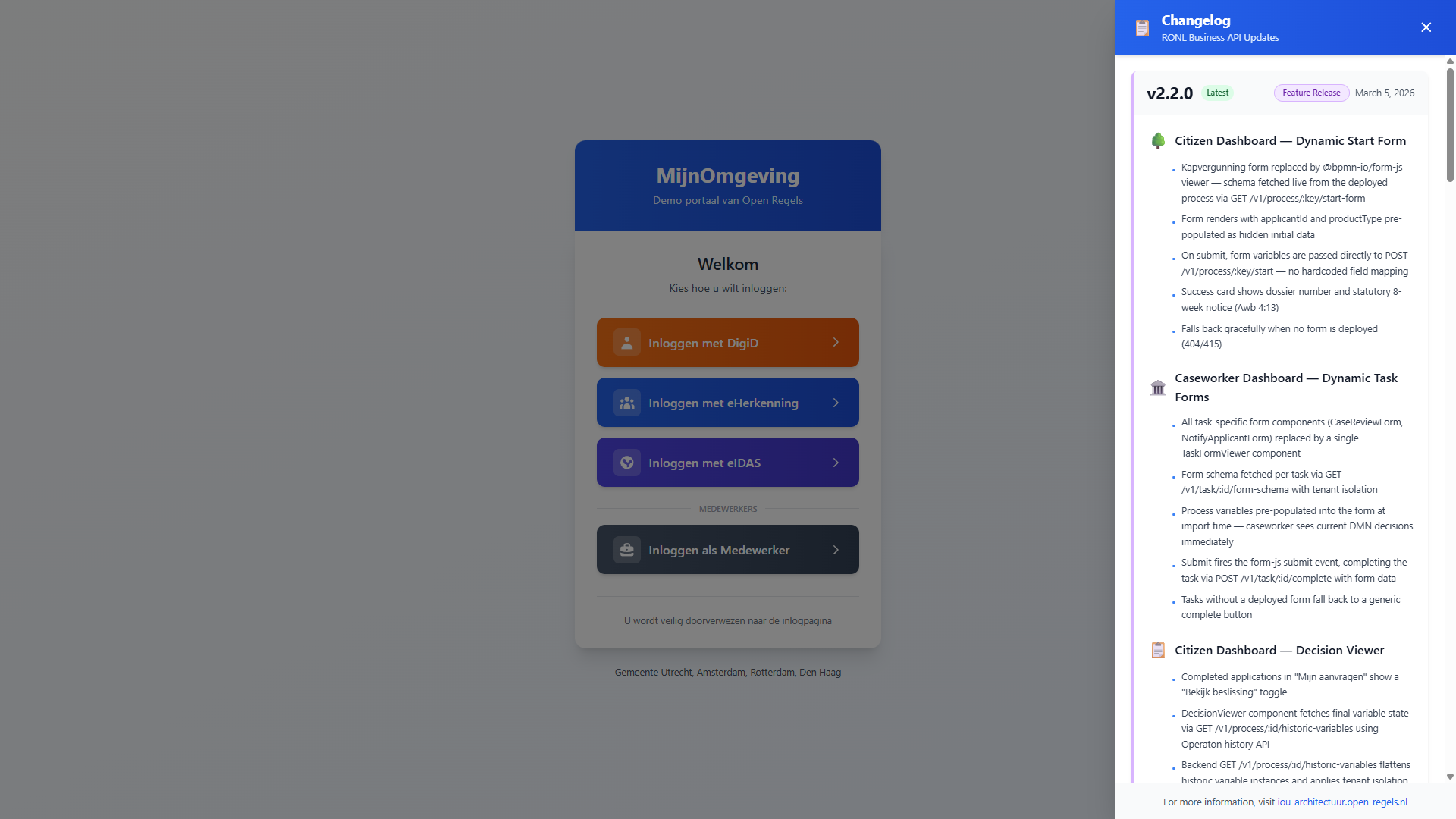
Features:
- Slides in from right (450px wide desktop, full-screen mobile)
- Blue gradient header matching MijnOmgeving theme
- Version-based organization with status badges
- Color-coded sections with icons
- Sticky footer with documentation link
- Closes via: click outside, ESC key, or X button
Usage in LoginChoice.tsx:
import { useState } from 'react';
import ChangelogPanel from './ChangelogPanel';

export default function LoginChoice() {
  const [changelogOpen, setChangelogOpen] = useState(false);

  return (
    <div>
      {/* Toggle Button */}
      <button onClick={() => setChangelogOpen(true)}>
        📋 Updates
      </button>

      {/* Changelog Panel */}
      <ChangelogPanel
        isOpen={changelogOpen}
        onClose={() => setChangelogOpen(false)}
      />
    </div>
  );
}
Updating changelog content:
Edit changelog-data.ts:
export const changelog: Changelog = {
  versions: [
    {
      version: "2.0.0",
      status: "Major Release",
      statusColor: "blue",
      borderColor: "blue",
      date: "February 21, 2026",
      sections: [
        {
          title: "Frontend Redesign",
          icon: "🎨",
          iconColor: "blue",
          items: [
            "New landing page with identity provider selection",
            "Custom Keycloak theme matching MijnOmgeving design",
          ],
        },
      ],
    },
  ],
};
Authentication with Keycloak JS
services/keycloak.ts exports the Keycloak instance. Initialisation is done manually in AuthCallback.tsx (not on import) so the IDP selection and caseworker sentinel can be applied before the first Keycloak call.
// services/keycloak.ts
const keycloak = new Keycloak({
  url: KEYCLOAK_URL, // resolved from hostname
  realm: "ronl",
  clientId: "ronl-business-api",
});

export default keycloak;
AuthCallback.tsx is the only place keycloak.init() is called. The two init strategies are:
| Strategy | onLoad value |
When used | Triggers redirect? |
|---|---|---|---|
| Citizen | 'login-required' |
digid, eherkenning, eidas | Yes — immediately |
| Caseworker | 'check-sso' |
medewerker | No — silent check only |
After check-sso returns false, keycloak.login({ loginHint: '__medewerker__' }) performs the redirect with the sentinel. After any successful authentication, sessionStorage.removeItem('selected_idp') is called before navigating to /dashboard.
Token refresh is handled automatically by the Keycloak JS adapter. The adapter refreshes the access token before the 15-minute expiry as long as the SSO session remains active.
Token refresh is still handled automatically by the adapter before the 15-minute expiry.
Multi-tenant theming
On successful login, services/tenant.ts reads the municipality claim from the decoded JWT and applies the corresponding theme:
initializeTenantTheme loads public/tenants.json, finds the matching entry, and calls applyTenantTheme, which sets CSS custom properties on document.documentElement:
root.style.setProperty("--color-primary", theme.primary);
root.style.setProperty("--color-primary-dark", theme.primaryDark);
// ...
All Tailwind utility classes and component styles reference these custom properties, so the entire UI re-themes without a page reload.
API client
services/api.ts wraps Axios and adds the JWT bearer token to every request:
const client = axios.create({
  baseURL: import.meta.env.VITE_API_URL,
});

client.interceptors.request.use((config) => {
  config.headers.Authorization = `Bearer ${keycloak.token}`;
  return config;
});
If a request returns HTTP 401 (token expired between refresh cycles), the interceptor triggers a silent Keycloak refresh and retries.
Environment variables
Required in .env files:
# Keycloak IAM
VITE_KEYCLOAK_URL=https://acc.keycloak.open-regels.nl

# Business API
VITE_API_URL=https://acc.api.open-regels.nl/v1

# Linked Data Explorer (used by ProcesBibliotheek)
VITE_LDE_API_URL=https://acc.backend.linkeddata.open-regels.nl/v1
Environment detection:
The application automatically detects the environment based on hostname:
const hostname = window.location.hostname;

let env: "local" | "acc" | "prod" = "local";
if (hostname.includes("acc.mijn.open-regels.nl")) {
  env = "acc";
} else if (hostname === "mijn.open-regels.nl") {
  env = "prod";
}
This is used in the Architecture footer to show environment-specific URLs.
Development commands
# Install dependencies
npm install

# Start dev server (http://localhost:5173)
npm run dev

# Build for production
npm run build

# Preview production build
npm run preview

# Type check
npm run type-check

# Lint
npm run lint

# Format
npm run format
Calling the Business API from a component
Example: Evaluating a DMN decision
import { businessApi } from "../services/api";
import type { OperatonVariable } from "@ronl/shared";

const handleEvaluate = async () => {
  try {
    const variables: Record<string, OperatonVariable> = {
      inkomen: {
        value: 24000,
        type: "Double",
      },
      leeftijd_requirement: {
        value: true,
        type: "Boolean",
      },
    };

    const response = await businessApi.evaluateDecision(
      "berekenrechtenhoogtezorg",
      variables,
    );

    if (response.success) {
      console.log("Result:", response.data.result);
    }
  } catch (error) {
    console.error("Evaluation failed:", error);
  }
};
Camunda Forms — @bpmn-io/form-js
Form rendering in both dashboards is handled by @bpmn-io/form-js v1.20.x (MIT-compatible). Forms are JSON schemas authored in the LDE Form Editor, deployed alongside BPMN in Operaton, and fetched at runtime by the backend form schema endpoints.
The package is already in packages/frontend/package.json. Import in any component that renders a form:
The CSS import is required — without it the form renders completely unstyled.
Callback stability pattern
All three form components store callbacks (onCompleted, onStarted, onError) in refs rather than including them in the useEffect dependency array. Without this, inline arrow functions passed from a parent cause the effect to re-fire on every render, instantiating a new Form object and looping indefinitely.
const onStartedRef = useRef(onStarted);
const onErrorRef = useRef(onError);

useEffect(() => { onStartedRef.current = onStarted; }, [onStarted]);
useEffect(() => { onErrorRef.current = onError; }, [onError]);

// Main init effect — callbacks intentionally NOT in the dependency array:
useEffect(() => { /* importSchema, attach listeners */ }, [processKey]);
Container div must always be in the DOM
The <div ref={containerRef} /> must be present in the DOM before form.importSchema is called. Conditional rendering (status === 'loading' && <div ref={...} />) means containerRef.current is null when the effect fires. Always render the container div and toggle visibility via a CSS class:
ProcessStartFormViewer
packages/frontend/src/components/ProcessStartFormViewer.tsx
Renders the start form for a BPMN process in the citizen dashboard.
| Prop | Type | Description |
|---|---|---|
processKey |
string |
BPMN process definition key |
initialData |
Record<string, unknown> |
Hidden pre-populated variables (e.g. applicantId, productType) |
onStarted |
(dossier: string) => void |
Called with businessKey on successful process start |
onError |
() => void |
Called on API or form error |
On mount: calls businessApi.process.startForm(processKey) to fetch the schema. On submit: calls businessApi.process.start(processKey, formData). Extracts businessKey from the response (falls back to processInstanceId).
TaskFormViewer
packages/frontend/src/components/CaseworkerDashboard/TaskFormViewer.tsx
Renders the form for a claimed task in the caseworker dashboard.
| Prop | Type | Description |
|---|---|---|
taskId |
string |
Operaton task ID |
variables |
Record<string, unknown> \| null |
Process variables for pre-population |
onCompleted |
() => void |
Called after successful task completion |
onError |
() => void |
Called on API or form error |
On mount: calls businessApi.process.startForm(processKey) to fetch the schema. On submit: calls businessApi.process.start(processKey, formData). Extracts businessKey from the response (falls back to processInstanceId). On 404 or 415 from the API, sets status = 'no-form' and renders "Geen formulier beschikbaar voor dit proces." — the service cannot be started. On unmount, calls form.destroy() to release the @bpmn-io/form-js instance.
DecisionViewer
packages/frontend/src/components/DecisionViewer.tsx
Displays the final decision for a completed process instance in the citizen dashboard (Mijn aanvragen). Readonly — no submit handler.
| Prop | Type | Description |
|---|---|---|
processInstanceId |
string |
Operaton process instance ID |
On mount, fires two requests in parallel via Promise.allSettled:
businessApi.process.historicVariables(processInstanceId)— resolves to the flattened final variable state.businessApi.process.decisionDocument(processInstanceId)— resolves to{ success: true, template: DocumentTemplate }if a document template is bundled in the Operaton deployment; rejects or returnssuccess: falsefor pre-v2.3.0 deployments.
Document template rendering (status === 'ready'): renderTipTapNode recursively walks the ProseMirror JSON tree, substituting {{variableKey}} text placeholders with the resolved historic variables and applying bold, italic, and underline marks. renderBlock dispatches on block.type: text → renderTipTapNode; variable → direct variable lookup; separator → <hr>; spacer → empty div; image → <img>. Zones are rendered in order — letterhead and contactInformation side-by-side in a CSS grid, then reference, body, closing, signOff, annex stacked vertically.
Form-js fallback (status === 'fallback'): When the decision-document fetch returns 404 or fails, a hardcoded FALLBACK_SCHEMA (five fields: status, permitDecision, finalMessage, replacementInfo, dossierReference) is mounted into a <div ref={containerRef}> via form.importSchema. The container div is always present in the DOM (toggled via CSS class) so that containerRef.current is non-null when the fallback useEffect fires.
Caseworker-only fields are excluded from both rendering paths.
See Dynamic Forms — Decision Viewer for the feature description.
Adding a new page
- Create the component:
// packages/frontend/src/pages/NewPage.tsx
export default function NewPage() {
  return (
    <div className="min-h-screen bg-gray-50">
      <h1>New Page</h1>
    </div>
  );
}
- Add route in App.tsx:
import NewPage from './pages/NewPage';

// In Routes
<Route path="/new-page" element={<NewPage />} />
- Add navigation link:
Adding a feature flag check
Feature flags are configured per municipality in public/tenants.json:
{
  "utrecht": {
    "name": "Gemeente Utrecht",
    "features": {
      "zorgtoeslag": true,
      "newFeature": false
    }
  }
}
Check the flag in your component:
import { useTenant } from '../contexts/TenantContext';

function MyComponent() {
  const { tenant } = useTenant();

  if (!tenant?.features?.newFeature) {
    return null; // Feature disabled for this municipality
  }

  return <div>New Feature Content</div>;
}
Styling guidelines
Use Tailwind utility classes:
<div className="bg-white rounded-lg shadow-md p-6">
  <h2 className="text-xl font-bold text-gray-900 mb-4">Title</h2>
</div>
Use CSS custom properties for themeable colors:
<button
  style={{ backgroundColor: 'var(--color-primary)' }}
  className="px-6 py-3 text-white rounded-lg"
>
  Themed Button
</button>
Responsive design:
Testing
Component Testing
Manual Testing Checklist
Landing page:
- All four login buttons render correctly
- Citizen buttons (DigiD, eHerkenning, eIDAS) are visually grouped
- Caseworker button appears below "MEDEWERKERS" divider
- Changelog panel opens and closes correctly
- Mobile responsive (< 640px)
Citizen flow:
- DigiD button stores
selected_idp = digidin sessionStorage -
AuthCallbackredirects to Keycloak withidpHint=digid - Login succeeds and JWT contains
roles: ["citizen"] - Dashboard loads with correct municipality theme
- Zorgtoeslag calculator submits and displays results
Caseworker flow:
- Caseworker button stores
selected_idp = medewerkerin sessionStorage -
AuthCallbackcallscheck-sso, notlogin-required - Keycloak login shows indigo "Inloggen als gemeentemedewerker" banner
- Username field is empty (sentinel
__medewerker__suppressed) - Login succeeds and JWT contains
roles: ["caseworker"] - SSO session reuse: second visit within session window goes straight to dashboard
Common:
- Token refresh works (keep page open > 15 min)
- "← Terug naar inlogkeuze" returns to
/in a single click - Logout redirects to landing page and clears SSO session
Browser Compatibility
Test in:
- Chrome 90+
- Firefox 88+
- Safari 14+
- Edge 90+
- Mobile Safari (iOS 14+)
- Chrome Mobile (Android)
Common Tasks
Update municipality themes
Edit public/tenants.json:
{
  "newmunicipality": {
    "name": "Gemeente NewCity",
    "theme": {
      "primary": "#1e3a8a",
      "primaryDark": "#1e40af"
    },
    "features": {
      "zorgtoeslag": true
    }
  }
}
Add a new IDP button
Edit LoginChoice.tsx:
{/* New IDP Button */}
<button
  onClick={() => handleIDPSelection('new-idp')}
  className="w-full flex items-center justify-between px-6 py-4 bg-gradient-to-r from-green-600 to-green-700 text-white rounded-xl"
>
  <div className="flex items-center gap-3">
    <div className="w-10 h-10 bg-white bg-opacity-20 rounded-lg">
      {/* Icon */}
    </div>
    <span className="font-semibold text-lg">Inloggen met New IDP</span>
  </div>
</button>
Debug Keycloak issues
Enable debug logging in services/keycloak.ts:
keycloak.onAuthSuccess = () => console.log("Auth success!");
keycloak.onAuthError = (error) => console.error("Auth error:", error);
keycloak.onAuthRefreshSuccess = () => console.log("Token refreshed");
keycloak.onAuthRefreshError = () => console.error("Token refresh failed");
keycloak.onTokenExpired = () => console.log("Token expired");
Related Documentation
- Local Development Setup — Prerequisites and getting started
- Frontend Deployment — Azure Static Web Apps deployment
- Keycloak Deployment — Custom theme setup
- Multi-Tenant Portal Features — Theming and tenant isolation
Questions? See Troubleshooting or check the Gitlab repository.