Local Development Setup
Prerequisites
| Tool | Minimum version | Purpose |
|---|---|---|
| Node.js | 20.x | Backend and frontend runtimes |
| npm | 10.x | Package management |
| Docker Engine | 24+ | Keycloak and PostgreSQL containers |
| Docker Compose | 2.x | Service orchestration |
| Git | Latest | Version control |
Clone and install
git clone https://github.com/your-org/ronl-business-api.git
cd ronl-business-api
npm install          # installs all workspace packages
The monorepo uses npm workspaces. npm install at the root installs dependencies for @ronl/backend, @ronl/frontend, and @ronl/shared simultaneously.
Environment files
Copy the example .env files and fill in local values:
cp packages/backend/.env.example packages/backend/.env
cp packages/frontend/.env.example packages/frontend/.env
packages/backend/.env — minimum for local development:
NODE_ENV=development
PORT=3002
HOST=localhost

CORS_ORIGIN=http://localhost:5173

KEYCLOAK_URL=http://localhost:8080
KEYCLOAK_REALM=ronl
KEYCLOAK_CLIENT_ID=ronl-business-api

JWT_ISSUER=http://localhost:8080/realms/ronl
JWT_AUDIENCE=ronl-business-api
TOKEN_CACHE_TTL=300

OPERATON_BASE_URL=https://operaton.open-regels.nl/engine-rest
OPERATON_TIMEOUT=30000

DATABASE_URL=postgresql://pgadmin:dev_password@localhost:5432/audit_logs
REDIS_URL=redis://localhost:6379

LOG_LEVEL=debug
LOG_FORMAT=json

RATE_LIMIT_WINDOW_MS=60000
RATE_LIMIT_MAX_REQUESTS=100
RATE_LIMIT_PER_TENANT=false

HELMET_ENABLED=true
SECURE_COOKIES=false
TRUST_PROXY=false

ENABLE_SWAGGER=true
ENABLE_METRICS=true
ENABLE_HEALTH_CHECKS=true
ENABLE_TENANT_ISOLATION=true
packages/frontend/.env — minimum for local development:
Start Docker services
Docker runs Keycloak and PostgreSQL locally:
This starts:
- keycloak — Keycloak 23 on http://localhost:8080
- postgres — PostgreSQL 16 on port 5432
On first start, Keycloak imports config/keycloak/ronl-realm.json automatically, creating the ronl realm with all test users, roles, and protocol mappers.
Wait approximately 30 seconds for Keycloak to be ready. You can monitor progress:
Keycloak is ready when you see: Keycloak 23.x.x on ... started
Start development servers
This starts both servers in parallel via concurrently:
- Backend —
http://localhost:3002(tsx watch, hot-reloads on TypeScript changes) - Frontend —
http://localhost:5173(Vite HMR, hot-reloads on React changes)
Open http://localhost:5173 in your browser. You will be redirected to Keycloak for login.
Test users
All test users have password test123.
| Username | Municipality | Role |
|---|---|---|
test-citizen-utrecht |
Utrecht | citizen |
test-caseworker-utrecht |
Utrecht | caseworker |
test-citizen-amsterdam |
Amsterdam | citizen |
test-caseworker-amsterdam |
Amsterdam | caseworker |
test-citizen-rotterdam |
Rotterdam | citizen |
test-caseworker-rotterdam |
Rotterdam | caseworker |
test-citizen-denhaag |
Den Haag | citizen |
test-caseworker-denhaag |
Den Haag | caseworker |
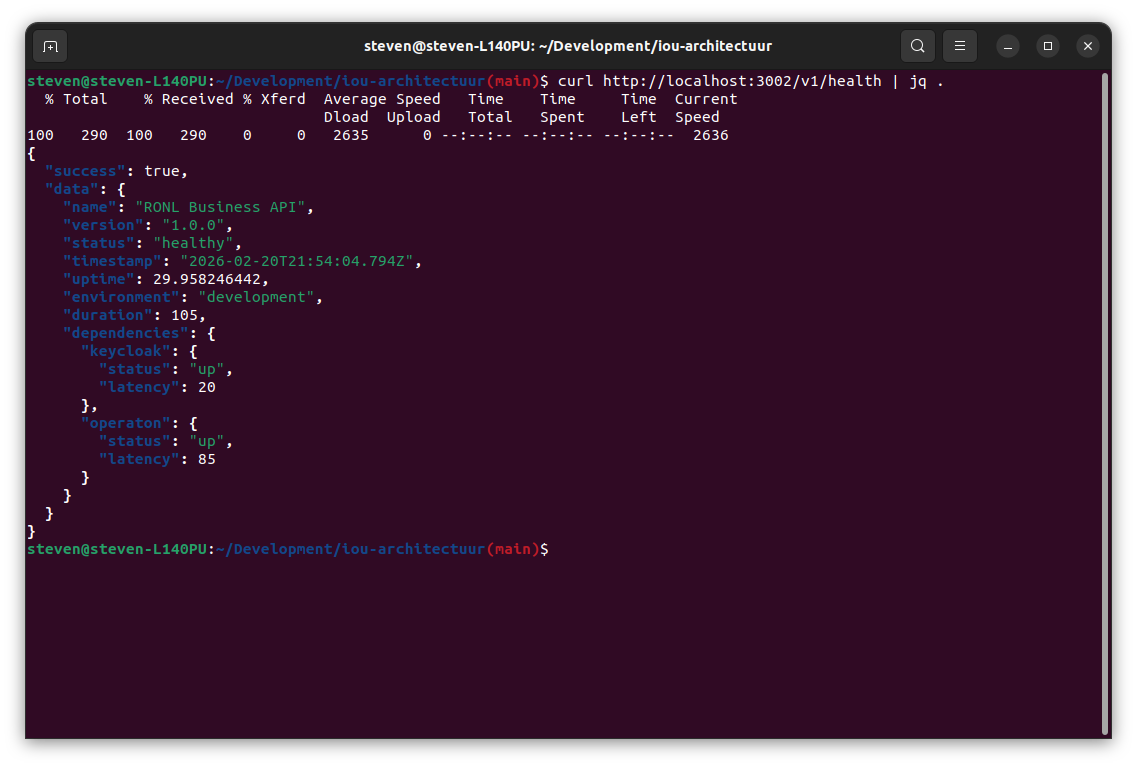
Verify the setup
Expected response:
{
  "name": "RONL Business API",
  "version": "1.0.0",
  "environment": "development",
  "status": "healthy",
  "services": {
    "keycloak": { "status": "up" },
    "operaton": { "status": "up" }
  }
}
Getting a JWT token for API testing
To test API endpoints directly (without the browser), obtain a token via curl. First retrieve the client secret from Keycloak Admin:
- Open
http://localhost:8080 - Login:
admin/admin→ select realm ronl - Navigate to Clients → ronl-business-api → Credentials
- Copy the Client secret
Then request a token:
TOKEN=$(curl -s -X POST http://localhost:8080/realms/ronl/protocol/openid-connect/token \
  -H "Content-Type: application/x-www-form-urlencoded" \
  -d "client_id=ronl-business-api" \
  -d "client_secret=<YOUR_CLIENT_SECRET>" \
  -d "username=test-citizen-utrecht" \
  -d "password=test123" \
  -d "grant_type=password" \
  | jq -r '.access_token')

echo "Token: $TOKEN"
Call a protected endpoint with the token:
curl -X POST http://localhost:3002/v1/process/zorgtoeslag/start \
  -H "Authorization: Bearer $TOKEN" \
  -H "Content-Type: application/json" \
  -d '{
    "variables": {
      "ingezeteneVanNederland": true,
      "18JaarOfOuder": true,
      "zorgverzekeringInNederland": true,
      "inkomenEnVermogen": 24000
    }
  }' | jq
Database access
Inspect the audit log database while the Docker services are running:
docker exec -it ronl-postgres psql -U postgres

# Switch to audit database
\c audit_logs

# View recent audit entries
SELECT * FROM audit_logs ORDER BY timestamp DESC LIMIT 10;

# View tenants
SELECT * FROM tenants;

# Exit
\q
Local service URLs
| Service | URL |
|---|---|
| Frontend | http://localhost:5173 |
| Backend API | http://localhost:3002 |
| Keycloak Admin | http://localhost:8080 (admin / admin) |
| Operaton Cockpit | http://localhost:8081/operaton/app/cockpit/default/ |
Stopping the environment
Ctrl+C                    # stop dev servers
npm run docker:down       # stop Docker services (keeps data)
npm run docker:down:volumes  # stop Docker and delete all data (clean slate)
Common issues
Keycloak Admin Console shows no realm
The realm import runs on first start only. If the container was started before config/keycloak/ronl-realm.json was present, run npm run docker:down:volumes && npm run docker:up.
JWT audience error on API calls
In Keycloak Admin: Clients → ronl-business-api → Client scopes → ronl-business-api-dedicated → Mappers → Add mapper → Audience → Save. Then log out and back in.
Roles not appearing in JWT
In Keycloak Admin: same path as above → Add mapper → User Realm Role → Save. Log out and back in.
CORS error in browser
Verify CORS_ORIGIN in packages/backend/.env matches the frontend URL exactly (including port).
For additional issues, see Troubleshooting.