Submitting a Calculation
This guide walks through how a citizen submits a zorgtoeslag (healthcare allowance) calculation — the reference use case for RONL Business API.
Prerequisites
You must be logged in. See Logging In — DigiD Flow if you have not yet authenticated.
Submitting the zorgtoeslag form
Step 1 — Open the service
After login, the portal shows the services available for your municipality. Select Zorgtoeslag berekenen (calculate healthcare allowance).
Step 2 — Fill in the form
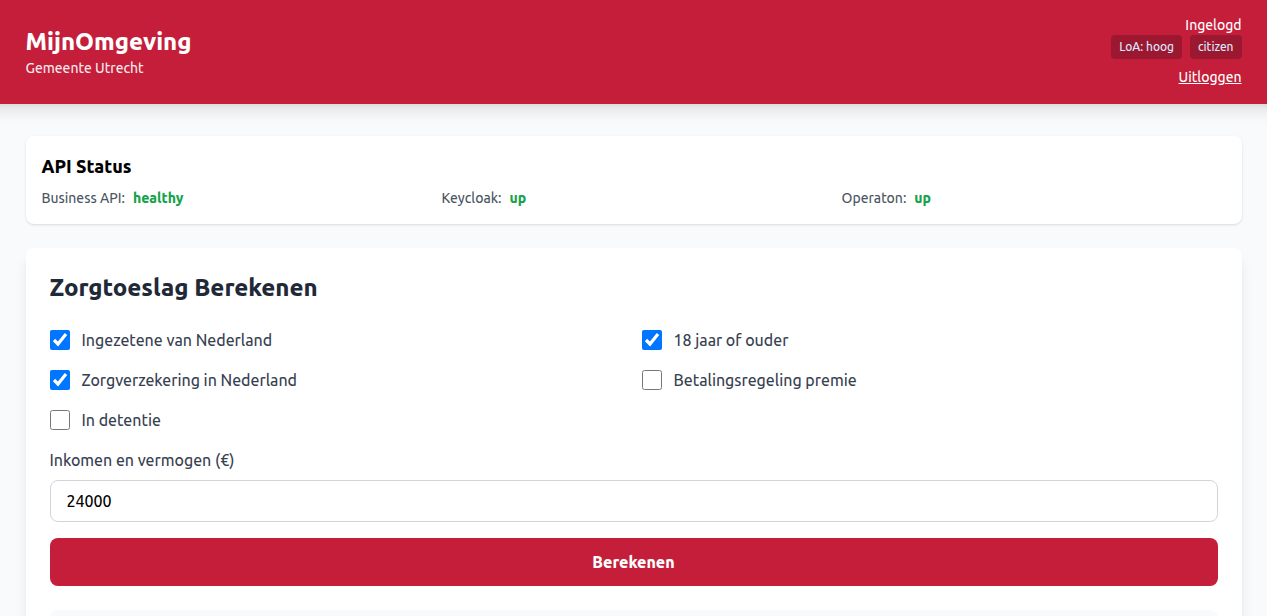
The form presents the eligibility criteria. The test environment pre-fills example values:
| Field | Label | Example value |
|---|---|---|
ingezeteneVanNederland |
Bent u ingezetene van Nederland? | ✓ |
18JaarOfOuder |
Bent u 18 jaar of ouder? | ✓ |
zorgverzekeringInNederland |
Heeft u een zorgverzekering in Nederland? | ✓ |
inkomenEnVermogen |
Jaarlijks inkomen (€) | 24000 |
Step 3 — Submit
Click Berekenen (Calculate). The portal sends:
POST /v1/process/zorgtoeslag/start
Authorization: Bearer <JWT>
Content-Type: application/json

{
  "ingezeteneVanNederland": true,
  "18JaarOfOuder": true,
  "zorgverzekeringInNederland": true,
  "inkomenEnVermogen": 24000
}
Step 4 — View the result
The result appears within a few seconds:
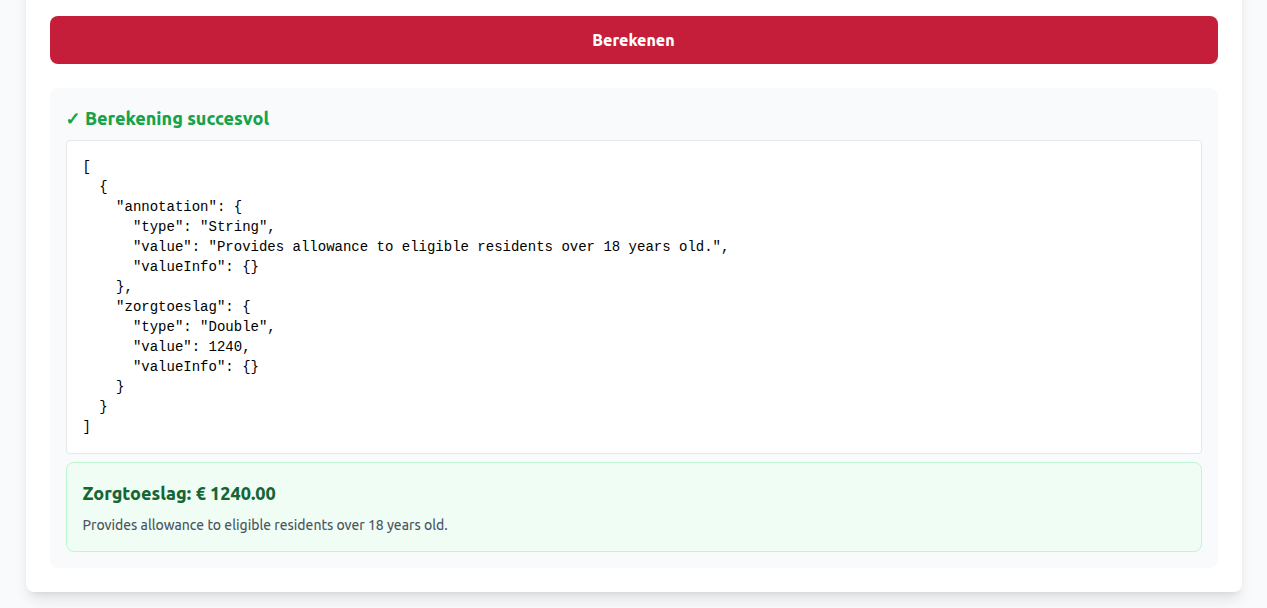
Resultaat: U heeft recht op zorgtoeslag
Maandbedrag: € 95,83 (€ 1.150 per jaar)
Aanvraagnummer: abc-123-def
Test scenarios
Use these to verify the calculation is working correctly end-to-end:
Scenario 1 — Eligible, standard income
| Field | Value |
|---|---|
| Ingezetene van Nederland | ✓ |
| 18 jaar of ouder | ✓ |
| Zorgverzekering in Nederland | ✓ |
| Betalingsregeling | ✗ |
| Detentie | ✗ |
| Jaarlijks inkomen | €24,000 |
Expected result: Eligible — zorgtoeslag €1,250 per year
Scenario 2 — Not eligible, income too high
| Field | Value |
|---|---|
| Ingezetene van Nederland | ✓ |
| 18 jaar of ouder | ✓ |
| Zorgverzekering in Nederland | ✓ |
| Betalingsregeling | ✗ |
| Detentie | ✗ |
| Jaarlijks inkomen | €50,000 |
Expected result: Not eligible — zorgtoeslag €0
Scenario 3 — Active payment plan
Same as Scenario 1 but with Betalingsregeling set to ✓.
Expected result: Payment plan active — eligibility and amount depend on current DMN rules; may be reduced or blocked.
Verification checklist
Before signing off on a test environment:
- Can log in as
test-citizen-utrecht - Can log in as
test-caseworker-utrecht - API health indicator shows all services UP
- Municipality name displays correctly in the portal header
- Assurance level (LoA) shows
hoog - Zorgtoeslag calculation completes and shows a result
- Results display correctly (amount, process instance ID)
- Can log out and log in again without error
-
Token auto-refreshes — session remains active beyond 15 minutes without manual re-login
-
The Business API validates your JWT
- Your
municipalityclaim (utrecht) is used to scope the request to your tenant - The input variables are combined with your user identity and submitted to Operaton
- Operaton executes the
zorgtoeslagBPMN workflow and evaluates the DMN decision table - The result is returned and an audit record is written
The process typically completes in under 2 seconds. The processInstanceId in the response (abc-123) can be used to retrieve the result later via GET /v1/process/abc-123/variables.
Troubleshooting
Form submits but no result appears
Check that the API Health indicator in the portal header shows all services as UP. If Operaton shows "down", the business rules engine is temporarily unavailable.
Error: FORBIDDEN / LOA_INSUFFICIENT
Your DigiD assurance level is too low for this service. Log out and log in again using DigiD with SMS code (midden) or the ID check app (hoog).
Error: RATE_LIMIT_EXCEEDED
Too many requests from your session. Wait one minute and try again.