BPMN Modeler
The BPMN Modeler is a full BPMN 2.0 process editor integrated into the Linked Data Explorer. It lets you design government service workflows visually, link BusinessRuleTask elements to DMN decision models or DRD chains, link UserTask and StartEvent elements to Camunda Forms authored in the Form Editor, and deploy the complete bundle — BPMN, subprocess BPMNs, and forms — to Operaton in a single operation.
Three-panel layout
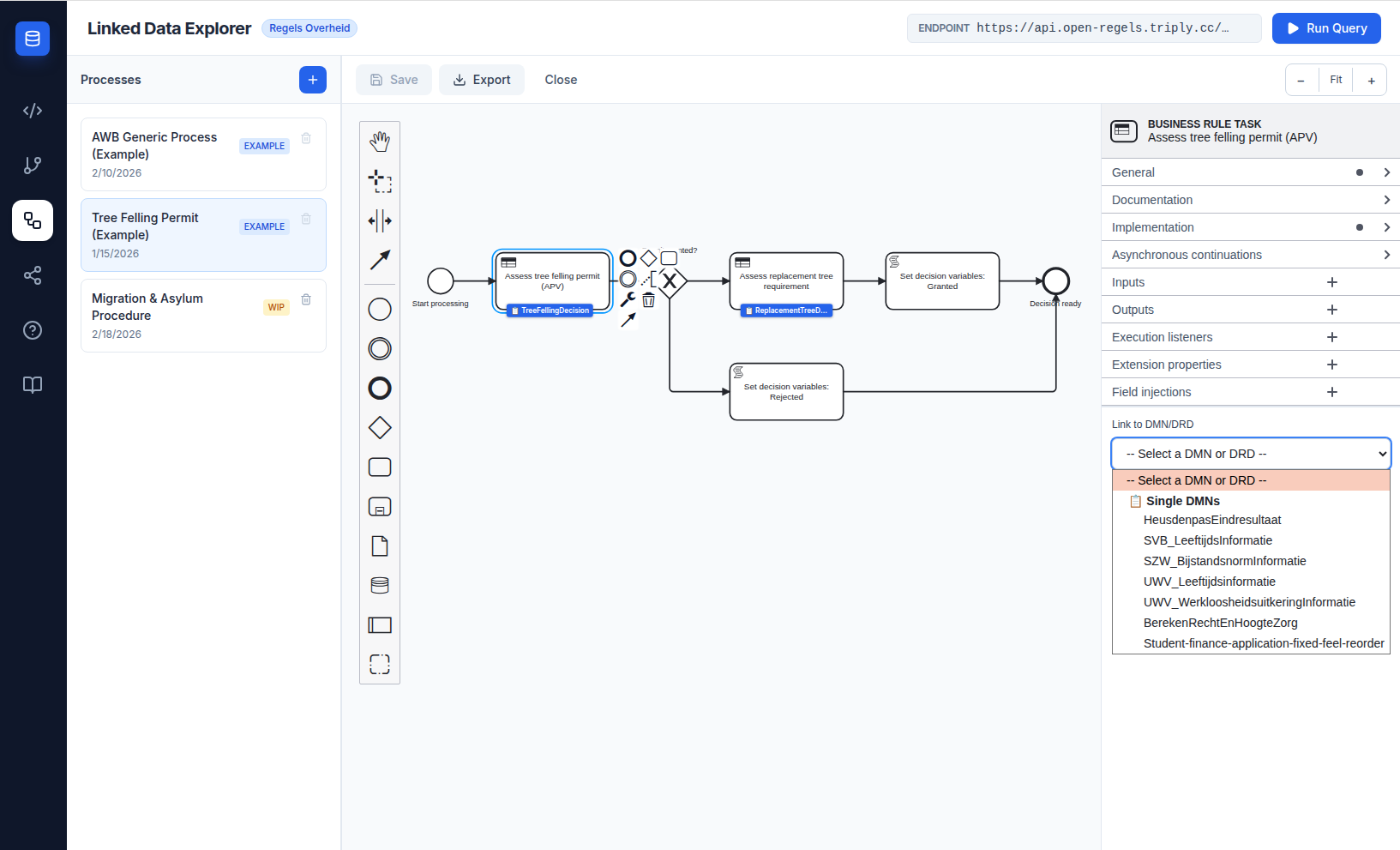
The Modeler uses the same three-panel layout as the Chain Builder:
- Left panel — Process list. Shows all saved processes with create, rename, and delete actions. An EXAMPLE badge marks protected processes that cannot be deleted.
- Centre panel — Canvas. Interactive BPMN 2.0 canvas powered by bpmn-js, with drag-and-drop palette, zoom controls, and scroll-to-zoom.
- Right panel — Properties. Shows element type, ID, name field, and — for
BusinessRuleTaskelements — the DMN/DRD decision reference section.
Process library
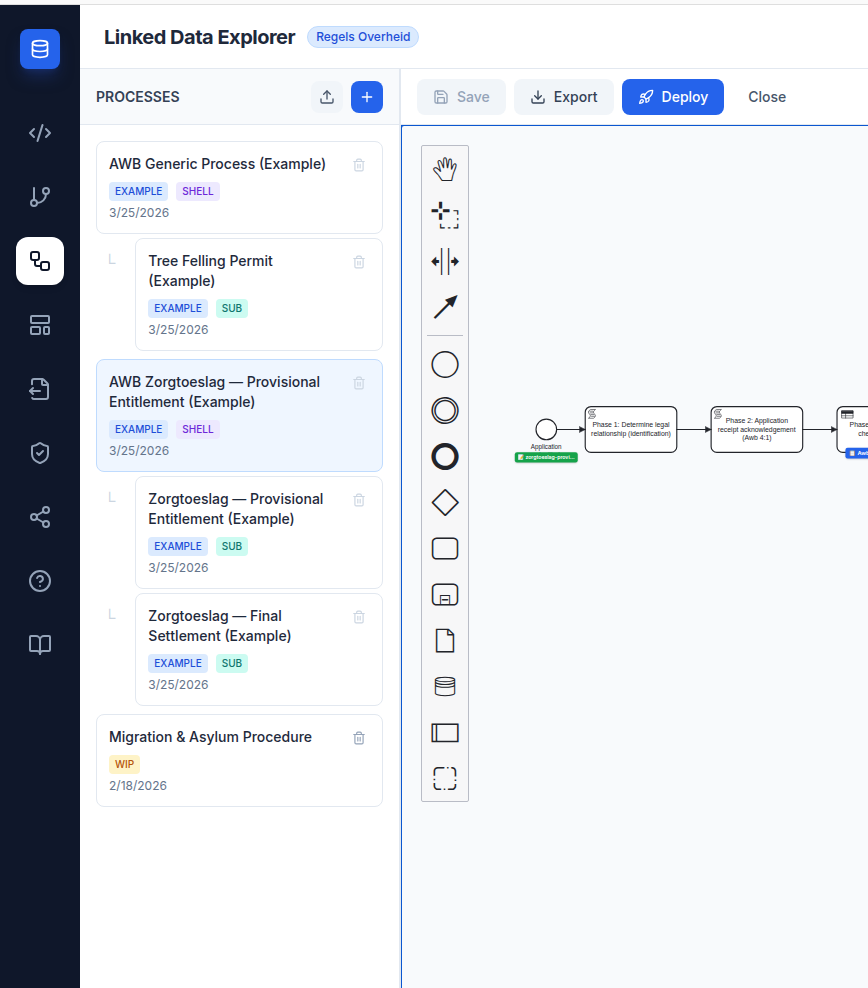
The left panel lists all processes grouped by their role in the AWB shell pattern.
Shell / subprocess hierarchy
The Linked Data Explorer models government service workflows as two-layer BPMN compositions: a universal AWB shell process handles the eight statutory procedural phases, and a product-specific subprocess delivers the substantive decision via a Call Activity. The process list reflects this structure visually.
Shell processes are top-level entries. Their subprocesses are indented beneath them with a tree connector. Standalone processes — those with no parent-child relationship — appear as top-level entries without indentation.
Role badges
Each process card carries one or more badges:
| Badge | Colour | Meaning |
|---|---|---|
EXAMPLE |
Blue | Seeded read-only example — cannot be deleted |
WIP |
Amber | Work in progress — user-authored |
SHELL |
Violet | AWB shell process — calls one or more subprocesses via a Call Activity |
SUB |
Teal | Subprocess — called by a shell via its calledElement attribute |
Process roles
Every BpmnProcess record carries three relationship fields:
| Field | Type | Description |
|---|---|---|
bpmnProcessId |
string |
The <process id="..."> value from the BPMN XML |
processRole |
'shell' \| 'subprocess' \| 'standalone' |
How this process relates to others |
calledElement |
string? |
For subprocesses: the bpmnProcessId of the parent shell |
User-created and imported processes default to standalone. The BPMN <process id="..."> value is extracted automatically from the XML on save.
Example processes
| Process | processRole |
calledElement |
|---|---|---|
| AWB Generic Process | shell |
— |
| Tree Felling Permit | subprocess |
AwbShellProcess |
| AWB Zorgtoeslag — Provisional Entitlement | shell |
— |
| Zorgtoeslag — Provisional Entitlement | subprocess |
AwbZorgtoeslagProcess |
| Zorgtoeslag — Final Settlement | subprocess |
AwbZorgtoeslagProcess |
| Migration & Asylum Procedure | standalone |
— |
BPMN palette
The palette provides all standard BPMN 2.0 elements: start, intermediate, and end events; tasks (including business rule tasks); gateways (exclusive, parallel, inclusive, event-based); sub-processes; data objects; pools; and text annotations.
DMN/DRD linking
When a BusinessRuleTask is selected in the properties panel, a Link to DMN/DRD dropdown appears. It loads options from two sources simultaneously:
- DRDs (Unified Chains) — DRD templates saved locally from the Chain Builder
- Single DMNs — individual decision models from the active TriplyDB endpoint
Selecting an option auto-populates camunda:decisionRef with the correct identifier and suggests a value for camunda:resultVariable. A visual info card below the dropdown confirms the selection, with purple styling for DRDs and blue for single DMNs. DRD cards also show the chain composition (which DMNs the DRD combines).
Export
Processes can be exported as .bpmn files for deployment to Operaton. The XML uses camunda: namespace attributes, which Operaton accepts for compatibility with the Camunda 7 ecosystem.
Form linking
When a UserTask or StartEvent is selected, the properties panel shows a Link to Form dropdown in addition to the standard element fields. The dropdown lists every form currently stored in the Form Editor's localStorage.
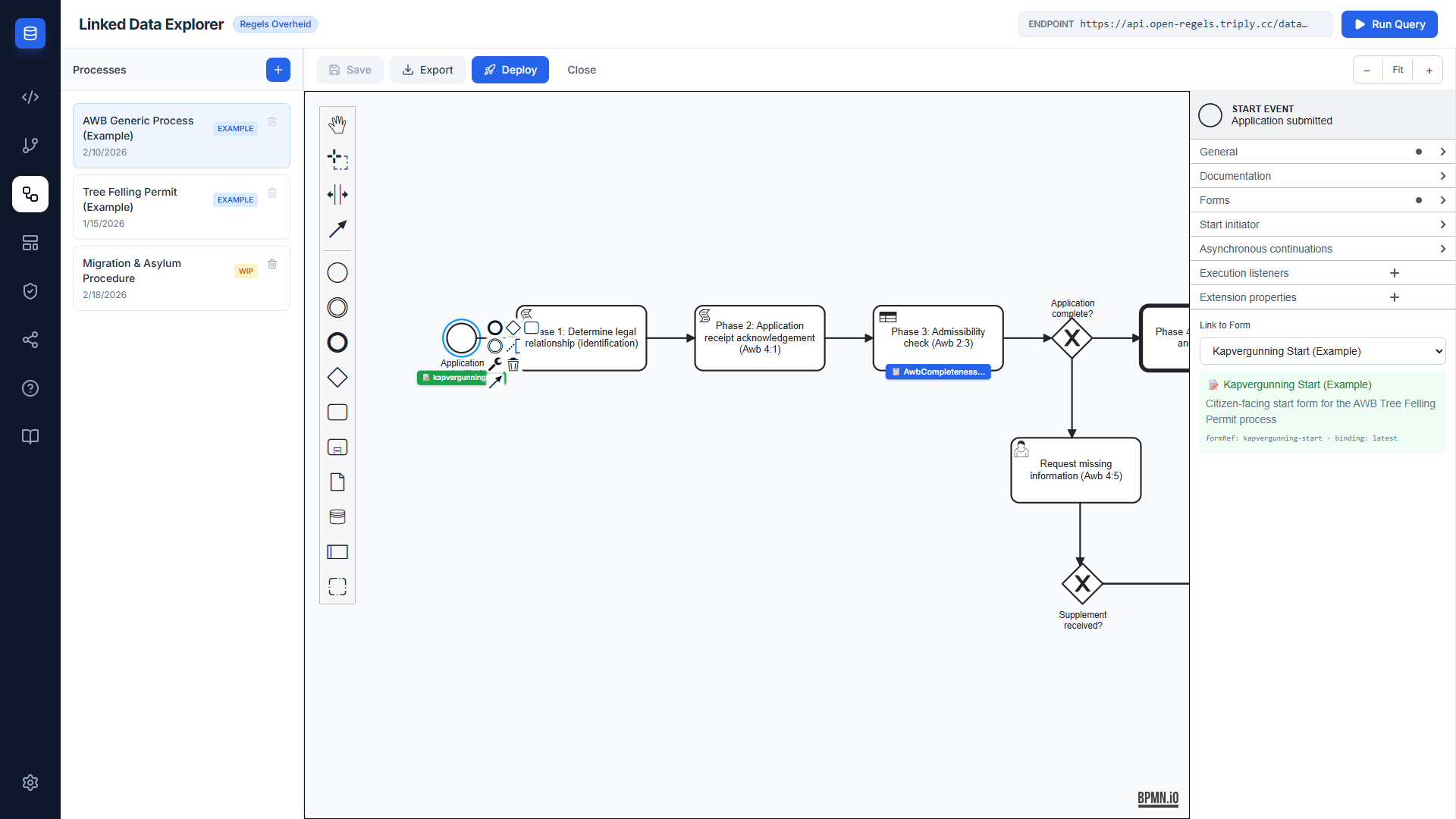
Selecting a form writes two attributes to the BPMN XML:
camunda:formRefBinding="latest" instructs Operaton to always resolve the most recently deployed version of that form ID, eliminating the need for version pinning.
A green badge appears below the element on the canvas once a form is linked, showing the form ID. The badge colour distinguishes form links (green) from DMN decision links (blue).
To remove a form link, open the Link to Form dropdown and select the blank option at the top.
Document template linking
When a UserTask is selected, the properties panel shows a Link decision template dropdown below the form selector. The dropdown lists every document template saved in the Document Composer's localStorage.
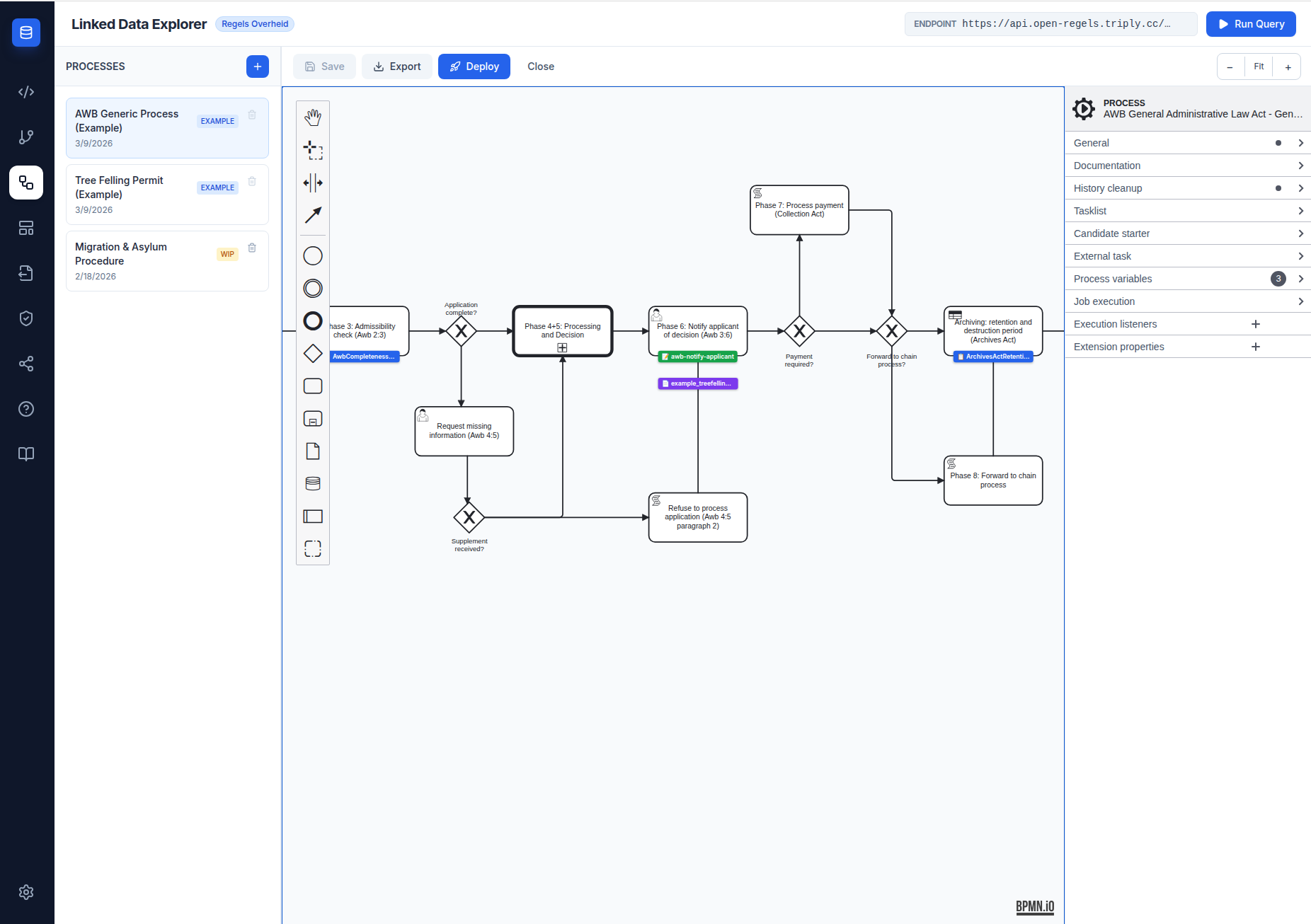
Selecting a template writes camunda:documentRef to the BPMN XML and renders a purple badge (📄) beneath the element on the canvas. The badge is positioned below the green form badge so all three linked artefacts are visible simultaneously:
| Badge colour | Artefact type | Attribute written |
|---|---|---|
| Amber | DMN / DRD decision | camunda:decisionRef |
| Green | Camunda Form | camunda:formRef |
| Purple | Document template | camunda:documentRef |
Document template linking is only available for UserTask elements (not StartEvent).
See Document Composer for how to create and manage document templates.
One-click deploy
The Deploy button in the Modeler toolbar opens a deploy modal that collects all resources needed for a complete Operaton deployment:
- The currently open BPMN file
- Any subprocess BPMNs referenced via
calledElementattributes (resolved recursively from saved processes) - All
.formfiles whoseidmatches acamunda:formReffound anywhere in the bundle
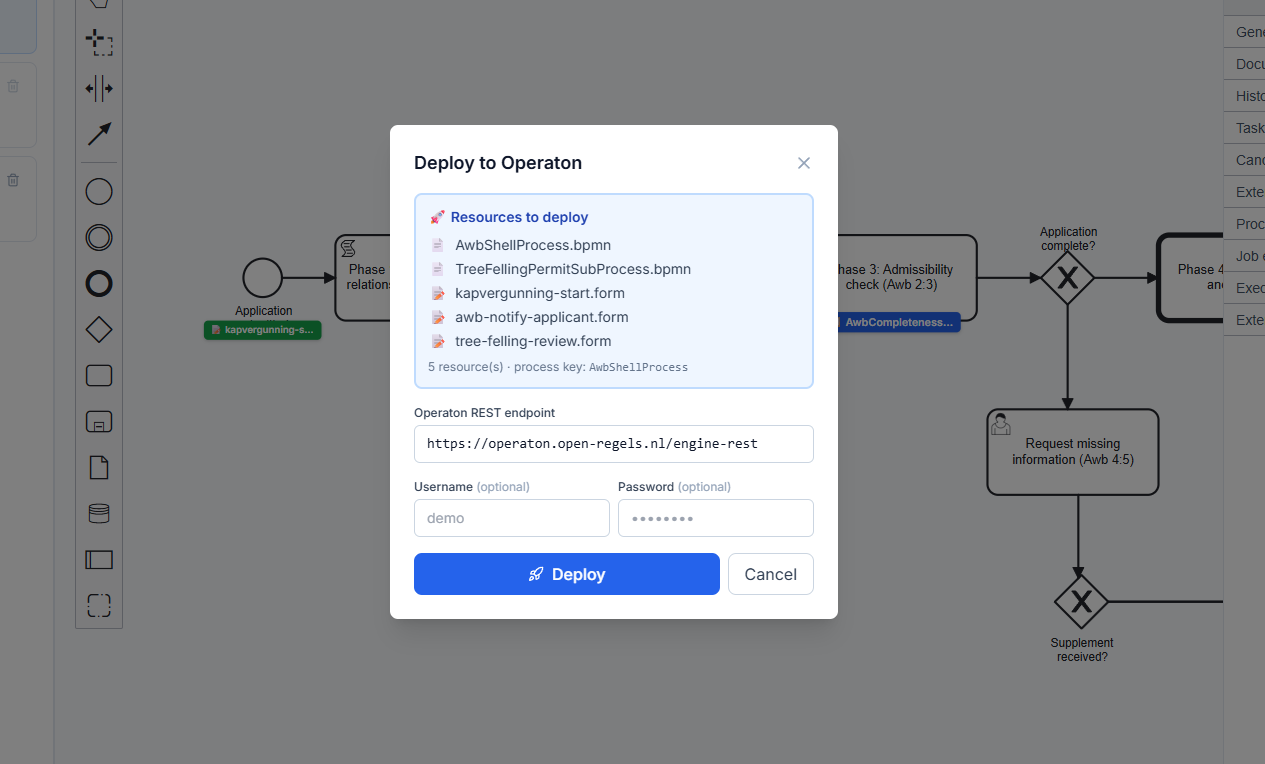
All resources are sent in a single multipart POST to Operaton. Because the BPMN and its forms share one deployment ID, camunda:formRef resolves correctly at runtime — no separate form deployment step is needed.
The modal provides:
- Operaton endpoint — pre-filled from
VITE_OPERATON_BASE_URL, editable per deployment - Username / Password — optional HTTP Basic Auth for instances that require it
- Resource list — shows exactly what will be included before you commit
- Deploy button — disabled after a successful deployment to prevent accidental re-deploy
If a camunda:formRef references a form ID that is not found in localStorage, it is listed as an unmatched reference. The deployment still proceeds, but that form will not resolve at runtime.
RoPA record linkage
Every process in the LDE can be linked to a RoPA record via ronl:ropaRef. Two mechanisms are available:
RoPA Record selector in the process list — when a process is open, a RoPA Record panel is pinned to the bottom of the left panel below the scrollable process list. A dropdown shows all available records; selecting one writes ronl:ropaRef into the process XML immediately.
BPMN Link tab in the RoPA Editor — the RoPA Editor's BPMN Link tab writes the same attribute and shows whether the current record ID matches the value already in the XML.
Both mechanisms produce identical results. The attribute is registered in ronlModdleDescriptor.json under the http://ronl.nl/schema/1.0 namespace so it survives saveXML() serialisation.
Deploy warning
The deploy modal checks for the presence of ronl:ropaRef on the process element. If absent, an amber warning appears between the resource list and the resource count line. The warning is non-blocking — the bundle can still be deployed — but is intended to prevent deploying to production without a linked RoPA record.
See RoPA Records for the full feature description.
Tree Felling Permit example
On first launch, the Modeler auto-creates the Tree Felling Permit example process, demonstrating a complete municipal workflow: application submission, two BusinessRuleTask elements linked to DMN decision models (TreeFellingDecision, ReplacementTreeDecision), an exclusive gateway routing to permit granted or rejected outcomes. The example is protected from deletion and serves as a reference for process designers.
Engine compatibility
The Modeler targets Operaton, the open-source fork of Camunda 7 CE. It uses camunda-bpmn-moddle for namespace support since no operaton-bpmn-moddle package exists yet. Operaton accepts both camunda: and operaton: namespace attributes, ensuring compatibility.
The Modeler targets Operaton, the open-source fork of Camunda 7 CE. It uses camunda-bpmn-moddle for namespace support since no operaton-bpmn-moddle package exists yet. The camunda:formRef and camunda:formRefBinding attributes used for form linking are also accepted by Operaton under the camunda: namespace.
Related documentation
- Form Editor — creating and managing Camunda Forms in the LDE
- RONL Business API — Dynamic Forms — how deployed forms are fetched and rendered at runtime in MijnOmgeving
- RONL API Endpoints — Process definition deployment — the
POST /api/dmns/process/deployendpoint this button calls - Document Composer — authoring decision document templates
- Document Composer user guide — step-by-step workflow