DMN Validator
The DMN Validator lets you validate one or more DMN files against the RONL DMN+ syntactic layers before publishing them to TriplyDB. It is accessible from the shield icon (🛡) in the sidebar.
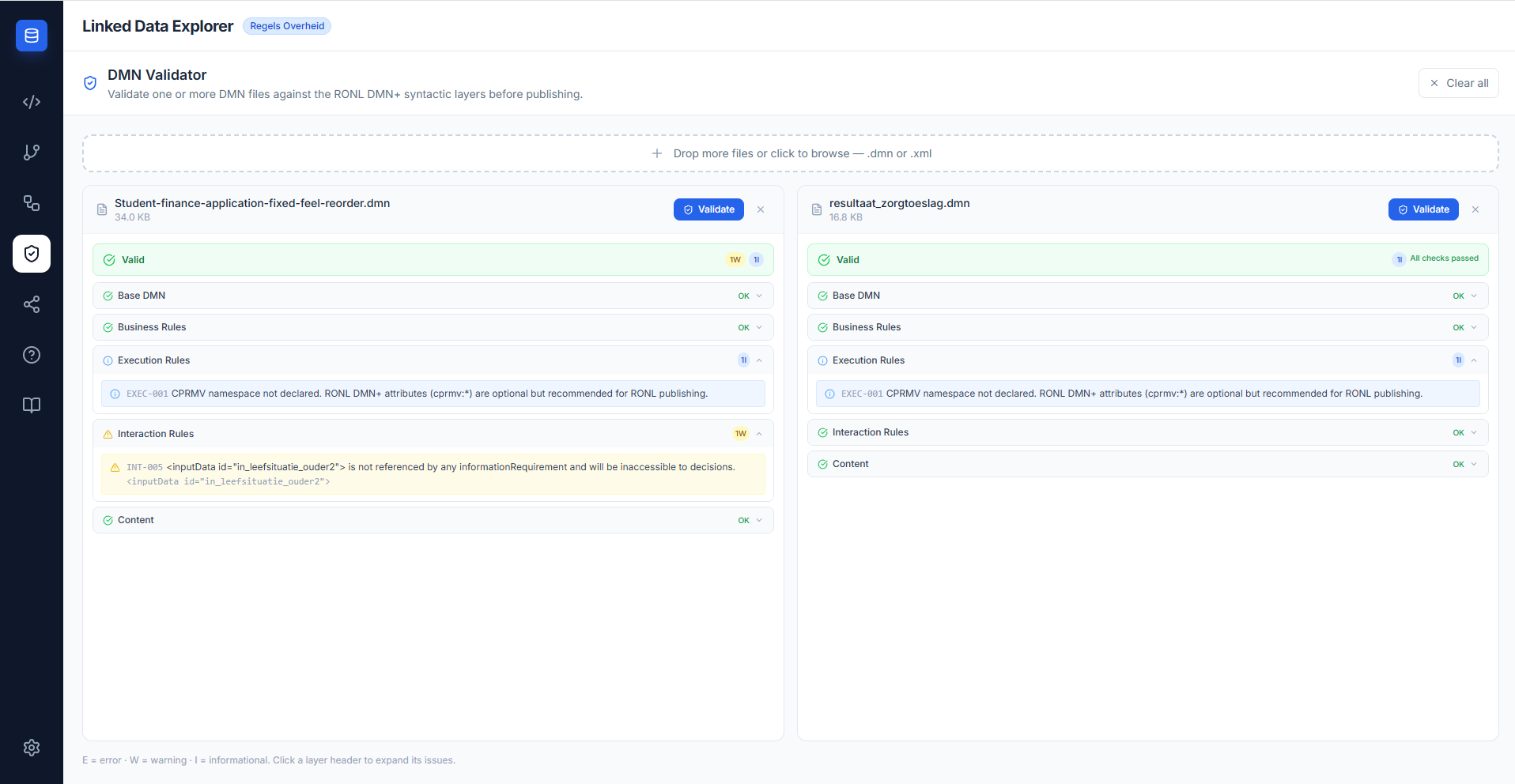
Multi-file validation
You can drop any number of .dmn or .xml files onto the validator at once, or add files incrementally — the drop zone remains visible at the top of the panel whenever files are loaded. Files are validated independently and displayed side-by-side for easy comparison.
Each file card shows:
- File name and size
- A Validate button to trigger validation for that file individually
- A Validate all button in the header to validate all loaded files at once
- The validation result with a summary badge and collapsible layer sections
- A remove (×) button to dismiss the file
Navigation state is preserved: switching to another view (SPARQL editor, chain builder, etc.) and returning does not clear the loaded files or their results.
Validation layers
Results are grouped into five layers. Each layer can be expanded to see individual issues. Issues carry a severity, a typed code, and a human-readable message.
| Layer | Badge | Covers |
|---|---|---|
| Base DMN | BASE-* | XML well-formedness, namespace, root element, required attributes |
| Business Rules | BIZ-* | Hit policy, typeRef presence and correctness, rule entry counts, hit-policy overlap detection |
| Execution Rules | EXEC-* | CPRMV extension attributes, enum values, date formats, BWB IDs |
| Interaction Rules | INT-* | DRD wiring — href resolution, orphaned inputs (DRDs only), variable name consistency, missing inputData declarations (INT-007) |
| Content | CON-* | Metadata quality — descriptions, typeRef, text annotations |
A file is valid when no layer produces an error. Warnings and informational messages are advisory; they highlight quality improvements recommended for RONL publishing but do not block use.
For the complete specification of every code and its rationale, see the DMN Validation Reference.
Severity levels
| Icon | Level | Meaning |
|---|---|---|
| 🔴 | Error | The DMN has a structural or semantic problem that will likely cause deployment or execution failure. Must be resolved. |
| 🟡 | Warning | The DMN will work but deviates from RONL publishing standards. Should be resolved before publishing. |
| 🔵 | Info | A quality suggestion. No functional impact. |
Validation example
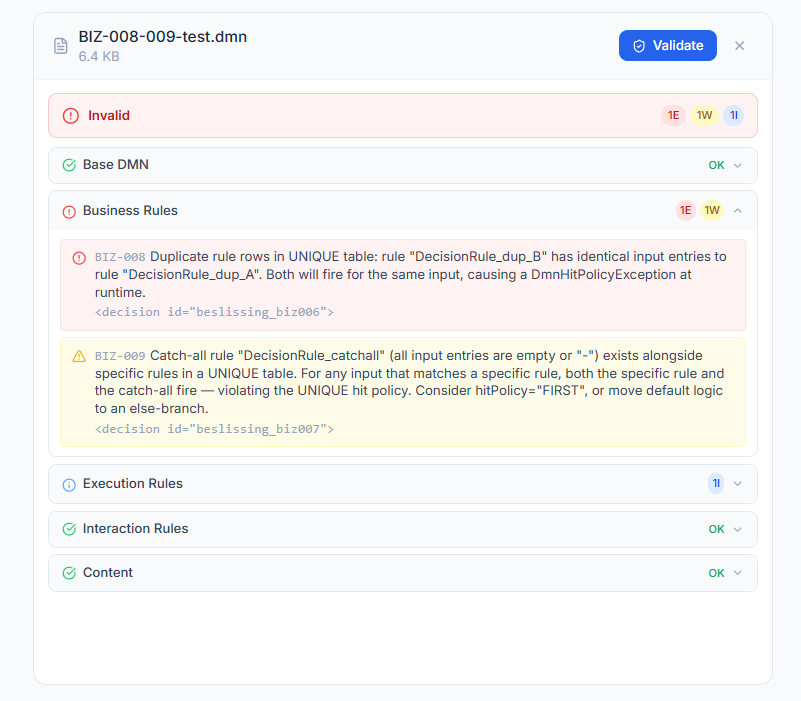
The screenshot below shows BIZ-008-009-test.dmn — a file deliberately authored with two hit-policy violations — loaded in the validator. The Business Rules layer reports one error and one warning.
Comparing files
Load multiple files to compare their validation profiles side-by-side. This is particularly useful when:
- Reviewing a set of DMNs before a batch publish to TriplyDB
- Comparing an updated version of a DMN against its predecessor
- Checking that a vendor's DMN implementation meets the same standards as the reference model
Each card scrolls independently, so you can inspect the layer details of one file without losing your position in another.