RoPA Records
The RoPA Records feature lets Product Owners author and maintain a Record of Processing Activities (RoPA) for every deployed process bundle, fulfilling the mandatory GDPR Article 30 obligation for government processing activities. Records are stored in PostgreSQL, linked to their BPMN process via ronl:ropaRef, and published to a public-facing website isolated from the LDE stack.
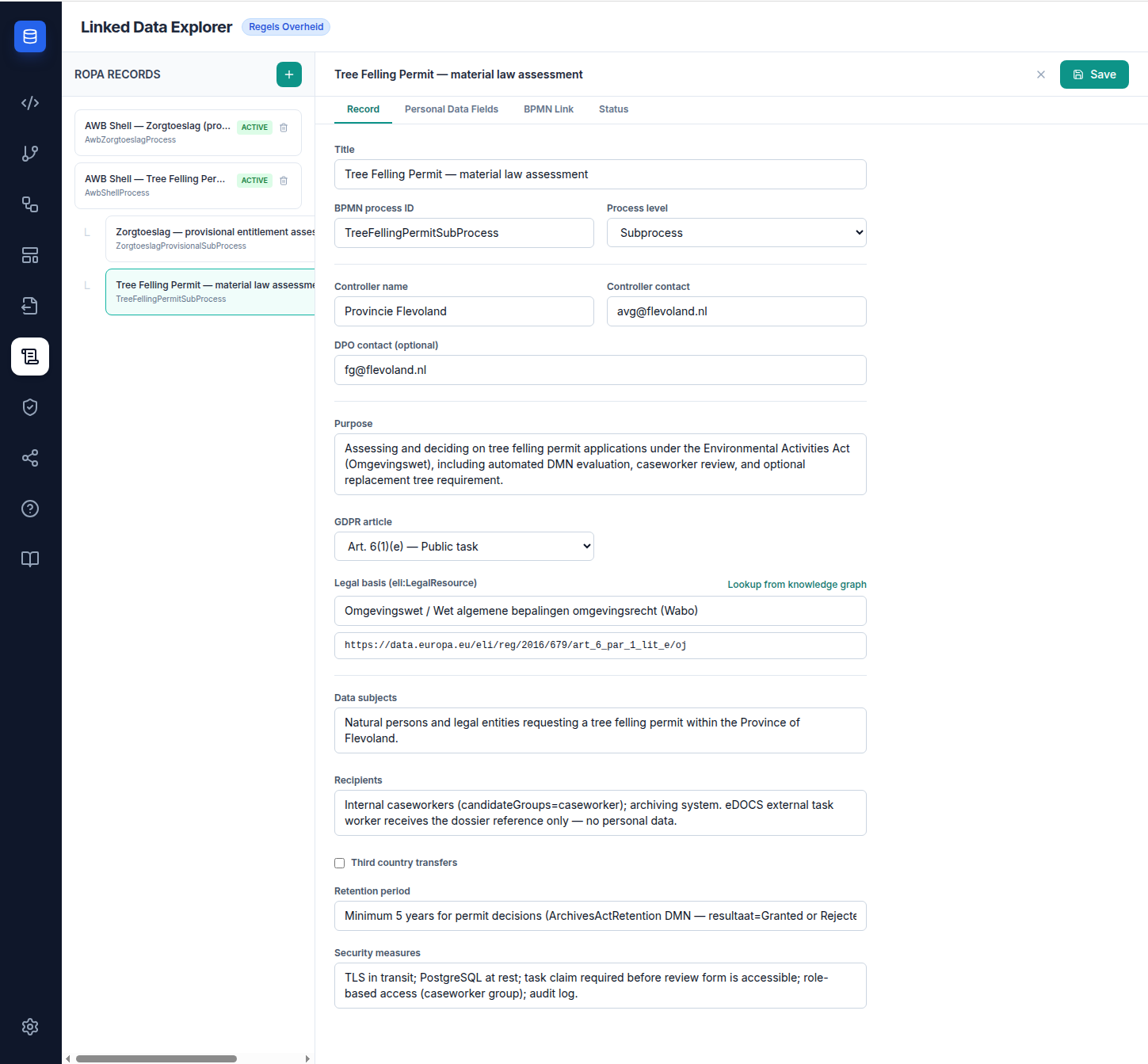
Two-panel layout
The RoPA Records view follows the same two-panel convention as the Form Editor:
- Left panel — Record list. All RoPA records grouped as shell processes first, subprocesses second, each with a DRAFT / ACTIVE / ARCHIVED status badge and a delete control.
- Right panel — Record editor. Four tabs covering the full GDPR Art. 30 data model, BPMN linkage, and lifecycle management.
Record list
Each entry in the list shows the record title, the bpmnProcessId it covers, and its current status. Shell records are top-level entries; subprocess records are indented beneath their parent shell with a tree connector — mirroring the hierarchy in the BPMN Modeler process list.
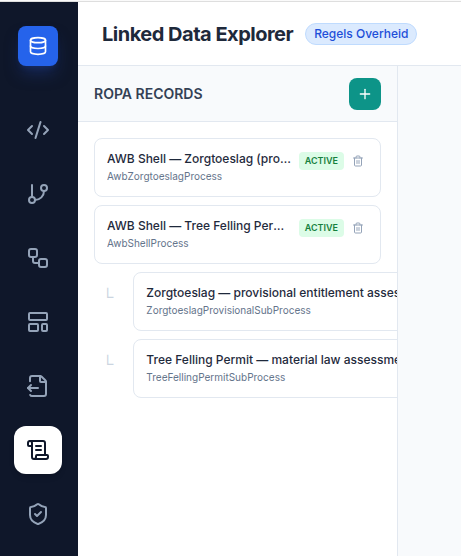
Clicking a record opens it in the editor. The + button in the panel header creates a new blank record.
Record tab
The Record tab collects all GDPR Article 30 mandatory fields:
| Field | Description |
|---|---|
| Title | Human-readable name for the processing activity |
| BPMN process ID | The <process id="..."> value from the BPMN XML — used to link the record to its process |
| Process level | Shell or Subprocess — reflects the AWB two-layer architecture |
| Controller name | Name of the data controller organisation |
| Controller contact | Contact address for the controller |
| DPO contact | Data Protection Officer contact (optional) |
| Purpose | Description of why the personal data is processed |
| GDPR article | Legal basis from the dropdown — Art. 6(1)(a) through (f) |
| Legal basis | eli:LegalResource URI and human-readable label |
| Data subjects | Categories of persons whose data is processed |
| Recipients | Who receives the data, including internal and external parties |
| Third country transfers | Toggle — reveals a detail field if transfers exist |
| Retention period | How long data is kept and under which statutory basis |
| Security measures | Technical and organisational measures in place |
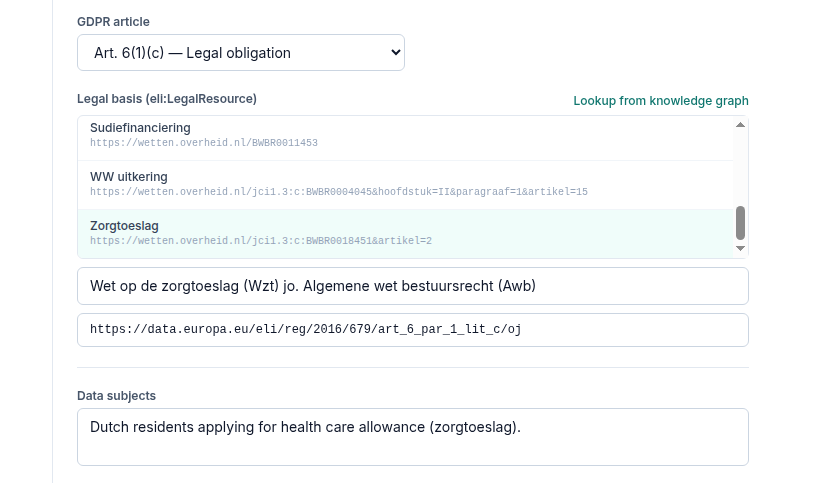
Legal basis lookup
The Lookup from knowledge graph button fires a SPARQL query against the TriplyDB RONL endpoint to retrieve all eli:LegalResource resources linked to cpsv:PublicService entries. Results appear as a pick-list; selecting one populates both the URI and label fields automatically.
Personal Data Fields tab
This tab lists every personal data field collected by the forms linked to this process. The Hydrate from forms button reads all camunda:formRef values from the process XML, loads the matching form schemas from the Form Editor storage, and appends one row per form component that has a key property — skipping headings, text blocks, and buttons.
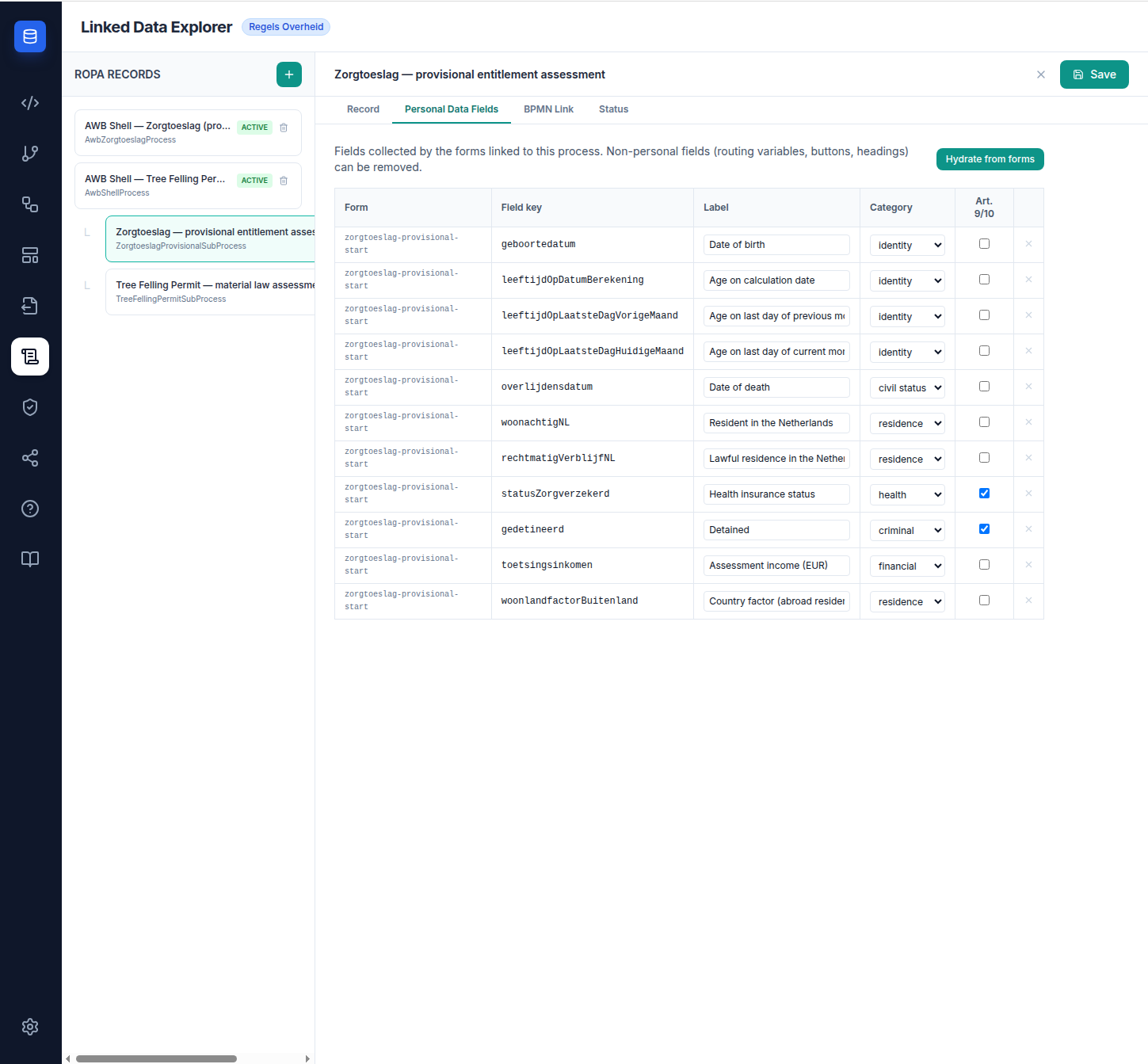
For each field the Product Owner classifies:
- Data category —
identity,financial,residence,health,civil status,criminal, orother - Art. 9/10 — checkbox for health data (Art. 9) and criminal data (Art. 10) — renders as a red badge on the public site
Non-personal fields (routing variables, computed outputs) can be removed from the table using the × button on each row.
BPMN Link tab
The BPMN Link tab writes ronl:ropaRef into the process XML, formally linking the record to its BPMN definition. The record must be saved first so it has a UUID.
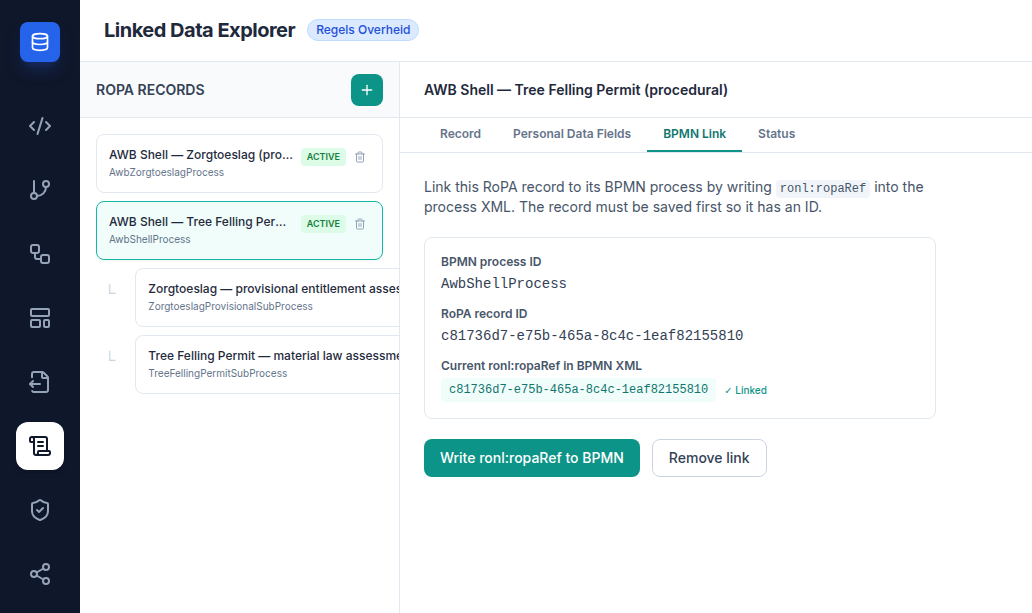
Clicking Write ronl:ropaRef to BPMN injects the attribute into the process XML and saves via BpmnService. If the xmlns:ronl namespace declaration is absent from the <definitions> element, it is added automatically.
The status indicator shows three states:
- Not linked — no
ronl:ropaRefpresent in the XML - Linked (green) —
ronl:ropaRefmatches this record's ID - Points to a different record (amber) — the XML has a
ronl:ropaRefbut it references a different record ID
Status tab
The Status tab controls the publication lifecycle of the record.
| Status | Meaning |
|---|---|
| Draft | Internal only — not returned by the public endpoint |
| Active | Publicly visible via GET /v1/ropa/public — appears on the public site |
| Archived | Hidden from public site — retained for audit purposes |
Activating a record shows a confirmation dialog: "Activating this record will make it publicly visible on ropa.flevoland.nl. Continue?" Status changes take effect after saving the record with the Save button in the top bar.
RoPA Selector in the BPMN Modeler
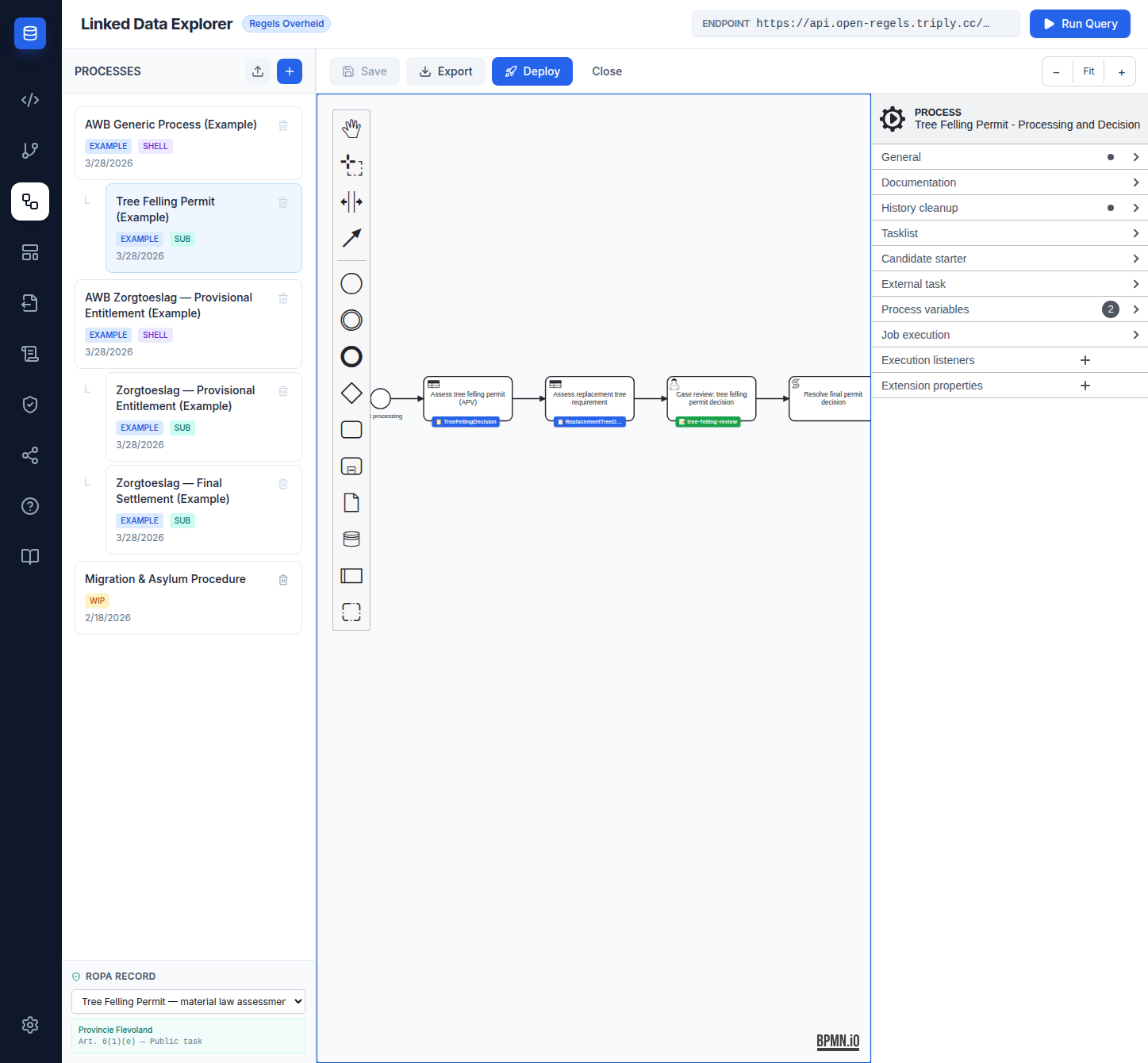
When a process is open in the BPMN Modeler, a RoPA Record panel appears pinned to the bottom of the process list — below the scrollable card list. It shows a dropdown of all available RoPA records and writes ronl:ropaRef directly into the process XML on selection, without requiring any canvas element to be selected.
Deploy modal warning
When deploying a bundle to Operaton, the deploy modal checks whether ronl:ropaRef is present on the process element. If absent, an amber warning is shown between the resource list and the resource count:
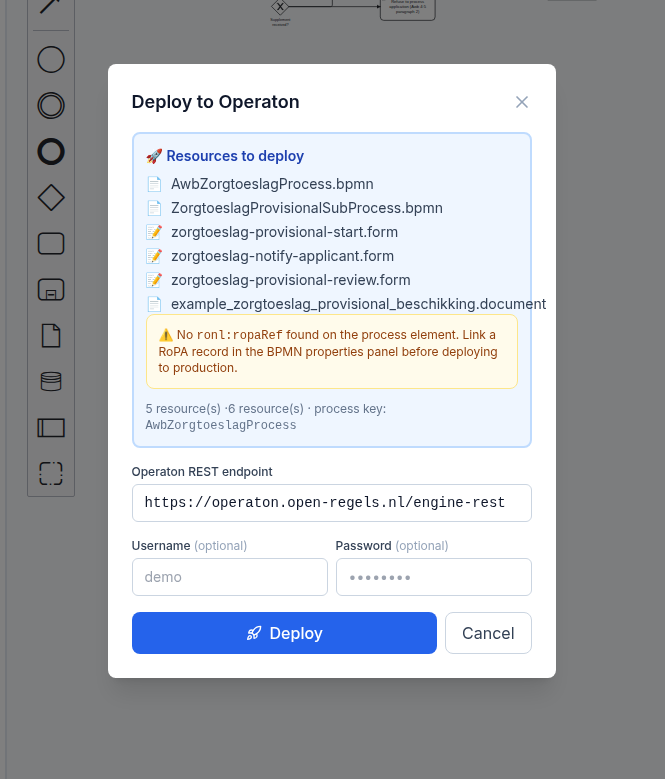
The warning is non-blocking — the Deploy button remains active. It is intended to prompt the Product Owner to complete the RoPA record before promoting to production.
Public website
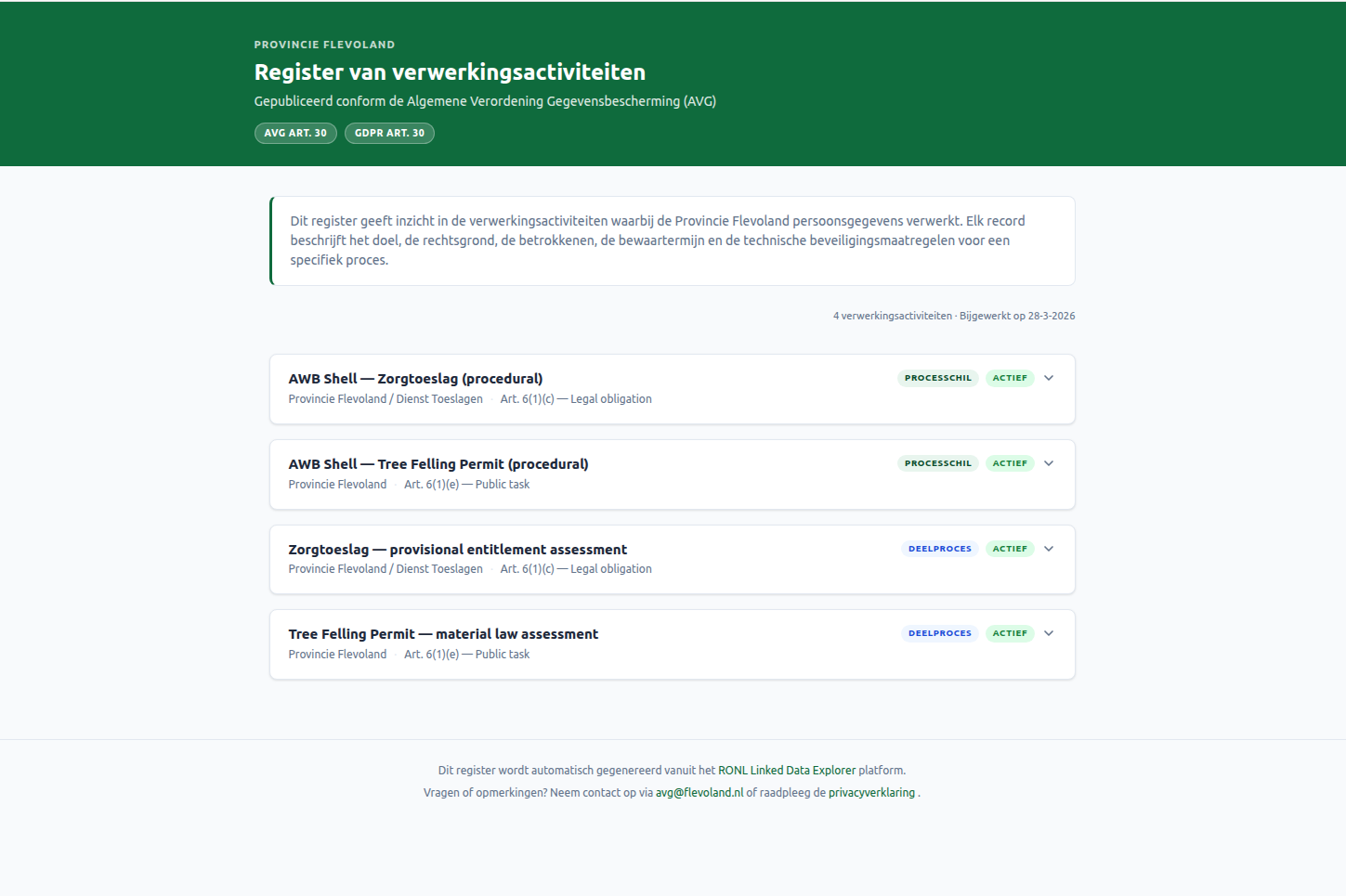
Active RoPA records are served from a CORS-open public endpoint and rendered on a dedicated static site ropa.open-regels.nl deployed separately from the LDE. The site displays collapsible cards — one per record — with all GDPR Art. 30 fields including the personal data fields table with colour-coded data categories and Art. 9/10 flags.
See RoPA Records developer docs for the API endpoint, database schema, and public site deployment.
Related documentation
- RoPA Records user guide — step-by-step authoring workflow
- RoPA Records developer docs — database schema, API routes, public site
- BPMN Modeler — RoPA linkage
- Document Composer — authoring decision document templates