Building DMN Chains
This guide covers the complete chain-building workflow, from discovering DMNs to executing a chain and interpreting results.
Opening the Chain Builder
Click the GitBranch icon in the left sidebar. The view loads three panels: Available DMNs (left), Chain Composer (centre), Configuration (right).
On first load, the backend queries TriplyDB for all published DMN models. The Available DMNs panel populates within a few seconds. If it remains empty, check the active endpoint in the Configuration panel.
Inspecting DMNs
Each DMN card in the Available DMNs panel shows its title, identifier, variable counts, publishing organisation, and any governance badge. Click on a card to expand it and see the full variable list — inputs in blue, outputs in green, each with its identifier and datatype.
Before building a chain, identify which DMNs you want to connect and verify that the output variables of the first match the input variables of the second, either by exact identifier or by shared semantic concept.
Building the chain
Drag a DMN card from the Available DMNs panel and drop it into the Chain Composer. A placeholder zone appears as you drag; release to place the card. Repeat for each subsequent DMN in the order you want them to execute.
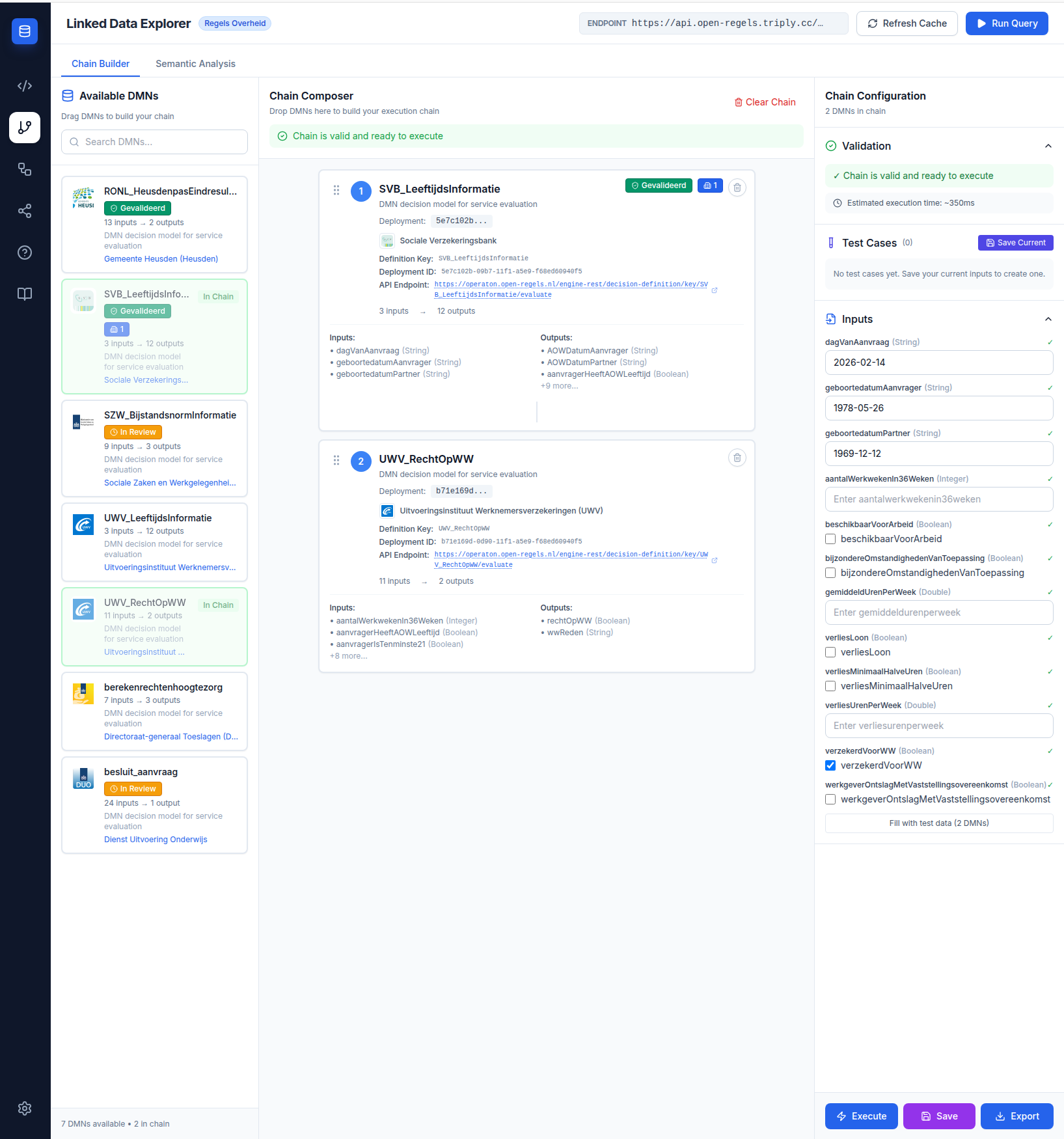
The validation panel below the composer updates after each drop:
- Green — DRD-compatible: all variable connections are exact identifier matches. The chain can be saved as a DRD for optimal performance.
- Amber — Sequential: one or more connections rely on semantic concept matching. The chain will execute as sequential API calls.
- Red — Invalid: one or more required inputs have no match. Hover over the red indicator to see which inputs are missing.
Providing inputs
The input form in the Configuration panel shows all variables the chain needs from you — those that are not satisfied by the output of an earlier DMN. Fill in each field with the appropriate value and type. Supported types: String, Integer, Double, Boolean, Date (YYYY-MM-DD).
If a DMN has been published with example schema:value data in TriplyDB, the input form pre-populates those values automatically.
Executing the chain
Click Execute when the chain is valid and inputs are filled. The execution panel expands to show per-step progress. Each step shows which DMN is executing, which inputs it received, and which outputs it produced. Timing per step and total execution time appear on completion.
For sequential chains, output variables from each step are automatically mapped to the input variables of the next step, including semantic variable renaming where needed.
Reading results
The final output panel shows the combined results from all steps. For DRD chains, this is the output of the entry-point decision. For sequential chains, it is the flattened output of the final DMN, together with intermediate outputs from earlier steps.
Removing a DMN from the chain
Click the trash icon on a DMN card in the Chain Composer to remove it. The validation status updates immediately and the input form adjusts to reflect the new chain.
Reordering the chain
Drag cards within the Chain Composer to reorder them. The validation status re-evaluates after the reorder.
Next steps
- Saving & Executing DRDs — save a DRD-compatible chain as a reusable template
- Semantic Analysis — understand why some chains require sequential execution