Saving & Executing DRDs
When a chain is DRD-compatible (green validation), you can save it as a Decision Requirements Diagram template. This deploys a unified DRD to Operaton and stores the template locally for reuse.
Saving a DRD
- Build a chain that shows green validation status ("Chain is valid and ready to execute").
- Click Save.
- The Save modal opens showing a purple 🎯 DRD badge, confirming the chain qualifies for DRD deployment.
- Enter a name and optional description.
- Click Save as DRD.
The system assembles the DMN XML with proper <informationRequirement> wiring, deploys it to Operaton, and stores the template in your browser's local storage. A success message shows the Operaton deployment ID.
Saving a sequential template
If the chain has amber validation (sequential execution required), clicking Save opens the same modal but shows a sequential template badge instead of a DRD badge. The template is saved locally for reuse but is not deployed to Operaton as a unified DRD.
My Templates
Saved templates appear in the My Templates section of the Configuration panel.
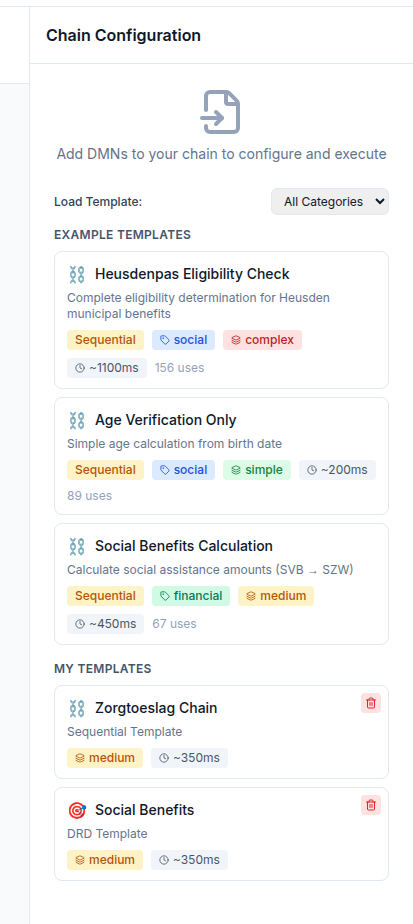
Each template card shows its name, description, type badge (🔗 DRD or sequential), and the endpoint it was saved for. Click a template card to load it into the Chain Composer. Templates are endpoint-scoped — templates saved for one TriplyDB dataset do not appear when a different endpoint is active.
Executing a DRD template
Loading a DRD template and clicking Execute sends a single API call to Operaton, referencing the DRD entry-point identifier. Operaton evaluates the full chain internally and returns the final result in one response. This is typically 50% faster than sequential execution for a two-step chain.
Using a DRD in a BPMN process
DRD templates appear in the BPMN Modeler's Link to DMN/DRD dropdown under the "🔗 DRDs (Unified Chains)" group. Selecting one auto-populates the camunda:decisionRef attribute with the DRD entry-point identifier, so a single BusinessRuleTask in your BPMN process can invoke the entire chain.
Notes on local storage
DRD templates are stored in localStorage and are scoped to the browser and device. They are not shared between users or between browsers. If you clear browser storage, templates are lost. Export the chain as JSON before clearing storage if you want to preserve it. A server-side template registry is planned for Phase 2.