Governance Badges
DMN cards in the Available DMNs panel and the Chain Composer display a validation badge when the DMN has been formally reviewed by a competent Dutch government authority.
Interpreting badges
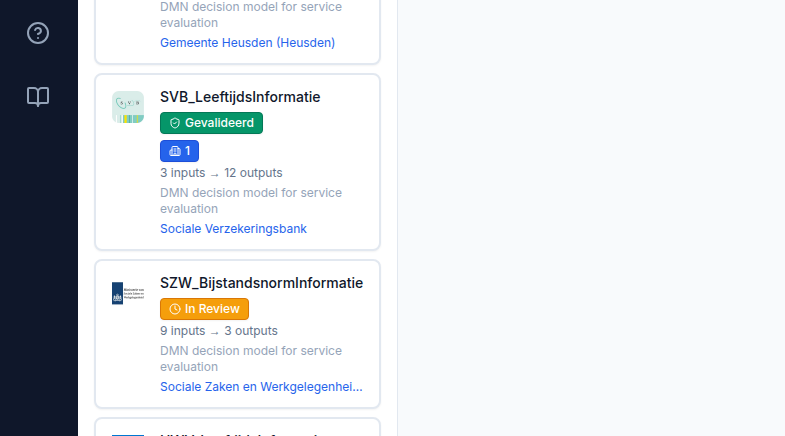
✓ Gevalideerd (green) — the DMN has been officially validated. The validating organisation and date are confirmed. This DMN has passed technical quality assurance by a recognised authority and is appropriate for production use.
⏱ In Review (amber) — validation is in progress. The DMN has been submitted to a competent authority but the review is not yet complete. Use with caution in production environments; contact the publishing agency for status.
No badge — no validation record exists in TriplyDB for this DMN. It may be experimental, a draft, or a community-contributed model. Verify its suitability independently before use in production.
Hover tooltip
Hover over any badge to see full validation details: the name of the validating organisation, the validation date in Dutch format, and any validation note recorded by the publisher.
Using validated DMNs in a chain
Governance badges are visible both in the Available DMNs list and on cards inside the Chain Composer. Building a chain from validated DMNs gives you confidence that each decision in the chain has been reviewed by its responsible authority.
Adding validation metadata (for publishers)
Validation metadata is added when publishing a DMN to TriplyDB via the CPSV Editor. In the CPSV Editor, expand the Validation Status section before publishing and select the appropriate status. If the status is "Officially Validated", fill in the validating organisation URI and validation date.
For the full publishing workflow, see CPSV Editor — Publishing to TriplyDB.