MCP AI Assistant
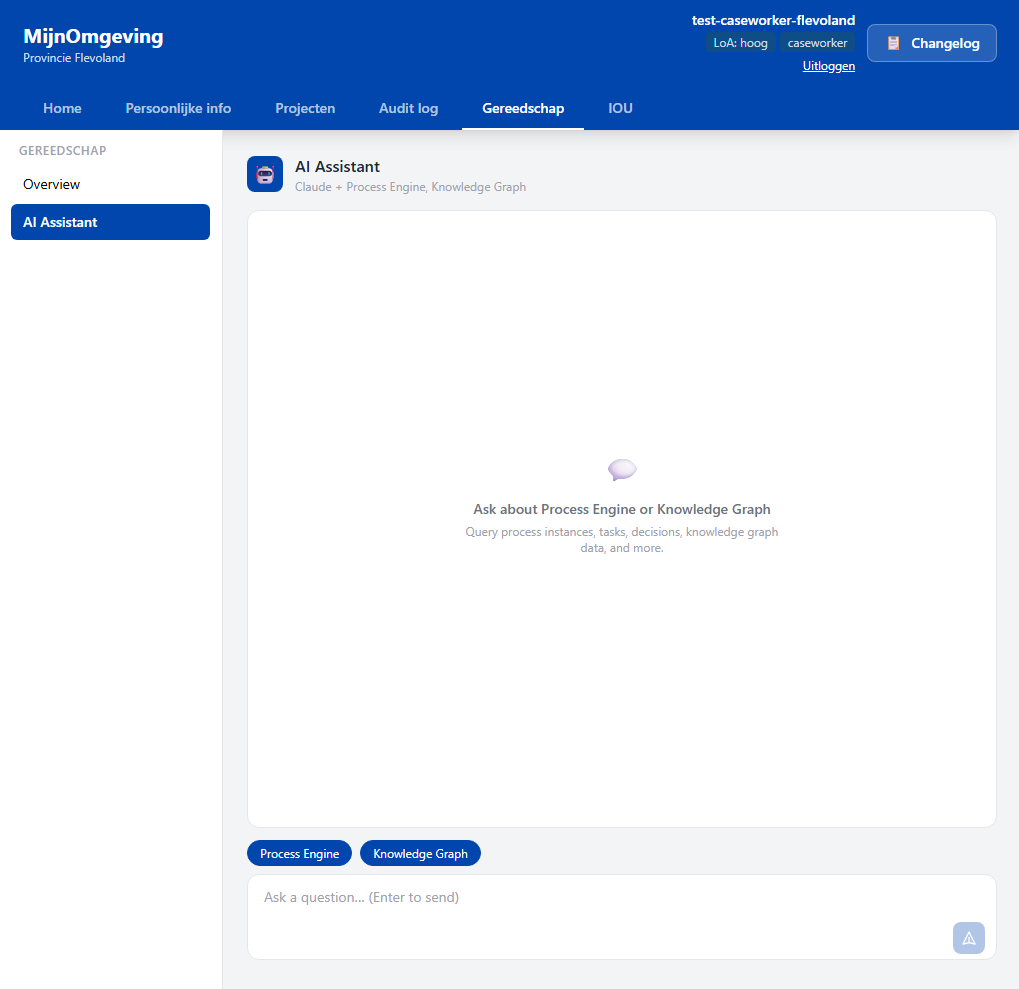
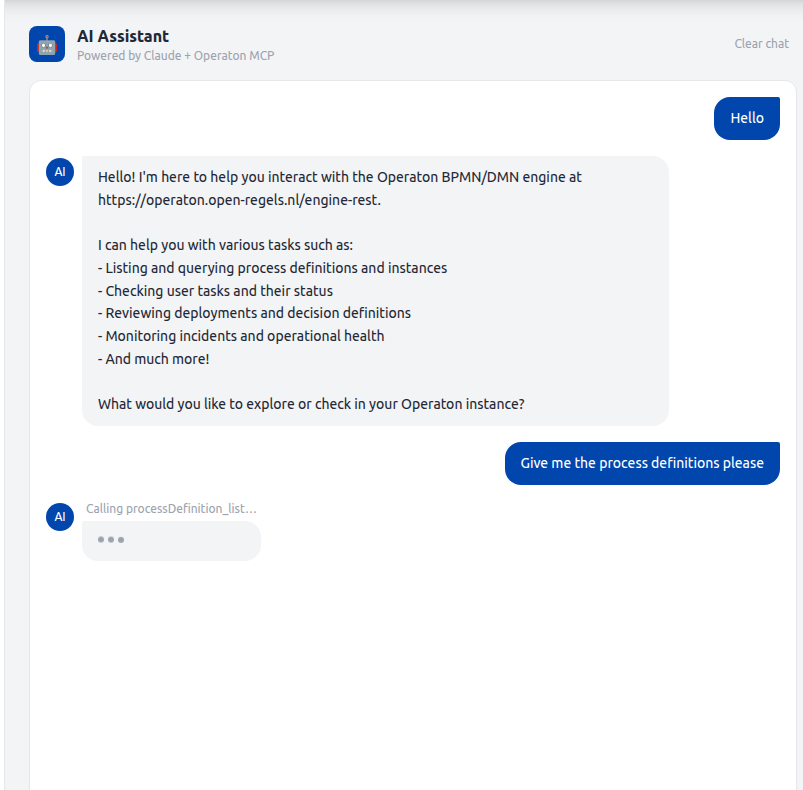
The AI Assistant is a streaming chat interface embedded in the Gereedschap tab of the caseworker dashboard. It connects a configurable LLM to a registry of data sources via the Model Context Protocol (MCP), allowing caseworkers to query process definitions, running instances, tasks, decisions, deployments, legislation, knowledge graph data, and deployed process bundles in natural language.
Sources and models are selected per session. See LLM Provider Architecture for how providers and models are registered and extended.
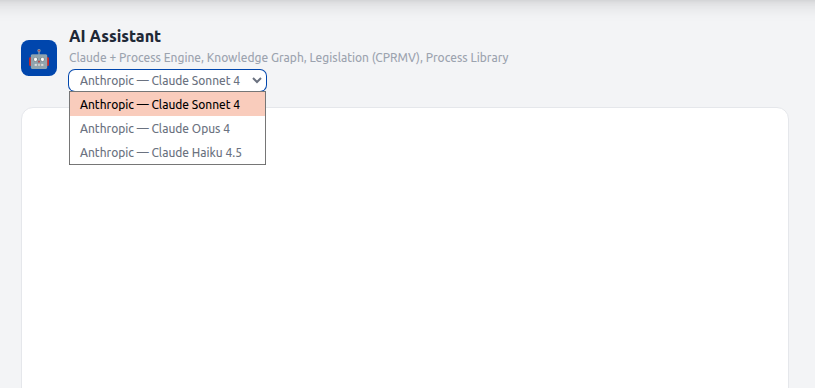
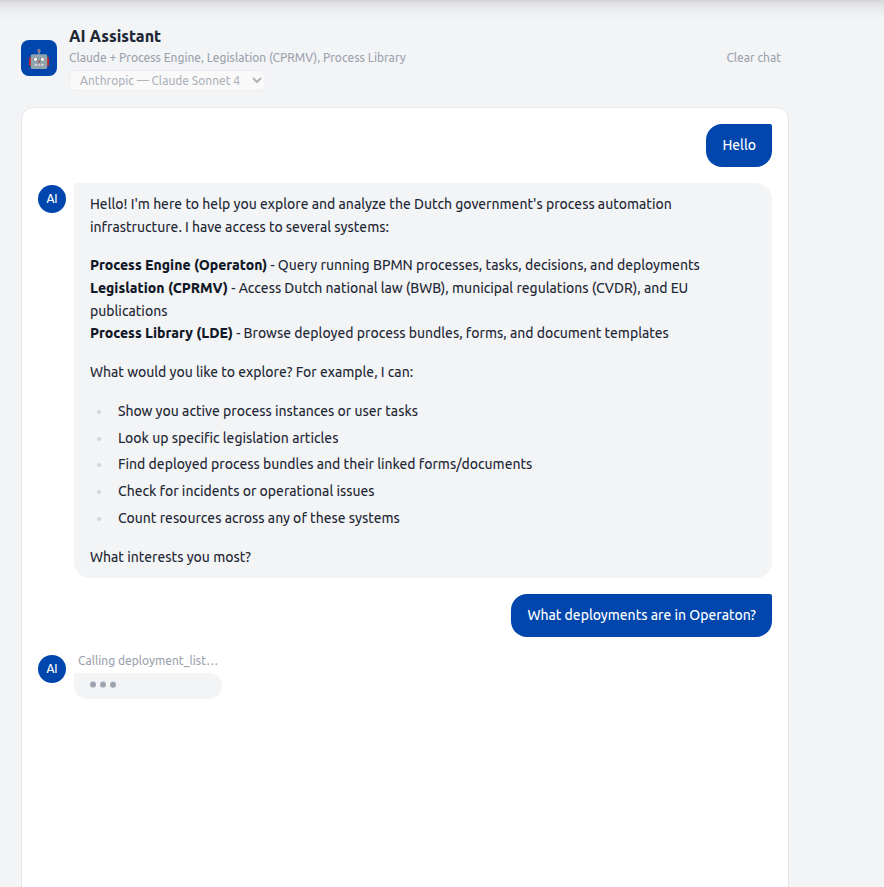
Data sources
The AI assistant connects to one or more MCP providers registered in McpRegistry. Each provider exposes a curated set of read-only tools and contributes a section to the system prompt. The frontend fetches the list of providers from GET /v1/mcp/sources on mount and pre-selects all connected ones. The user can deselect sources before sending a message.
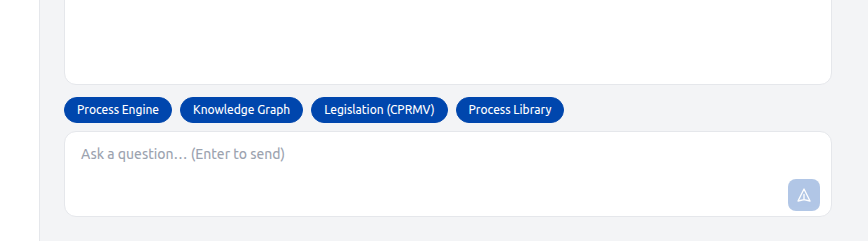
Four providers are registered. Each is independently enabled via its env var and appears in GET /v1/mcp/sources only when connected.
| Source ID | Display name | Transport | Tools | Description |
|---|---|---|---|---|
operaton |
Process Engine | stdio | 16 | Live Operaton data: process instances, tasks, deployments, decisions, incidents |
triplydb |
Knowledge Graph | stdio | 11 | RONL knowledge graph via SPARQL: DMN metadata, public services, organisations, rules, concepts |
cprmv |
Legislation (CPRMV) | HTTP | 3 | Dutch and EU legislation: BWB national law, CVDR municipal regulations, EU CELLAR |
lde |
Process Library | stdio | 6 | LDE asset store: deployed BPMN bundles, form schemas, document templates |
The sources array in the POST /v1/mcp/chat request body controls which providers are active for a given turn. An empty array activates all connected providers.
Process Engine tools (operaton)
The OperatonMcpProvider spawns the operaton-mcp npm package as a stdio child process and allows the following 16 tools:
processDefinition_list, processDefinition_count, processDefinition_getByKey, processInstance_list, processInstance_count, processInstance_get, task_list, task_count, task_getById, decision_list, decision_getByKey, deployment_list, deployment_count, deployment_getById, incident_list, incident_count
All other operaton-mcp tools are blocked by the ALLOWED_TOOLS set in OperatonMcpProvider.ts.
Access pattern
The MCP AI Assistant uses Pattern 2 — operaton-mcp via engine-rest from the Operaton Access Patterns reference. The operaton-mcp subprocess talks directly to Operaton's engine-rest API, bypassing the RONL Business API entirely. It receives the full, unfiltered Operaton surface — all process instances, all deployments, all tenants — with no organisation filter applied.
In mcpClient.service.ts, the StdioClientTransport spawns the operaton-mcp child process and passes it the following env vars directly from the backend configuration:
OPERATON_BASE_URL: config.operaton.baseUrl,   // → OPERATON_BASE_URL (must end with /engine-rest)
OPERATON_USERNAME: config.operaton.username,
OPERATON_PASSWORD: config.operaton.password,
Authentication is basic auth — unlike the standalone external operaton-mcp configuration described in the access patterns page, which uses OIDC client credentials. Because the AI assistant runs as an embedded backend subprocess, it inherits the backend's own Operaton service account credentials rather than an independent Keycloak client.
OPERATON_BASE_URL must point at engine-rest
Setting OPERATON_BASE_URL to the RONL Business API base URL (e.g. https://acc.api.open-regels.nl) will break every MCP tool call. The AI assistant requires the native engine-rest path structure — routes like /process-instance, /history/process-instance, and /deployment must resolve directly on the Operaton host. See Why the patterns are incompatible.
Knowledge Graph tools (triplydb)
The TriplyDbMcpProvider spawns the bundled src/mcp-servers/triplydb/index.ts (compiled to dist/mcp-servers/triplydb/index.js in production) and exposes the following 11 tools:
dmn_list, dmn_get, dmn_chain_links, dmn_enhanced_chain_links, dmn_semantic_equivalences, organization_list, service_list, rule_list, concept_list, service_rules_metadata, sparql_query
Requires TRIPLYDB_ENDPOINT and TRIPLYDB_TOKEN. If the connection fails at startup the provider is silently unavailable.
Knowledge graph vs live engine
The TriplyDB knowledge graph contains documented metadata about decision models, including their intended Operaton endpoints. It is not live deployment data. To verify what is actually running in Operaton, the Process Engine source must also be selected. The model is prompted to note this distinction in its responses.
Legislation tools (cprmv)
The CprmvMcpProvider connects to the CPRMV HTTP MCP server at acc.cprmv.open-regels.nl/mcp using StreamableHTTPClientTransport — it is a remote HTTP endpoint, not a local subprocess. It exposes 3 tools:
rules_rules__rule_id_path__get — retrieves a specific rule or rule set from BWB (national law), CVDR (municipal regulations), or EU CELLAR (European publications); supports path navigation to individual articles
ref_ref__referencemethod___reference__get — resolves a rule reference by Juriconnect method (jci 1.3 / 1.31); supports artikel, hoofdstuk, paragraaf, onderdeel, lid
celex_cellar_by_celex__celexid___language___format__get — finds EU CELLAR publications by CELEX id; returns ruleset IDs usable with the rules tool
Requires CPRMV_MCP_ENABLED=true. CPRMV_URL defaults to https://acc.cprmv.open-regels.nl/mcp.
Process Library tools (lde)
The LdeMcpProvider spawns the bundled src/mcp-servers/lde/index.ts and connects directly to the LDE PostgreSQL database (lde_assets). It exposes 6 tools:
bundle_list — all deployed BPMN bundles with forms, documents, subprocesses, and linked DMN keys
bundle_get — single bundle by bpmnProcessId
form_list / form_get — form schema listing and full Camunda Form JSON schema by id (matches camunda:formRef in BPMN)
document_list / document_get — document template listing and full template including zones and bindings (matches ronl:documentRef in BPMN)
Requires LDE_MCP_ENABLED=true and LDE_DATABASE_URL pointing at the LDE lde_assets database.
LDE vs Operaton
The Process Library reflects the LDE asset store — what has been authored and deployed from the LDE. The Process Engine source reflects what is currently live in Operaton. Combining both gives the most complete picture.
Architecture
McpChatSection (React)
  │  native fetch + ReadableStream
  │  { message, history, sources[], modelId }
  ▼
POST /v1/mcp/chat  (text/event-stream)
  │  SSE: { type: "status" | "delta" | "done" | "error" }
  ▼
runChatStream()  — mcpChat.service.ts
  │  resolves LlmProvider from LlmRegistry by modelId
  │  resolves tools + system prompt from McpRegistry by sources[]
  ▼
LlmProvider.streamTurn()
  │  e.g. AnthropicLlmProvider → client.messages.stream()
  ▼
LLM (Claude, GPT-4o, …)
  │  tool_use blocks → MCP tool calls → McpRegistry.callTool()
  ▼
McpRegistry  — routes each tool call to the owning provider
  ├── OperatonMcpProvider   (stdio subprocess → operaton-mcp → engine-rest)
  ├── TriplyDbMcpProvider   (stdio subprocess → triplydb-mcp → SPARQL)
  ├── CprmvMcpProvider      (HTTP → acc.cprmv.open-regels.nl/mcp)
  └── LdeMcpProvider        (stdio subprocess → lde-mcp → PostgreSQL)
The backend runs an agentic loop: the LLM receives the conversation and available tools, decides which tools to call, executes them through the registry, feeds results back, and repeats until stop_reason: end_turn. The loop runs for up to 10 rounds. Responses stream to the browser over Server-Sent Events (SSE).
SSE event types
All events are JSON-encoded on the data: field of a standard SSE frame.
type |
Payload fields | When emitted |
|---|---|---|
status |
message: string |
Immediately before each MCP tool call executes |
delta |
text: string |
Each text token from Claude |
done |
— | Loop completed cleanly |
error |
message: string |
Timeout, tool failure, or Anthropic API error |
Pre-flight errors (MCP disabled, MCP not connected, missing message body) are returned as standard JSON with an appropriate HTTP status code before the SSE headers are flushed.
mcpChat.service.ts
runChatStream(history, userMessage, emit, selectedProviderIds, modelId, signal?) is the agentic loop entry point. It resolves the correct LlmProvider from LlmRegistry by modelId and the scoped tool definitions and system prompt from McpRegistry by selectedProviderIds. The service has no direct dependency on any LLM SDK.
Text deltas arrive via the onDelta callback supplied to LlmProvider.streamTurn() and are emitted immediately, so the user sees tokens in real time. See LLM Provider Architecture — Response delivery for the streaming vs. buffered trade-off.
Tool result truncation. Each tool result is capped at 12,000 characters before being added to the messages array. Multi-round queries against Operaton list endpoints can return large JSON payloads; without truncation the accumulated messages array exceeds the 200,000-token API limit.
AbortSignal threading. The signal is passed to client.messages.stream() and checked before each tool execution. This ensures a timed-out or disconnected request does not leave an orphaned Anthropic API call running.
// The event types emitted by runChatStream
export type ChatStreamEvent =
  | { type: 'status'; message: string }
  | { type: 'delta'; text: string }
  | { type: 'done' }
  | { type: 'error'; message: string };

export type ChatEventCallback = (event: ChatStreamEvent) => void;
mcp.routes.ts
POST /v1/mcp/chat flushes SSE headers immediately after the pre-flight guards pass, then drives runChatStream and writes events to the response.
res.setHeader('Content-Type', 'text/event-stream');
res.setHeader('Cache-Control', 'no-cache');
res.setHeader('Connection', 'keep-alive');
res.setHeader('X-Accel-Buffering', 'no'); // disables Caddy / nginx proxy buffering
res.flushHeaders();
A single AbortController covers both the 480-second hard timeout and client-disconnect cleanup (req.on('close', ...)). A send() helper guards res.writableEnded before each write so a disconnecting client cannot cause a write-after-end error.
Audit log exclusion. POST /v1/mcp/chat is excluded from audit.middleware.ts alongside GET /v1/admin/audit. Chat turns are high-frequency and do not require an audit trail.
Allowed tools
Each McpProvider maintains its own ALLOWED_TOOLS set as a curation gate. Only the listed tools are exposed to the LLM; all others are stripped from the tool definitions before the first API call. Tools from providers not included in the request's sources[] array are never loaded at all.
| Provider | Allowed tools |
|---|---|
OperatonMcpProvider |
processDefinition_list/count/getByKey, processInstance_list/count/get, task_list/count/getById, decision_list/getByKey, deployment_list/count/getById, incident_list/count |
TriplyDbMcpProvider |
dmn_list, dmn_get, dmn_chain_links, dmn_enhanced_chain_links, dmn_semantic_equivalences, organization_list, service_list, rule_list, concept_list, service_rules_metadata, sparql_query |
CprmvMcpProvider |
rules_rules__rule_id_path__get, ref_ref__referencemethod___reference__get, celex_cellar_by_celex__celexid___language___format__get |
LdeMcpProvider |
bundle_list, bundle_get, form_list, form_get, document_list, document_get |
To enable or disable a tool, add or remove its name from the provider's ALLOWED_TOOLS set. No other code changes are required.
System prompt conventions
The system prompt instructs Claude to use maxResults=20 when listing resources for display, use dedicated count tools when counting, filter by latestVersion=true for process definitions and decisions unless the user asks for version history, and never narrate tool calls in the response text — only return the final answer.
Frontend
businessApi.mcp.chatStream() — api.ts
The axios POST has been replaced with a native fetch + ReadableStream async generator. The generator refreshes the Keycloak token before the request (mirroring the axios interceptor), consumes the SSE stream line by line, and yields typed McpChatStreamEvent objects.
for await (const event of businessApi.mcp.chatStream(message, history, sources, modelId, abortSignal)) {
  if (event.type === 'delta')  { /* append text to bubble */ }
  if (event.type === 'status') { /* show tool name above typing dots */ }
  if (event.type === 'done')   { /* commit bubble to message history */ }
  if (event.type === 'error')  { /* show error pill */ }
}
McpChatSection.tsx
| State variable | Purpose |
|---|---|
streamingContent |
Accumulated delta text for the in-progress bubble |
streamingRef |
Mutable ref that accumulates deltas without stale-closure risk |
statusMessage |
Tool name shown above the typing dots between rounds |
abortRef |
AbortController for the active stream; cancelled on unmount |
availableSources |
Provider metadata fetched from GET /v1/mcp/sources on mount |
selectedSources |
Set of provider IDs toggled by the source selector buttons |
availableModels |
Model entries fetched from GET /v1/mcp/models on mount |
selectedModelId |
Currently selected model ID; sent with every chat request |
In-progress bubble. While loading && streamingContent !== '', a separate assistant bubble renders below the confirmed message history. It displays streamingContent with a blinking cursor (animate-pulse). When done arrives, the accumulated text is committed to the messages array via onMessagesChange and the streaming state is cleared.
Status line. When loading && streamingContent === '' && statusMessage !== null, the tool name (e.g. Calling deployment_list…) is rendered in small grey text above the three typing dots. This is the only real-time feedback visible during multi-round tool execution.
Clear chat. The button now calls abortRef.current?.abort() before clearing messages, aborting any in-flight stream immediately. It is visible whenever messages.length > 0 || loading.
Prerequisites
| Requirement | Details |
|---|---|
MCP_ENABLED=true |
Backend env var; defaults to false |
ANTHROPIC_API_KEY |
Required for Anthropic models; enables AnthropicLlmProvider |
OPENAI_API_KEY |
Optional; enables OpenAILlmProvider and its models in the selector |
OPERATON_USERNAME |
Operaton credentials passed to the OperatonMcpProvider child process |
OPERATON_PASSWORD |
— |
TRIPLYDB_MCP_ENABLED |
Set to true to register TriplyDbMcpProvider; defaults to false |
TRIPLYDB_ENDPOINT |
SPARQL endpoint URL for the RONL knowledge graph |
TRIPLYDB_TOKEN |
Bearer token for the TriplyDB endpoint; may be empty for public endpoints |
CPRMV_MCP_ENABLED |
Set to true to register CprmvMcpProvider; defaults to false |
CPRMV_URL |
CPRMV MCP endpoint; defaults to https://acc.cprmv.open-regels.nl/mcp |
LDE_MCP_ENABLED |
Set to true to register LdeMcpProvider; defaults to false |
LDE_DATABASE_URL |
PostgreSQL connection string for the LDE lde_assets database |
| Node.js 22 LTS | Required by operaton-mcp; Azure App Service must use NODE|22-lts |
caseworker role |
JWT claim required to access POST /v1/mcp/chat |
operaton-mcp is a regular package.json dependency of packages/backend. On Linux (Azure App Service) it is resolved from node_modules at startup via require.resolve. On Windows/macOS it falls back to npx -y operaton-mcp. No global install is needed.
Local development
# packages/backend/.env

MCP_ENABLED=true
ANTHROPIC_API_KEY=sk-ant-...

# Process Engine (required)
OPERATON_BASE_URL=https://operaton.open-regels.nl/engine-rest
OPERATON_USERNAME=demo
OPERATON_PASSWORD=<password>

# Knowledge Graph (optional)
TRIPLYDB_MCP_ENABLED=true
TRIPLYDB_ENDPOINT=https://api.open-regels.triply.cc/datasets/stevengort/RONL/services/RONL/sparql
TRIPLYDB_TOKEN=

# Legislation (optional)
CPRMV_MCP_ENABLED=true
CPRMV_URL=https://acc.cprmv.open-regels.nl/mcp

# Process Library (optional)
LDE_MCP_ENABLED=true
LDE_DATABASE_URL=postgresql://lde_user:lde_password@localhost:5432/lde_assets
Start the backend as normal. All enabled providers connect at startup. Check the logs for one line per provider:
INFO  operaton-provider  Operaton MCP provider connected
INFO  triplydb-provider  TriplyDB MCP provider connected
INFO  cprmv-provider     CPRMV MCP provider connected
INFO  lde-provider       LDE MCP provider connected
If a provider fails to connect within 30 seconds the backend continues without it. Failed providers do not appear as connected in GET /v1/mcp/sources. The /v1/mcp/chat route returns 503 MCP_NOT_CONNECTED only when all selected providers are unavailable.
Azure App Service — ACC deployment
az webapp config appsettings set \
  --name ronl-business-api-acc \
  --resource-group rg-ronl-acc \
  --settings \
    MCP_ENABLED=true \
    ANTHROPIC_API_KEY="sk-ant-..." \
    OPERATON_USERNAME="<user>" \
    OPERATON_PASSWORD="<pass>" \
    TRIPLYDB_MCP_ENABLED=true \
    TRIPLYDB_ENDPOINT="https://api.open-regels.triply.cc/datasets/stevengort/RONL/services/RONL/sparql" \
    TRIPLYDB_TOKEN="" \
    CPRMV_MCP_ENABLED=true \
    LDE_MCP_ENABLED=true \
    LDE_DATABASE_URL="postgresql://...lde_assets?sslmode=verify-full"

# Ensure Node 22 LTS runtime
az webapp config set \
  --name ronl-business-api-acc \
  --resource-group rg-ronl-acc \
  --linux-fx-version "NODE|22-lts"
After deployment, verify all providers in the application logs:
az webapp log tail --name ronl-business-api-acc --resource-group rg-ronl-acc
# Look for one connected line per enabled provider:
# operaton-provider  Operaton MCP provider connected
# triplydb-provider  TriplyDB MCP provider connected
# cprmv-provider     CPRMV MCP provider connected
# lde-provider       LDE MCP provider connected
Troubleshooting
503 MCP_NOT_CONNECTED — All providers selected for the request are unavailable. Individual provider failures are non-fatal — the backend continues without them. Check GET /v1/mcp/sources to see which providers are connected. For the Process Engine specifically: verify MCP_ENABLED=true, OPERATON_BASE_URL, OPERATON_USERNAME, and OPERATON_PASSWORD are correct, and that the App Service runtime is NODE|22-lts (the child process will silently fail on Node 20). For LdeMcpProvider: verify LDE_DATABASE_URL is reachable and uses sslmode=verify-full (not sslmode=require) to avoid a pg-connection-string SSL warning.
400 prompt is too long — A multi-round query accumulated too many tokens. This is handled automatically — each tool result is truncated to 12,000 characters. If it still occurs, the query is driving an unusual number of rounds with very large results; try a more specific question.
Stream hangs / timeout — The hard timeout is 480 seconds (CHAT_TIMEOUT_MS in mcp.routes.ts). Cross-source queries involving TriplyDB SPARQL can take several minutes of wall-clock time. If you consistently hit the timeout, check whether TriplyDB is slow or whether the query is driving more than MAX_TOOL_ROUNDS = 10 rounds.
EPIPE errors in logs — These are suppressed. They are expected when the MCP stdio pipe closes on disconnect and do not indicate a problem.