Dynamic Forms
From v2.2.0, the RONL Business API MijnOmgeving portal renders all citizen and caseworker forms as Camunda Forms — JSON schemas executed at runtime by @bpmn-io/form-js. No form fields are hardcoded in the React application; the schema is fetched from the deployed Operaton process definition each time a form is opened.
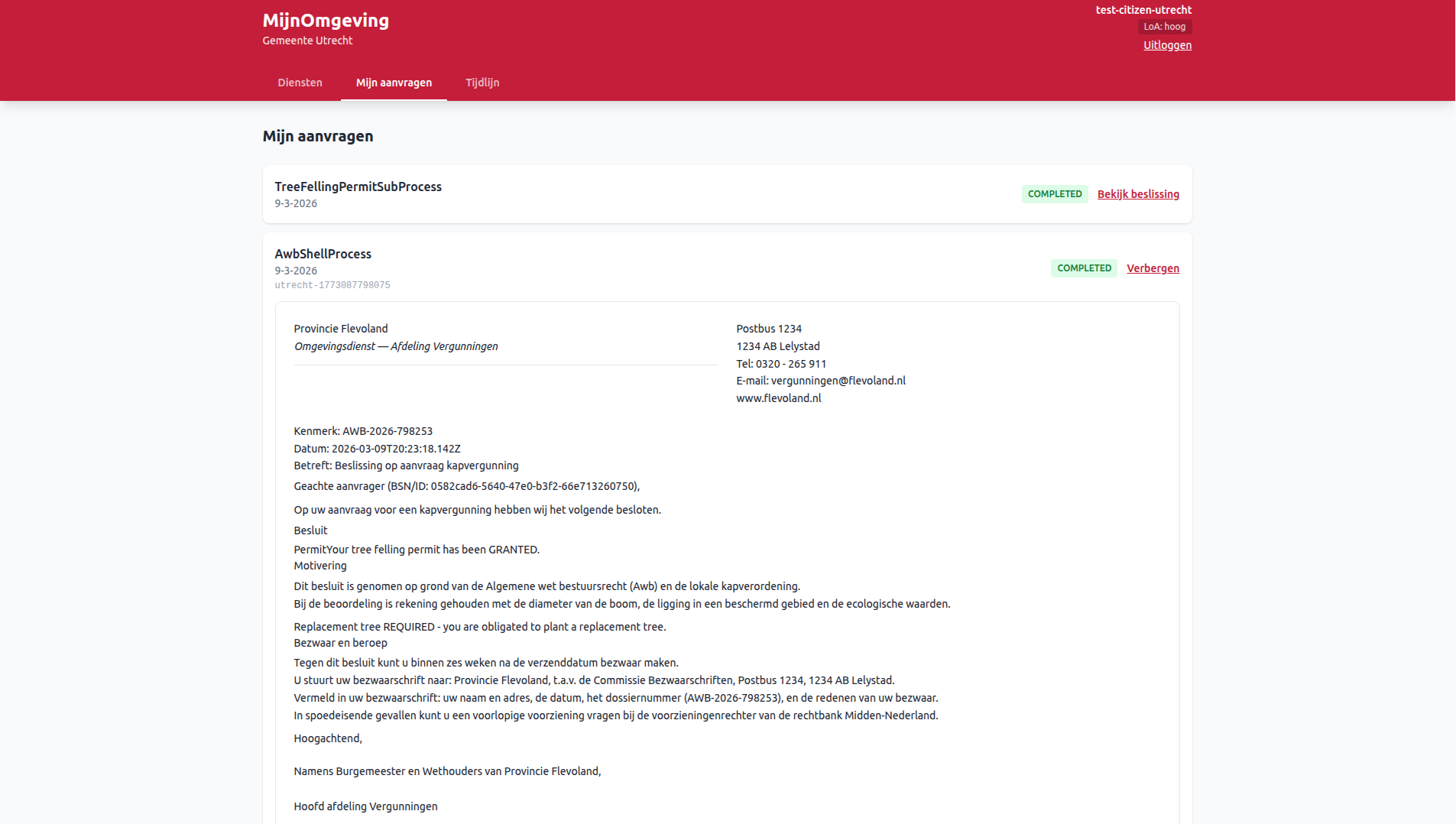
From v2.3.0, the Decision Viewer no longer renders a hardcoded @bpmn-io/form-js readonly schema. It fetches the Document Template bundled in the Operaton deployment and renders it as styled HTML — matching the letter layout authored in the LDE Document Composer. A form-js fallback remains for process instances deployed before document templates were introduced.
The three AWB Kapvergunning forms
Three forms cover the complete tree felling permit workflow. All are authored in the LDE Form Editor and deployed alongside the BPMN via the LDE BPMN Modeler one-click deploy.
kapvergunning-start — citizen start form
Linked to the StartEvent of AwbShellProcess via camunda:formRef="kapvergunning-start". Rendered in the citizen dashboard when the citizen opens the Kapvergunning service.
| Field key | Label | Type |
|---|---|---|
treeDiameter |
Stamdiameter (cm) | Number |
protectedArea |
Beschermd gebied? | Checkbox |
applicantId |
— | Hidden (pre-filled) |
productType |
— | Hidden (pre-filled) |
tree-felling-review — caseworker review form
Linked to Sub_CaseReview (UserTask inside TreeFellingPermitSubProcess). Rendered in the caseworker dashboard after the task is claimed.
| Field key | Label | Type |
|---|---|---|
permitDecision |
Vergunningsbesluit (DMN) | Readonly display |
replacementDecision |
Herplant vereist (DMN) | Readonly display |
reviewAction |
Actie | Radio: confirm / change |
reviewPermitDecision |
Nieuw besluit | Select (visible when reviewAction = "change") |
reviewReplacementDecision |
Nieuw herplantbesluit | Checkbox (visible when reviewAction = "change") |
awb-notify-applicant — caseworker notification form
Linked to Task_Phase6_Notify (UserTask in AwbShellProcess). Rendered in the caseworker dashboard after the notification task is claimed.
| Field key | Label | Type |
|---|---|---|
status |
Status | Readonly display |
permitDecision |
Vergunningsbesluit | Readonly display |
finalMessage |
Beslissing | Readonly display |
replacementInfo |
Herplantinformatie | Readonly display |
notificationMethod |
Wijze van kennisgeving | Select: email / letter / phone / portal |
notificationNotes |
Aanvullende notities | Text (optional) |
applicantNotified |
Bevestiging kennisgeving | Checkbox (required) |
BPMN linking
Forms are linked to BPMN elements using the camunda:formRef and camunda:formRefBinding attributes:
<bpmn:startEvent id="StartEvent_1">
  <bpmn:extensionElements>
    <camunda:formData>
      <camunda:formRef>kapvergunning-start</camunda:formRef>
      <camunda:formRefBinding>latest</camunda:formRefBinding>
    </camunda:formData>
  </bpmn:extensionElements>
</bpmn:startEvent>
camunda:formRefBinding="latest" instructs Operaton to always resolve the most recently deployed version of the form ID — no version pinning required. The LDE BPMN Modeler writes these attributes automatically via the Link to Form dropdown.
Deployment
Forms must be deployed to Operaton alongside the BPMN in the same deployment bundle so that camunda:formRef can resolve at runtime (all resources share one deployment ID). The LDE BPMN Modeler one-click deploy bundles the main BPMN, any referenced subprocess BPMNs, and all linked .form files automatically.
Runtime rendering
Citizen start form — ProcessStartFormViewer
When the citizen opens the Kapvergunning service, ProcessStartFormViewer calls GET /v1/process/AwbShellProcess/start-form to fetch the deployed schema. @bpmn-io/form-js renders the form with applicantId and productType as hidden initial data. On submit, the form variables are forwarded directly to POST /v1/process/AwbShellProcess/start.
If no form has been deployed, the portal shows "Geen formulier beschikbaar" and the service cannot be started.
Caseworker task forms — TaskFormViewer
After claiming a task, TaskFormViewer calls GET /v1/task/:id/form-schema. The task's current process variables are pre-populated as initial data so the caseworker sees the latest DMN outcomes immediately. On submit, the form data completes the task via POST /v1/task/:id/complete.
Tasks without a deployed form fall back to a generic complete button.
Decision Viewer — DecisionViewer
Completed applications in Mijn aanvragen show a Bekijk beslissing toggle. Clicking it expands the Decision Viewer panel beneath the application card.
On mount, DecisionViewer fires two requests in parallel:
GET /v1/process/:id/historic-variables— retrieves the final variable state from the Operaton history API. The backend flattens the historic variable instances and applies tenant isolation via themunicipalityvariable.GET /v1/process/:id/decision-document— resolves theDocumentTemplatebundled in the Operaton deployment. The backend reads theronl:documentRefattribute from the BPMN UserTask XML, then fetches the corresponding.documentresource from the deployment bundle.
Document template path (v2.3.0+): If the document endpoint returns a template, DecisionViewer renders it as styled HTML. TipTap/ProseMirror JSON text blocks are rendered as React elements — bold, italic, and underline marks are preserved. {{variableKey}} placeholders in text blocks are substituted with the resolved historic process variables. variable blocks render the value directly by key. The letterhead and contact information zones are displayed side-by-side in a CSS grid, matching the Document Composer canvas layout.
Form-js fallback path (pre-v2.3.0 deployments): If GET /v1/process/:id/decision-document returns 404 DOCUMENT_NOT_FOUND (no ronl:documentRef present, or the .document resource is absent from the deployment bundle), DecisionViewer falls back to rendering a hardcoded readonly @bpmn-io/form-js schema with five fields: status, permitDecision, finalMessage, replacementInfo, and dossierReference.
Caseworker-only action fields are excluded from both rendering paths.
API endpoints
| Method | Endpoint | Description |
|---|---|---|
GET |
/v1/process/:key/start-form |
Fetch deployed start form schema for a process definition |
GET |
/v1/task/:id/form-schema |
Fetch deployed task form schema for a task instance |
GET |
/v1/process/:id/historic-variables |
Fetch final variable state of a completed process instance |
GET |
/v1/process/:id/decision-document |
Fetch the DocumentTemplate bundled in the Operaton deployment for a completed process instance |
See API Endpoints for full details and error codes.
Related pages
- LDE Form Editor — authoring Camunda Forms
- LDE Document Composer — authoring DocumentTemplates
- LDE BPMN Modeler — Form linking — linking forms to BPMN elements
- LDE BPMN Modeler — Document linking — linking document templates to BPMN elements
- Submitting an Application — citizen perspective
- Caseworker Workflow — caseworker perspective
- Frontend Development — Camunda Forms — component reference