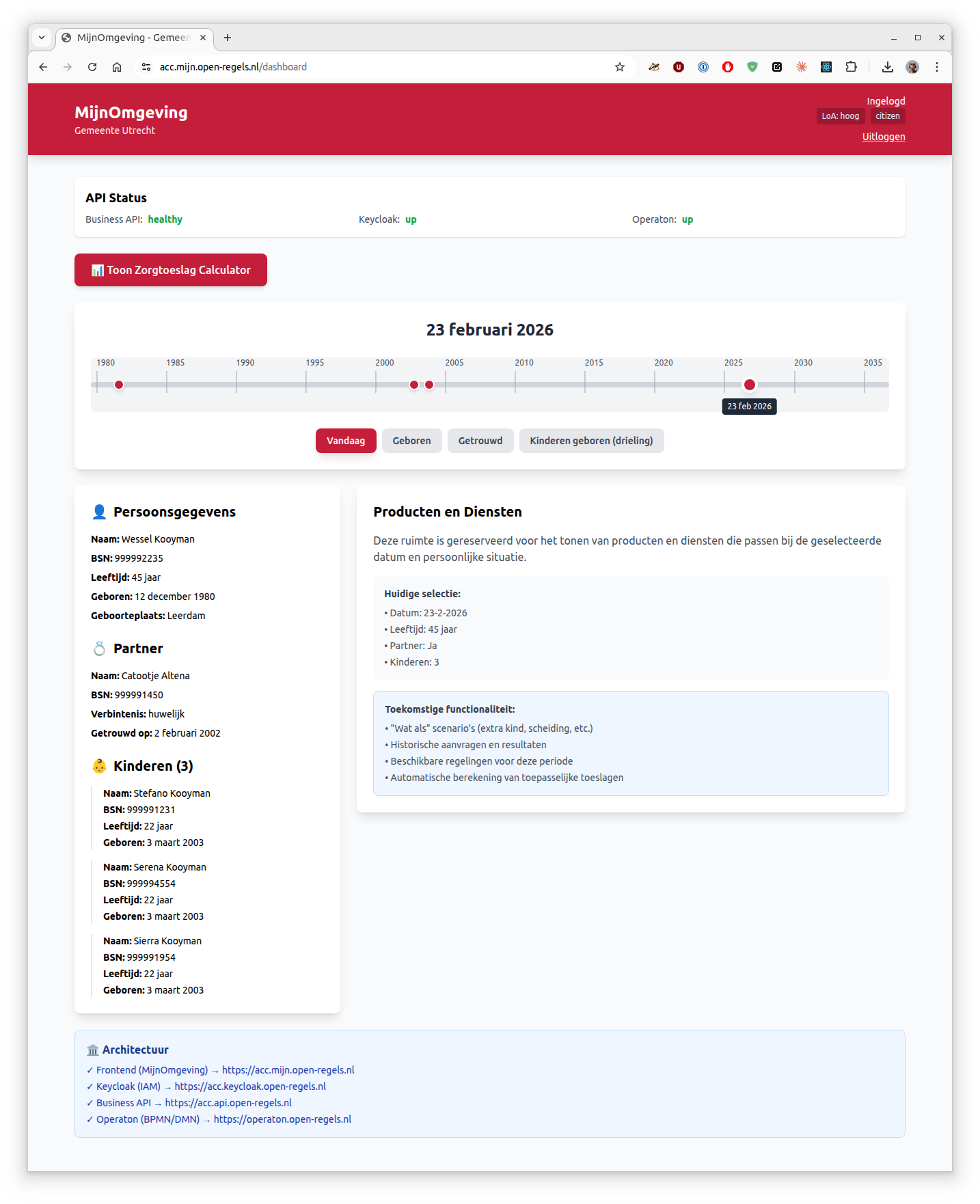
Timeline Navigation
Overview
The Timeline Navigation feature allows citizens to view their personal data at any point in time - past, present, or future. This enables "what if" scenario planning for life events and helps citizens understand how their circumstances affect eligibility for government services.
What It Does
The timeline provides:
- Historical View - See how your personal data looked at any date since birth
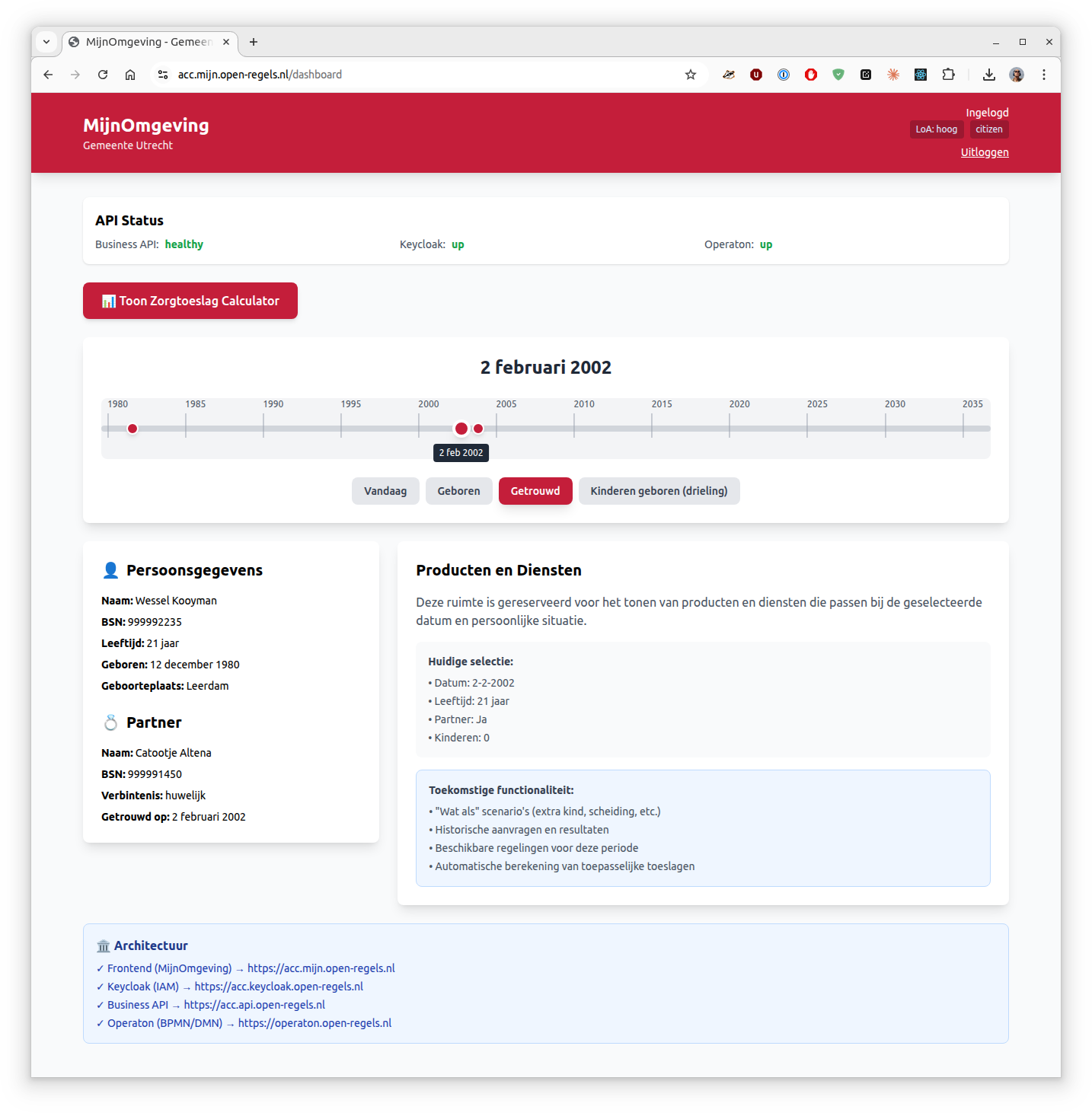
- Event Markers - Visual indicators for major life events (birth, marriage, children)
- Dynamic Data - Person, partner, and children information updates based on selected date
- Future Scenarios - Select future dates to plan for upcoming life changes
- Interactive Navigation - Drag slider or click event buttons to jump to specific dates
User Flow
Accessing the Timeline
- Login to MijnOmgeving using DigiD
- Navigate to Dashboard
- Click "📅 Toon Tijdlijn" button
- Timeline loads with your life events from BRP data
Using the Timeline
Navigation Methods:
- Drag the slider - Smooth navigation through time
- Click year markers - Jump to a specific year (1980, 1985, 1990...)
- Click event buttons - Jump directly to major life events
- Vandaag (Today)
- Geboren (Birth)
- Getrouwd (Marriage)
- Kinderen geboren (Children born)
What You See:
- Top Panel - Interactive timeline with current date display
- Left Panel - Personal data that updates as you change the date:
- Your information (name, BSN, age, birthplace)
- Partner information (appears after marriage date)
- Children information (appears after birth dates, ages update)
- Right Panel - Placeholder for products and services (future functionality)
Example Scenarios
Viewing Past Data
"What did my household look like in 2005?"
- Drag slider to 2005 or click near 2005 on timeline
- See your age at that time (25 years old)
- See partner information (married since 2002)
- See children information (triplets age 2 years old)
Planning Future Changes
"What if I have another child in 2027?"
- Select a date in 2027
- See current household composition
- (Future) Compare eligibility for toeslagen with/without additional child
- (Future) See how income requirements change
"What If" Scenario Planning (Vision)
The right panel will eventually support:
- Add Life Events - Simulate birth, marriage, divorce, moving
- Compare Scenarios - Side-by-side comparison of benefits
- Historical Applications - See past zorgtoeslag calculations
- Service Matching - Automatically show eligible services for that time period
- Impact Analysis - Understand how life changes affect your benefits
Use Cases
Financial Planning:
- "How would my zorgtoeslag change if I get divorced?"
- "What benefits am I eligible for if I have another child?"
Retroactive Understanding:
- "Was my zorgtoeslag calculation correct in 2020?"
- "What services was I eligible for when my children were born?"
Future Preparation:
- "When will my child turn 18 and how does that affect my benefits?"
- "What happens to my toeslagen when I retire?"
Data Sources
The timeline integrates with:
- BRP (Basisregistratie Personen)
- Municipal Personal Records Database
- Current personal data
- Partner information
- Children information
-
Birth dates and relationships
-
(Future) Verblijfplaatshistorie - Address history
- (Future) Stored Applications - Historical zorgtoeslag calculations
Privacy & Security
- Authentication Required - DigiD login with LoA "hoog"
- Personal Data Only - You can only view your own timeline
- Audit Logging - All timeline access is logged for compliance
- No Data Storage - Timeline calculations are done in real-time
Technical Notes
- Timeline range: Birth date - 2 years to Current date + 10 years
- Event detection: Automatic from BRP data (marriage, children)
- Age calculations: Dynamic based on selected date
- Section visibility: Partner/children sections only appear after relevant dates
Current Limitations
- Only test data available (Wessel Kooyman, BSN: 999992235)
- No address history yet
- No historical application data
- No actual "what if" simulation yet
- Single persona across all municipalities
Timeline View - Current date