RIP Phase 1 Workflow
From v2.6.0, the RONL Business API caseworker dashboard includes a RIP Phase 1 flow that lets infrastructure project team members start, track, and complete the two-phase project definition and preliminary design preparation process entirely within MijnOmgeving. The process is backed by the RipPhase1Process BPMN and the RipProjectTypeAssignment DMN, using the same claim-first caseworker task queue as the AWB Kapvergunning and HR onboarding.
This implementation is specific to Provincie Flevoland and uses the infra-projectteam realm role as the access gate.
Who can use this
| Role | What they can do |
|---|---|
caseworker |
View own Profiel, Rollen & rechten, Taken |
infra-projectteam |
All of the above, plus start RIP Fase 1 processes, view WIP and completed project documents |
The infra-projectteam role is a Keycloak realm role assigned to infrastructure employees after they complete the HR onboarding flow (via EmployeeRoleAssignment DMN output candidateGroups).
In test environments, test-infra-flevoland holds this role for Flevoland.
Projecten tab — three RIP sections
After login with the Flevoland tenant, the Projecten top-nav item exposes three RIP-specific left-panel sections in addition to Taken:
| Section | Label | Accessible to |
|---|---|---|
rip-fase1 |
RIP Fase 1 starten | infra-projectteam |
rip-fase1-wip |
RIP Fase 1 WIP | infra-projectteam |
rip-fase1-gereed |
RIP Fase 1 gereed | infra-projectteam |
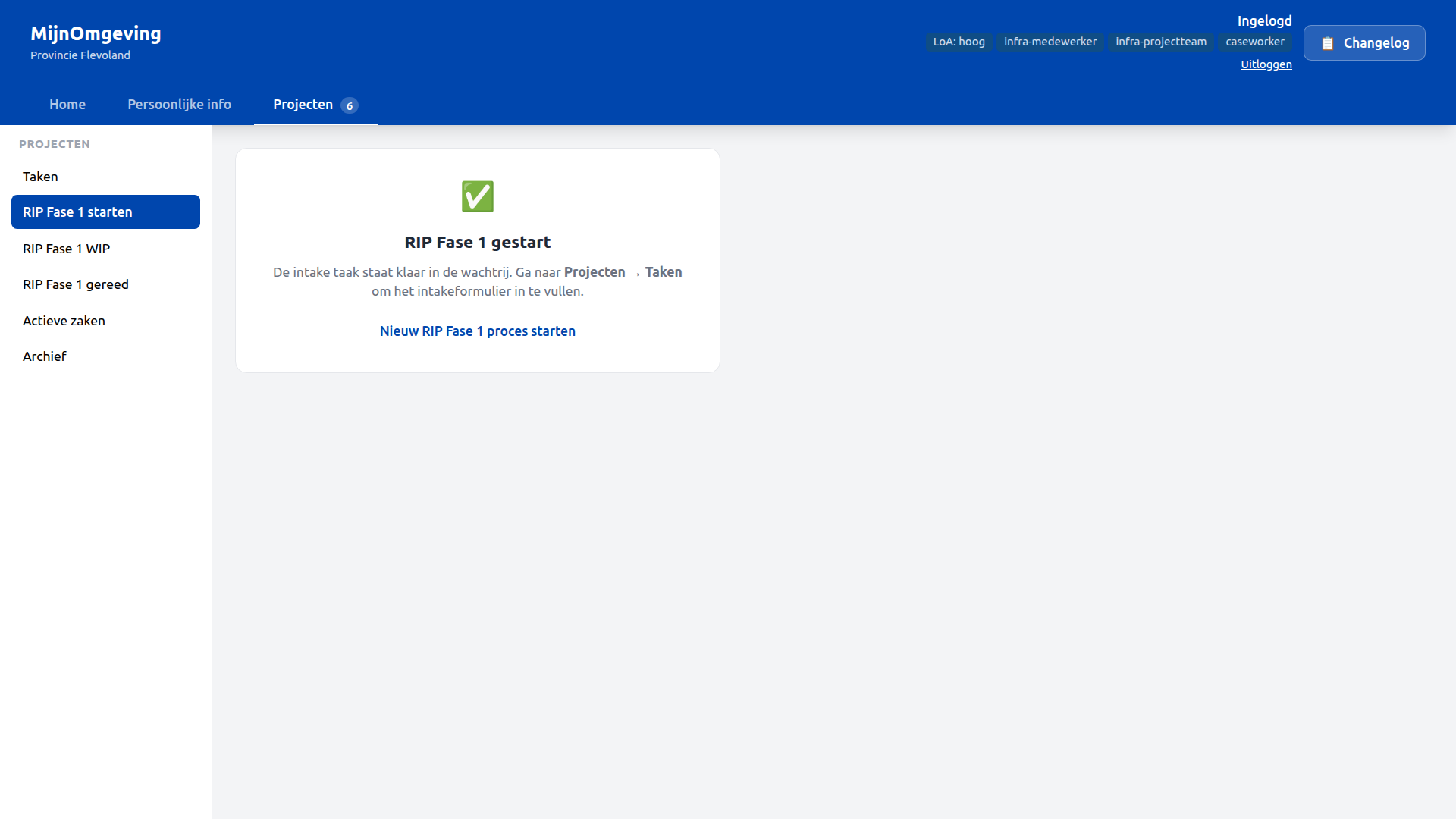
Starting a process — RIP Fase 1 starten
The RIP Fase 1 starten section starts a new RipPhase1Process instance:
Step 1 — Click RIP Fase 1 starten. The button calls POST /v1/process/RipPhase1Process/start with an empty variables body.
Step 2 — A success card confirms the process has started and points to Projecten → Taken to continue.
Step 3 — In the task queue, the first task Complete intake form appears with status Openstaand.
Process flow — 17 steps
The RipPhase1Process covers two phases: project definition (intake) and preliminary design preparation (PSU + PDP). All user tasks use candidateGroups="infra-projectteam".
| Step | Task | Form / Document |
|---|---|---|
| 1 | Complete intake form | rip-intake.form |
| — | DMN: determine project roles | RipProjectTypeAssignment |
| — | ServiceTask: create eDOCS workspace | writes edocsWorkspaceId |
| 2 | Organise intake meeting | rip-intake-meeting.form |
| 3 | Complete intake report | rip-intake-report.form + rip-intake-report.document |
| — | ServiceTask: save intake report to eDOCS | writes edocsIntakeReportId |
| 4 | Approve intake report | rip-approval.form |
| ↺ | Rejected → loops back to step 3 | |
| 5 | Organise PSU | rip-psu-organize.form |
| 6 | PSU execution | rip-psu-execution.form |
| 7 | Complete PSU report | rip-psu-report.document |
| — | ServiceTask: save PSU report to eDOCS | writes edocsPsuReportId |
| 8 | Prepare risk file | rip-risk-file.form |
| 9 | Complete preliminary design principles | rip-pdp.document |
| — | ServiceTask: save PDP to eDOCS | writes edocsPdpId |
| 10 | Approve preliminary design principles | rip-approval.form |
| ↺ | Rejected → loops back to step 9 | |
| — | End | Phase 1 complete |
Key process variables
| Variable | Type | Set by |
|---|---|---|
projectNumber |
String | Intake form — eDOCS workspace key |
projectName |
String | Intake form |
projectType |
String | Intake form — DMN input |
department |
String | Intake form — DMN input |
candidateGroups |
String | DMN output |
assignedRoles |
String | DMN output |
edocsWorkspaceId |
String | eDOCS workspace ServiceTask |
edocsIntakeReportId |
String | eDOCS document ServiceTask |
edocsPsuReportId |
String | eDOCS document ServiceTask |
edocsPdpId |
String | eDOCS document ServiceTask |
approvalStatus |
String | Approval form — "approved" or "rejected" |
Working through tasks — Taken
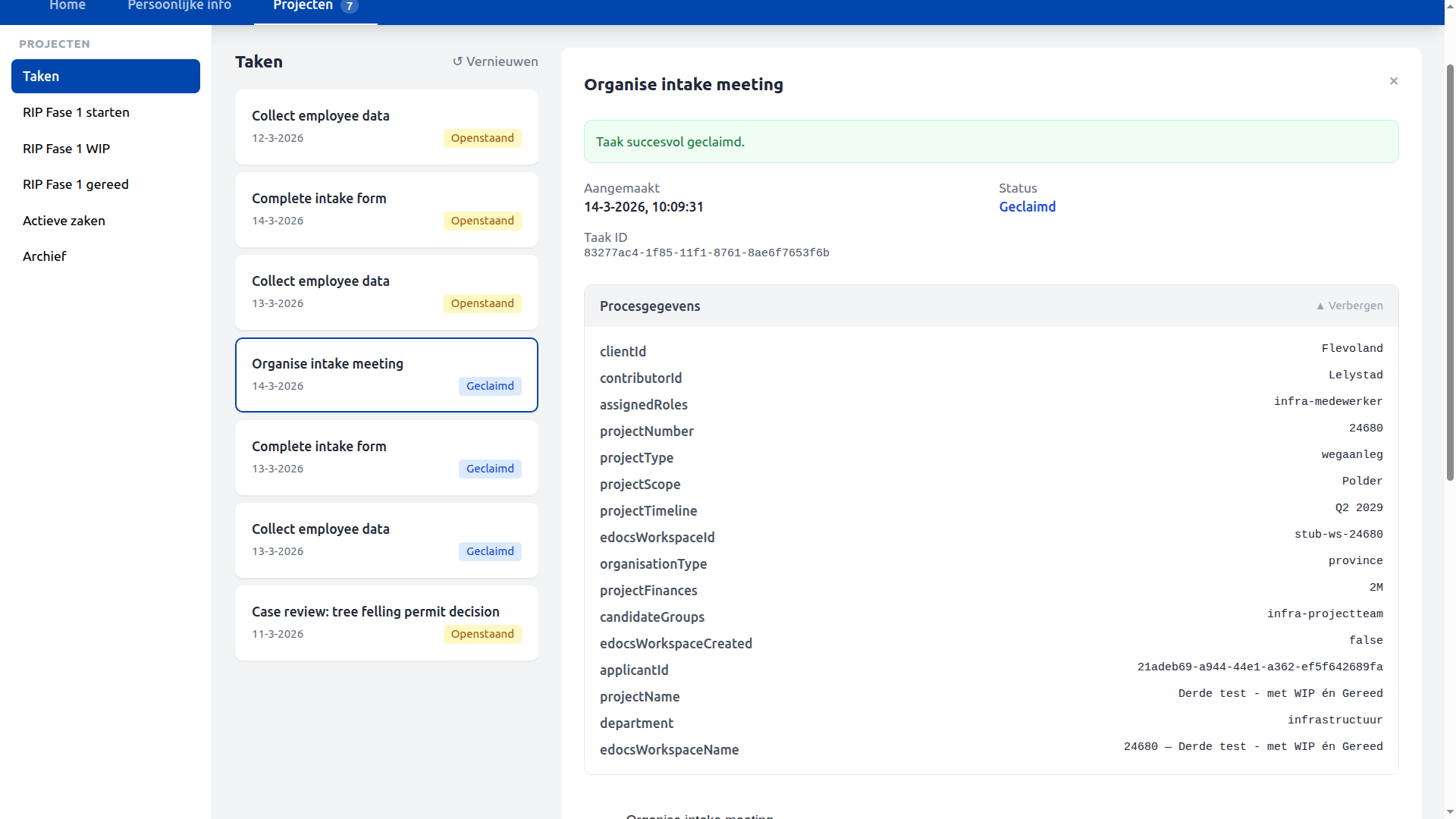
Each task in the queue follows the standard claim-first pattern:
- Navigate to Projecten → Taken
- Select the task — Procesgegevens shows current project variables (collapsed by default when task is claimed)
- Click Taak claimen — status changes to Geclaimd
- Fill in the form and click Submit
- The next task in the process appears in the queue
Tracking live projects — RIP Fase 1 WIP
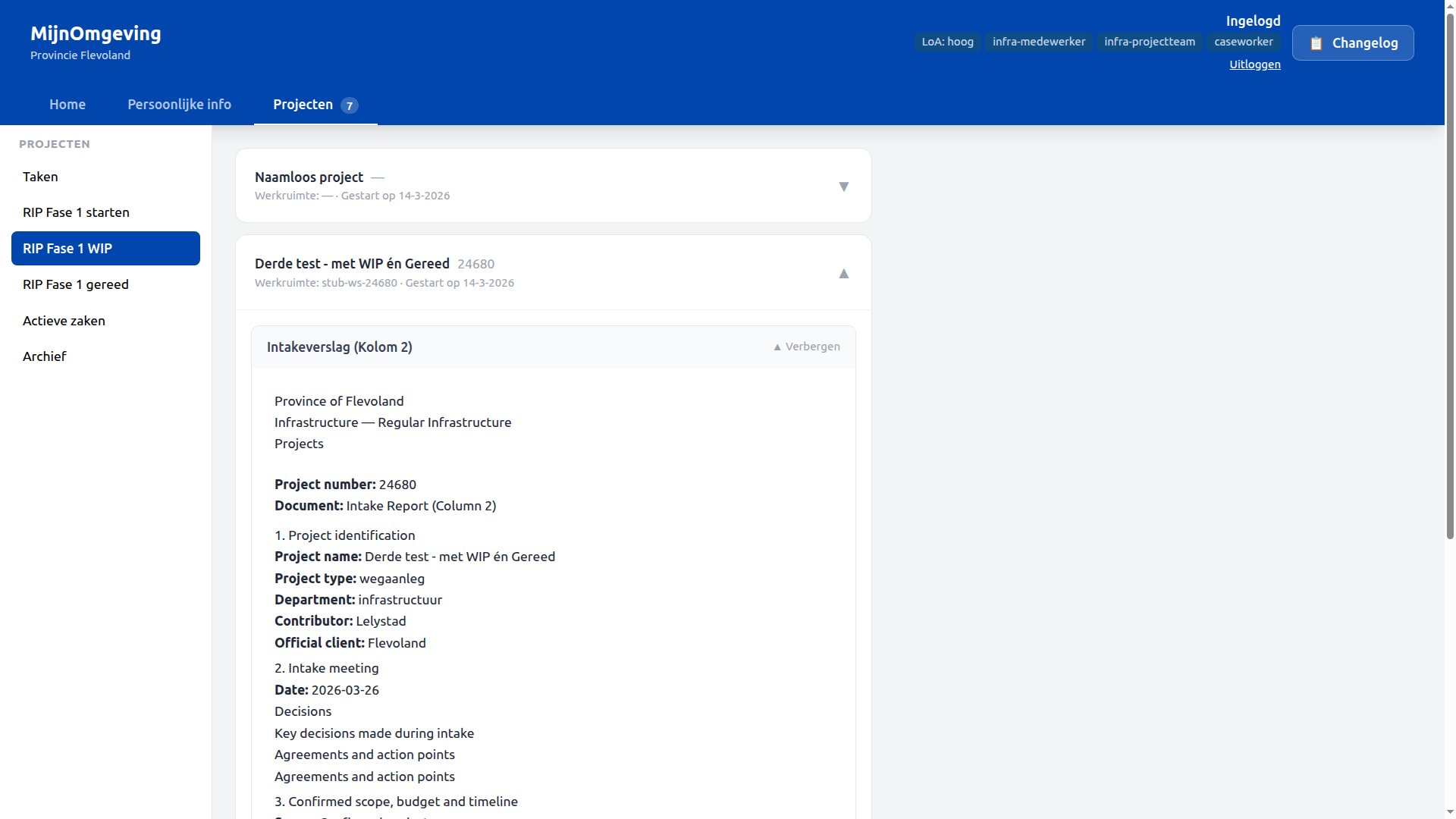
The RIP Fase 1 WIP section lists all active RipPhase1Process instances for the current organisation via GET /v1/rip/phase1/active. Each card shows:
- Project name and number
- eDOCS workspace ID
- Start date
Clicking a project expands it to show the three document sections:
| Section | Document | Available when |
|---|---|---|
| Intakeverslag (Kolom 2) | rip-intake-report.document |
After step 3 completed |
| PSU-verslag (Kolom 3) | rip-psu-report.document |
After step 7 completed |
| Voorlopige Ontwerpuitgangspunten (Kolom 4) | rip-pdp.document |
After step 9 completed |
Documents not yet produced show Nog niet beschikbaar. All three documents render using the same TipTap/ProseMirror zone renderer as the citizen DecisionViewer, with process variables substituted inline.
Completed projects — RIP Fase 1 gereed
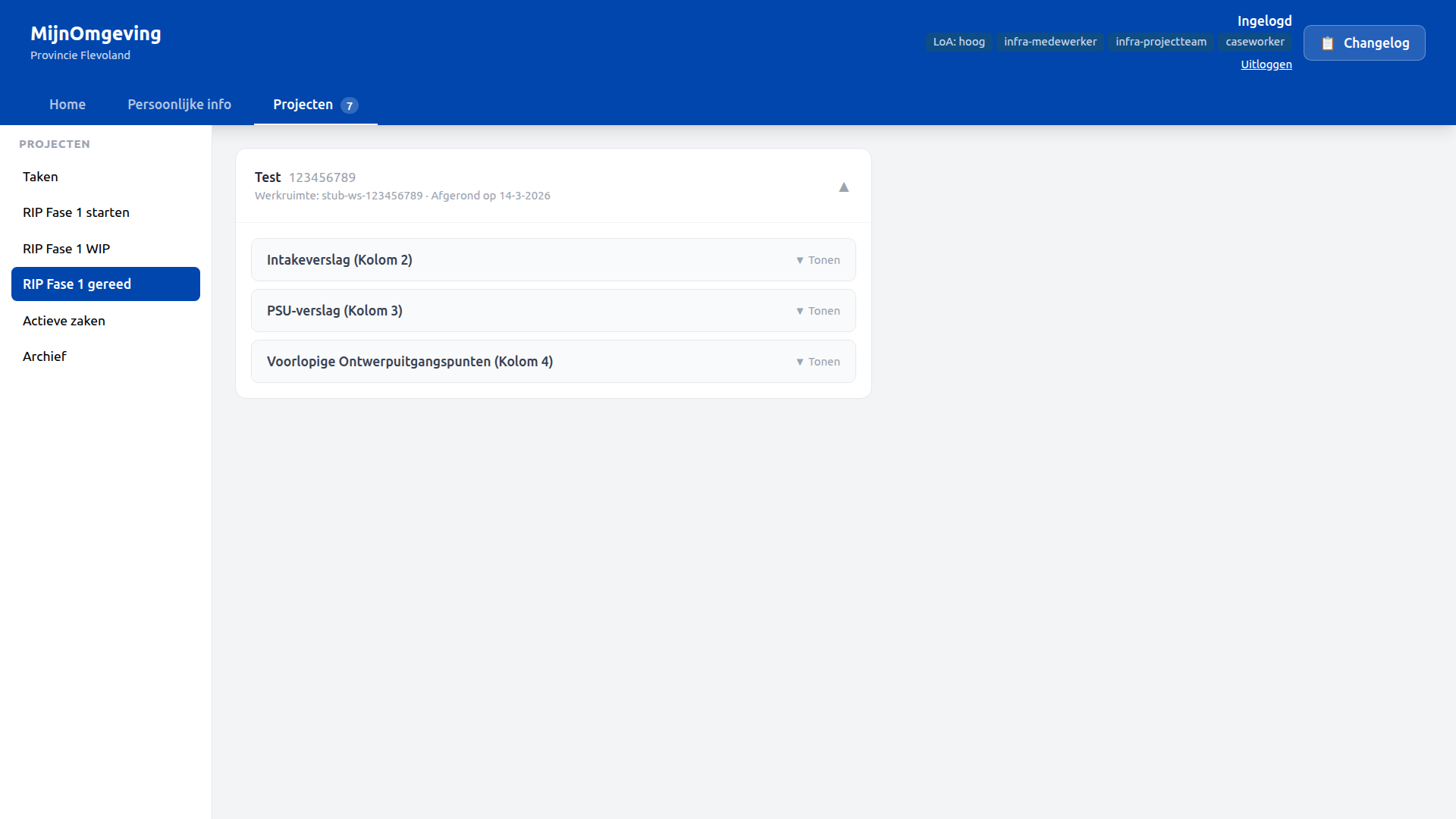
The RIP Fase 1 gereed section lists all completed RipPhase1Process instances via GET /v1/rip/phase1/completed. The layout is identical to the WIP view, with completion date instead of start date. All three documents are rendered in the same collapsible sections.
RipPhase1Process — BPMN overview
flowchart LR

subgraph Intake["Intake"]
    Start((Start)) --> IntakeTask[Intake]
    IntakeTask --> Approval1{Approved?}
end

subgraph PSU["PSU"]
    PSUWork[Execute PSU]
end

subgraph PDP["PDP"]
    PDPWork[PDP & Risk File]
    Approval2{Approved?}
    End((End))
end

Approval1 -- No --> IntakeTask
Approval1 -- Yes --> PSUWork

PSUWork --> PDPWork --> Approval2
Approval2 -- No --> PDPWork
Approval2 -- Yes --> End
RipProjectTypeAssignment DMN
| Inputs | projectType, department |
| Outputs | candidateGroups, assignedRoles |
| Hit policy | FIRST |
All current rules resolve to infra-projectteam / infra-medewerker, allowing any team member to claim tasks. The table is structured to accept granular per-role rules in future iterations — new rows can be added and the bundle redeployed without BPMN changes.
LDE build — what to deploy
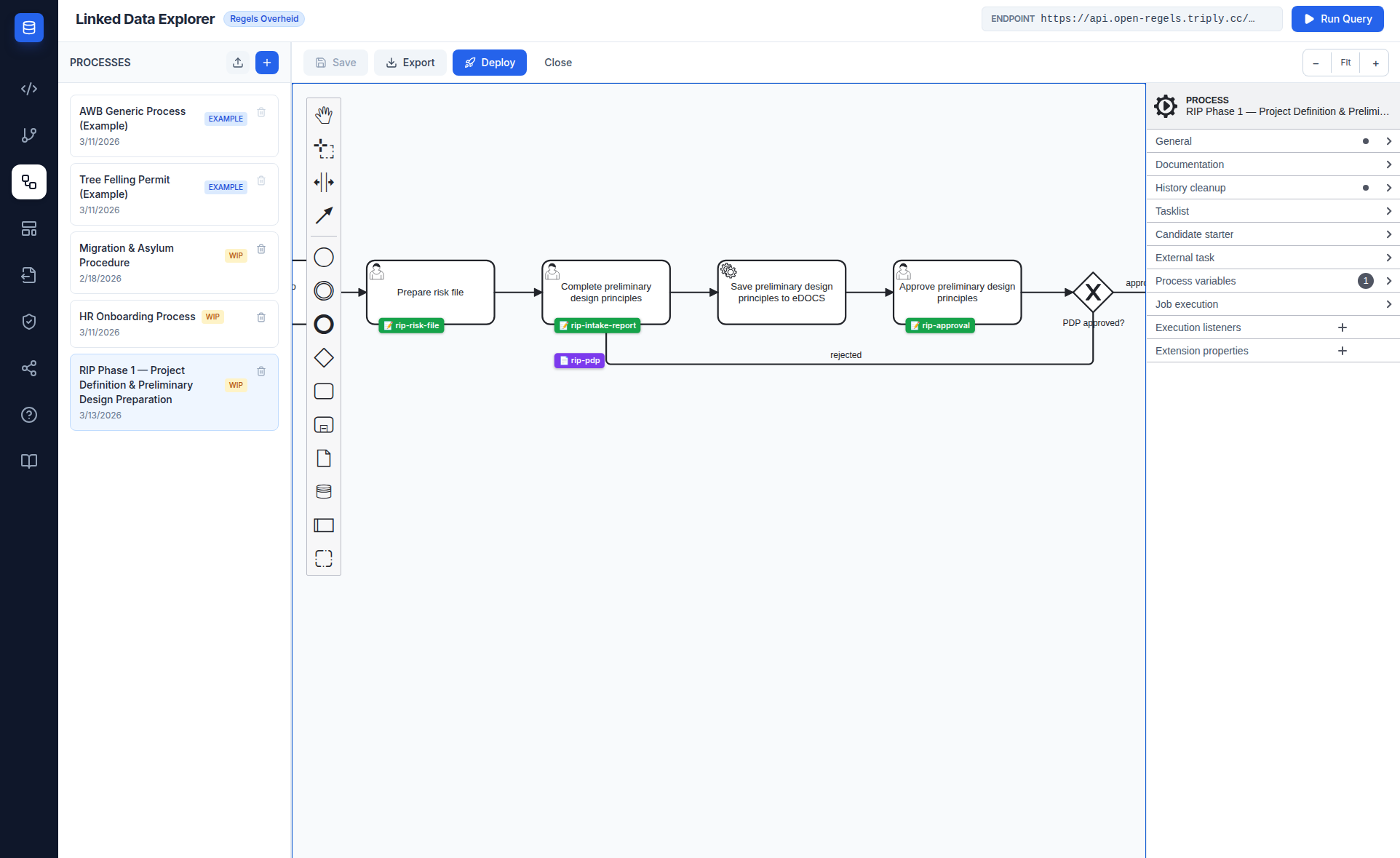
The full RIP Phase 1 bundle lives in examples/organizations/flevoland/rip-phase1/ and must be deployed as a single Operaton deployment. The LDE one-click deploy bundles BPMN, DMN, forms, and documents together.
Files in the bundle
| File | Type | Description |
|---|---|---|
RipPhase1Process.bpmn |
BPMN | Main process definition |
RipProjectTypeAssignment.dmn |
DMN | Role assignment rules |
rip-intake.form |
Form | Project details — step 1 |
rip-intake-meeting.form |
Form | Meeting confirmation — step 2 |
rip-intake-report.form |
Form | Intake report fields — step 3 |
rip-psu-organize.form |
Form | PSU organisation — step 5 |
rip-psu-execution.form |
Form | PSU execution notes — step 6 |
rip-risk-file.form |
Form | Risk file confirmation — step 8 |
rip-approval.form |
Form | Reusable approval/rejection — steps 4 and 10 |
rip-intake-report.document |
Document | Intake Report (Column 2) |
rip-psu-report.document |
Document | PSU Report (Column 3) |
rip-pdp.document |
Document | Preliminary Design Principles (Column 4) |
LDE deploy steps
- Open the LDE BPMN Canvas and load
RipPhase1Process.bpmn - Ensure all seven forms are authored and linked to their respective UserTasks via
camunda:formRef - Ensure the three documents are authored in the Document Composer and linked to their UserTasks via
ronl:documentRefin the properties panel - Click Deploy — the LDE packages all files into a single Operaton deployment
- Verify the deployment in the Operaton Cockpit under
RipPhase1Process
DMNs are not part of the deploy bundle
Decision models referenced via camunda:decisionRef on BusinessRuleTask elements are not included in this deployment. DMNs reach Operaton through a separate path: they are published to TriplyDB by the CPSV Editor and deployed to Operaton from there. The BPMN process resolves camunda:decisionRef at runtime against whatever is already deployed — as long as the DMN key matches, no additional action is needed here.
Also deploy — HR Onboarding update
The EmployeeRoleAssignment DMN in the HR onboarding bundle was updated to prepend infra-projectteam to the candidateGroups output for all infrastructuur department rules. This update must be redeployed as part of the same release so that infra employees onboarded via HR get the infra-projectteam candidate group automatically.
Bundle: examples/organizations/flevoland/HrOnboardingProcess.bpmn + EmployeeRoleAssignment.dmn + all HR forms + hr-it-handover.document
eDOCS integration
The RipPhase1Process uses the Operaton external task pattern for eDOCS integration. The LDE backend worker polls two topics:
| Topic | Triggered by | Reads | Writes |
|---|---|---|---|
rip-edocs-workspace |
Task_EnsureWorkspace |
projectNumber, projectName |
edocsWorkspaceId, edocsWorkspaceName, edocsWorkspaceCreated |
rip-edocs-document |
Task_SaveIntakeReport, Task_SavePsuReport, Task_SavePDP |
edocsWorkspaceId, documentTemplateId, all template variables |
edocsIntakeReportId / edocsPsuReportId / edocsPdpId |
Stub mode (EDOCS_STUB_MODE=true, default in development): all eDOCS calls return realistic fake responses. Set EDOCS_STUB_MODE=false and configure EDOCS_BASE_URL, EDOCS_LIBRARY, EDOCS_USER_ID, and EDOCS_PASSWORD to connect to a live OpenText eDOCS server.
Backend endpoints
| Method | Endpoint | Auth | Description |
|---|---|---|---|
GET |
/v1/rip/phase1/active |
Bearer JWT (caseworker) |
Lists active RipPhase1Process instances for the municipality, enriched with projectNumber, projectName, edocsWorkspaceId |
GET |
/v1/rip/phase1/:instanceId/documents |
Bearer JWT (caseworker) |
Returns all three document templates + current process variables for one instance. Absent documents are null. |
GET |
/v1/rip/phase1/completed |
Bearer JWT (caseworker) |
Lists completed RipPhase1Process instances, enriched with projectNumber, projectName, edocsWorkspaceId, endTime |
GET |
/v1/edocs/status |
Bearer JWT (caseworker) |
eDOCS connectivity status and stub mode flag |
POST |
/v1/edocs/workspaces/ensure |
Bearer JWT (caseworker) |
Create or retrieve a project workspace in eDOCS |
POST |
/v1/edocs/documents |
Bearer JWT (caseworker) |
Upload a rendered document to a workspace |
GET |
/v1/edocs/workspaces/:id/documents |
Bearer JWT (caseworker) |
List documents in an eDOCS workspace |
All /v1/rip/ endpoints apply municipality-based tenant isolation: the municipality process variable is compared to the JWT municipality claim.
Test accounts
| Username | Organisation | Roles |
|---|---|---|
test-hr-flevoland |
Flevoland | caseworker, hr-medewerker |
test-infra-flevoland |
Flevoland | caseworker, infra-projectteam, infra-medewerker |
Password for all test accounts: test123
test-hr-flevoland is used to onboard test-infra-flevoland via the HR onboarding flow. test-infra-flevoland arrives with employeeId: EMP-FLV-001 pre-configured and can immediately start RIP Fase 1 processes.
Related documentation
- Caseworker Workflow — General task queue and claim-first pattern
- HR Onboarding Workflow — How
infra-projectteamroles get assigned - API Endpoints — RIP and eDOCS endpoints
- Keycloak Realm Configuration —
infra-projectteam,infra-medewerkerroles and test users - BPMN Design Criteria —
candidateGroups,ronl:documentRefpattern